Explained
Video Baby Monitors, Explained: What to Look For
Understand every spec on the box so you can pick a monitor that fits your home, your nerves, and your privacy.
In this guide
A video baby monitor lets you see and hear your child from another room. This guide explains how the two main types differ, what each spec really means, and where privacy and security should sit on your list.
The 30-second version
- There are two families, and they solve different problems. Dedicated monitors talk only to their own parent unit and never touch the internet. WiFi/smart monitors stream to your phone from anywhere. Neither is 'better'; they trade convenience against your comfort with being online.
- Security is a real spec, not marketing. A camera pointed at your child's crib is worth protecting. Look for encryption, mandatory password setup, and a clear privacy policy. This matters more than an extra megapixel of resolution.
- Clear night vision beats high daytime resolution. You will use this device mostly in a dark room. A crisp, well-lit infrared image at 2am is more useful than a sharp picture you rarely see in daylight.
- Range and battery are about your actual home. Advertised range assumes open air with no walls. Thick floors and older houses cut it down fast. A parent unit that survives the night without charging saves real frustration.
- Most 'smart' alerts are optional comfort, not necessities. Cry detection, motion zones, and temperature warnings can reassure or annoy, depending on the parent. Buy the core seeing-and-hearing job first; treat the extras as tie-breakers.
The products this guide is about
Our verdict on each, with the full reasoning on the companion review.
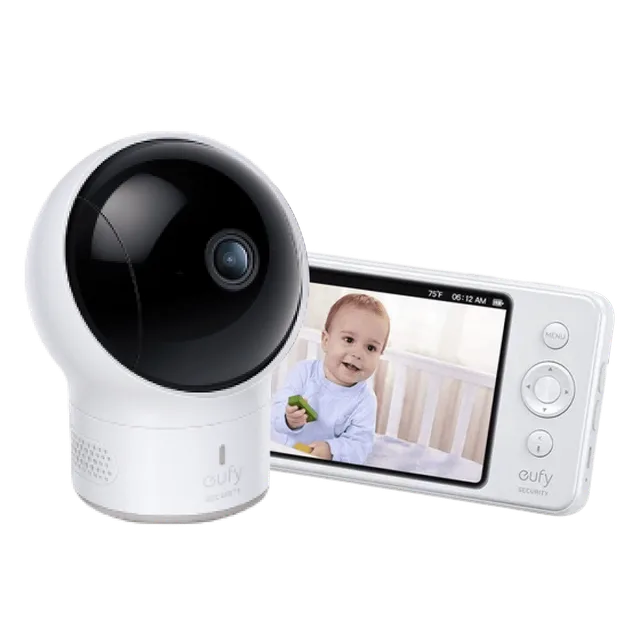
- Buy eufy SpaceView Pro Baby Monitor The best all-around pick: a private, no-WiFi monitor with a huge screen, long battery, and nothing to hack. Amazon
- Buy Infant Optics DXR-8 Pro The hack-proof, dedicated-screen workhorse with interchangeable lenses and standout ease of use. Amazon
- It depends Nanit Pro Smart Baby Monitor Gorgeous 1080p overhead view and real sleep/breathing analytics, but you pay for it up front and often monthly. Amazon
- Skip BOIFUN WiFi Baby Monitors (Meari-made, e.g. 6T) Cheap and feature-packed, but built on the Meari platform flagged by security researchers for exposing over a million video feeds.
What actually matters
- How it connects. Dedicated (FHSS) monitors use their own private radio link and never go online, which sidesteps most hacking worries but ties you to a screen you carry room to room. WiFi monitors use your home internet and phone, giving you access from work or a hotel, at the cost of trusting the company's servers and security.
- Night vision quality. Infrared night vision is what you'll rely on most. Look for an image that stays clear and doesn't wash out or turn grainy in a fully dark room, and a mode that switches automatically as the room dims.
- Security and privacy. With any internet-connected camera, ask who can see the feed. Encryption in transit, a forced strong password, optional two-factor login, and a company that clearly states it doesn't sell footage are the difference between peace of mind and a device you'll unplug.
- Two-way audio. A microphone and speaker let you soothe or talk to your child without walking in. Useful for reassurance and for telling an older toddler to lie back down, but check that it's clear and not tinny.
- Range and reliability in your home. The number on the box assumes no walls. What matters is whether the signal holds from the nursery to your bedroom and kitchen, and whether it drops out or reconnects gracefully.
- Parent-unit battery (dedicated models). If the handheld screen dies overnight you lose the monitor. Look for battery that lasts a full night and a low-power audio-only mode that stretches it further.
The specs, in plain English
Green flags vs red flags
Green flags
- Clear, honest privacy policy stating the company doesn't sell or share your footage
- Encryption in transit and a forced strong password (ideally optional two-factor login) on WiFi models
- Night-vision image that stays sharp and doesn't wash out in a fully dark room
- Parent unit that lasts a full night on a charge, with a low-power audio-only mode
- Local viewing option or a dedicated model if you'd rather nothing touched the internet
- Straightforward setup and a stable connection that reconnects on its own after a drop
Red flags
- No mention of encryption or security anywhere in the specs or setup
- Default or no password required, or an app that never prompts you to change credentials
- Vague privacy terms, or a maker with a public history of feed breaches it never addressed
- Reviews describing frequent disconnects, laggy video, or a parent unit that dies overnight
- Cloud storage or advanced alerts locked behind an unavoidable ongoing subscription with no local fallback
- Marketing that leans on megapixels and 'AI' while staying silent on how the feed is protected
Who's who: the brands
- Nanit - WiFi/smart monitors known for an overhead view and sleep-tracking extras; features often tie into a subscription, so check what's free.
- Owlet - Pairs cameras with wearable monitoring; strong on data and alerts, which some parents find reassuring and others find anxiety-inducing.
- Infant Optics - Popular for dedicated, non-WiFi monitors with interchangeable lenses; appeals to parents who want nothing on the internet.
- Eufy (Anker) - Offers both dedicated and local-storage-leaning models; often marketed on no-monthly-fee viewing and on-device storage.
- VTech - A long-standing maker of dedicated parent-unit monitors across a wide range of feature levels; broad availability.
- Motorola (Binatone) - Licensed baby monitors spanning dedicated and WiFi lines; features and quality vary by model, so read the specific unit's details.
- Hubble - The platform behind several WiFi baby-camera lines; app-based, so its privacy and security practices are worth reviewing.
- Google Nest / Wyze - General-purpose security cameras sometimes used as baby monitors; capable and inexpensive, but not built for nursery-specific alerts and usually cloud-dependent.
How to read a listing without getting fooled
Start by deciding whether you want a camera on the internet at all. If the idea unsettles you, a dedicated non-WiFi monitor removes most of the security question and you can judge it on picture, range, and battery. If you value watching from anywhere, accept that you're trusting a company and weight encryption, password rules, and the privacy policy heavily. Then rank the core job (clear seeing and hearing, especially at night, over a reliable connection) above the extras like cry detection, temperature readouts, and PTZ. Those are tie-breakers between two devices that already do the basics well.
How much should you spend?
Entry-level monitors cover the essential job of seeing and hearing your child, but often with lower-resolution night vision, shorter range, and thinner or absent security features on the WiFi ones. Mid-range is where most parents land: clearer night images, more reliable connections, and, on smart models, proper encryption and account security. Premium tiers add sleep tracking, wearables, higher resolution, and polished apps, much of which is comfort rather than necessity, and some of it is gated behind a subscription. Spend for a stable connection and, on any internet-connected model, genuine security, before you spend for extra sensors and analytics.
Questions, answered
Can a video baby monitor be hacked?
A dedicated non-WiFi monitor essentially can't be reached from outside your home. A WiFi monitor can, in principle, which is why encryption, a strong unique password, and two-factor login matter. Choosing a reputable maker and never leaving default credentials removes the large majority of the real-world risk.
Is a WiFi monitor or a dedicated one better?
Neither is universally better. Dedicated monitors are simpler and stay offline, so they sidestep most security worries but tie you to a handheld screen. WiFi monitors let you watch from anywhere and add smart features, at the cost of trusting a company's servers. Pick based on how you feel about an internet-connected camera.
Do I need a high-resolution camera?
Not especially. On a small parent-unit screen or a phone, the jump from 720p to 2K is modest, and you view the feed mostly in the dark. Clear night vision and a connection that doesn't drop out matter far more day to day than raw resolution numbers on the box.
What is PTZ and do I need it?
PTZ means pan-tilt-zoom: you can remotely swivel and magnify the camera. It helps with a mobile toddler or checking a room corner, but it adds moving parts that can wear out. It's a nice-to-have, not essential, especially for a newborn who stays put in a crib.
How much range do I really need?
Enough to reach the rooms where you spend time, judged by your actual walls and floors, not the box's open-air figure. Older or larger homes cut range considerably. For WiFi models, what matters is solid router coverage in the nursery; for dedicated models, test it before the return window closes.
Are subscriptions worth it?
Sometimes. Subscriptions usually unlock cloud recording, sleep analytics, or extended alerts. The core job of live seeing and hearing should work without paying monthly; if a monitor hides basic viewing behind a fee, treat that as a warning. Decide whether the extras genuinely reassure you before committing to ongoing costs.
Or jump to the head-to-head: eufy SpaceView Pro Baby Monitor vs Infant Optics DXR-8 Pro.