Explained
Vertical Mice, Explained
After reading, you'll understand every term on a vertical mouse's spec sheet and know which features actually matter for a comfortable, all-day wrist.
In this guide
A vertical mouse tips your hand into a relaxed 'handshake' position so your forearm stops twisting palm-down all day, which is where flat-mouse wrist ache comes from. The category runs from budget wireless clones to specialist ergonomic devices, and the spec sheets are full of jargon like grip angle, DPI, and polling rate that hide what really matters. The two things first-time buyers get wrong are picking an angle that's too steep to control and buying a shell that doesn't fit their hand or handedness.
The 30-second version
- Grip angle is the whole point. A moderate rotation of roughly 55 to 60 degrees relaxes the forearm for most people, while steeper near-vertical angles suit existing pain but feel awkward to newcomers.
- Fit beats every spec. A mouse sized wrong for your hand, or that doesn't come in your handedness, cancels out the ergonomic benefit no matter how good the sensor is.
- Build quality is comfort, not luxury. A hollow, creaky shell makes you grip harder, which is the exact strain a vertical mouse is supposed to remove.
- Expect an adjustment period. Most people need a few days to a couple of weeks before their speed and accuracy return to normal after switching from a flat mouse.
- Software is optional polish. Mainstream vertical mice work plug-and-play; companion apps mostly add button remapping, cursor-speed tuning, and multi-device switching.
The products this guide is about
Our verdict on each, with the full reasoning on the companion review.
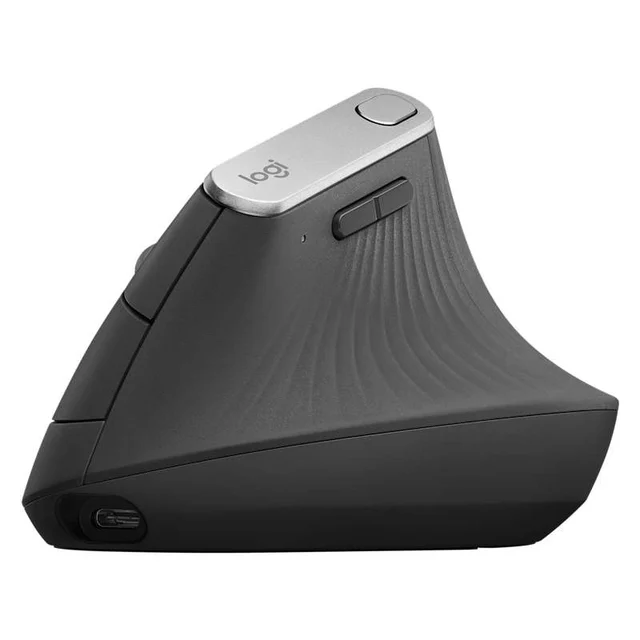
- Buy Logitech MX Vertical The all-rounder that gets vertical right - a 57-degree angle, a proper sensor, and premium build without going full medical device. Amazon
- Buy Logitech Lift Vertical Ergonomic Mouse The same 57-degree comfort scaled down for smaller hands, with quiet clicks and a two-year battery - the easiest vertical mouse to live with. Amazon
- It depends Evoluent VerticalMouse C The steep, near-fully-vertical specialist that RSI sufferers swear by - proven relief, but dated and overkill for most.
- Skip ProtoArc EM11 NL Ergonomic Vertical Mouse A cheap way to try the vertical shape, sized only for hands under 7.5 inches and short on the details that decide daily comfort. Amazon
What actually matters
- Grip angle determines how much your forearm relaxes; too shallow and you keep the strain, too steep and you lose control, so a moderate angle is the safe starting point for newcomers.
- Hand size and handedness decide whether the shell actually fits, and many models are one-size, right-hand only, which leaves small hands and left-handers out.
- Build quality keeps the comfort you paid for; flex and hollow plastic make you clench, undoing the point of going vertical.
- Sensor accuracy affects how much you have to correct the cursor, and fighting an imprecise pointer makes you grip and tense up.
- Connectivity and power determine how painlessly the mouse fits your desk, whether that's Bluetooth, a USB receiver, recharging, or a swappable battery.
- Button customization lets you cut down how far your hand travels with cursor-speed keys and remappable buttons, which adds up over a full workday.
- Click feel and noise matter in shared or quiet spaces, where mushy or loud switches get tiring fast.
The specs, in plain English
Green flags vs red flags
Green flags
- A stated, moderate grip angle in the mid-to-high 50s of degrees, described by owners as relaxed rather than tippy
- A shell offered in more than one size, or in both right- and left-handed versions
- A solid, non-hollow body that owners say holds up over months without creaking
- Both Bluetooth and a receiver, so it fits whatever port situation your desk has
- Quiet, positive clicks and an adjustable cursor speed
- A brand with a track record and responsive support in owner reports
Red flags
- No grip angle listed at all, or vague 'ergonomic' claims with a nearly flat shape
- One-size, right-hand-only with no fit information for smaller or larger hands
- Owner reports of a hollow, creaky shell or buttons that fail early
- Only a proprietary receiver with no Bluetooth, if your setup has no spare USB port
- Driver software with a reputation for being clunky or unsupported on current operating systems
- Suspiciously deep discounts on an unknown brand with thin, repetitive reviews
Who's who: the brands
- Logitech - The mainstream ergonomic leader; its vertical line pairs a well-judged moderate angle with polished software and reliable build.
- Evoluent - A long-running ergonomics specialist known for steep, near-fully-vertical designs favored by people with existing RSI.
- Anker - A budget-friendly accessories maker whose vertical mice are a common low-cost entry point into the shape.
- ProtoArc - A value-focused brand offering inexpensive vertical mice for trying the shape before committing to a premium model.
- Kensington - An office-peripheral maker with ergonomic pointing devices aimed at workplace and comfort-conscious buyers.
How to read a listing without getting fooled
Start with the grip angle, and if it isn't stated, treat that as a warning; a genuine vertical mouse tells you how far it rotates your hand, and the mid-to-high 50s is the friendliest range for a first-timer. Next, find the hand-size and handedness details, because a shell built for large right hands is useless to a small left hand no matter how high the DPI number climbs. Don't be dazzled by big sensitivity or polling-rate figures; for office and creative work, smooth, accurate tracking matters far more than headline numbers, and any modern optical sensor clears that bar. Check the connectivity line for whether it offers Bluetooth, a receiver, or both, and read the power section to see whether you're recharging or swapping a battery. Finally, read owner reports for the words that specs hide: creak, hollow, mushy, slippery, or clunky software are the ones that predict regret.
How much should you spend?
Think in tiers rather than numbers. The cheapest wireless models get you the vertical shape and little else, and their hollow builds and basic sensors often undercut the very comfort you're buying, making them a false economy for daily use; they make sense only as a throwaway test of whether the shape helps you. The mid tier is the value sweet spot for most people, delivering a well-judged angle, a solid shell, quiet clicks, and dependable tracking without paying for extras. Stepping up to premium buys a grippier body, rechargeable power, and a dedicated cursor-speed button, which is worth it if you're at the desk all day. The most expensive specialist devices are justified mainly by a steeper angle and deep customization for people with real, ongoing pain; for everyone else they're overkill. Spend enough to get a build that lasts a workday, and stop chasing spec-sheet numbers that don't change how your wrist feels.
Questions, answered
Does a vertical mouse actually help wrist pain?
Many owners report real relief because a vertical mouse holds your forearm in a neutral handshake position instead of forcing it to twist palm-down, easing pressure through the wrist. It isn't a cure and results vary from person to person. This is general product information, not medical advice; if you have persistent pain, numbness, or a diagnosed condition, consult a doctor or occupational therapist.
How steep should the grip angle be?
For most people a moderate angle around 57 degrees is the sweet spot: enough to relax the forearm without feeling tippy or hard to control. Steeper, near-vertical designs can help people with existing RSI but often feel awkward to newcomers, so if you're new to the shape, start moderate.
Is there a left-handed option?
Sometimes, but not always. Many vertical mice are molded for right hands only, so left-handers should specifically look for a model sold in a dedicated left-handed version rather than assuming one exists.
Do I need to install software?
Usually not. Mainstream vertical mice work plug-and-play out of the box. Companion apps mostly add extras like button remapping, cursor-speed tuning, and switching between multiple computers. Some brands' apps are far more polished than others, so factor that in if customization matters to you.
Is there an adjustment period?
Usually. Most people need a few days to a couple of weeks for their accuracy and speed to return to normal after switching from a flat mouse, and it can feel strange at first. Owners generally say the comfort payoff is worth pushing through, especially with a moderate angle.
Bluetooth or a USB receiver: which is better?
Neither is strictly better. Bluetooth frees up a USB port and is convenient on laptops; a bundled receiver can feel a touch more reliable and often reconnects faster, but it uses a port. The most flexible mice offer both, so you can pick per computer.
Or jump to the head-to-head: Logitech MX Vertical vs Logitech Lift Vertical Ergonomic Mouse.