

Office & WFH
The Best Vertical Mice for Wrist Comfort: 4 Compared (and One to Skip)
We compared four current vertical/ergonomic mice on grip angle, hand fit, connectivity, build and value to find the ones that actually spare your wrist.
The short version
A vertical mouse rotates your hand into a neutral handshake grip, and for most people the 57-degree Logitech MX Vertical is the one to get: comfortable, accurate, and well built. Smaller hands, left-handers, and anyone watching their budget should get the Logitech Lift, which offers the same angle with quiet clicks and a two-year battery for less. The Evoluent VerticalMouse C is worth it only if you have serious RSI and need its steeper, near-fully-vertical grip and can tolerate its dated software. Skip the ultra-cheap ProtoArc EM11 NL - its page publishes no grip angle, no battery life and no customization software, and the Lift covers the same small-to-medium hands for a small step up. Best for: office and remote workers whose wrists ache after a day on a flat mouse.
Our picks at a glance
- Logitech MX Vertical - Buy. The all-rounder that gets vertical right - a 57-degree angle, a proper sensor, and premium build without going full medical device.
- Logitech Lift Vertical Ergonomic Mouse - Buy. The same 57-degree comfort scaled down for smaller hands, with quiet clicks and a two-year battery - the easiest vertical mouse to live with.
- Evoluent VerticalMouse C - It depends. The steep, near-fully-vertical specialist that RSI sufferers swear by - proven relief, but dated and overkill for most.
- ProtoArc EM11 NL Ergonomic Vertical Mouse - Skip. A cheap way to try the vertical shape, sized only for hands under 7.5 inches and short on the details that decide daily comfort.
The verdict in 30 seconds
What mattered most
- Grip angle
- Hand size fit
- Connectivity
- Power
- Software & buttons
- Build & sensor
A vertical mouse rotates your hand into a relaxed 'handshake' position, taking the twist out of your forearm that a flat mouse forces all day. The category runs from a specialist medical-grade device to sub-budget wireless clones, and the difference in how they feel over an eight-hour day is enormous. We lined up four you can buy right now: two we recommend without hesitation, one that's right only for a specific person, and one budget pick we'd steer you away from.
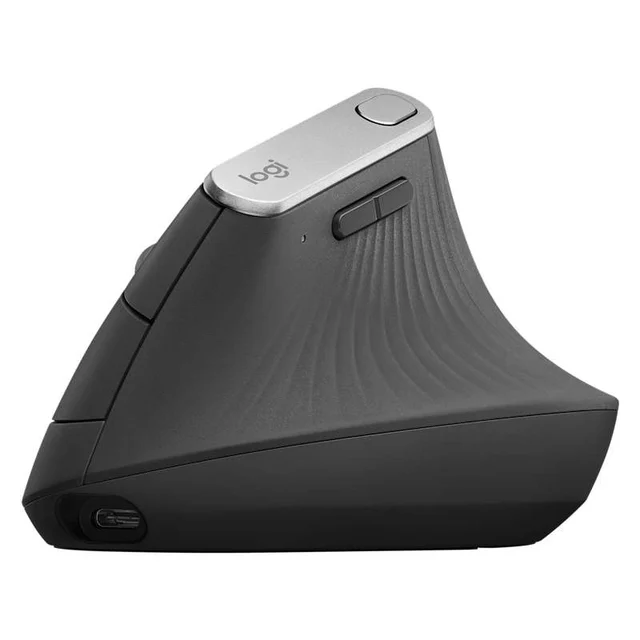
The all-rounder that gets vertical right - a 57-degree angle, a proper sensor, and premium build without going full medical device.
Best for: Most people with medium-to-large hands who want one vertical mouse that just works for daily office and creative use.
- 57-degree grip angle that reviewers consistently describe as the sweet spot - noticeably less forearm twist without feeling awkward or tippy
- 4000 DPI sensor and a cursor-speed button, so it tracks accurately and reduces how far your hand has to travel
- Charges over USB-C (a quick top-up gives hours of use), pairs over Bluetooth or the bundled receiver, and can switch between multiple computers
- Textured rubber body that owners say stays grippy and comfortable for full workdays
- One size only, shaped for medium-to-large right hands - small hands and lefties are out of luck
- Premium price, and the recharge-only design means a dead battery briefly tethers you to a cable
Own the Logitech MX Vertical? Tell us how it held up.
Thanks. Counted, and shown once enough owners have weighed in.
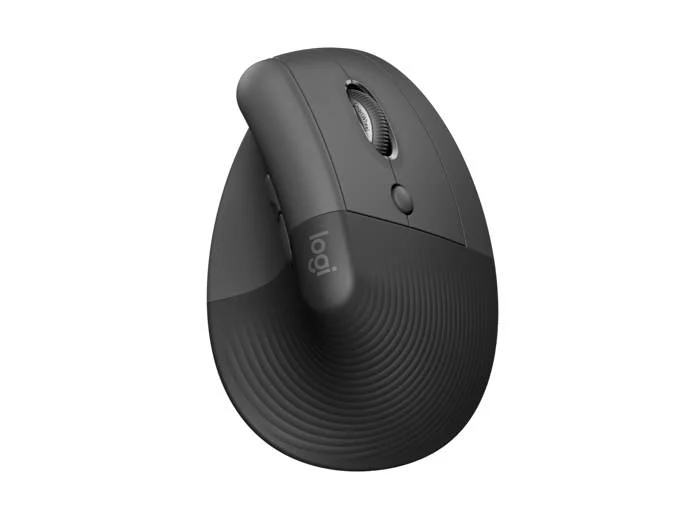
The same 57-degree comfort scaled down for smaller hands, with quiet clicks and a two-year battery - the easiest vertical mouse to live with.
Best for: Small-to-medium hands, left-handers, and anyone who wants near-MX comfort for less money and a quieter click.
- Same relaxed 57-degree angle as the pricier MX Vertical but in a smaller shell that suits small-to-medium hands
- Comes in dedicated right- and left-handed versions and several colors - the only pick here a left-hander can buy
- Quiet clicks and a single AA battery that owners report lasting up to around two years, so there's nothing to recharge
- Connects over Bluetooth or the bundled receiver and works across multiple devices
- Lighter, more hollow feel than the MX Vertical, and the smaller body cramps genuinely large hands
- No rechargeable cell or wired mode - you're swapping a battery rather than plugging in
Own the Logitech Lift Vertical Ergonomic Mouse? Tell us how it held up.
Thanks. Counted, and shown once enough owners have weighed in.
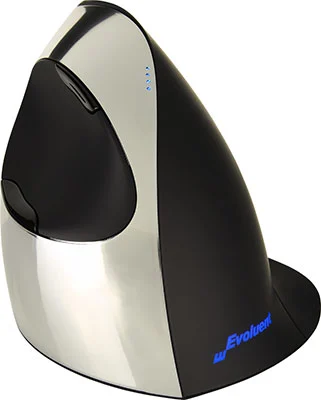
The steep, near-fully-vertical specialist that RSI sufferers swear by - proven relief, but dated and overkill for most.
Best for: People with real, ongoing RSI or a clinician's recommendation who need the most aggressive vertical angle and don't mind fussy software.
- The most upright, hand-on-its-edge grip here - owners with existing wrist or forearm pain often report it's the only mouse that lets them keep working
- Made by an ergonomics specialist selling vertical mice since 2002, with a pointer-speed button and lights to switch between fast and precise tracking
- Comes in wired and wireless versions, with five buttons you can reassign in Evoluent's Mouse Manager software
- The steepest angle is polarizing - reviewers new to vertical mice often find it tiring rather than relaxing
- Glossy plastic finish feels dated and can get slippery, and the companion driver software has a reputation for being clunky on current operating systems
- The priciest option here for a design that has barely changed in years
Amazon had no buyable listing for this when we last checked. The link still works if it returns.
Find it on Amazon Read our detailed assessmentOwn the Evoluent VerticalMouse C? Tell us how it held up.
Thanks. Counted, and shown once enough owners have weighed in.
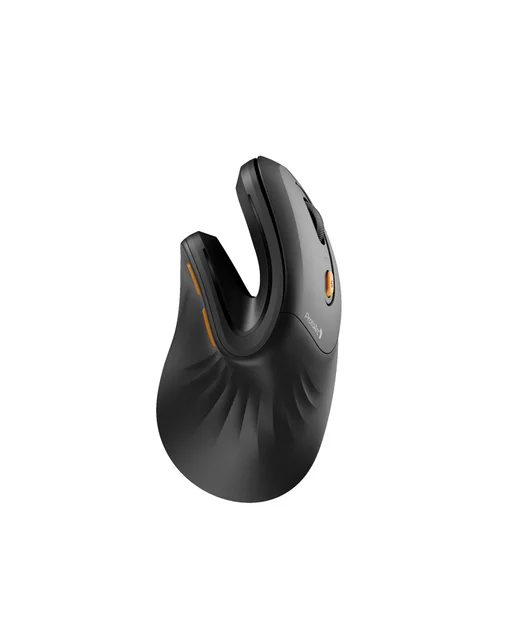
A cheap way to try the vertical shape, sized only for hands under 7.5 inches and short on the details that decide daily comfort.
Best for: Anyone who wants to test whether a vertical shape helps their wrist before committing, on the tightest possible budget.
- Gets you the core benefit - an upright grip that takes the twist out of your wrist - for a fraction of the price of the Logitechs
- Rechargeable 500mAh battery over USB-C, quiet clicks, 1000, 1600 and 2400 DPI, and Bluetooth plus a 2.4GHz receiver for up to three devices
- Forward and back side buttons and a 2-year limited hardware warranty
- ProtoArc sizes it for small to medium hands under 7.5 inches and lists no left-handed version, the same hands the Lift serves with a left-hand model as well
- No battery life is published for the 500mAh battery, and no grip angle is given for a mouse sold on its angle
- No customization software is listed, so the two side buttons are forward and back only
- The page contradicts itself on Bluetooth, giving 5.0 in the product summary and 4.0 in the description
Own the ProtoArc EM11 NL Ergonomic Vertical Mouse? Tell us how it held up.
Thanks. Counted, and shown once enough owners have weighed in.
| Criteria | Logitech MX Vertical Top pick Buy it Buy | Logitech Lift Vertical Ergonomic Mouse Buy it Buy | Evoluent VerticalMouse C It depends | ProtoArc EM11 NL Ergonomic Vertical Mouse Skip it Buy |
|---|---|---|---|---|
| Best for | Most people with medium-to-large hands who want one vertical mouse that just works for daily office and creative use. | Small-to-medium hands, left-handers, and anyone who wants near-MX comfort for less money and a quieter click. | People with real, ongoing RSI or a clinician's recommendation who need the most aggressive vertical angle and don't mind fussy software. | Anyone who wants to test whether a vertical shape helps their wrist before committing, on the tightest possible budget. |
| Price tier | $$$ · premium | $$ · mid-range | $$$$ · flagship | $ · budget |
| Grip angle | 57° - relaxed sweet spot | 57° - same relaxed angle | Steepest, near-vertical handshake | Not published |
| Hand size fit | Medium to large, right-hand only | Small to medium; left-hand version too | Medium to large, right-hand only | Small to medium, under 7.5 in; no left-hand model listed |
| Connectivity | Bluetooth, receiver, USB-C wired | Bluetooth or receiver | Wired or wireless versions | 2x Bluetooth + 2.4GHz receiver, 3 devices |
| Power | Rechargeable USB-C | 1x AA, up to ~2 years | Wired USB, or wireless (1 AA, about 3 to 5 months) | Rechargeable 500mAh, battery life not published |
| Software & buttons | Options+, multi-device, cursor-speed key | Options+, 6 custom buttons | 5 programmable buttons via Windows driver (clunky) | No software listed; forward and back side buttons |
| Build & sensor | Premium grippy build, precise sensor | Solid but lighter; quiet clicks | Well-built but glossy/dated | Optical, 1000/1600/2400 DPI, 3 million+ click life |
| Price tier | $$$ · premium | $$ · mid-range | $$$$ · flagship | $ · budget |
Which one is right for you?
- Most people with medium-to-large hands who want one vertical mouse that just works for daily office and creative use. Buy it Logitech MX Vertical
- Small-to-medium hands, left-handers, and anyone who wants near-MX comfort for less money and a quieter click. Buy it Logitech Lift Vertical Ergonomic Mouse
- People with real, ongoing RSI or a clinician's recommendation who need the most aggressive vertical angle and don't mind fussy software. It depends Evoluent VerticalMouse C
- Anyone who wants to test whether a vertical shape helps their wrist before committing, on the tightest possible budget. Skip it ProtoArc EM11 NL Ergonomic Vertical Mouse
How we judged the field
We don’t run our own lab. Instead we synthesize independent testing, long-term owner reports, and the consistent themes that show up across expert reviews, then weigh them against what actually matters for wrist comfort over a full workday. Four things rose to the top. Grip angle is the whole point - too shallow and you keep the strain, too steep and control suffers - so we looked for the angle reviewers describe as relaxed rather than awkward. Hand fit matters just as much: a mouse that’s superb for large hands can be unusable for small ones, and left-handers need a version that actually exists. Build and sensor decide whether the comfort lasts, since a hollow shell and an imprecise sensor make you grip harder and fight the cursor - the opposite of what you want. Finally, connectivity and power determine how painlessly the mouse fits your desk. Price tier is qualitative throughout; we never chase the cheapest sticker if it undermines the ergonomics you’re paying for.
Logitech MX Vertical
Buy itThis is the mouse we’d hand most people. Its 57-degree angle is the one reviewers keep calling the sweet spot: enough rotation to take the twist out of your forearm, but not so steep that the mouse feels tippy or hard to steer. The sensor is genuinely precise, and a dedicated cursor-speed button lets you cross the screen with less hand movement - a small thing that adds up over a day. The textured rubber body is comfortable to hold for hours, it charges over USB-C with a fast top-up, and it hops between Bluetooth and the bundled receiver across multiple computers. The catches are simple: it’s a single size built for medium-to-large right hands, and it’s a premium buy. For its intended user, it’s hard to beat.
Logitech Lift Vertical Ergonomic Mouse
Buy itThe Lift takes almost everything good about the MX Vertical and shrinks it for smaller hands - and in doing so becomes the easiest vertical mouse to recommend broadly. You get the same relaxed 57-degree angle, quiet clicks that owners appreciate in shared spaces, and a single AA battery that reviewers report running for up to around two years, so there’s nothing to recharge. Crucially, it’s the only pick here a left-hander can actually buy off the shelf, and it comes in a few colors. It feels a touch lighter and more hollow than the MX Vertical, and large hands will find it cramped, but for most people it delivers the lion’s share of the comfort for less money.
Evoluent VerticalMouse C
It dependsEvoluent has been making vertical mice since before most brands took the shape seriously, and the VerticalMouse C is the specialist’s choice. Its grip is the steepest here - closer to a fully upright handshake - and people with existing wrist or forearm pain often say it’s the one mouse that lets them keep working. Five buttons are programmable in Evoluent’s Windows software, and it comes in wired and wireless versions, but only for medium-to-large right hands. But that steep angle is polarizing: newcomers frequently find it more tiring than relaxing. The glossy plastic feels dated and can get slippery, the driver software has a reputation for being clunky on current operating systems, and it’s the priciest option here for a design that has barely changed in years. Right for a specific person with real RSI; overkill for everyone else.
ProtoArc EM11 NL Ergonomic Vertical Mouse
Skip itThe appeal is obvious: it’s the cheapest way to find out whether a vertical shape helps your wrist. It has a 500mAh battery that charges over USB-C, 1000, 1600 and 2400 DPI settings, quiet clicks, forward and back side buttons, and pairs over Bluetooth or a 2.4GHz receiver with up to three devices, with a 2-year limited warranty behind it. The problem is what ProtoArc leaves off the page. It gives no grip angle for a mouse whose whole case is its angle, no battery life for that 500mAh cell, and no software for remapping buttons, and it cannot settle which Bluetooth version it uses, listing 5.0 in the summary and 4.0 in the description. It is also sized for small to medium hands under 7.5 inches with no left-handed model listed, which is exactly the hand the Lift is built for, and the Lift adds a published battery life, six customizable buttons and a left-hand version for a small step up. Buy it only as a low-cost experiment with the shape.
Sources
Specs in this review come from these pages.
- Logitech, MX Vertical Advanced Ergonomic Mouse product page (logitech.com)
- Logitech, Lift Vertical Ergonomic Mouse product page (logitech.com)
- Evoluent, VerticalMouse C Right Wired product page (evoluent.com)
- Evoluent, VerticalMouse C Right Wireless product page (evoluent.com)
- ProtoArc, EM11 NL Ergonomic Vertical Mouse product page (protoarc.com)
Logitech MX Vertical vs Logitech Lift: which should you buy?
These two share the same excellent 57-degree angle, so the decision comes down to your hand and your wallet. Choose the MX Vertical if you have medium-to-large hands and want the best of everything: a grippier premium body, a cursor-speed button, and USB-C recharging. Choose the Lift if your hands are on the smaller side, you’re left-handed, you want quieter clicks, or you’d simply rather spend less and swap a battery every couple of years than pay for the flagship. Neither is a compromise - the Lift is the more universally comfortable fit, while the MX Vertical is the more capable tool. If you’re unsure and have average-to-large hands, the MX Vertical is the safer long-term pick; if you’re unsure and have smaller hands, get the Lift.
What to look for
- A moderate grip angle (around 57°) if you’re new to vertical mice - it delivers most of the relief with the least awkwardness.
- The right hand size and handedness - a vertical shell that’s too big or too small cancels out the ergonomic benefit, and many models are right-hand only.
- A solid, non-hollow build and an accurate sensor - flex and imprecision make you grip and correct more, which defeats the purpose.
- Connectivity that fits your desk - Bluetooth versus a USB receiver, and whether you want recharging or a swappable battery.
- Button customization and cursor-speed control if you want to reduce how far your hand travels.
- Willingness to adapt - plan for a short adjustment period before your speed and accuracy return to normal.
Our final take
A vertical mouse is one of the cheapest, most effective changes you can make if a flat mouse leaves your wrist aching, but only if you buy one that’s actually built to last a workday. For most people the Logitech MX Vertical is the pick: a comfortable angle, a precise sensor, and a premium body that earns its price. Smaller hands, left-handers, and budget-minded buyers should get the Logitech Lift, which delivers nearly the same comfort for less. Reserve the Evoluent VerticalMouse C for genuine RSI cases that need its steeper grip and can live with dated software, and skip the ProtoArc EM11 NL - its page leaves out the grip angle, battery life and customization you would need to judge it, and a small step up to the Lift buys a mouse that publishes all three. Whichever you choose, give yourself a week to adjust before you judge it.
Questions, answered
Does a vertical mouse actually help wrist pain?
Many owners and reviewers report real relief because a vertical mouse holds your forearm in a neutral 'handshake' position instead of forcing it to twist palm-down all day, which eases pressure through the wrist. It isn't a cure and results vary from person to person. This is general product information, not medical advice - if you have persistent pain, numbness or a diagnosed condition, consult a doctor or occupational therapist.
How steep should the angle be?
Around 57 degrees, as on both Logitech picks, is the popular middle ground: enough to relax the forearm without feeling tippy or hard to control. Steeper, near-vertical designs like the Evoluent can help people with existing RSI but often feel awkward to newcomers. If you're new to vertical mice, start with a moderate angle.
Is there a left-handed vertical mouse here?
Yes. The Logitech Lift ships in a dedicated left-handed version. The MX Vertical, the Evoluent VerticalMouse C, and the ProtoArc EM11 NL are right-hand only, which is common in this category, so left-handers should focus on the Lift. Evoluent does sell a left-handed version of its older VerticalMouse 4.
Do I need software to use one?
No - all of these work as plug-and-play mice out of the box. Software (Logitech's Options+ or Evoluent's driver) only adds button remapping, cursor-speed tuning and multi-device features. The Logitech app is the more polished experience; Evoluent's driver is more powerful but has a reputation for being finicky.
Is there an adjustment period?
Usually. Most people need a few days to a couple of weeks for their accuracy and speed to return to normal after switching from a flat mouse, and it can feel strange at first. Owners generally say the comfort payoff is worth pushing through the transition, especially with a moderate 57-degree angle.
Deciding between the top two? See our head-to-head: Logitech MX Vertical vs Logitech Lift Vertical Ergonomic Mouse.
More in Office & WFH
Vertical Mice, Explained Plain-English guide → Logitech MX Vertical vs Logitech Lift Vertical Ergonomic Mouse Head-to-head →  The Best Under-Desk Walking Pads: 4 Compared (and One to Skip)
  The Best Webcams for Working From Home (and One to Skip)
  The Best Whiteboards: 4 Compared (and One to Skip)
  The Best Wireless Presenters: 4 Compared (and One to Skip)