

Office & WFH
The Best Webcams for Working From Home (and One to Skip)
Four work-from-home webcams tested against independent reviews: the Logitech Brio 500, Anker PowerConf C200 and Elgato Facecam MK.2 - and one you should skip.
The short version
The Logitech Brio 500 is our pick: RightLight 4 keeps your face evenly lit in dim or backlit home offices, and Show Mode flips the lens to share documents on your desk. The Anker PowerConf C200 wins when you want 2K sharpness and a wider adjustable frame on a large monitor. Skip the Logitech StreamCam - its autofocus hunts and the mount won't tilt. The Elgato Facecam MK.2 suits streamers who own a mic and sit within its fixed-focus range. Best for remote workers who take daily video calls in imperfect lighting.
Our picks at a glance
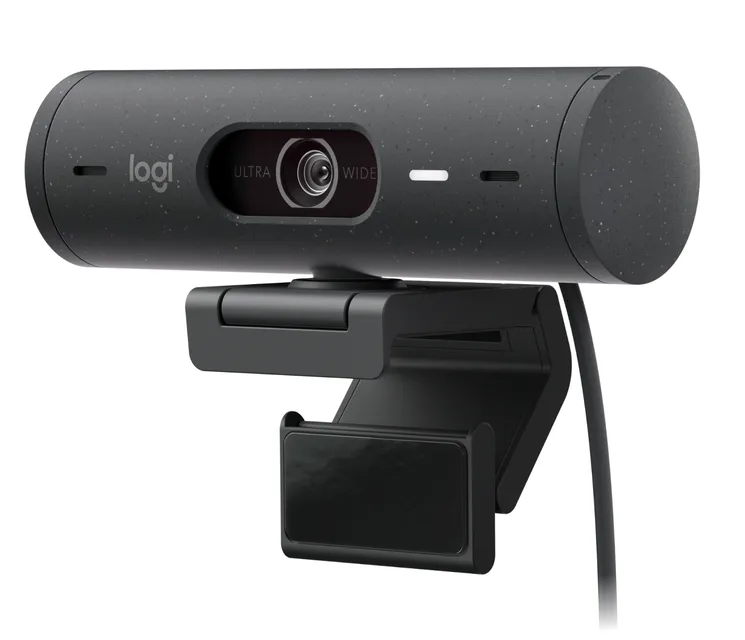
- Logitech Brio 500 - Buy. The no-drama pick for meetings - it fixes bad home lighting on its own and just works.
- Anker PowerConf C200 - Buy. The value champ - 2K sharpness, adjustable framing and solid mics for budget money.
- Elgato Facecam MK.2 - It depends. The best-looking image here - if you already have a mic and want real camera controls.
- Logitech StreamCam - Skip. A sharp streaming camera sold at a WFH price - but missing the things WFH actually needs.
The verdict in 30 seconds
What mattered most
- Resolution / frame rate
- Low-light handling
- Built-in microphone
- Privacy shutter
- Field of view
- Price tier
For daily video calls, a webcam's job is simple: make you look clear and well-lit without a fuss, and not embarrass you when the light changes. We cross-checked hands-on impressions from independent testing against what actually matters for Teams, Zoom and Meet - auto light correction, a usable built-in mic, and a privacy shutter - rather than chasing 4K numbers that meeting apps throttle away anyway. Three of these are easy to recommend at their price. One is a good camera aimed at the wrong buyer, so we'd pass on it for work.
The no-drama pick for meetings - it fixes bad home lighting on its own and just works.
Best for: Most remote workers who just want to look good on calls with zero tweaking.
- AI auto light correction reliably rescues dim or backlit rooms
- Dual noise-reducing mics are clear enough to skip a headset
- Built-in privacy shutter and handy Show Mode for documents
- Caps at 1080p/30 - fine for calls, not for content creation
- HDR can look a touch flat next to pricier cameras
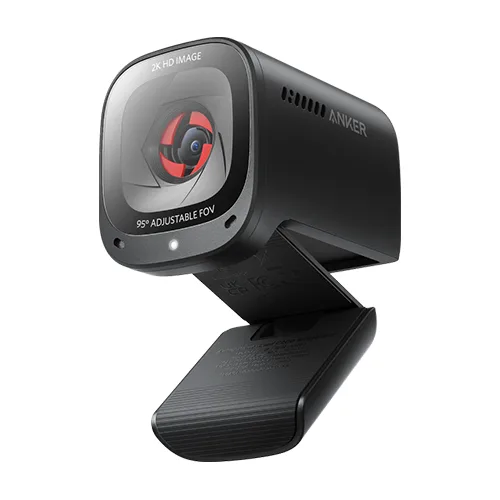
The value champ - 2K sharpness, adjustable framing and solid mics for budget money.
Best for: Anyone who wants a good call camera without spending much.
- Sharp, well-exposed 2K image that reviewers rate well above its price
- Selectable field of view (65/78/95°) plus AI noise-cancelling dual mics
- Physical privacy cover and a compact, travel-friendly body
- No HDR listed, so harsh window backlight is harder than on the Brio
- 2K tops out at 30fps, and the 95° setting shows some edge distortion
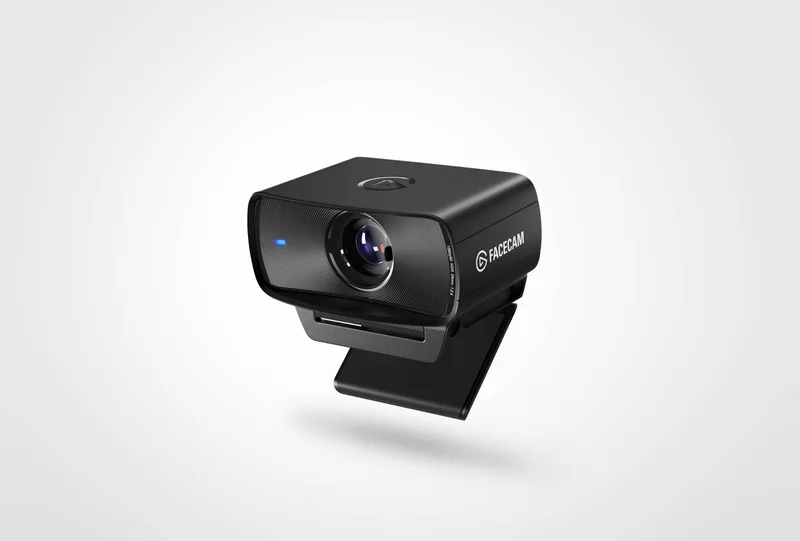
The best-looking image here - if you already have a mic and want real camera controls.
Best for: Appearance-conscious workers who already use a headset and want top image quality.
- Sony STARVIS sensor with HDR gives the cleanest, most natural image of the group
- Holds detail in low light without getting grainy
- DSLR-style manual controls (ISO, exposure, white balance) plus a privacy shutter
- No built-in microphone - you must bring a headset or separate mic
- Fixed focus (30 to 120 cm) and more camera than basic calls need
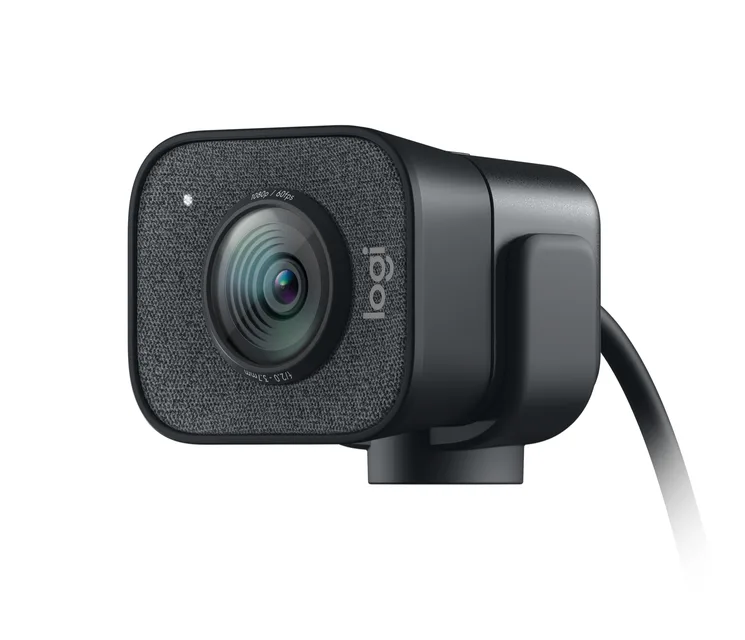
A sharp streaming camera sold at a WFH price - but missing the things WFH actually needs.
Best for: Streamers, not meeting-takers - for pure video calls it costs more and does less.
- Crisp, smooth 1080p/60 with dependable face-tracking autofocus
- Sturdy build with a mount that supports portrait or landscape
- No privacy shutter and no HDR auto light correction
- USB-C only, so many work laptops and docks need an adapter
- Priced above the meeting-focused Brio 500 while giving you less for calls
| Criteria | Logitech Brio 500 Top pick | Anker PowerConf C200 | Elgato Facecam MK.2 | Logitech StreamCam |
|---|---|---|---|---|
| Verdict | Buy it | Buy it | It depends | Skip it |
| Best for | Most remote workers who just want to look good on calls with zero tweaking. | Anyone who wants a good call camera without spending much. | Appearance-conscious workers who already use a headset and want top image quality. | Streamers, not meeting-takers - for pure video calls it costs more and does less. |
| Price tier | $$ · mid-range | $ · budget | $$$ · premium | $$$ · premium |
| Resolution / frame rate | 1080p / 30fps | 2K / 30fps | 1080p / 60fps | 1080p / 60fps |
| Low-light handling | Auto light correction (HDR) | Good, larger aperture | Excellent (STARVIS + HDR) | Decent, no HDR |
| Built-in microphone | Dual, noise-reducing | Dual, AI noise-cancel | None - bring your own | Dual |
| Privacy shutter | Yes | Yes (slide cover) | Yes | No |
| Field of view | 90° (adjustable 90 / 78 / 65°) | 65 / 78 / 95° selectable | 84° fixed | 78° fixed |
| Price tier | $$ · mid-range | $ · budget | $$$ · premium | $$$ · premium |
Which one is right for you?
- Most remote workers who just want to look good on calls with zero tweaking. Buy it Logitech Brio 500
- Anyone who wants a good call camera without spending much. Buy it Anker PowerConf C200
- Appearance-conscious workers who already use a headset and want top image quality. It depends Elgato Facecam MK.2
- Streamers, not meeting-takers - for pure video calls it costs more and does less. Skip it Logitech StreamCam
How we judged the field
We prioritized image quality in ordinary rooms rather than studio setups: how a camera handles a backlit window and weak overhead light, how natural skin tones look, and whether the microphones are usable without a headset. We also weighed setup friction, mounting flexibility, and software that helps rather than nags. Marketing leans on resolution numbers and AI labels, so we discount both and judge the picture a colleague actually sees. RBE does not run a lab; we synthesize independent testing and owner reports over months, then flag the patterns that repeat. On that basis the Logitech Brio 500 leads for everyday calls, with the Anker PowerConf C200 close behind as the sharper-framed runner-up for people on large monitors.
Logitech Brio 500
Buy itThe Brio 500 is a 1080p webcam aimed at daily meetings rather than streaming. Its headline feature is RightLight 4, Logitech’s exposure system that tracks your face and lifts shadows when a window sits behind you, so you read as a person instead of a silhouette. A second feature, Show Mode, tilts the lens downward on a magnetic hinge to capture papers or sketches on your desk, then reorients the image automatically. Dual noise-reducing microphones and a physical privacy cover round out the package, and it connects over USB-C. Reviewers and owners consistently note the even lighting and quick setup across Zoom, Teams, and Meet. The recurring gripe concerns that Show Mode hinge: several owners report it feels stiff, and because the camera attaches by magnets, the whole body can pop off instead of tilting. It also tops out at 1080p. Right buyer: a remote worker in a room that is lit imperfectly. Wrong buyer: a streamer chasing maximum resolution.
Anker PowerConf C200
Buy itThe PowerConf C200 is a 2K webcam built for hybrid workers who want more detail than 1080p without paying for 4K. Two features stand out: an adjustable field of view switchable between 65, 78, and 95 degrees through the lightweight AnkerWork app, and a built-in privacy cover that slides over the lens. A larger aperture with an adaptive light sensor and dual AI noise-cancelling microphones handle dim rooms and voice pickup. Owners repeatedly describe the software as small and easy to configure, and note the 2K image looks crisper on a large monitor than the 1080p field. What they like less: Anker lists autofocus rather than the fixed focus of the Elgato, and some owners describe a brief refocus when they lean in; a minority mention the wide 95-degree setting introduces edge distortion, and no HDR is listed. Right buyer: someone on a big display who wants a sharper frame and simple controls. Wrong buyer: anyone with a bright window behind them who needs HDR to hold their face.
Elgato Facecam MK.2
It dependsThe Facecam MK.2 targets streamers and creators, and its value hinges on how you sit. It pairs a 1/2.5-inch Sony Starvis sensor with a fixed-focus Elgato Prime Lens rated for 30 to 120 centimeters, and it outputs uncompressed 1080p60 through the Camera Hub software, which also stores settings on onboard memory. HDR and noise reduction are new to this generation. The fixed focus is deliberate: with no autofocus motor, there is none of the hunting or flickering that afflicts cheaper cameras, and independent reviewers treat that steadiness as a feature rather than a shortcut. The catch is that you must stay inside the focus range to look sharp, and there is no built-in microphone, so you need a separate mic. Reviewers also note the redesigned body uses a lot of plastic. Right buyer: a streamer at a fixed desk distance who already owns a microphone and wants clean, uncompressed video. Wrong buyer: a caller who wants an all-in-one with mic and autofocus.
Logitech StreamCam
Skip itThe StreamCam records 1080p at 60fps over USB-C through a 78-degree glass lens with autofocus and dual microphones, and supports a vertical orientation mode aimed at social video. When it locks focus, the footage is crisp with pleasing color, and creators who shoot vertical clips still find it useful. We land on skip for two repeated reasons. First, the autofocus: multiple reviewers and owners describe it drifting in and out even in good light, leaving faces briefly soft - the opposite of the Facecam’s steady fixed focus. Second, owners report the monitor clip offers no tilt adjustment, which limits framing on a tall monitor. A smaller annoyance is the USB-C-only cable, which forces an adapter on older machines. None of this makes it unusable, and for vertical content on a set desk it can serve. But for everyday calls the Brio 500 lights you better, and for streaming the Facecam holds focus more reliably. Right buyer: a vertical-video creator at a fixed distance. Wrong buyer: most callers and anyone who moves.
Sources
Specs in this review come from these pages.
Logitech Brio 500 vs Anker PowerConf C200: which should you buy?
Both earn a buy, and the split comes down to lighting versus resolution. The Brio 500 wins on how it handles bad light: RightLight 4 lifts your face out of shadow more convincingly than the Anker’s correction, and Show Mode adds a genuine trick for sharing physical objects. The PowerConf C200 wins on raw detail - its 2K sensor resolves more on a large monitor, and its adjustable field of view gives you three framings instead of relying on a software crop. If your room is dim or backlit and you value the document-sharing hinge, choose the Brio 500. If your lighting is decent and you sit in front of a big display where extra pixels show, the PowerConf C200 gives you a sharper picture with simpler software. For most remote workers in ordinary rooms, the Brio 500’s lighting advantage matters more day to day.
What to look for
Start with your lighting, because it decides more than resolution. If a window or lamp sits behind you, prioritize exposure correction - the Brio 500’s RightLight 4 - over megapixels, since a sharp silhouette still hides your face. If your lighting is controlled and you work on a large monitor, a 2K sensor like the PowerConf C200’s adds visible detail. Next, decide on focus. Autofocus reads better on a spec sheet, but it can hunt; a fixed-focus camera like the Facecam MK.2 stays sharp as long as you sit within its range, which suits a stable desk setup. Then check the microphone: if you want one device for calls, avoid cameras with no built-in mic. Consider mounting and tilt if you use a tall monitor, and confirm your ports before buying a USB-C-only model. Finally, weigh the software - some apps assist with framing and exposure, others simply run in the background. Match those four factors to how you actually work rather than to the highest number on the box.
Our final take
For daily video calls in rooms with imperfect light, the Logitech Brio 500 is the safe pick: it lights your face well, sets up quickly, and adds a useful document-sharing mode, provided you accept a 1080p ceiling and a stiff hinge. The Anker PowerConf C200 is the sharper choice on a big monitor. Streamers with a separate mic and a fixed seat should consider the Elgato Facecam MK.2 for its steady focus. The Logitech StreamCam trails mainly because its autofocus wanders and its mount will not tilt.
Questions, answered
Do I need 4K, or is 1080p enough for work calls?
For meetings on Zoom, Teams, or Meet, 1080p is plenty, since those platforms compress your feed anyway. Good lighting and exposure matter more than resolution. Choose the Brio 500 for lighting; step up to the 2K PowerConf C200 only if you record locally on a large monitor.
Is fixed focus a downside on the Elgato Facecam MK.2?
Not necessarily. Fixed focus keeps you sharp without the hunting that autofocus cameras like the StreamCam and PowerConf C200 can show, provided you sit within roughly 30 to 120 centimeters. If you stay at a stable desk distance it is an advantage; if you move around often, autofocus suits you better.
Do these webcams work without a separate microphone?
The Brio 500, PowerConf C200, and StreamCam all include built-in microphones adequate for calls, so no headset is required. The Elgato Facecam MK.2 is the exception - it has no microphone at all, so pair it with a separate mic or headset.
Why is the Logitech StreamCam a skip if it shoots 1080p60?
The resolution is fine; the focus is the problem. Owners and reviewers repeatedly report its autofocus drifting even in good light, and owners say the monitor clip cannot tilt. For calls the Brio 500 lights you better, and for streaming the Facecam holds focus more steadily.
Deciding between the top two? See our head-to-head: Logitech Brio 500 vs Anker PowerConf C200.
More Office & WFH reviews
 The Best Whiteboards: 4 Compared (and One to Skip)
  The Best Wireless Presenters: 4 Compared (and One to Skip)
  The Best Keyboard Wrist Rests: 4 Compared (and One to Skip)
  The Best Office Chair Mats: 4 Compared (and One to Skip)
  The Best Filing Cabinets: 4 Compared (and One to Skip)
  The Best Laptop Cooling Pads: 4 Compared (and One to Skip)