

Office & WFH
The Best Wireless Presenters: 4 Compared (and One to Skip)
We compared four current presentation clickers on range, pointer type, connectivity, battery, and cross-platform reliability to find the ones worth carrying.
The short version
For most presenters the Logitech Spotlight is the one to beat: its digital highlight and magnify show up on any screen, including video calls, and it pairs over Bluetooth or a USB receiver, charges over USB-C, and reaches about 100 ft. If you don't need digital effects, the Logitech R500s covers the essentials with dual connectivity and a full year on one AAA. The Kensington Presenter Expert with Green Laser is worth it specifically for large physical rooms where a bright green dot matters, but it drops Bluetooth and on-screen pointing. The basic Kensington red-laser clicker works, yet a small step up buys a meaningfully better remote. Best for: pick the Spotlight for hybrid and big presentations, the R500s for everyday reliability.
Our picks at a glance
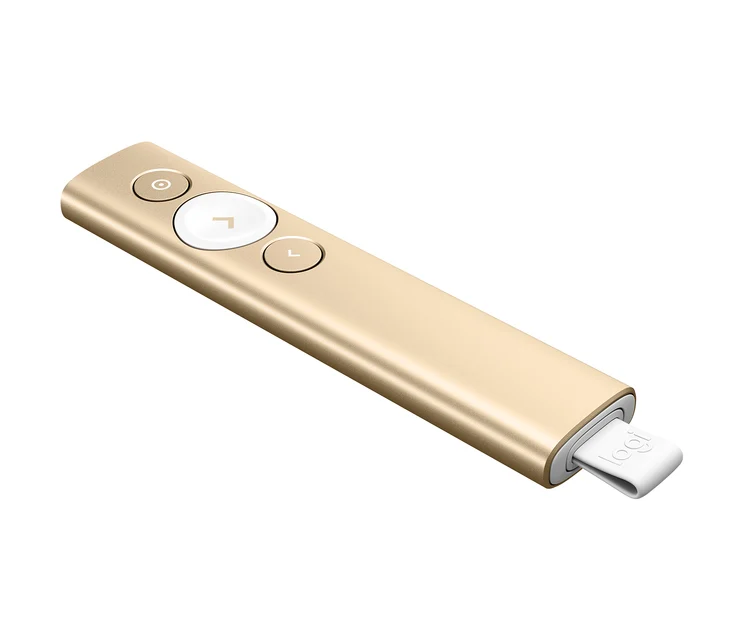
- Logitech Spotlight Presentation Remote - Buy. The only one here whose on-screen highlight works on a TV, a projector, or a video call where a laser dot would be invisible.
- Logitech R500s Laser Presentation Remote - Buy. The default sensible pick, with dual connectivity, a full year on one AAA, and controls you can find without looking.
- Kensington Presenter Expert Wireless with Green Laser - It depends. A big-room specialist: the green laser is far easier to see across a hall, but you give up Bluetooth and any on-screen pointer.
- Kensington Wireless Presenter with Red Laser & Nano Receiver - Skip. Nothing broken here; it's just so basic that a small step up to the R500s gets you Bluetooth, longer battery, and better ergonomics.
The verdict in 30 seconds
What mattered most
- Connectivity
- Pointer type
- Range (approx.)
- Power
- Battery life
- Works on video calls / shared screens
A presentation remote has one job: never fail you in front of a room. We weighed the four clickers people actually reach for in 2026 across range, pointer visibility, connectivity, and battery. Two are easy recommendations, one is a genuine 'it depends,' and one is a skip that a slightly better remote quietly outclasses.
The only one here whose on-screen highlight works on a TV, a projector, or a video call where a laser dot would be invisible.
Best for: Frequent presenters, trainers, and anyone who presents to TVs, projectors, or remote/hybrid audiences.
- On-screen digital pointer highlights, magnifies, and spotlights anything, and shows up on screen shares and TVs where a physical laser can't
- Dual connectivity: Bluetooth or the bundled USB receiver, with roughly 30 m / 100 ft of usable range
- USB-C rechargeable with about three months per charge, and a one-minute quick charge is enough for a whole talk
- Logi Options+ app (Windows and macOS) adds timed vibration alerts and on-screen cursor control; iOS and Android get basic functions only
- Clearly the priciest option, and overkill if you only ever click through slides in the same small room
- The digital effects lean on the app being installed, so a locked-down borrowed laptop reduces it to a basic clicker
Own the Logitech Spotlight Presentation Remote? Tell us how it held up.
Thanks. Counted, and shown once enough owners have weighed in.
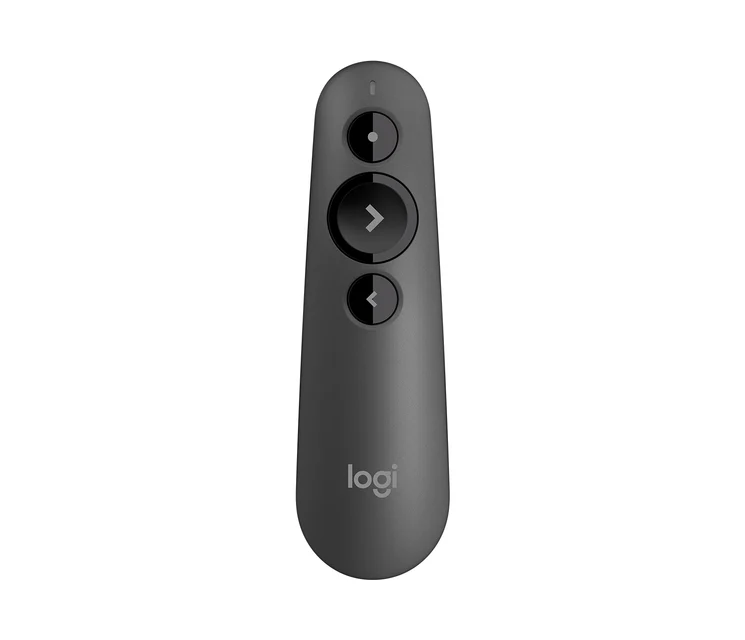
The default sensible pick, with dual connectivity, a full year on one AAA, and controls you can find without looking.
Best for: Most people, from office presenters and students who want a reliable, no-fuss clicker without paying for digital effects.
- Connects over Bluetooth or the bundled USB receiver, so it works whether or not you have a free port
- Single AAA battery lasts up to about 12 months, and there's no charging cable to forget
- Slim, intuitive button layout that owners say is easy to operate by feel mid-sentence
- Broad support across Windows, macOS, iOS, and Android with common slide apps
- Physical red laser can be hard to see on bright screens and doesn't appear on video calls or shared displays
- Roughly 20 m / 65 ft range is fine for meeting rooms but tighter than large-hall options
Own the Logitech R500s Laser Presentation Remote? Tell us how it held up.
Thanks. Counted, and shown once enough owners have weighed in.
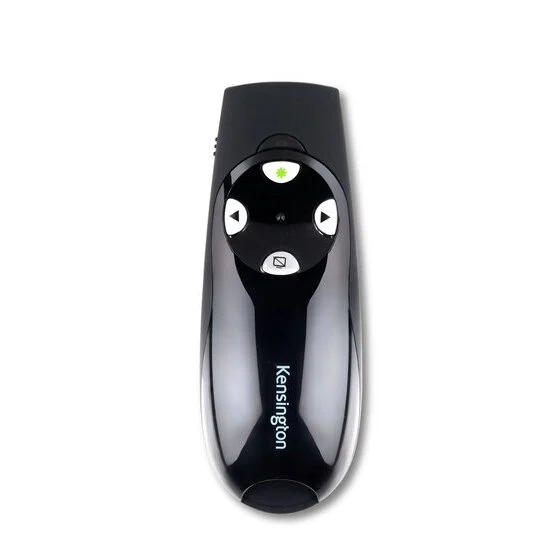
A big-room specialist: the green laser is far easier to see across a hall, but you give up Bluetooth and any on-screen pointer.
Best for: Lecturers and conference speakers who present in large physical rooms and need a pointer people can actually follow.
- Green laser is dramatically more visible than a red dot on large or brightly lit screens
- Long 2.4 GHz range (around 45 m / 150 ft) with encrypted plug-and-play pairing suits auditoriums
- Contoured shape, on-board receiver storage, and a carrying case make it travel-friendly
- True plug-and-play on Windows and macOS with no software or drivers needed
- USB receiver only, no Bluetooth, so it needs a free USB-A port on the presenting machine
- No on-screen digital pointer, so the green laser is useless on video calls and screen shares
- Runs on disposable AAA batteries rather than a rechargeable cell
Own the Kensington Presenter Expert Wireless with Green Laser? Tell us how it held up.
Thanks. Counted, and shown once enough owners have weighed in.
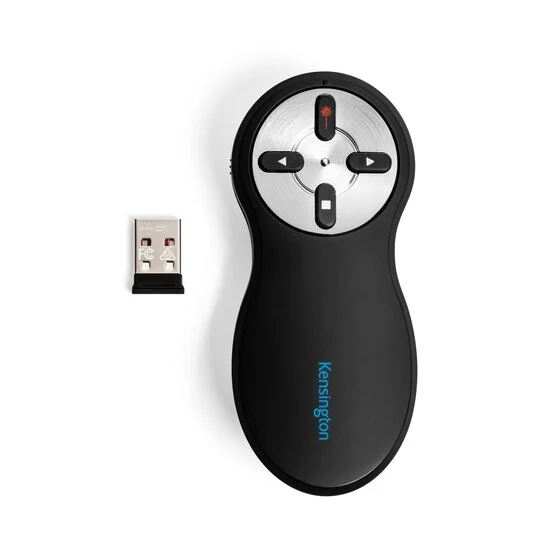
Nothing broken here; it's just so basic that a small step up to the R500s gets you Bluetooth, longer battery, and better ergonomics.
Best for: Very occasional presenters on a tight budget who just need forward, back, and a dot in a small room.
- Genuinely plug-and-play with a tiny nano USB receiver and no setup
- Simple four-button layout is easy to learn for occasional use
- Inexpensive enough to keep as a backup in a bag
- Red laser is faint on modern bright displays and invisible on any shared or video screen
- USB receiver only, with no Bluetooth fallback if the port is taken
- Basic ergonomics and disposable AAA power make it feel dated next to similarly priced rivals
Own the Kensington Wireless Presenter with Red Laser & Nano Receiver? Tell us how it held up.
Thanks. Counted, and shown once enough owners have weighed in.
| Criteria | Logitech Spotlight Presentation Remote Top pick Buy it Buy | Logitech R500s Laser Presentation Remote Buy it Buy | Kensington Presenter Expert Wireless with Green Laser It depends Buy | Kensington Wireless Presenter with Red Laser & Nano Receiver Skip it Buy |
|---|---|---|---|---|
| Best for | Frequent presenters, trainers, and anyone who presents to TVs, projectors, or remote/hybrid audiences. | Most people, from office presenters and students who want a reliable, no-fuss clicker without paying for digital effects. | Lecturers and conference speakers who present in large physical rooms and need a pointer people can actually follow. | Very occasional presenters on a tight budget who just need forward, back, and a dot in a small room. |
| Price tier | $$$ · premium | $$ · mid-range | $$ · mid-range | $ · budget |
| Connectivity | Bluetooth + USB receiver | Bluetooth + USB receiver | USB-A 2.4 GHz receiver only | USB-A 2.4 GHz nano receiver only |
| Pointer type | On-screen digital highlight, magnify & spotlight | Physical red laser | Physical green laser | Physical red laser |
| Range (approx.) | ~30 m / 100 ft | ~20 m / 65 ft | ~45 m / 150 ft | ~20 m / 65 ft |
| Power | USB-C rechargeable | Single AAA | AAA batteries | AAA batteries |
| Battery life | ~3 months per charge | Up to ~12 months per battery | Not stated by maker | Not stated by maker |
| Works on video calls / shared screens | Yes (digital pointer) | No (laser only) | No (laser only) | No (laser only) |
| Platforms | Windows, macOS (basic on iOS, Android) | Windows, macOS, iOS, Android | Windows, macOS | Not stated, driver free |
| Price tier | $$$ · premium | $$ · mid-range | $$ · mid-range | $ · budget |
Which one is right for you?
- Frequent presenters, trainers, and anyone who presents to TVs, projectors, or remote/hybrid audiences. Buy it Logitech Spotlight Presentation Remote
- Most people, from office presenters and students who want a reliable, no-fuss clicker without paying for digital effects. Buy it Logitech R500s Laser Presentation Remote
- Lecturers and conference speakers who present in large physical rooms and need a pointer people can actually follow. It depends Kensington Presenter Expert Wireless with Green Laser
- Very occasional presenters on a tight budget who just need forward, back, and a dot in a small room. Skip it Kensington Wireless Presenter with Red Laser & Nano Receiver
How we judged the field
We don’t run a lab. Instead we synthesize independent testing, expert reviews, and the pile-up of long-term owner reports to see what actually holds up in a real room. For presenters, a few things separate the keepers from the clutter: reliable range and connectivity so the clicker never stutters mid-slide; a pointer your audience can genuinely see; battery you don’t have to think about; controls you can operate by feel without looking down; and honest cross-platform support for Mac, Windows, and mobile slide apps.
One distinction shaped almost every verdict below: a physical laser only exists on the projection surface in the room, while an on-screen digital pointer is drawn onto the display itself. As more talks go hybrid, that difference decides whether your emphasis reaches half the audience or all of it. We weighted it accordingly, but not blindly: for a speaker who only ever presents in person, a bright laser is still the simpler tool.
Logitech Spotlight Presentation Remote
Buy itThe Spotlight is the most future-proof presenter in this group because it sidesteps the laser’s biggest weakness. Its digital pointer highlights, magnifies, and spotlights whatever you aim at, and because the effect is rendered on the display, it shows up on TVs, in recordings, and on video calls where a laser dot simply wouldn’t. Reviewers consistently single this out as the feature that changes how you present.
The fundamentals are strong too: it pairs over Bluetooth or a bundled USB receiver, reaches roughly 30 m / 100 ft, and charges over USB-C with about three months of life per charge, and Logitech says a one-minute charge gives up to 3 hours of use. The Logi Options+ app (Windows and macOS) layers on timed vibration alerts and on-screen cursor control. The catch is price and dependence on that app: on a locked-down machine where you can’t install software, the fancy effects fall away and you’re left with a (very good) basic clicker. For anyone presenting regularly, especially to hybrid audiences, it’s worth it.
Logitech R500s Laser Presentation Remote
Buy itThe R500s is the remote we’d hand to most people. It keeps the parts that matter: Bluetooth and a USB receiver, so it connects to nearly anything, and pairs them with a control layout owners describe as easy to run by feel. A single AAA battery lasts up to about a year, which quietly removes the most common presenter anxiety: dead-clicker-mid-talk.
What you give up versus the Spotlight is the digital pointer. The R500s uses a conventional red laser, which can wash out on bright screens and won’t appear on shared or video displays. Its roughly 20 m / 65 ft range is ample for meeting rooms and classrooms but not built for a ballroom. None of that is a flaw so much as a scope: for everyday slide-clicking on a budget that isn’t rock-bottom, it hits the sweet spot.
Kensington Presenter Expert Wireless with Green Laser
It dependsThis one is a specialist, and whether it’s right for you hinges entirely on your room. Its headline is the green laser, which is far more visible than a red one on large or washed-out screens, and it backs that with long 2.4 GHz range near 45 m / 150 ft and encrypted, driver-free pairing. Contoured ergonomics, on-board receiver storage, and a carrying case make it a tidy travel companion for someone who lives on stages.
But the compromises are real. There’s no Bluetooth (it needs a free USB-A port), and there’s no on-screen digital pointer, so all that laser brightness is worthless the moment you present over a video call or screen share. If your world is big physical rooms, it’s a genuinely great tool. If your world is hybrid meetings, it’s the wrong tool no matter how good the laser is. Hence: it depends.
Kensington Wireless Presenter with Red Laser & Nano Receiver
Skip itThere’s nothing defective about this basic clicker. It’s plug-and-play with a tiny nano receiver, the four-button layout is easy to learn, and it’s cheap enough to toss in a bag as a spare. For a strictly occasional presenter in a small room, it does the job.
The reason to skip it is opportunity cost. Its red laser is faint on modern displays and invisible on any shared screen, it offers no Bluetooth fallback, and its dated ergonomics and disposable batteries feel a generation behind. A modest step up to the R500s adds Bluetooth, roughly a year of battery, and a nicer in-hand feel, enough of an upgrade that most buyers will be happier spending a little more. Buy it only if the lowest possible price is the deciding factor.
Sources
Specs in this review come from these pages.
- Logitech, Spotlight Presentation Remote product page (logitech.com)
- Logitech, R500s Laser Presentation Remote product page (logitech.com)
- Kensington, Presenter Expert Wireless with Green Laser product page (kensington.com)
- Kensington, Wireless Presenter with Red Laser - Nano Receiver product page (kensington.com)
Logitech Spotlight vs Logitech R500s: which should you buy?
These two Logitech remotes bracket the decision for most shoppers, and the choice comes down to one question: where does your audience sit? If some of them are ever on the other end of a video call, a projector-plus-TV setup, or a recording, the Spotlight is worth the premium: its digital pointer is the only one here that reaches remote viewers, and the timer and vibration cues help you pace a talk. It’s the pick for trainers, sales presenters, and hybrid teams.
If you present in the same kinds of rooms to people who are physically there, the R500s gives you the same rock-solid dual connectivity and comfortable controls for meaningfully less, and its year-long AAA life is arguably more foolproof than remembering to charge. Buy the Spotlight for capability and flexibility; buy the R500s for value and simplicity. Neither will embarrass you.
What to look for
- Pointer that fits your rooms: a physical laser for in-person only; an on-screen digital pointer if any audience is remote or watching a shared screen.
- Dual connectivity: Bluetooth plus a USB receiver covers every laptop and tablet you might present from.
- Enough range with headroom: ~20 m / 65 ft for meeting rooms; look toward ~45 m / 150 ft for large halls, and expect real-world numbers to run lower.
- Battery you won’t fret over: long-life AAA lets you swap in seconds before a talk; USB-C rechargeable saves buying batteries; pick the trade-off that suits your nerves.
- Controls you can work by feel: distinct, well-spaced buttons matter more than button count.
- Honest platform support: confirm Mac, Windows, and your slide app, and check whether advanced features need installed software.
Our final take
The wireless-presenter market has quietly split in two, and the split is about screens, not slides. If your emphasis needs to reach people who aren’t in the room, the Logitech Spotlight is the clear pick because its digital pointer is the only one that travels through a video call or a shared display, and it’s a polished, long-range, quick-charging remote besides. If you present in person and want dependable simplicity, the Logitech R500s does the core job beautifully for less. Reach for the Kensington Presenter Expert with Green Laser only when a big physical room makes visibility the top priority, and pass on the basic Kensington red-laser clicker unless price is the single deciding factor; a small step up buys a noticeably better tool.
Questions, answered
Do I need a laser pointer or a digital on-screen pointer?
It depends where you present. A physical laser (red or green) only shows up on a projector screen or wall in the room, so it's fine for in-person talks. A digital on-screen pointer, like the Spotlight's highlight and magnify, is drawn onto the display itself, which means it also appears on TVs, in screen shares, and on video calls where a laser dot would be invisible. If any of your audience watches remotely, the digital pointer is the safer choice.
Bluetooth or a USB receiver, which is more reliable?
Both are reliable; the difference is convenience. A USB receiver is genuinely plug-and-play and doesn't need pairing, but it occupies a port and requires you to carry the dongle. Bluetooth frees the port and works with tablets and phones that have no USB-A slot. The remotes we'd recommend for most people offer both, so you can use whichever the presenting machine supports.
How much range do I actually need?
For a normal meeting room or classroom, around 20 m / 65 ft is plenty and covers every model here. Large lecture halls, ballrooms, or stages where you roam far from the laptop are where longer-range options like the green-laser Kensington (roughly 45 m / 150 ft) earn their keep. Walls, bodies, and other 2.4 GHz devices can shorten real-world range, so leave some headroom.
Is USB-C rechargeable better than AAA batteries?
Each has a trade-off. USB-C rechargeable remotes like the Spotlight avoid buying batteries and often quick-charge in a minute for hours of use, but a flat one means finding a cable. AAA-powered clickers like the R500s can run close to a year and let you swap in a fresh battery seconds before you walk on stage. For high-stakes talks, some presenters prefer the swappable-battery safety net.
Will these work with Mac, Keynote, and Google Slides?
Yes. All four advance and reverse slides in the major apps, the Logitech R500s officially lists Windows, macOS, Chrome, iPadOS, and Android, and the Spotlight lists Windows and macOS with basic functions on mobile. The Kensington remotes are driver-free on Windows and macOS. Advanced features like the Spotlight's digital pointer and timer rely on installing Logitech's companion software, which matters if you'll present from a locked-down or borrowed computer.
Deciding between the top two? See our head-to-head: Logitech Spotlight Presentation Remote vs Logitech R500s Laser Presentation Remote.
More in Office & WFH
Wireless Presenters, Explained Plain-English guide → Logitech Spotlight Presentation Remote vs Logitech R500s Laser Presentation Remote Head-to-head →  The Best Keyboard Wrist Rests: 4 Compared (and One to Skip)
  Office Chair Mats: Which to Buy and Which to Skip
  The Best Filing Cabinets: 4 Compared (and One to Skip)
  The Best Laptop Cooling Pads: 4 Compared (and One to Skip)