

Office & WFH
The Best Laptop Cooling Pads: 4 Compared (and One to Skip)
We compared four 2026 laptop cooling pads on real cooling gain, noise, build, and ergonomics to find what actually stops thermal throttling.
The short version
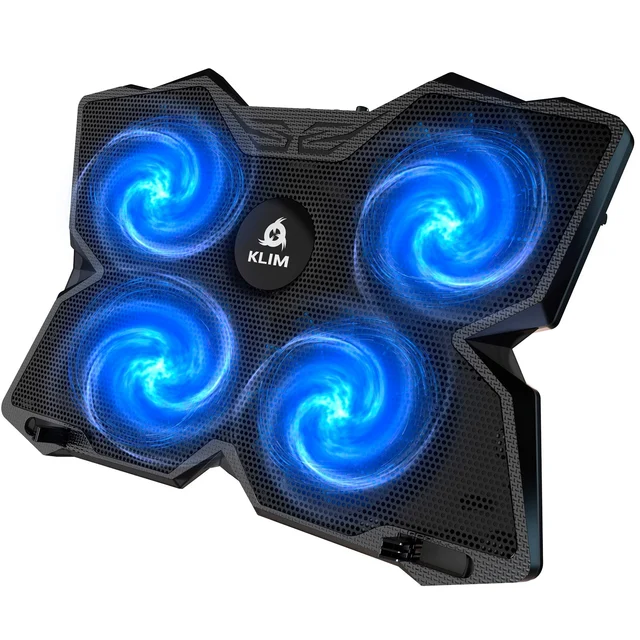
Most people are best served by the KLIM Wind: four quiet-but-effective fans, a durable metal-mesh top, broad laptop compatibility, and a long warranty. If you have a gaming or workstation laptop that thermal-throttles under sustained load, the IETS GT500's sealed vacuum turbofan pulls heat out far more aggressively, at the cost of real noise and a foam kit you must fit to your machine. The TopMate C5 is a fine ergonomic stand with gamer styling but only moderate cooling, so it's a maybe. The Havit HV-F2056 is a bestseller for its low price, but its gentle airflow makes it a tilted stand more than a true cooler. Best for: buy the KLIM Wind for everyday reliability, or the IETS GT500 for maximum cooling on a hot gaming laptop.
Our picks at a glance
- KLIM Wind Laptop Cooling Pad - Buy. Four fast-but-quiet fans and a 5-year warranty make this the safe everyday pick for most laptops.
- IETS GT500 Turbo-Fan Laptop Cooler - Buy. A single high-pressure turbofan and sealing foam pull real heat off a gaming laptop, if you can live with the noise.
- TopMate C5 Gaming Laptop Cooling Pad - It depends. Five fans, an LCD readout, and height adjustment for cheap, but the airflow is more show than substance.
- Havit HV-F2056 Slim Laptop Cooling Pad - Skip. A wildly popular bargain pad that works best as a quiet, tilted stand rather than a real cooler.
The verdict in 30 seconds
What mattered most
- Cooling approach
- Cooling gain under load
- Noise at full speed
- Ergonomic adjustment
- Build quality
- Best use
A laptop cooling pad only earns its desk space if it drops temperatures enough to matter without sounding like a hair dryer. We weighed a quiet everyday pad, a high-airflow gaming pad, a vacuum-style side extractor, and a bargain bestseller. Two are easy recommendations, one is right only for a specific buyer, and one is really just a tilted stand with fans.
Four fast-but-quiet fans and a 5-year warranty make this the safe everyday pick for most laptops.
Best for: Anyone who wants a reliable, low-drama pad for daily work, study, or light gaming.
- Strong airflow from four 1200 RPM fans while staying genuinely quiet
- Metal-mesh top feels durable and grips the laptop well
- Backed by a long warranty owners actually report honoring
- Fits everything from 11-inch ultrabooks to 17-inch machines
- Fixed low tilt won't satisfy people who want a steep angle
- Blue LEDs can't be turned off independently of the fans

A single high-pressure turbofan and sealing foam pull real heat off a gaming laptop, if you can live with the noise.
Best for: Gaming and workstation laptops that throttle under sustained heavy load.
- Sealed-foam design forces air through the laptop's own vents for the biggest temperature drops reviewers report
- Infinitely variable speed dial lets you trade noise for cooling
- Bottom intake avoids blowing hot rear-exhaust air back at the screen
- Includes a 3-port USB hub and a dust filter
- Loud at full speed, comparable to a loud conversation
- Foam kit must be sized and fitted to your specific laptop to work
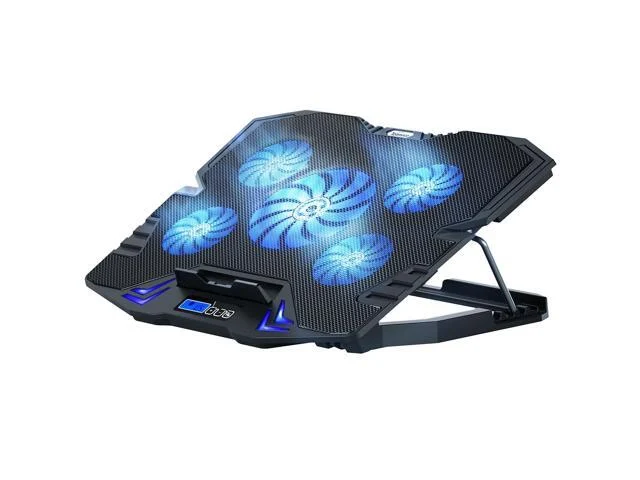
Five fans, an LCD readout, and height adjustment for cheap, but the airflow is more show than substance.
Best for: Buyers who want ergonomics and gamer looks more than maximum thermal performance.
- Five fans plus a large center fan move a decent amount of air
- Five-step height adjustment doubles as an ergonomic stand
- LCD speed display and multiple fan modes add fine control
- Pass-through USB ports keep a port free
- Cooling gains are modest next to a sealed vacuum design
- LED lighting and buzzy fans can get distracting at high speed
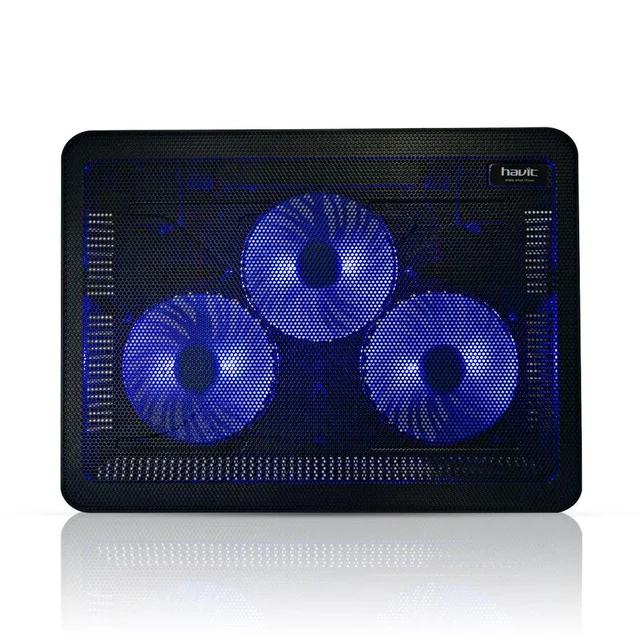
A wildly popular bargain pad that works best as a quiet, tilted stand rather than a real cooler.
Best for: Light users who mainly want a slight lift and a whisper of airflow on the cheap.
- Very inexpensive and extremely light and portable
- Three fans are quiet enough to forget about
- Simple two-height stand improves typing and viewing angle
- Airflow is too gentle to meaningfully cut temperatures under load
- Thin plastic build feels flimsy and flexes
| Criteria | KLIM Wind Laptop Cooling Pad Top pick | IETS GT500 Turbo-Fan Laptop Cooler | TopMate C5 Gaming Laptop Cooling Pad | Havit HV-F2056 Slim Laptop Cooling Pad |
|---|---|---|---|---|
| Verdict | Buy it | Buy it | It depends | Skip it |
| Best for | Anyone who wants a reliable, low-drama pad for daily work, study, or light gaming. | Gaming and workstation laptops that throttle under sustained heavy load. | Buyers who want ergonomics and gamer looks more than maximum thermal performance. | Light users who mainly want a slight lift and a whisper of airflow on the cheap. |
| Price tier | $$ · mid-range | $$$ · premium | $$ · mid-range | $ · budget |
| Cooling approach | 4 balanced fans | Sealed turbofan (vacuum) | 5 fans + center fan | 3 slim fans |
| Cooling gain under load | Good | Strongest | Moderate | Minimal |
| Noise at full speed | Low | High | Moderate | Very low |
| Ergonomic adjustment | Fixed low tilt | Adjustable stand | 5-step height | 2-step height |
| Build quality | Metal mesh, sturdy | Solid, heavier | Plastic, decent | Thin plastic |
| Best use | Everyday all-rounder | Gaming under heavy load | Ergonomics + looks | Light lift only |
| Warranty confidence | Long, well-regarded | Standard | Standard | Basic |
| Price tier | $$ · mid-range | $$$ · premium | $$ · mid-range | $ · budget |
Which one is right for you?
- Anyone who wants a reliable, low-drama pad for daily work, study, or light gaming. Buy it KLIM Wind Laptop Cooling Pad
- Gaming and workstation laptops that throttle under sustained heavy load. Buy it IETS GT500 Turbo-Fan Laptop Cooler
- Buyers who want ergonomics and gamer looks more than maximum thermal performance. It depends TopMate C5 Gaming Laptop Cooling Pad
- Light users who mainly want a slight lift and a whisper of airflow on the cheap. Skip it Havit HV-F2056 Slim Laptop Cooling Pad
How we judged the field
We don’t run our own thermal lab. Instead, we synthesize independent testing, teardown-style analysis, and the pattern of owner reports across thousands of buyers to see what holds up in daily use. For cooling pads, four things separate the useful from the decorative: how much the design actually lowers temperatures under sustained load, how much noise it makes to get there, how solid the build and ergonomics feel, and whether the fit matches real laptops. We weighted genuine cooling gain and livable noise most heavily, because a pad that cools well but screams gets unplugged, and a silent pad that does nothing is just a stand.
A quick reality check that shapes every verdict below: airflow design matters more than fan count. A single sealed turbofan that forces air through your laptop’s vents can beat five open fans blowing at a closed underside. Keep that in mind as the numbers-on-the-box get louder.
The KLIM Wind is the pad we’d hand to almost anyone. Its four fans spin fast enough to move real air yet stay quiet in normal use, and the metal-mesh top feels far sturdier than the thin plastic on bargain models. Reviewers consistently note it strikes the best balance of cooling and silence in its class, and owners repeatedly praise the long warranty as something the company actually honors. It fits everything from small ultrabooks to 17-inch machines, and rear legs give a comfortable typing tilt. The main limits are minor: the angle is fixed and low, and the LEDs are tied to the fans. For everyday work, study, and light gaming, it simply gets the job done without fuss.
The IETS GT500 takes a fundamentally different approach. Instead of open fans, it uses a high-pressure turbofan plus sealing foam that mates to your laptop’s underside, so air is pulled through the machine’s own vents rather than wafted around it. When it fits your laptop well, independent testing and owner reports describe the largest temperature drops of any pad here, which is exactly what a throttling gaming or workstation laptop needs. An infinitely variable dial lets you trade noise for cooling, and the bottom intake avoids recirculating hot rear-exhaust air toward the screen. The catches are honest ones: at full tilt it’s about as loud as a loud conversation, and you have to size and fit the foam to your specific model. Do that, and it cools harder than anything else on this list.
The TopMate C5 looks like the enthusiast pick on paper: five fans plus a large center fan, an LCD speed readout, multiple fan modes, and five height settings with a lit-up gamer aesthetic. As an adjustable stand it’s genuinely nice, and the pass-through USB ports are convenient. But its cooling is only moderate, because open fans blowing at a laptop’s closed underside can’t match a sealed design, and at high speed the fans get buzzy and the lighting distracting. It’s a reasonable buy if you mainly want ergonomics and looks, and a poor one if you’re chasing maximum thermals. That split is why it lands as a maybe rather than a clear yes.
The Havit HV-F2056 is one of the best-selling cooling pads anywhere, and it’s easy to see the appeal: it’s cheap, feather-light, quiet, and adds a gentle tilt. The problem is the actual cooling. Its three slim fans move too little air to meaningfully cut temperatures when a laptop is working hard, so under load it behaves like a tilted stand with a faint breeze rather than a true cooler. The plastic body also flexes and feels flimsy. If all you want is a slight lift and a whisper of airflow for browsing and video, it’s fine, but as a cooling solution it doesn’t do enough to earn a recommendation over the KLIM Wind.
KLIM Wind vs IETS GT500: which should you buy?
This is the real decision for most shoppers, because these two win in different ways. The KLIM Wind is the generalist: quiet, durable, widely compatible, warranty-backed, and effective enough that most laptops never throttle with it running. You set it down, forget it’s there, and it quietly helps. The IETS GT500 is the specialist: it cools dramatically harder, but only after you fit foam to your laptop, and only if you accept meaningful fan noise when you push it.
Pick the KLIM Wind if you want an everyday all-rounder that keeps a mainstream laptop comfortable without any tuning. Pick the IETS GT500 if you have a gaming or workstation laptop that visibly throttles under sustained load and you care more about peak cooling than silence. In short: the KLIM Wind is the better pad for most people, and the IETS GT500 is the better cooler for the hottest machines.
What to look for
- Airflow design over fan count. A sealed or vacuum design that pushes air through your laptop’s vents beats a wall of open fans blowing at a closed underside.
- Noise you can live with. Look for a variable speed control so you can run quiet for browsing and loud only when gaming.
- The right size and vent match. Confirm the supported inch range, and make sure the fans sit under your laptop’s hot zones and intakes.
- Build and grip. Metal mesh and rubberized stops resist flex and keep the laptop from sliding at an angle.
- Ergonomics. Adjustable height or a comfortable fixed tilt reduces neck and wrist strain during long sessions.
- Warranty. A long, well-regarded warranty is a good proxy for a company that stands behind its fans.
Our final take
Most people should buy the KLIM Wind. It’s the pad that gets the fundamentals right, quiet, sturdy, compatible, and warranty-backed, and it keeps a typical laptop comfortable without any setup. If your machine genuinely thermal-throttles under heavy gaming or rendering, step up to the IETS GT500 and accept the noise and foam-fitting in exchange for the biggest temperature drops here. The TopMate C5 is a decent ergonomic stand with gamer styling if cooling is secondary, and the Havit HV-F2056 is best understood as an inexpensive tilted stand rather than a real cooler. Match the design to how hard you actually push your laptop, and you’ll spend once and cool right.
Questions, answered
Do laptop cooling pads actually lower temperatures?
Yes, but the size of the benefit varies a lot. A sealed vacuum-style cooler like the IETS GT500 can pull heat directly through a laptop's vents and drop temperatures noticeably under load, while a gentle slim pad may only shave a few degrees. The real-world gain depends on how your laptop's intakes and exhausts are laid out.
Are vacuum coolers better than traditional multi-fan pads?
For raw cooling on a laptop with a bottom or side intake, a sealed vacuum cooler usually wins because it moves air through the machine rather than just around it. The trade-offs are more noise and the need to fit foam to your specific laptop. For quiet everyday use, a balanced multi-fan pad like the KLIM Wind is the more livable choice.
Will a cooling pad make my laptop noticeably louder?
It can. Quiet pads like the KLIM Wind and Havit HV-F2056 are easy to ignore, but a high-RPM turbofan cooler at full speed is about as loud as a loud conversation. Most coolers with a speed dial let you run them slower and quieter when you don't need maximum cooling.
Does the size of the pad need to match my laptop?
Roughly, yes. Check the supported range: the KLIM Wind handles 11 to 17 inches, and most pads list a similar span. A pad slightly larger than your laptop is fine, but you want the fans positioned under the laptop's hot zones and intake vents to do the most good.
Is a cheap cooling pad good enough?
For light browsing and video, an inexpensive pad that adds a little lift and airflow may be all you need. But if you play games or run heavy workloads and see your laptop throttling, a budget pad's gentle fans often aren't enough, and stepping up to a stronger design pays off.
Deciding between the top two? See our head-to-head: KLIM Wind Laptop Cooling Pad vs IETS GT500 Turbo-Fan Laptop Cooler.
More Office & WFH reviews
 The Best Anti-Fatigue Mats: 4 Compared (and One to Skip)
  The Best Big and Tall Office Chairs: 4 Compared (and One to Skip)
  The Best Desk Cable Management Kits: 4 Compared (and One to Skip)
  The Best Conference Speakerphones: 4 Compared (and One to Skip)
  The Best Copyholders: 4 Compared (and One to Skip)
 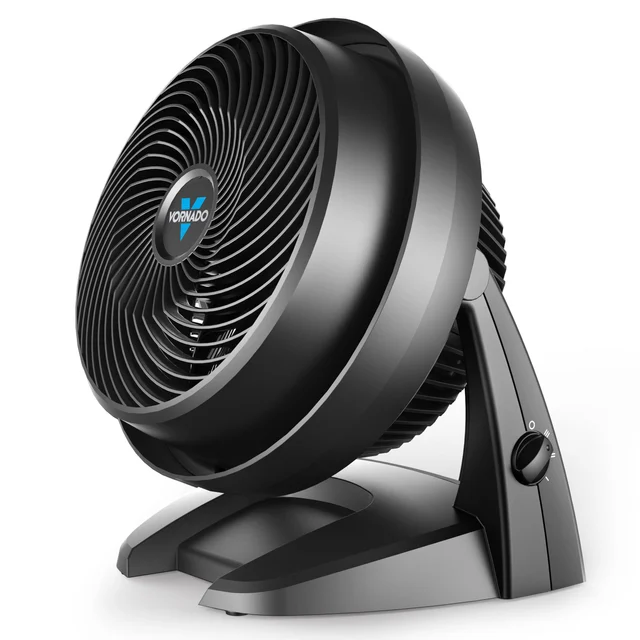 The Best Desk Fans: 4 Compared (and One to Skip)