

Office & WFH
The Best Desk Cable Management Kits: 4 Compared (and One to Skip)
Four current under-desk cable kits compared on how they mount, what they carry, and whether they survive a sit-stand desk.
The short version
Mounting method is the whole story in desk cable management. Adhesive trays, clips and J channels are the category's dominant complaint, because the underside of a desk is typically raw, dusty particleboard, which is close to the worst surface tape can be asked to hold. The VIVO Under Desk Cable Management Tray costs very little, screws into that surface, and carries a power strip plus adapters without further thought. If your desk raises and lowers, add the Ergonofis Cable Management Spine, the only product here designed to flex through the full travel rather than resist it. The StarTech UDCMTRAY is the same idea as the VIVO with more length, worth its premium only on a wide desk. Best for: anyone willing to put two screws into their desk, which is the single decision that separates a kit that lasts from one that ends up in a drawer.
Our picks at a glance
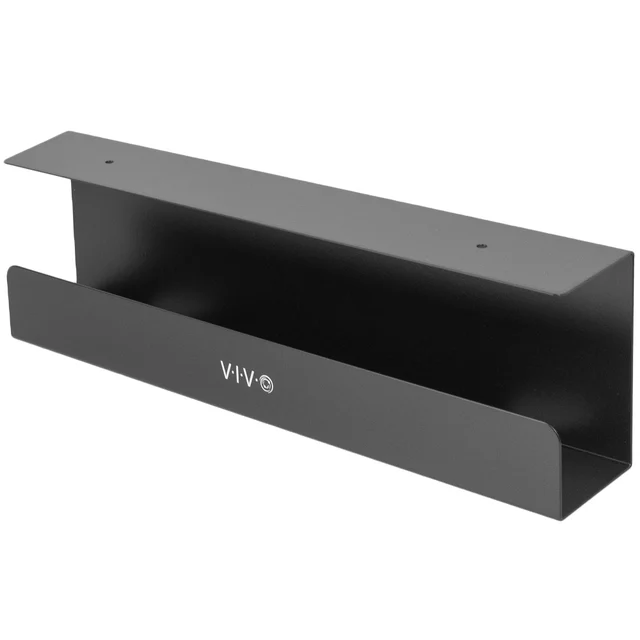
- VIVO Under Desk Cable Management Tray (DESK-AC06-1C) - Buy. A plain steel tray that screws into the desk and stops being a problem, which is most of what this category needs to do.
- Ergonofis Cable Management Spine - Buy. The one product here actually engineered for a desk that moves, and the reason standing desk owners stop re-taping clips every month.
- StarTech.com Under Desk Cable Management Tray (UDCMTRAY) - It depends. A longer version of the same screw-mounted tray idea, worth the premium only if you need the extra span.
- Yecaye 94in J Channel Cable Raceway - Skip. Tidy on a smooth lacquered surface, and the single most common thing owners report peeling off a raw desk underside.
The verdict in 30 seconds
What mattered most
- How it mounts
- Holds a power strip
- Works on particleboard or MDF
- Sit-stand desks
- Capacity and length
- Install effort
Cable management fails in one predictable way: the thing you stuck to the underside of your desk falls off. Adhesive is what most kits ship with, and the underside of a desk is usually the worst surface in the room for it, being unfinished, dusty, and often raw particleboard. We synthesized independent testing and long-run owner reports to sort two kits worth buying from one that only suits a specific desk and one that is better skipped.
A plain steel tray that screws into the desk and stops being a problem, which is most of what this category needs to do.
Best for: Almost any fixed-height desk, and the default first purchase before you buy anything else.
- Mounts with wood screws straight into wood, particleboard or MDF, so it holds where taped trays let go
- Roughly 16.5 by 3 by 4.5 inches with an 11 lb rating, enough for a surge protector plus two or three power bricks
- Open channel design means you can drop a cable in later without unthreading the whole bundle
- Drilling is required, and the pilot holes are permanent
- Short enough that wide desks with a lot of gear usually want two of them
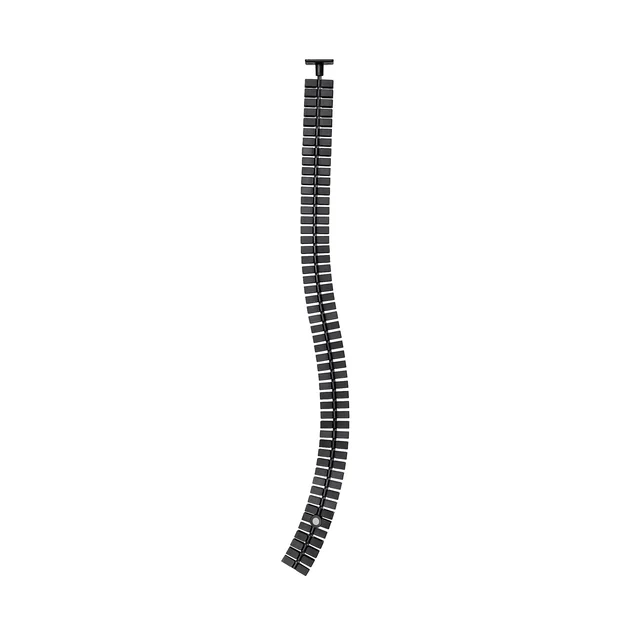
The one product here actually engineered for a desk that moves, and the reason standing desk owners stop re-taping clips every month.
Best for: Sit-stand desks where cables are getting yanked, pinched or snagged on every height change.
- Interlocking polypropylene segments flex through the full sit-to-stand travel instead of resisting it, which is exactly where static clips and channels fail
- Installs under the desk with two screws and includes a magnet holder, so nothing depends on tape
- 41 inches long and, per Ergonofis, takes about ten cables depending on size, and the interlocking segments let you adjust the length
- Costs several times what a plain tray costs and does a narrower job: it routes cables, it does not hold a power strip
- Warranty coverage is short at one year
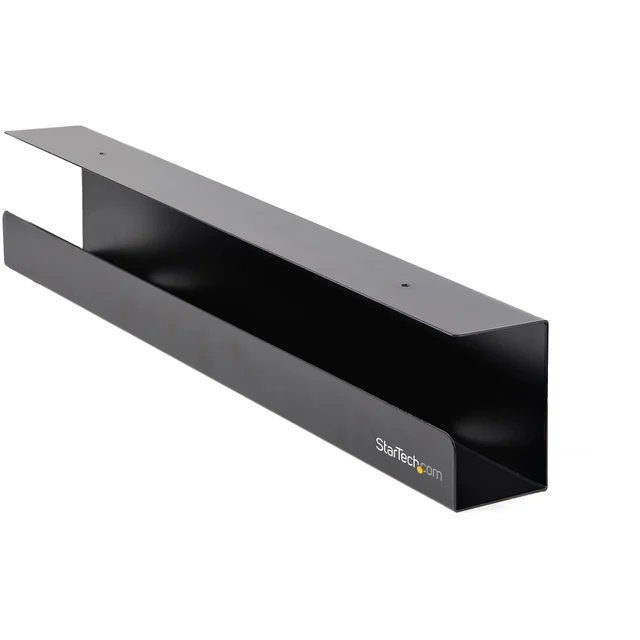
A longer version of the same screw-mounted tray idea, worth the premium only if you need the extra span.
Best for: Wide desks, procurement-driven buyers, and anyone who wants one tray to span the whole desktop.
- Longer than the VIVO, so a wide desk can be covered by one tray instead of two
- Screw-mounted like the VIVO, though the current capacity and warranty are worth confirming on StarTech's product page
- Sold through business and office supply channels, which matters if you are buying on a company card
- Costs meaningfully more than budget trays that mount the same way
- Check the stated depth before buying, because tall wall-wart adapters sit proud of a shallow tray lip
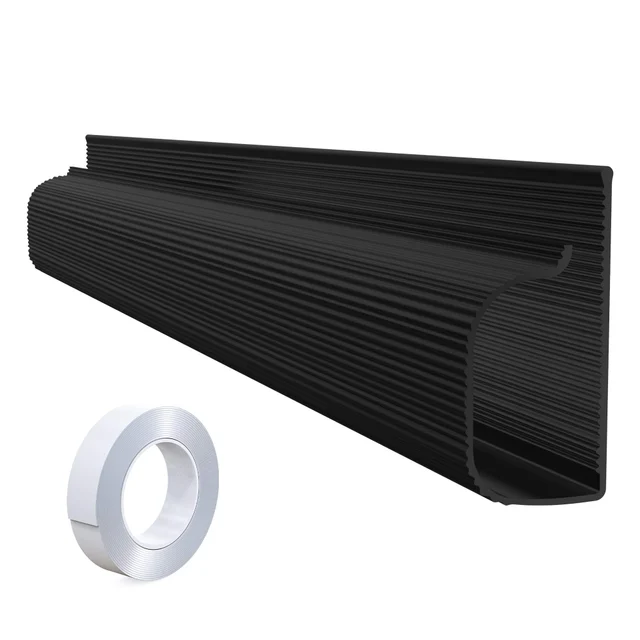
Tidy on a smooth lacquered surface, and the single most common thing owners report peeling off a raw desk underside.
Best for: Only a smooth, sealed, painted or laminate surface on a desk that never moves.
- Open-top J channel lets you add or pull a cable without disassembling anything
- Six PVC sections cover a long run cheaply, and the kit needs no tools at all
- Adhesive is the only mounting method, and owner reports repeatedly describe sections dropping within weeks on unfinished, textured or particleboard undersides
- Adhesive bonds of this kind generally need a clean surface and a long cure before loading, which tells you how marginal the bond is
- Repeated sit-stand cycling stresses the bond further, and failed tape leaves residue you then have to scrape off
Amazon had no buyable listing for this when we last checked. The link still works if it returns.
Check price on Amazon Read our detailed assessment| Criteria | VIVO Under Desk Cable Management Tray (DESK-AC06-1C) Top pick | Ergonofis Cable Management Spine | StarTech.com Under Desk Cable Management Tray (UDCMTRAY) | Yecaye 94in J Channel Cable Raceway |
|---|---|---|---|---|
| Verdict | Buy it | Buy it | It depends | Skip it |
| Best for | Almost any fixed-height desk, and the default first purchase before you buy anything else. | Sit-stand desks where cables are getting yanked, pinched or snagged on every height change. | Wide desks, procurement-driven buyers, and anyone who wants one tray to span the whole desktop. | Only a smooth, sealed, painted or laminate surface on a desk that never moves. |
| Price tier | $ · budget | $$ · premium | $ · mid-range | $ · budget |
| How it mounts | Wood screws into the desk underside | Two screws at the desk, plus a magnet holder | Screw mounted | Self-adhesive tape only |
| Holds a power strip | Yes, rated to 11 lb | No, it routes cables only | Yes, check StarTech for the rating | No, cables only |
| Works on particleboard or MDF | Yes, screws bite into the panel | Yes, mechanically fastened | Yes, mechanically fastened | Often not, tape struggles on raw stock |
| Sit-stand desks | Fine, but cable slack needs a separate fix | Purpose built, flexes with the travel | Fine, but cable slack needs a separate fix | Poor, movement works the bond loose |
| Capacity and length | 16.5 in tray, 11 lb | 41 in run, about 10 cables | Longer tray, rating on StarTech page | About 94 in total across six sections |
| Install effort | Screwdriver, a few minutes | Screwdriver plus routing time | Screwdriver, a few minutes | Peel and stick, then a long cure |
| Reversible without marks | No, leaves screw holes | No, leaves screw holes | No, leaves screw holes | In theory yes, in practice tape residue |
| Price tier | $ · budget | $$ · premium | $ · mid-range | $ · budget |
Which one is right for you?
- Almost any fixed-height desk, and the default first purchase before you buy anything else. Buy it VIVO Under Desk Cable Management Tray (DESK-AC06-1C)
- Sit-stand desks where cables are getting yanked, pinched or snagged on every height change. Buy it Ergonofis Cable Management Spine
- Wide desks, procurement-driven buyers, and anyone who wants one tray to span the whole desktop. It depends StarTech.com Under Desk Cable Management Tray (UDCMTRAY)
- Only a smooth, sealed, painted or laminate surface on a desk that never moves. Skip it Yecaye 94in J Channel Cable Raceway
How we judged the field
We do not run a lab. What we do is read across independent testing, teardown-level product documentation and large volumes of aggregated owner reports, then look for the failure that keeps repeating. In desk cable management that failure is not capacity, finish or looks. It is mounting. Kit after kit ships with adhesive strips, and the surface it is being asked to bond to is the underside of a desk: unfinished, often textured, frequently raw particleboard, and almost never cleaned first. Reviewers who load adhesive trays report them holding for a short test window with a light load. Owners reporting months later describe the same trays on the floor.
So the criteria we weighted hardest were: how the product fastens, whether it can carry a surge protector rather than just cables, whether it survives an MDF or particleboard underside, and whether it copes with a sit-stand desk moving through its full travel several times a day. Length, capacity and warranty mattered after that. Price mattered last, because the cheapest mechanically fastened product beats the nicest taped one.
This is a bent piece of metal with screw holes in it, and that is the point. It fixes to the desk with the supplied screws, and VIVO lists it for wood, particleboard and MDF desks. At 16.5 by 3 by 4.5 inches and rated to 11 lb, it takes a surge protector plus a couple of laptop bricks, which is the load that causes taped trays to let go in the first place.
The open channel shape is more useful than a closed box. You can drop a new cable in from below months later without unthreading the bundle, which is how these setups actually get used. Installation is a screwdriver and a few minutes, and the tray is short enough that a wide desk generally wants two, which is affordable at this tier.
The compromises are real but small. You are drilling into your desk, and those holes are permanent. This tray is screw-mount only, so a glass or metal desktop is out. But on the wood, MDF or particleboard tops that most home offices actually have, it does the job the category promises and then stops needing attention.
A sit-stand desk breaks static cable management. Cables that are neat at sitting height are stretched at standing height, and the connectors take that load every cycle. Adhesive clips are the first casualty, because each height change works at the bond. Owner reports back this up plainly: tape that behaves perfectly on a fixed desk fails on a moving one.
The Ergonofis spine is built for that motion. Interlocking polypropylene segments form a flexible column from the desk underside to the floor, bending and extending through the travel rather than resisting it. Ergonofis says it installs under the desk with two screws, and it ships with a magnet holder, so nothing in the load path is tape. The run is 41 inches, Ergonofis says it holds about ten cables depending on their size, and the interlocking segments let you adjust the length to your desk.
It is expensive for what it is, and it does a narrower job than a tray: it routes and protects cables, it does not hold your power strip. Warranty coverage is on the short side at one year. Buy it as the second piece of a two-part setup, not as the whole answer.
Same concept as the VIVO, executed longer. It mounts with screws; confirm the current dimensions, weight rating and warranty on StarTech’s product page before you buy. On a wide desk that single span is genuinely nicer than butting two short trays together, and buyers who purchase through business or office supply channels will find this on the approved list where budget brands are not.
The question is what you are paying for. It mounts identically to a tray costing a fraction as much, with screws into the same surface. Check the depth too, because tall plug-in adapters stick out past the lip of a shallow tray rather than disappearing into it.
If you need the length or are spending someone else’s budget, it is a sound buy. If you are optimizing your own money, buy two cheap trays and put the difference toward a spine.
Yecaye 94in J Channel Cable Raceway
Skip itThe design is fine. Six open-top J channel sections in PVC, no tools, and you can lift a cable in or out at any point without dismantling the run. On a smooth painted or laminate surface it looks good and stays put.
The mounting is the problem. Tape is the only option, and the surface it targets is the one place in your home office least suited to it. Aggregated owner reports on this style of adhesive raceway come back to the same outcome: sections dropping within weeks on unfinished, textured or bare particleboard undersides, usually taking the cables down with them. Adhesive raceways of this kind generally want a clean surface and a long cure before loading, which is a fair signal of how much margin there is. Height-adjustable desks make it worse, because every cycle works at the bond. And when tape does fail it leaves residue you get to scrape off before you can mount anything else.
There is a narrow case for it, on a sealed, smooth, static desk. Outside that case, a tray that takes two screws costs about the same and simply does not have this failure mode.
VIVO Under Desk Cable Management Tray (DESK-AC06-1C) vs Ergonofis Cable Management Spine: which should you buy?
They are not really rivals, and the choice comes down to whether your desk moves.
If your desk stays at one height, buy the VIVO tray and stop. It hides the surge protector and the adapter bricks, which is the ugly majority of the problem, and it costs very little. A spine adds nothing on a static desk beyond a tidier vertical run to the floor, which a couple of reusable ties will also achieve.
If your desk is height adjustable, the spine is doing work nothing else here does. The tray still hides the power strip, but it cannot stop cables being pulled tight at standing height or piling on the floor at sitting height, and it will not stop adhesive clips migrating loose. The spine handles the travel by design.
The practical answer for a sit-stand setup is both: a screwed tray for the strip and bricks, a spine for the drop to the floor. That combination costs less than most all-in-one kits and, unlike them, has no taped parts in the load path.
What to look for
- Mechanical fastening over adhesive. Screws or a clamp, ideally. If a kit’s only mounting method is tape, assume it will need remounting on an unfinished or particleboard underside.
- Screw length versus desktop thickness. Measure the panel and pick screws shorter than it. A screw that pops through the desk surface is the one truly unfixable mistake here.
- Weight rating, not just size. A surge protector plus two laptop adapters is heavier than people expect. Around 11 lb is a common and adequate rating; anything vague about capacity is a warning.
- Tray depth for adapter bricks. Shallow trays leave tall wall-warts sticking out. Check depth, not only length.
- A separate plan for the floor drop on sit-stand desks. A tray alone does not solve cable travel. Budget for a spine or vertebrae chain from the start rather than discovering the need later.
- Open channels beat closed boxes. You will add a cable next month. Being able to drop one in without unthreading the bundle is worth more than a sealed look.
- Clamp mounting for glass, metal or rented desks. If you cannot drill, a clamp-on tray is the correct fallback, not tape. Check the clamp’s jaw range against your desktop thickness.
Our final take
This is a category where the cheap answer is also the right one, as long as you are willing to put screws into your desk. The VIVO Under Desk Cable Management Tray costs little, holds the load, and never asks you about it again. That is the whole brief.
Add the Ergonofis Cable Management Spine only if your desk moves, where it earns its premium by being the one part designed around that travel. Take the StarTech UDCMTRAY if you need a single tray to span a wide desk or you are buying through a business channel that stocks it. And treat adhesive-only kits like the Yecaye J channel as decoration for a smooth, sealed, stationary surface, because on the raw particleboard underside most desks actually have, tape is the part that fails.
Questions, answered
Do adhesive cable trays and clips ever hold?
They can, on the right surface. Owner reports are consistent that adhesive clips and channels stay put on smooth painted, lacquered, laminate or metal undersides, and come loose on textured, unfinished or bare particleboard. Since most desk undersides are the second kind, adhesive is a coin flip you do not need to take. If you do use tape, clean the surface with isopropyl alcohol, press firmly across the whole strip, and leave it 24 hours before loading it.
Will screws damage a particleboard or MDF desk?
Short wood screws into the underside of a particleboard or MDF top hold well and leave marks nobody sees. The failure mode to avoid is a screw longer than the panel is thick, which will pop through the desktop surface. Measure the panel, choose screws shorter than that, and drill a small pilot hole so the board does not swell around the thread.
What actually changes on a standing desk?
Everything moves. A static tray still works, but the cables running from the desk to the floor need slack and a defined path, or they get stretched at standing height and pool on the floor when you sit. That is what a cable spine or vertebrae chain is for. Kits without one tend to fail at the joints, and adhesive parts fail faster because every height change loads the bond.
Do I still need a raceway if I already have a tray?
Usually not under the desk. A tray hides the power strip and the mess of adapters, which is the bulk of the problem. Raceways earn their place on visible runs, along a wall or a desk leg, where you want a cover rather than a container. Buying both for the same span mostly duplicates work.
What is the right order to install a cable kit?
Unplug everything and pull the desk away from the wall first. Mount the tray, put the surge protector in it, then plug devices back in one at a time, routing each cable before you connect the next. Leave a loop of slack at every device so you can move the monitor later. If the desk is height adjustable, set it to full standing height while you measure the drop to the floor, then fit the spine or chain to that length.
Deciding between the top two? See our head-to-head: VIVO Under Desk Cable Management Tray (DESK-AC06-1C) vs Ergonofis Cable Management Spine.
More Office & WFH reviews
 The Best Conference Speakerphones: 4 Compared (and One to Skip)
  The Best Copyholders: 4 Compared (and One to Skip)
  The Best Desk Fans: 4 Compared (and One to Skip)
  The Best Desk Mats: 4 Compared (and One to Skip)
  The Best Desk Organizers: 4 Compared (and One to Skip)
  The Best Document Scanners: 4 Compared (and One to Skip)