

Office
The Best Copyholders: 4 Compared (and One to Skip)
We compared four desk document holders on where the paper ends up relative to the screen, how far the angle and height adjust, how much paper each one takes, and how much desk each one eats.
The short version
The BakkerElkhuizen Q-doc 515 is the pick, because it is the only one here that publishes the numbers you need to match it to your desk: a 515 by 290 mm surface, seven height steps from 120 to 240 mm, and a tilt range of 12 to 46 degrees. The Fellowes Non-Magnetic Copyholder is the value pick and the one most people should try first, holding up to 125 letter sheets with a line guide. The Vu Ryte MemoScape PRO suits you if you write on paper as much as you read it, since its 18 inch easel is rated for medium to heavy documents and Vu Ryte asks for at least 6 inches of desk between keyboard and monitor. Skip the Fellowes Metal Copyholder: it sits at the top of Fellowes' own copyholder pricing, and Fellowes publishes neither its weight nor its tilt range. None of these is a medical device and none of them treats anything. Get the placement right first, then pick the shape that fits your desk. Best for: anyone who works from printed pages next to a screen and is tired of looking down and sideways all day.
Our picks at a glance
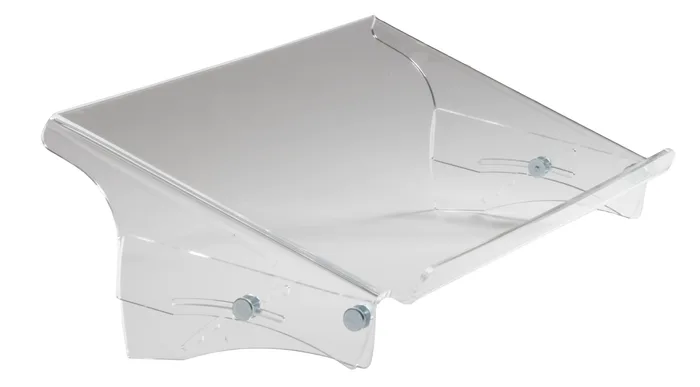
- BakkerElkhuizen Q-doc 515 - Buy. A rigid acrylic tray that sits in the gap between keyboard and monitor and publishes an actual height and angle range.
- Fellowes Non-Magnetic Copyholder - Buy. The plain folding easel that does the beside-the-screen job properly and holds a genuine stack of paper.
- Vu Ryte MemoScape PRO - It depends. An 18 inch wide in-line easel built to be written on as well as read from, if your desk has the depth for it.
- Fellowes Metal Copyholder - Skip. A metal version of a job that plastic already does, at the top of Fellowes' own copyholder pricing.
The verdict in 30 seconds
What mattered most
- Format
- Stated dimensions
- Paper capacity
- Angle adjustment
- Height adjustment
- Line guide or clip
A copyholder exists for one reason: if you type from paper, the paper should not be flat on the desk beside you. OSHA's Computer Workstations eTool is blunt about it, saying documents should be at the same height and distance as the monitor, and that a holder positioned directly beneath the screen cuts down the repeated head and neck movement of looking from screen to page. That single sentence rules out most of what gets sold as a copyholder. We picked four that represent the genuinely different shapes on the market: a rigid in-line tray, a cheap folding easel, a wide easel you can write on, and a metal one that costs a lot more than it should.
A rigid acrylic tray that sits in the gap between keyboard and monitor and publishes an actual height and angle range.
Best for: Someone who reads and types at the same time all day and wants the page set at a known angle under the screen.
- Tilt is stated as 12 to 46 degrees, so you can match it to your screen rather than guess.
- Seven height steps from 120 to 240 mm cover low monitors and raised ones.
- The 515 by 290 mm surface takes A4, A3 and heavy files up to 5 kg.
- No line guide and no clip, so loose single sheets rely on the sliding edge alone.
- Height and angle change by loosening four screws, not a lever, so it is not a mid-task adjustment.
- Needs a real gap between keyboard and monitor, which shallow desks do not have.
- Sold through resellers rather than off a shelf, and BakkerElkhuizen does not state a warranty term on the product page.
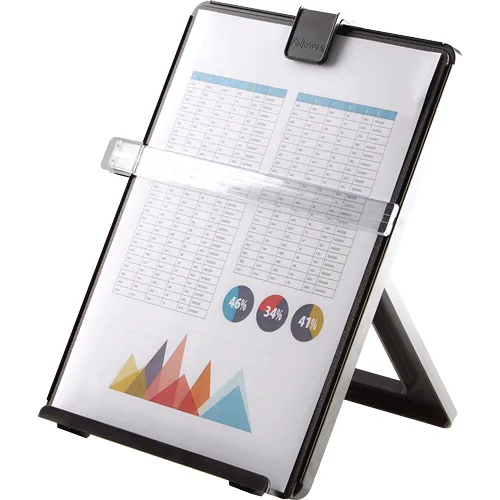
The plain folding easel that does the beside-the-screen job properly and holds a genuine stack of paper.
Best for: Most people, and anyone who wants to find out whether a copyholder helps before spending real money.
- Holds up to 125 sheets of letter size paper, more than most easels this size.
- Includes a line guide for keeping your place on the page.
- Folding easel design that can be put away when you are done.
- Fellowes does not publish a tilt range in degrees or a height range, so you cannot check the fit before buying.
- As a freestanding easel it takes real desk space beside the monitor.
- It is an easel, so it parks the page to the side of the screen rather than under it.
- Plastic rather than metal or acrylic, which shows in how it feels.
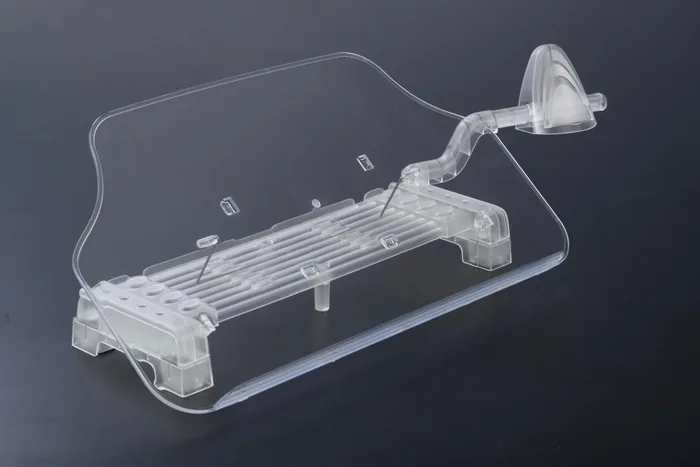
An 18 inch wide in-line easel built to be written on as well as read from, if your desk has the depth for it.
Best for: People who write on paper as much as they read it, and who have a deep desk with a monitor pushed well back.
- The easel is 18 inches wide and 10 inches tall at the centre, so a spread notebook or a binder fits.
- Vu Ryte states multiple base slots for angle adjustment and recommends it for medium to heavy document support.
- Assembles with no screws or tools and includes a removable side arm that pivots and fits either side.
- Vu Ryte asks for a minimum of 6 inches of desk between keyboard and monitor, which many setups do not have.
- No sheet capacity is published for the PRO, and no angle range in degrees either.
- No line guide or clip, so a loose single sheet can slide.
- The build material is not stated anywhere on the product page.
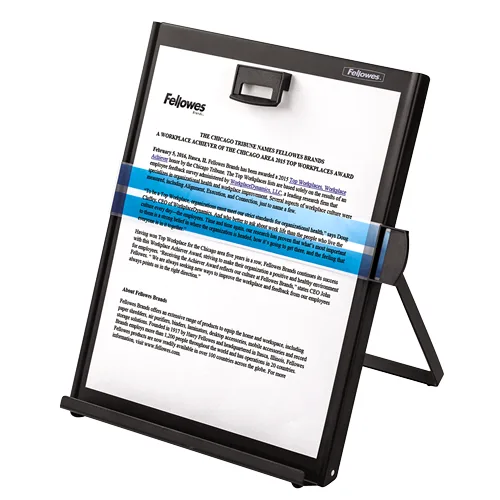
A metal version of a job that plastic already does, at the top of Fellowes' own copyholder pricing.
Best for: A shared office that wants something harder to break, and is happy to pay for that alone.
- Holds up to 200 sheets of letter size paper, the highest capacity in this group.
- Metal construction that Fellowes sells as its durable option.
- Magnetic line guide for keeping your place on the page.
- Fellowes lists it at the top of its copyholder range while it does the same beside-the-screen job as its budget plastic model.
- No product weight and no tilt range are published, so stability and fit are both unknowns before purchase.
- The line guide works by magnet, which means pages sit pinned against the panel rather than clipped.
| Criteria | Q-doc 515 Top pick | Non-Magnetic Copyholder | MemoScape PRO | Metal Copyholder |
|---|---|---|---|---|
| Verdict | Buy it | Buy it | It depends | Skip it |
| Best for | Someone who reads and types at the same time all day and wants the page set at a known angle under the screen. | Most people, and anyone who wants to find out whether a copyholder helps before spending real money. | People who write on paper as much as they read it, and who have a deep desk with a monitor pushed well back. | A shared office that wants something harder to break, and is happy to pay for that alone. |
| Price tier | $$$ · premium | $ · budget | $$ · mid-range | $$$ · premium |
| Format | In-line, between keyboard and monitor | Freestanding easel beside the screen | In-line easel, 18 in wide | Freestanding metal easel |
| Stated dimensions | 515 x 290 mm surface | Not shown on maker page | Easel 18 in wide, 10 in tall at centre; base 14 x 5 in | Not shown on maker page |
| Paper capacity | Not published; rated to 5 kg | Up to 125 letter sheets | Not published | Up to 200 letter sheets |
| Angle adjustment | 12 to 46 degrees | Range not published | Multiple base slots; range not published | Range not published |
| Height adjustment | 120 to 240 mm, seven steps | Adjustable; range not published | Not published | Not published |
| Line guide or clip | Neither; sliding edge only | Line guide | Removable pivoting side arm | Magnetic line guide |
| Build material | 100% recycled cast acrylic | Plastic | Not published; tinted, made in USA | Metal |
| Warranty | Not published on the product page | Not shown on maker page | Not published | Not shown on maker page |
Which one is right for you?
- Someone who reads and types at the same time all day and wants the page set at a known angle under the screen. Buy it BakkerElkhuizen Q-doc 515
- Most people, and anyone who wants to find out whether a copyholder helps before spending real money. Buy it Fellowes Non-Magnetic Copyholder
- People who write on paper as much as they read it, and who have a deep desk with a monitor pushed well back. It depends Vu Ryte MemoScape PRO
- A shared office that wants something harder to break, and is happy to pay for that alone. Skip it Fellowes Metal Copyholder
How we judged the field
Five things decide whether a copyholder earns its desk space. First, where it puts the page: OSHA’s Computer Workstations eTool says documents should be at the same height and distance as the monitor, so a holder that cannot get near that is solving the wrong problem. Second, adjustability, and specifically whether the manufacturer publishes a height and angle range you can check against your own desk before buying. Third, stability under load, which the same guidance calls out directly, saying a holder should be stable when loaded with heavier documents such as a textbook. Fourth, how the page is held: a line guide, a clip, a raised lip or nothing at all changes how usable it is when you are flipping through a stack. Fifth, footprint, because an in-line holder only works if you have the gap between keyboard and monitor to give it.
The field splits by shape, and the shapes are not interchangeable. In-line holders bridge the keyboard-to-monitor gap and keep the page in your line of sight, but they need depth. Freestanding easels park the page beside the screen and work on almost any desk, at the cost of some head turning. Wide easels aimed at people who write as well as read sit between the two. Monitor clip-ons exist mostly because they are cheap. We picked one strong example of each of the first three, plus one commonly bought easel that costs premium money for budget-easel results. Note that many of these products publish very little, and where a number is not on the manufacturer’s page we have said so rather than guessed.
BakkerElkhuizen Q-doc 515
Buy itThe Q-doc 515 is the one that actually matches what the ergonomics guidance describes. It is a single formed sheet of cast acrylic that bridges the gap between keyboard and monitor, and BakkerElkhuizen publishes the numbers that let you check it against your own desk: a 515 by 290 mm surface, seven height steps from 120 to 240 mm, and tilt from 12 to 46 degrees. That range is wide enough to line the page up with a low monitor on a shallow desk or a raised one on an arm. The raised bottom edge, between 30 and 45 mm depending on the setting, lets the keyboard slide underneath when you push it back. It is rated to 5 kg, so a ring binder or A3 drawings are fine. The trade-offs are real. There is no line guide and no clip, adjustment means loosening four screws rather than flicking a lever, and it is sold through resellers rather than off a shelf. For anyone who reads while typing, it is still the right shape.
Fellowes Non-Magnetic Copyholder
Buy itThis is the copyholder to buy if you are not sure a copyholder will help you. It is an unglamorous folding plastic easel, and it does the beside-the-screen job better than its price suggests: up to 125 letter sheets and a line guide for tracking your place. What you do not get is data. Fellowes publishes no tilt range and no height range, so you are buying on trust that the adjustment covers your screen. It also sits beside the monitor rather than under it, which is the compromise the shape forces.
Vu Ryte MemoScape PRO
It dependsThe MemoScape PRO is the outlier, and it suits a specific person. Vu Ryte builds it around an 18 inch wide easel that stands 10 inches tall at the centre on a 14 by 5 inch base, and the pitch is that you can write on it, not just read from it. The company rates it for medium to heavy document support, states multiple slots in the base for angle adjustment, and includes a removable side arm that pivots and mounts on either side for smaller pages. It goes together without screws or tools and is made in the USA. The catch is stated plainly by Vu Ryte itself: it wants a minimum of 6 inches of desk between your keyboard and your monitor. Plenty of desks do not have that, especially with a monitor on a stand rather than an arm. Vu Ryte also publishes no sheet capacity for the PRO, no angle range in degrees, and no build material. If you have the depth and you write on paper, it is a genuinely good buy.
Fellowes Metal Copyholder
Skip itThe Metal Copyholder is a real product that plenty of offices buy, and it is the one most people here should pass on. On paper it looks like an upgrade: 200 letter sheets, the highest capacity in this group, metal construction, and a magnetic line guide. The problem is what you pay for that. Fellowes lists it at the top of its own copyholder range, well above the plastic Non-Magnetic model, for the same beside-the-screen job and a difference of 75 sheets. And for a product whose main argument is that it is sturdier, Fellowes publishes neither a product weight nor a tilt range, so the two things you would most want to verify are simply absent. The magnetic guide pins pages against the panel, which is fine for a static page and awkward when you are flipping. Buy it if you specifically need metal.
Sources
Specs in this review come from these pages.
- OSHA Computer Workstations eTool: Document Holders (osha.gov)
- OSHA Computer Workstations eTool: Monitors (osha.gov)
- BakkerElkhuizen Q-doc 515 product page (bakkerelkhuizen.com)
- Fellowes Non-Magnetic Copyholder (item 21106) product page (fellowes.com)
- Fellowes Metal Copyholder (item 11053) product page (fellowes.com)
- Vu Ryte MemoScape PRO (VUR 7000) product page (vuryte.com)
BakkerElkhuizen Q-doc 515 vs Fellowes Non-Magnetic Copyholder: which should you buy?
These two answer different questions. The Q-doc 515 answers ‘how do I get the page into the same line of sight as my screen’, and it is the only holder here that lets you set that up to a published number instead of eyeballing it. Seven height steps from 120 to 240 mm and a 12 to 46 degree tilt range mean you can match a monitor sitting low on the desk or one raised on an arm, and the 5 kg rating covers binders and manuals rather than just loose sheets. The Fellowes Non-Magnetic Copyholder answers ‘how do I stop reading off the desk without spending much’, and it does that well, with 125 sheet capacity and a line guide.
The deciding factor is your desk, not your budget. Get a tape measure out and check the gap between the back of your keyboard and the front edge of your monitor base. If you have room for a 290 mm deep surface with the keyboard able to slide under it, buy the Q-doc 515; that gap is exactly what the in-line shape needs and nothing else here uses it as well. If you do not have that gap, an in-line holder will just push your keyboard forward and make your typing posture worse, and the Fellowes easel beside the screen is the honest answer. Buy the cheap one first if you are unsure; it costs little to learn which camp you are in.
What to look for
- Measure the gap first: the single number that decides in-line versus easel is the distance between the back of your keyboard and the front of your monitor base, so measure it before you shortlist anything.
- A published angle range beats ‘adjustable’: most brands in this category say a holder tilts without saying how far, and a stated range like 12 to 46 degrees is the only way to know it will line up with your screen.
- Check load rating as well as sheet count: sheet capacity tells you about loose paper, but a weight rating in kilograms or pounds is what tells you whether a ring binder or a textbook will stay put.
- Look for a lip, a clip or a line guide: something has to physically hold the page, and which one you want depends on whether you flip pages constantly or leave one sheet up for an hour.
- Stability matters more than material: the OSHA guidance asks that a holder be stable when loaded with heavier documents, so a wide non-slip base beats a thin one regardless of whether it is plastic, acrylic or metal.
- Watch the lighting: the same guidance notes that task lighting on the document should not cause glare on the monitor, so think about where your desk lamp sits before you add a large reflective surface in front of the screen.
Our final take
A copyholder is a cheap fix for a habit you probably do not notice: looking down and to the side at a flat page a few hundred times a day. The guidance is unusually specific about the fix, which is to get the page to roughly the same height, distance and angle as your screen. The Q-doc 515 is the only holder here that publishes enough detail to do that deliberately, and it is our pick if the gap between your keyboard and monitor allows it. The Fellowes Non-Magnetic Copyholder is the sensible starting point for everyone else, and it is cheap enough that finding out you prefer the in-line shape is not an expensive mistake. Skip the metal one; you are paying for the material, not the result.
Questions, answered
Where is a copyholder actually supposed to go?
OSHA's Computer Workstations eTool says documents should be at the same height and distance as the monitor, and that a holder can be positioned directly beneath the monitor. The reasoning is that documents placed too far away make you adopt awkward head postures or move your head and neck repeatedly between screen and page. The same eTool notes that positioning the holder below the monitor also gives you a sturdy writing surface if you need to make written entries. If a holder cannot get the page anywhere near the height and distance of your screen, it is not doing the job the guidance describes. Measure the gap between your keyboard and the base of your monitor before you buy anything.
In-line under the screen, or an easel beside it?
In-line is closer to what the guidance describes, because the page sits in the same line of sight as the screen and you move your eyes rather than turn your head. The catch is that in-line holders need a real gap between keyboard and monitor; the Q-doc 515 wants room for a 290 mm deep surface, and Vu Ryte asks for at least 6 inches. An easel beside the screen is the fallback when that gap does not exist. If you go that route, OSHA's monitor guidance is a useful sanity check: it says monitors should not be more than 35 degrees to the left or right, and the same logic applies to how far off-centre you park the paper.
Are the clip-on holders that grip the side of a monitor worth it?
They are the cheapest way to get paper near the screen, and they have two structural problems. A clip that grips the bezel puts the page in front of part of the panel or hanging off the edge with no support behind it, and OSHA's guidance also asks that a document holder be stable when loaded with heavier documents such as a textbook, which a bezel clip is not. Several of the better-known clip-on models have quietly disappeared from manufacturer catalogues in recent years, so availability is patchy. If your desk genuinely has no room for anything else, a clip-on is better than paper flat on the desk. It is not what we would buy first.
How much paper capacity do I actually need?
Less than the marketing implies, for most people. If you are keying from a two-page invoice or a printed spreadsheet, anything here handles it. Capacity matters when you are working through a stack and want it to stay put as it thins out, which is where the Fellowes models help: 125 sheets on the Non-Magnetic and 200 on the Metal. Note that the acrylic holders quote a weight limit instead, 5 kg for the Q-doc 515, which is a different and arguably more useful number because it covers ring binders and bound manuals. If you mostly work from books or binders rather than loose sheets, look at the weight rating and ignore the sheet count.
Does a copyholder do anything for neck or eye discomfort?
The ergonomics guidance is about posture and workstation layout, not treatment. OSHA describes the hazard as awkward head postures and frequent head and neck movement between monitor and document, and describes the holder as a way to reduce that movement. That is a claim about how you sit and move, not a claim that any product prevents or cures anything, and no copyholder is a medical device. Placement, monitor height and lighting all matter alongside the holder itself; the same eTool notes that task lighting on the document should not cause glare on the monitor. If you have persistent pain or vision problems, that is a conversation for a clinician, not a purchase decision.
Deciding between the top two? See our head-to-head: BakkerElkhuizen Q-doc 515 vs Fellowes Non-Magnetic Copyholder.
More Office reviews
 The Best Desk Fans: 4 Compared (and One to Skip)
  The Best Desk Mats: 4 Compared (and One to Skip)
  The Best Desk Organizers: 4 Compared (and One to Skip)
  The Best Document Scanners: 4 Compared (and One to Skip)
  The Best Drafting Chairs: 4 Compared (and One to Skip)
  Best Electric Standing Desks: The Honest Three-Way