

Office & WFH
The Best Document Scanners: 4 Compared (and One to Skip)
We compared four current desktop document scanners on speed, duplex, OCR software, receipt handling, and wireless to find the right fit.
The short version
For most home offices, the Ricoh ScanSnap iX1600 is the scanner to buy: about 40 pages per minute duplex, a color touchscreen, easy dual-band Wi-Fi, and some of the cleanest scans in independent testing. If receipts, invoices, and tax paperwork dominate your desk, the Epson RapidReceipt RR-600W's receipt software that feeds categorized data to QuickBooks and TurboTax earns it the nod instead. The Brother ADS-4300N is a fast, durable workgroup machine but relies on wired Ethernet with no Wi-Fi or touchscreen, so it suits shared office use more than solo wireless convenience. The Canon imageFORMULA R40 scans beautifully in black and white but is USB-only and dated, making it hard to recommend today. Best for: buy the iX1600 for versatile everyday scanning, or the RR-600W if your life runs on receipts.
Our picks at a glance
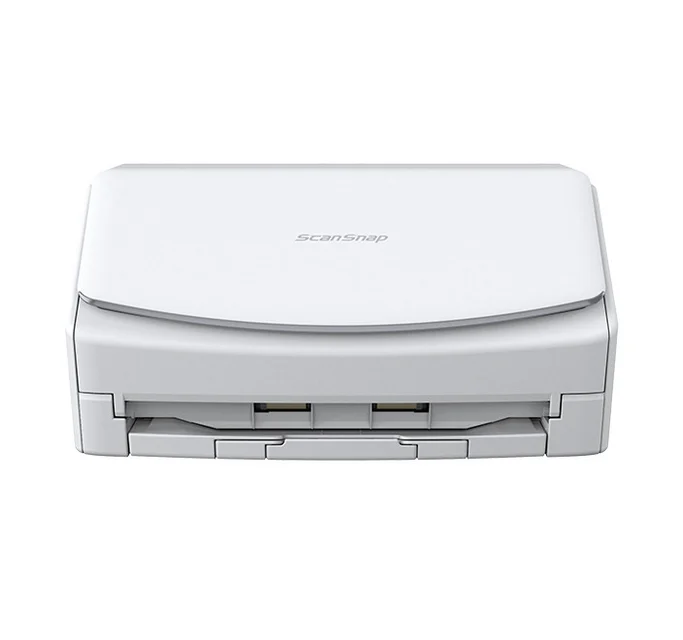
- Ricoh ScanSnap iX1600 - Buy. The fastest, most polished all-rounder, with a color touchscreen and genuinely easy wireless.
- Epson RapidReceipt RR-600W - Buy. A fast duplex scanner whose real edge is turning receipt and invoice stacks into categorized accounting data.
- Brother ADS-4300N - It depends. A rugged, fast workgroup scanner built around wired networking rather than Wi-Fi convenience.
- Canon imageFORMULA R40 - Skip. Excellent black-and-white scan quality held back by USB-only connectivity and an aging design.
The verdict in 30 seconds
What mattered most
- Duplex speed (rated)
- Feeder capacity
- Duplex scanning
- Wireless / connectivity
- Software & OCR
- Receipt / expense handling
A good desktop scanner turns paper piles into searchable files without babysitting. We weighed four current, buyable-in-2026 models on throughput, duplex reliability, bundled OCR software, receipt and expense capture, and how painless the wireless setup really is. Two earn a clear buy, one is a strong pick only for the right situation, and one is hard to recommend now.
The fastest, most polished all-rounder, with a color touchscreen and genuinely easy wireless.
Best for: Home offices and small businesses that want the fastest, most fuss-free wireless scanning for mixed paperwork.
- Rated at roughly 40 pages per minute duplex from a 50-sheet feeder, and independent testing consistently ranks its scans among the cleanest
- 4.3-inch color touchscreen plus dual-band Wi-Fi make one-touch scanning to a phone or cloud service straightforward
- ScanSnap software sorts documents, receipts, business cards, and photos into the right profile
- Bundled OCR is competent but, per independent testing, less accurate than some rivals on dense text
- Receipt capture is convenient but does not export to accounting packages as directly as a dedicated receipt scanner
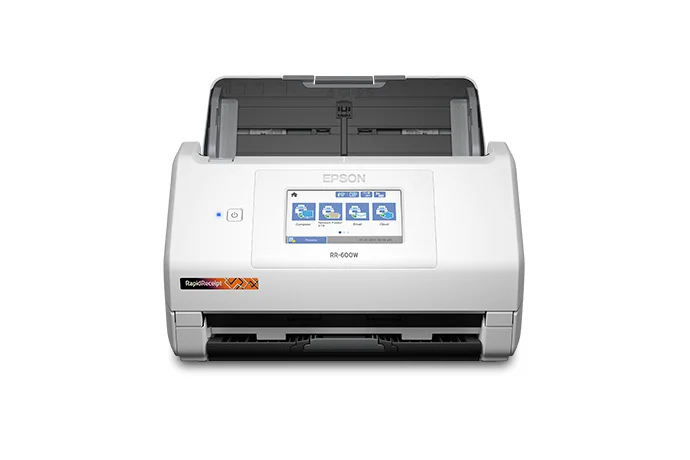
A fast duplex scanner whose real edge is turning receipt and invoice stacks into categorized accounting data.
Best for: Freelancers, landlords, and small businesses that live in receipts, invoices, and tax-season paperwork.
- Scans up to about 35 pages per minute duplex from a large 100-sheet feeder, with a color touchscreen and Wi-Fi
- RapidReceipt software turns receipts and invoices into categorized data that integrates with QuickBooks and TurboTax
- Handles small, curled receipts and full documents equally well, making it a strong dual-purpose machine
- The receipt-management software is the reason to buy it; those who only scan plain documents pay for capabilities they will not use
- Owners note the accounting-data extraction occasionally needs manual correction on faded or crumpled receipts
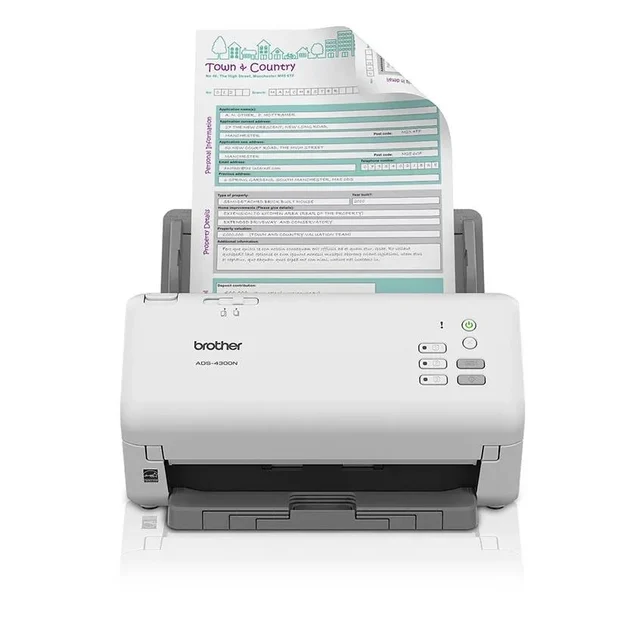
A rugged, fast workgroup scanner built around wired networking rather than Wi-Fi convenience.
Best for: Small offices that want a shared, Ethernet-connected scanner and do not need Wi-Fi or a touchscreen.
- Roughly 40 pages per minute duplex from a big 80-sheet feeder, with reliability owners praise for high daily volume
- Ethernet and USB 3.0 let a whole team share one scanner over the wired network
- Broad driver support (TWAIN/ISIS/WIA) fits it into existing document-management workflows
- No built-in Wi-Fi and no touchscreen; mobile scanning rides on the wired network rather than a direct wireless link
- No dedicated receipt or expense software, so it is a plain document workhorse, not a bookkeeping tool
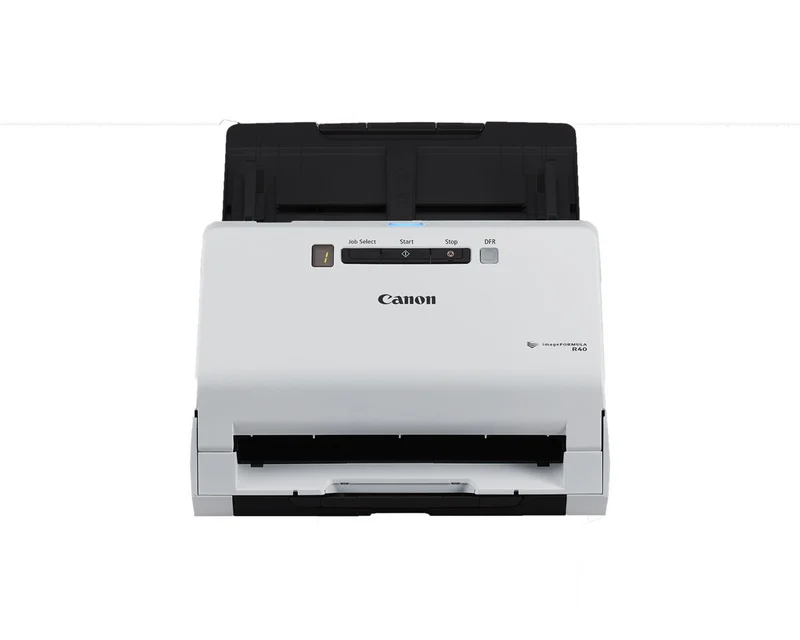
Excellent black-and-white scan quality held back by USB-only connectivity and an aging design.
Best for: A budget desk companion for one person who is happy tethering to a single computer by USB.
- Independent testing rates its black-and-white document, receipt, and handwriting reproduction near the top of the field
- Compact footprint, simple setup, and a wallet-friendly price
- USB-only: no Wi-Fi, no Ethernet, and no touchscreen, so it cannot scan directly to a phone
- Real-world duplex throughput at high resolution lags the rated speed, and the design is several years old
| Criteria | Ricoh ScanSnap iX1600 Top pick | Epson RapidReceipt RR-600W | Brother ADS-4300N | Canon imageFORMULA R40 |
|---|---|---|---|---|
| Verdict | Buy it | Buy it | It depends | Skip it |
| Best for | Home offices and small businesses that want the fastest, most fuss-free wireless scanning for mixed paperwork. | Freelancers, landlords, and small businesses that live in receipts, invoices, and tax-season paperwork. | Small offices that want a shared, Ethernet-connected scanner and do not need Wi-Fi or a touchscreen. | A budget desk companion for one person who is happy tethering to a single computer by USB. |
| Price tier | $$$ · premium | $$$ · premium | $$ · mid-range | $ · budget |
| Duplex speed (rated) | ~40 ppm | ~35 ppm | ~40 ppm | Not verified, slower in practice at high DPI |
| Feeder capacity | 50 sheets | 100 sheets | 80 sheets | Not verified |
| Duplex scanning | Yes | Yes | Yes | Yes |
| Wireless / connectivity | Dual-band Wi-Fi + USB | Wi-Fi + USB | Ethernet + USB, no Wi-Fi | USB only |
| Software & OCR | ScanSnap Home, bundled OCR | ScanSmart/RapidReceipt, strong OCR | TWAIN/ISIS + iPrint&Scan | CaptureOnTouch, strong scan quality |
| Receipt / expense handling | Good, auto-sorts receipts | Best, integrates with QuickBooks/TurboTax | Basic, no expense tools | Basic, no expense tools |
| Touchscreen | 4.3-inch color | 4.3-inch color | None (button panel) | None (button panel) |
| Price tier | $$$ · premium | $$$ · premium | $$ · mid-range | $ · budget |
Which one is right for you?
- Home offices and small businesses that want the fastest, most fuss-free wireless scanning for mixed paperwork. Buy it Ricoh ScanSnap iX1600
- Freelancers, landlords, and small businesses that live in receipts, invoices, and tax-season paperwork. Buy it Epson RapidReceipt RR-600W
- Small offices that want a shared, Ethernet-connected scanner and do not need Wi-Fi or a touchscreen. It depends Brother ADS-4300N
- A budget desk companion for one person who is happy tethering to a single computer by USB. Skip it Canon imageFORMULA R40
How we judged the field
We do not run a scanning lab. Instead, we synthesize independent testing, expert teardowns, and aggregated owner reports into one practical verdict, then weight the criteria that matter day to day. For desktop document scanners those criteria are throughput (rated pages per minute versus what owners actually see), duplex reliability, the quality and usefulness of the bundled software and OCR, how well the machine captures receipts and business cards, and how painless the wireless or network setup is. We also factor in build quality and long-term reliability, since a scanner that jams or misfeeds erases any speed advantage on paper.
Ricoh ScanSnap iX1600
Buy itThe ScanSnap iX1600 (sold under the Ricoh and Fujitsu ScanSnap names) is the most well-rounded scanner here. It is rated at roughly 40 pages per minute in duplex from a 50-sheet feeder, and independent testing repeatedly places its output among the cleanest and sharpest of any consumer scanner. The 4.3-inch color touchscreen lets you set up one-touch profiles that route scans to a folder, an email, or a cloud service, and dual-band Wi-Fi means it does not need to sit next to your computer. ScanSnap software sorts documents, receipts, business cards, and photos into the right place. The main caveats are modest: its bundled OCR is good but not the most accurate on dense text, and receipt capture, while tidy, does not export structured data to accounting software the way a dedicated receipt scanner does.
Epson RapidReceipt RR-600W
Buy itThe RapidReceipt RR-600W is essentially a fast, capable document scanner wrapped around expense-management software, and that software is the reason to choose it. It scans up to about 35 pages per minute in duplex from a generous 100-sheet feeder, adds a color touchscreen and Wi-Fi, and handles both small curled receipts and full-size documents. Its software turns receipts and invoices into categorized digital data that integrates with financial apps such as QuickBooks and TurboTax. Owners note that faded or crumpled receipts occasionally need a manual correction, and if you never touch receipts you are paying for features you will not use. But for anyone whose paperwork is mostly financial, this is the more valuable buy.
Brother ADS-4300N
It dependsThe ADS-4300N is a fast, tough workgroup scanner: about 40 pages per minute in duplex from a large 80-sheet feeder, with the kind of daily-volume reliability owners consistently praise. It shares over Ethernet and USB 3.0, and its broad driver support (TWAIN, ISIS, WIA, SANE) drops it neatly into existing document-management workflows. The catch is what it lacks. There is no built-in Wi-Fi and no touchscreen; mobile scanning runs over the wired network rather than a direct wireless link, and there is no receipt or expense software. If you want a shared, Ethernet-connected workhorse for an office, it is excellent. If you pictured scanning wirelessly from the couch or want turnkey receipt capture, it is the wrong tool, which is why it lands on “it depends.”
Canon imageFORMULA R40
Skip itThe imageFORMULA R40 is not a bad scanner; independent testing rates its black-and-white document, receipt, and handwriting reproduction near the top of the field, and it is compact and inexpensive. The problem is everything around the scan. It is USB-only, with no Wi-Fi, no Ethernet, and no touchscreen, so it must stay tethered to a single computer and cannot scan directly to a phone. Its real-world duplex speed at higher resolutions falls short of its rating, owners report, and the design has been on the market for several years. Given how much more the similarly priced or slightly pricier alternatives offer, it is hard to recommend today.
Ricoh ScanSnap iX1600 vs Epson RapidReceipt RR-600W: which should you buy?
Both are premium, touchscreen, Wi-Fi scanners with similar throughput, so the decision comes down to what you scan. The iX1600 is the better generalist: slightly faster in practice, with the cleanest scans in the group and software that intelligently sorts mixed paperwork. Choose it if your day is a blend of contracts, letters, forms, and the occasional receipt. The RR-600W wins the moment receipts and invoices dominate, because its OCR turns those stacks into categorized data for QuickBooks and TurboTax rather than just images in a folder, and its 100-sheet feeder swallows larger batches. In short: buy the iX1600 for versatile everyday scanning, and the RR-600W if your workflow is fundamentally about expense and financial paperwork.
What to look for
- Duplex, single-pass scanning to capture both sides at once and halve your time on two-sided paper.
- Rated speed tempered by reality: expect real-world throughput to dip at high resolution or with mixed page sizes.
- Wireless or network connectivity if you want to scan from a phone or place the unit away from your desk; USB-only ties you to one computer.
- Software that matches your work: general document filing and cloud routing, or dedicated receipt and expense extraction that exports to accounting tools.
- A feeder large enough for your typical batch, plus multi-feed detection so overlapping pages do not get skipped.
- Confirmed driver support for your current Windows or macOS version, especially on older models.
Our final take
For the widest range of users, the Ricoh ScanSnap iX1600 is the scanner to buy: fast, beautifully clean scans, an easy touchscreen, and genuinely painless wireless. If your desk is buried in receipts and invoices, the Epson RapidReceipt RR-600W’s accounting-grade data extraction makes it the smarter choice and an easy second buy. The Brother ADS-4300N is a fine shared office workhorse as long as you accept wired networking and no touchscreen. The Canon imageFORMULA R40 scans well but is too limited by its USB-only, dated design to recommend over the others today.
Questions, answered
What is duplex scanning and do I need it?
Duplex means the scanner captures both sides of a page in a single pass, instead of making you flip the stack over. The iX1600, RR-600W, and ADS-4300N all scan both sides in one pass. If you handle any two-sided documents such as contracts, statements, or forms, duplex roughly halves your scanning time and is well worth having.
Which of these is best for scanning receipts and invoices?
The Epson RapidReceipt RR-600W. Its bundled software turns receipts and invoices into categorized digital data that integrates with financial apps such as QuickBooks and TurboTax. The ScanSnap iX1600 also captures receipts neatly, but it does not push structured data into accounting packages as directly.
Do I need Wi-Fi, or is a USB scanner fine?
It depends on how you work. Wi-Fi models like the iX1600 and RR-600W let you scan directly to a phone, tablet, or cloud folder and place the scanner anywhere. The Brother ADS-4300N shares over wired Ethernet, while the Canon R40 is USB-only and must stay tethered to one computer. If you want to scan from multiple devices or place the unit away from your desk, choose a wireless or networked model.
How fast are these scanners in real use?
Makers rate the iX1600 and ADS-4300N at up to 40 pages per minute and the RR-600W at up to 35 pages per minute. Real-world throughput drops for everyone at high resolution or with mixed paper sizes, and owners report the Canon R40 slows noticeably at high resolution.
Will these scanners work with both Windows and Mac?
Generally, yes. The iX1600 supports Windows 10 and 11 and macOS 10.15 or later, and the wireless models add mobile apps for iOS and Android. Before buying, confirm the manufacturer lists a driver for your specific operating system version, since older scanners occasionally lag behind the newest OS releases.
Deciding between the top two? See our head-to-head: Ricoh ScanSnap iX1600 vs Epson RapidReceipt RR-600W.
More Office & WFH reviews
 The Best Drafting Chairs: 4 Compared (and One to Skip)
  Best Electric Standing Desks: The Honest Three-Way
  Best Ergonomic Keyboards (Split & Contoured) for Office and WFH
  The Best Affordable Ergonomic Office Chairs (And the Popular One to Skip)
  The Best Fire Rated Safes: 4 Compared (and One to Skip)
  The Best Fountain Pens: 4 Compared (and One to Skip)