

Office & WFH
Best Ergonomic Keyboards (Split & Contoured) for Office and WFH
We compared four split and contoured ergonomic keyboards for office and home desks, weighing real wrist relief against learning curve, tenting, and build.
The short version
For serious wrist and forearm relief, the Kinesis Advantage360 Professional is our pick: its concave keywells and thumb clusters change how you reach keys, though you will lose speed for a few weeks. Want comfort without relearning? The Logitech Ergo K860 curves and lifts your wrists while keeping a normal layout. The ZSA Moonlander suits tinkerers who want optional tenting and deep customization. Skip the Keychron Q11 if ergonomics is your goal: it is a lovely mechanical board but Keychron lists no tenting, so the posture gain is mostly the gap between halves.
Our picks at a glance
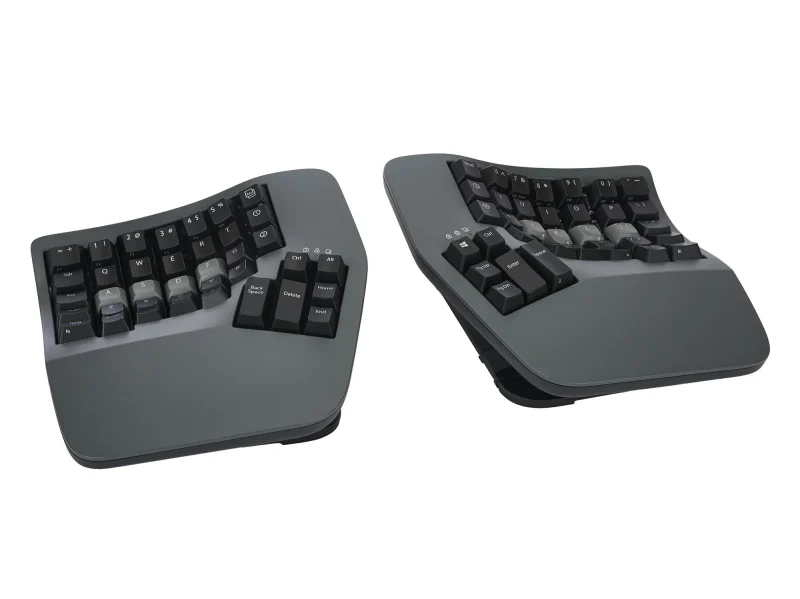
- Kinesis Advantage360 Professional - Buy. The most aggressive ergonomic correction here, with concave keywells and dual thumb clusters that cut finger travel and wrist deviation.
- Logitech Ergo K860 - Buy. The easiest on-ramp to ergonomic typing: a curved split layout with a cushioned wrist rest and almost no learning curve.
- ZSA Moonlander - It depends. A fully separable columnar split with optional tenting and the deepest configurator, aimed squarely at tinkerers.
- Keychron Q11 - Skip. A superb split-style mechanical board that turns out to be only lightly ergonomic once you look past the marketing.
The verdict in 30 seconds
What mattered most
- Ergonomic style
- Halves separate
- Tenting / wrist lift
- Switch type
- Customization
- Learning curve
Split and contoured keyboards promise real relief for wrists and shoulders, but they ask something back: time spent relearning how you type. We synthesized independent expert testing and long-term owner reports to separate the boards that earn that trade-off from the ones that mostly look the part. Below are three we would buy for different needs and one we would pass on.
The most aggressive ergonomic correction here, with concave keywells and dual thumb clusters that cut finger travel and wrist deviation.
Best for: Heavy typists and anyone managing existing wrist or finger strain who wants the strongest ergonomic correction.
- Deep concave keywells and splayed columns reduce reaching and ulnar deviation more than any flat split layout
- Dual thumb clusters move Enter, Backspace, and modifiers off weak pinkies; Clique software and optional ZMK firmware make every key remappable over Bluetooth or cable
- The contoured, columnar layout takes most typists several weeks to reach previous speed
- Bulky footprint and top-tier pricing, and the fixed keywell shape suits some hand sizes better than others
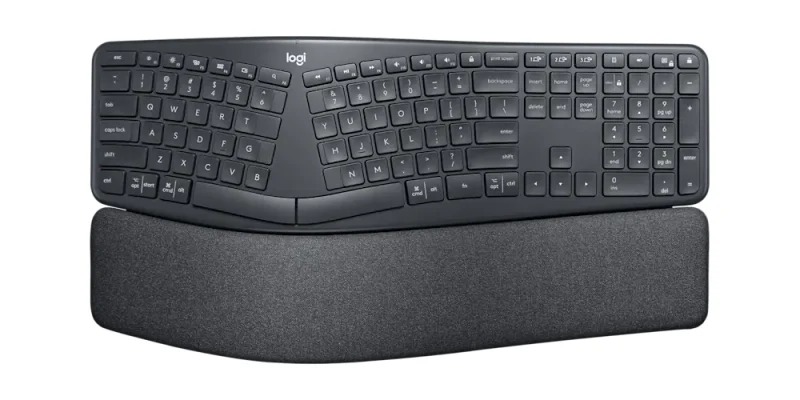
The easiest on-ramp to ergonomic typing: a curved split layout with a cushioned wrist rest and almost no learning curve.
Best for: Office and WFH users who want comfort and a wrist lift without relearning how to type.
- Curved, split key layout with a generous cushioned wrist rest that supports the palms straight out of the box
- Reverse tilt feet (0, -4, or -7 degrees) and wireless connectivity; the familiar staggered keys mean full typing speed on day one
- The halves are fused in one piece, so you cannot set true shoulder-width spacing
- Low-profile, non-mechanical keys feel soft and shallow, and remapping is shallow next to mechanical rivals
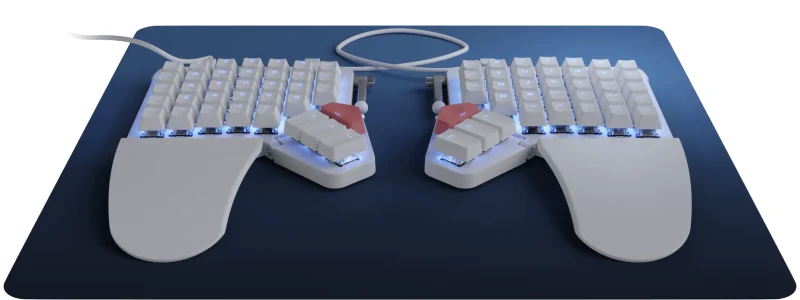
A fully separable columnar split with optional tenting and the deepest configurator, aimed squarely at tinkerers.
Best for: Developers and keyboard tinkerers willing to invest time tuning layers and tenting to their hands.
- A tilting thumb module, an optional Platform tenting accessory, and fully separable halves let you dial in tilt and shoulder-width spacing
- Hot-swappable switches plus the Oryx configurator and QMK give layer-deep, per-key control
- The columnar, reduced-key layout is a steep adjustment; expect a few slow weeks
- Reaching the thumb clusters and relearning ortholinear columns frustrates some owners
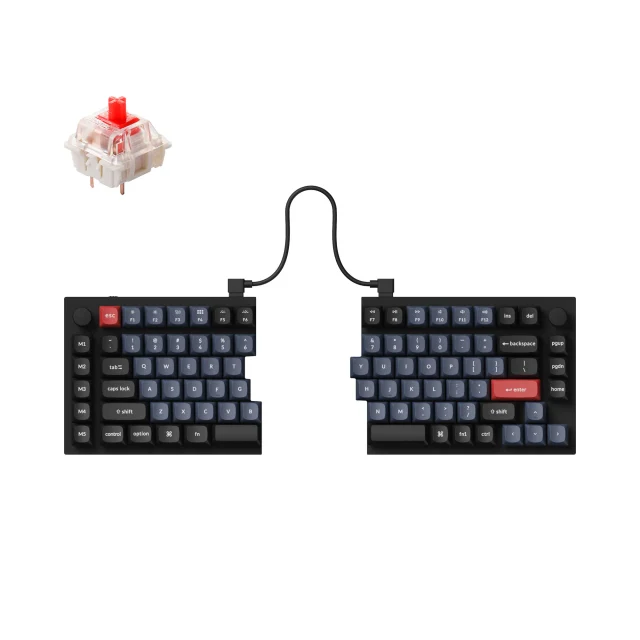
A superb split-style mechanical board that turns out to be only lightly ergonomic once you look past the marketing.
Best for: Enthusiasts who want a split-look mechanical keyboard, not people buying primarily to relieve wrist pain.
- Solid metal-bodied build and hot-swappable switches deliver a genuinely satisfying typing feel
- QMK firmware and the Keychron Launcher web app for deep remapping
- Keychron lists no tenting kit or tilt adjustment, so your wrists stay flat; the ergonomic gain is mostly the gap between the halves
- The cable between the halves limits how far apart you can place the halves, and the heavy metal body is a chore to reposition
| Criteria | Kinesis Advantage360 Professional Top pick | Logitech Ergo K860 | ZSA Moonlander | Keychron Q11 |
|---|---|---|---|---|
| Verdict | Buy it | Buy it | It depends | Skip it |
| Best for | Heavy typists and anyone managing existing wrist or finger strain who wants the strongest ergonomic correction. | Office and WFH users who want comfort and a wrist lift without relearning how to type. | Developers and keyboard tinkerers willing to invest time tuning layers and tenting to their hands. | Enthusiasts who want a split-look mechanical keyboard, not people buying primarily to relieve wrist pain. |
| Price tier | $$$$ · flagship | $$ · mid-range | $$$ · premium | $$ · mid-range |
| Ergonomic style | Contoured concave keywells | Curved one-piece split | Flat columnar split | Staggered split, flat |
| Halves separate | Fully separable | Fixed one-piece | Fully separable | Tethered by cable |
| Tenting / wrist lift | Built-in, 3 adjustable tenting heights | Reverse tilt + wrist rest | Tilting thumb module, optional tenting accessory | None built in |
| Switch type | Mechanical, concave wells | Low-profile, non-mechanical | Mechanical, hot-swappable | Mechanical, hot-swappable |
| Customization | Clique/ZMK, full per-key remap | Basic | Oryx + QMK, deep | QMK/Launcher, deep |
| Learning curve | Steep (weeks) | Minimal | Steep (weeks) | Moderate |
Which one is right for you?
- Heavy typists and anyone managing existing wrist or finger strain who wants the strongest ergonomic correction. Buy it Kinesis Advantage360 Professional
- Office and WFH users who want comfort and a wrist lift without relearning how to type. Buy it Logitech Ergo K860
- Developers and keyboard tinkerers willing to invest time tuning layers and tenting to their hands. It depends ZSA Moonlander
- Enthusiasts who want a split-look mechanical keyboard, not people buying primarily to relieve wrist pain. Skip it Keychron Q11
How we judged the field
We do not lab-test at RBE. Instead we read across independent expert reviews and months of owner feedback, then weigh the patterns that repeat. For split and contoured keyboards, three things matter more than spec sheets: how much the shape actually reduces wrist and forearm strain, how long it takes to type at full speed again, and whether the hardware supports the posture it promises. A board can look ergonomic and still leave your wrists flat and pronated.
We limited the field to models still listed and supported by their makers in 2026, since firmware and replacement parts matter on keyboards you keep for years. We looked for genuine tenting or contouring, sensible thumb use, and remapping depth, and we treated marketing language skeptically. What follows are three keyboards we would buy for different needs and one we would steer most ergonomic buyers away from.
Kinesis Advantage360 Professional
Buy itThe Advantage360 Professional is the most committed ergonomic design in this group. Each hand gets a concave keywell that lets shorter fingers reach shorter distances, and the columns are splayed so your wrists stay straighter than on a flat board. Two thumb clusters take over Enter, Backspace, Space, and modifier keys, which is the single biggest change for anyone whose pinkies ache by mid-afternoon.
The Professional model programs through Kinesis’s Clique tool, with optional ZMK firmware, Bluetooth, and full per-key remapping, and the halves separate completely for shoulder-width placement. The cost is time: owners consistently report a few weeks of slower typing before muscle memory catches up, and the shape is large and opinionated. For people already fighting wrist or finger strain, that trade is usually worth it, and this is our overall pick.
Logitech Ergo K860
Buy itThe Ergo K860 is the sensible starting point for most office and home workers. It keeps a normal staggered layout but curves and splits it in a single fixed piece, and it adds a cushioned wrist rest plus reverse tilt feet that lift your palms. Because the key positions barely move, there is almost no learning curve; you sit down and type at full speed the same day.
The compromises are real but modest. The halves cannot separate, so you cannot set true shoulder-width spacing, and the low-profile keys feel soft and shallow next to a mechanical board. Remapping is limited to basic software. None of that undermines the comfort it delivers, which is why it is our runner-up and the easiest board here to recommend broadly.
ZSA Moonlander
It dependsThe Moonlander is built for people who want to tune everything. The halves separate fully, the thumb module tilts and the optional Platform accessory adds tenting, and the switches are hot-swappable. Its Oryx configurator paired with QMK gives layer-deep, per-key control that few rivals match, so you can shape the layout around your exact hand size and habits.
The columnar, reduced-key layout is the hurdle. Fingers that spent years on staggered rows have to relearn straight columns, and some owners struggle to reach the thumb clusters comfortably at first. Expect a few slow weeks. If you enjoy that kind of tinkering, it rewards the effort; if you just want relief with minimal fuss, it is more machine than you need, which is why we mark it depends.
Keychron Q11
Skip itThe Q11 is a genuinely good keyboard that is only lightly ergonomic. The metal body and hot-swappable switches produce a typing feel enthusiasts love, and QMK firmware with the Keychron Launcher web app makes it endlessly configurable. As a mechanical split board, it is excellent.
As an ergonomic tool, it falls short of its billing. Keychron lists no tenting kit and no tilt adjustment, so your wrists stay as flat as on a normal keyboard, and the only real posture benefit is the gap between the two halves. That gap is limited by the cable between the halves, and the heavy metal body is awkward to reposition. If you want a split-look mechanical board, it is a fine choice. If you are buying to fix wrist pain, your money does more elsewhere, so we would skip it.
Kinesis Advantage360 Professional vs Logitech Ergo K860: which should you buy?
This is the decision most readers face: maximum correction or minimum friction. The Advantage360 Professional reshapes how your fingers and thumbs move, which is what you want if strain is already affecting your work. It costs more, takes weeks to master, and occupies more desk, but owners who commit rarely return to a flat board.
The Ergo K860 asks for none of that. It curves and lifts your wrists inside a familiar layout, so the comfort arrives immediately and the price is far gentler. It will not correct posture as deeply, and its membrane keys and fixed halves cap how far you can go. Choose the Advantage360 if you have real pain and patience; choose the K860 if you want a comfortable, low-effort upgrade you can start using today.
What to look for
Start with your symptoms. If your wrists bend sideways or your pinkies fatigue, prioritize contouring and thumb clusters, which points to the Advantage360. If your hands are mostly fine and you want prevention plus a wrist lift, a curved board like the K860 is enough.
Then weigh your patience for relearning. Contoured and columnar boards cost you speed for weeks before they pay off, while curved staggered boards do not. Consider whether you need the halves to separate for broad shoulders, whether tenting adjustment matters to you, and how much remapping you will actually use. Finally, be honest that a split appearance alone does little; the comfort comes from tenting, spacing, and thumb use, not the seam down the middle.
Our final take
The Kinesis Advantage360 Professional does the most to fix bad typing posture and is our pick for anyone serious about wrist and forearm relief, provided you accept a real adjustment period. The Logitech Ergo K860 is the runner-up and the easiest board to recommend to most people, delivering comfort without relearning. The ZSA Moonlander is the tinkerer’s choice for optional tenting and deep customization. The Keychron Q11 is a lovely mechanical keyboard but a weak ergonomic one, so skip it if relief is the reason you are shopping.
Questions, answered
Are split keyboards actually better for wrist pain?
Often, yes. Splitting and tilting the halves lets your forearms sit straighter, reducing the sideways wrist bend most typing pain comes from. The catch is that benefit depends on tenting and spacing, not just a split appearance, and on giving yourself weeks to adapt.
How long does it take to get used to a contoured keyboard?
Owners commonly report a few weeks to feel comfortable and longer to reach their old speed on a columnar or contoured board like the Advantage360 or Moonlander. Curved staggered boards such as the K860 need little to no adjustment.
Do I need mechanical switches for an ergonomic keyboard?
No. Switch type affects typing feel, not wrist posture. The low-profile, non-mechanical Ergo K860 is comfortable and quiet, while mechanical boards give firmer feedback and remapping. Choose based on the sound and feel you prefer, then judge ergonomics on shape, tenting, and thumb use.
What is tenting and why does it matter?
Tenting raises the center of the keyboard so your palms tilt slightly inward toward a handshake position, easing forearm rotation. It is one of the biggest comfort factors. The Moonlander offers tenting through its optional Platform accessory; the Advantage360 has three built-in tenting heights; the Keychron Q11 has none.
Are these keyboards good for gaming too?
They can be, with caveats. Mechanical splits like the Moonlander and Q11 have low latency and remappable keys, but columnar layouts and separated halves take adjustment for fast games. The K860 works fine for casual play. None are built specifically for competitive gaming.
Deciding between the top two? See our head-to-head: Kinesis Advantage360 Professional vs Logitech Ergo K860.
More Office & WFH reviews
 The Best Affordable Ergonomic Office Chairs (And the Popular One to Skip)
  The Best Fire Rated Safes: 4 Compared (and One to Skip)
  The Best Fountain Pens: 4 Compared (and One to Skip)
  The Best Gaming Chairs: 4 Compared (and One to Skip)
  The Best Headphone Stands: 4 Compared (and One to Skip)
  The Best Home Printers: 4 Compared (and One to Skip)