

Office & WFH
The Best Monitor Arms for Office and WFH Desks (2026)
Four current monitor arms compared for office and WFH desks - a workhorse pick, a premium counterbalance, a budget value, and one gas-spring arm to skip.
The short version
For most office and WFH desks, the Ergotron LX Desk Mount is the arm to buy: its Constant Force spring is set once and holds a mainstream monitor for years, and it carries heavier screens than the Humanscale. Choose the Humanscale M2.1 for a cleaner look, lighter monitors and a long warranty. The VIVO STAND-V001 is a genuine budget value with clamp and grommet mount options. Skip the Mount-It! MI-1771 gas-spring arm, which owners report drooping and needing repeated re-tensioning within months.
Our picks at a glance
- Ergotron LX Desk Mount Monitor Arm - Buy. The set-and-forget workhorse most desks should default to, with position-holding owners stop thinking about after install.
- Humanscale M2.1 Monitor Arm - Buy. A quiet, near-hardware-free counterbalance arm for people who care how the desk looks and want a long warranty.
- VIVO Single Monitor Desk Mount (STAND-V001) - Buy. The honest budget choice, a pole-and-arm mount with clamp and grommet options that holds its height without drama.
- Mount-It! Gas Spring Single Monitor Desk Mount (MI-1771) - Skip. Fine on day one, but the arm here most likely to creep downward and need repeated re-tightening.
The verdict in 30 seconds
What mattered most
- Holds position over time
- Weight capacity
- Screen size range
- Motion mechanism
- Build and finish
- Warranty
A monitor arm should disappear into your desk: set the height once, forget it for years, and reclaim the space the stock stand wasted. The arms that fail do it slowly - a screen that creeps downward, a clamp that dents the desk, a tension screw you keep re-tightening. We synthesized independent ergonomics experts and long-run owner reports to sort three current arms worth buying from one that is better skipped.
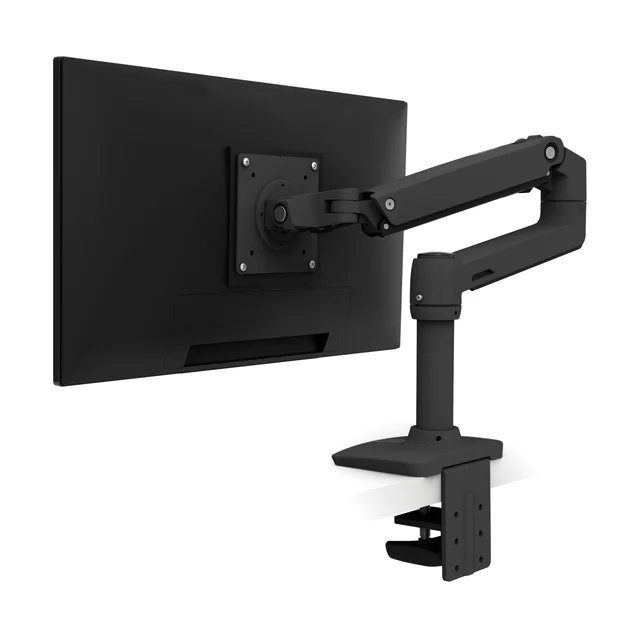
The set-and-forget workhorse most desks should default to, with position-holding owners stop thinking about after install.
Best for: Most single-monitor office and WFH desks that want one arm and no fuss.
- Constant Force spring is tensioned once with the bundled hex key and holds a mainstream desk monitor at the chosen height for years
- Higher weight rating than the Humanscale here (check Ergotron's spec sheet against your monitor), so a mainstream monitor sits below the ceiling where drooping begins
- Industrial, utilitarian look that reads more office than home
- The C-clamp base occupies a noticeable chunk of desk-edge depth
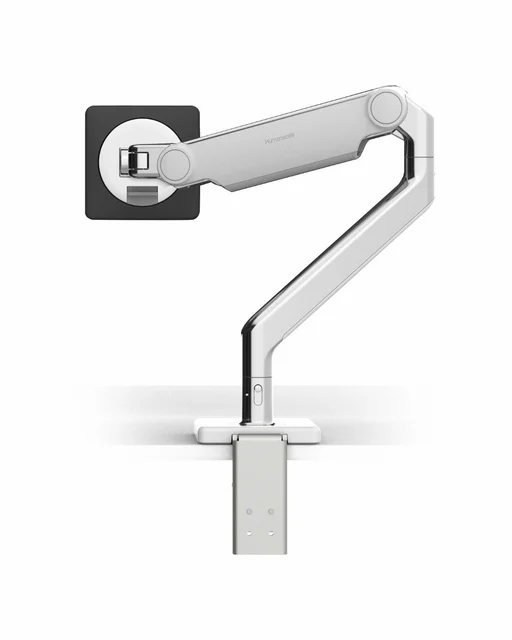
A quiet, near-hardware-free counterbalance arm for people who care how the desk looks and want a long warranty.
Best for: Lighter monitors on visible desks, and shared or hot-desk workstations.
- Mechanical Compensator spring holds any set height without periodic re-tuning, and the self-lubricating precision bearings keep motion smooth over time
- Top-to-bottom cable management hides almost all cabling and hardware, and Humanscale offers a long warranty
- Lower weight ceiling (about 15.4 lb flat, 12.6 lb curved) rules out many heavier 32-inch and curved panels
- Costs meaningfully more than arms that hold position just as well
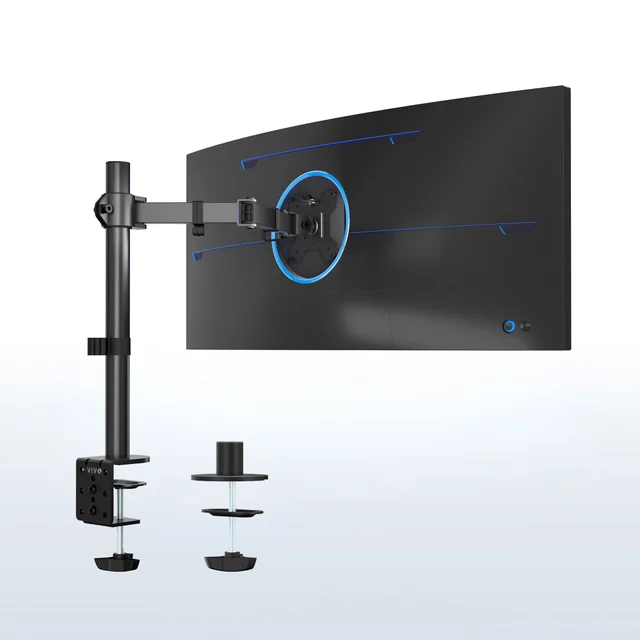
The honest budget choice, a pole-and-arm mount with clamp and grommet options that holds its height without drama.
Best for: First arms, secondary desks, and anyone who wants full articulation without spending much.
- C-clamp and grommet mounting options plus VESA 75x75 and 100x100 support, so it fits most desks and monitors
- Center-pole design rated to 22 lb, 13 to 32 inch screens and ultrawides up to 38 inches, with +/-90 degree tilt and 360 degree swivel and rotation
- Motion is stiffer and less refined than the spring arms above
- Pole-plus-arm reach is shorter and less fluid than a true parallel-arm design, with some flex at full extension
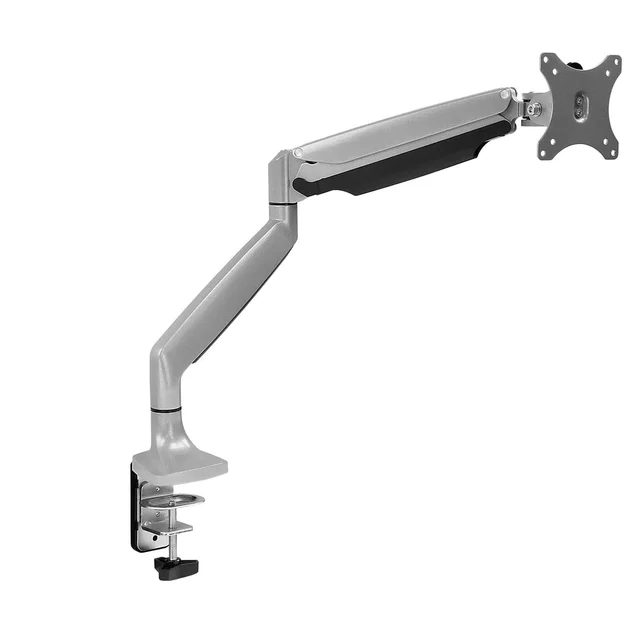
Fine on day one, but the arm here most likely to creep downward and need repeated re-tightening.
Best for: Only a light, short-term secondary screen where sag is tolerable.
- Low entry price with C-clamp and grommet mounting options
- Gas-spring cylinder gives smooth one-hand motion when freshly tensioned
- Owners commonly report the screen drooping after a few months as the gas spring loses tension
- Tension screw and tilt joint need repeated adjustment to stay level, and the joints lean on plastic
| Criteria | Ergotron LX Desk Mount Monitor Arm Top pick | Humanscale M2.1 Monitor Arm | VIVO Single Monitor Desk Mount (STAND-V001) | Mount-It! Gas Spring Single Monitor Desk Mount (MI-1771) |
|---|---|---|---|---|
| Verdict | Buy it | Buy it | Buy it | Skip it |
| Best for | Most single-monitor office and WFH desks that want one arm and no fuss. | Lighter monitors on visible desks, and shared or hot-desk workstations. | First arms, secondary desks, and anyone who wants full articulation without spending much. | Only a light, short-term secondary screen where sag is tolerable. |
| Price tier | $$ · mid-range | $$$ · premium | $ · budget | $ · budget |
| Holds position over time | Set-once spring, stays for years | Compensator holds without re-tuning | Mechanical spring, holds but stiffer | Gas spring; owners report creep |
| Weight capacity | Higher than M2.1 (see spec sheet) | About 15.4 lb flat, 12.6 lb curved | Up to 22 lb | See maker spec |
| Screen size range | Mainstream desk monitors | Lighter panels (check weight) | 13 to 32 in, ultrawide to 38 in | See maker spec |
| Motion mechanism | Constant Force spring | Mechanical Compensator spring | Mechanical spring on pole | Gas-spring cylinder |
| Build and finish | Metal, industrial look | Polished aluminum or black, minimal hardware | Steel and aluminum, functional | Aluminum with plastic joints |
| Warranty | Long (check Ergotron terms) | Long (check Humanscale terms) | 3 years | Check maker terms |
Which one is right for you?
- Most single-monitor office and WFH desks that want one arm and no fuss. Buy it Ergotron LX Desk Mount Monitor Arm
- Lighter monitors on visible desks, and shared or hot-desk workstations. Buy it Humanscale M2.1 Monitor Arm
- First arms, secondary desks, and anyone who wants full articulation without spending much. Buy it VIVO Single Monitor Desk Mount (STAND-V001)
- Only a light, short-term secondary screen where sag is tolerable. Skip it Mount-It! Gas Spring Single Monitor Desk Mount (MI-1771)
How we judged the field
We read across independent ergonomics experts and long-run owner reports rather than testing arms ourselves, then weighted the things that actually go wrong months after setup: a screen that slowly droops, a clamp that dents the desk edge, and tension that needs constant re-adjustment. We limited the field to single-monitor desk mounts still in production in 2026, sized for the mainstream panels most office and work-from-home desks run. Capacity headroom carried the most weight, because an arm working near its rated ceiling is the one that sags first. From there we compared how each arm holds a set height, how it clamps to the desk, how refined the motion feels day to day, and how long the maker stands behind it.
Three arms earned a buy for different desks and budgets. One earned a skip, because the way it fails is exactly the failure a monitor arm exists to prevent.
Ergotron LX Desk Mount Monitor Arm
Buy itThe LX is the arm most owners stop thinking about after they install it, which is the whole point of the category. Its Constant Force spring is tensioned once with the bundled hex key, and then it holds a screen at the chosen height for years rather than months. Its weight rating is higher than the Humanscale’s, so a mainstream monitor sits below the ceiling where drooping starts, and the extra headroom is the single best predictor of an arm that stays put.
What owners consistently like more is the position-holding: nudge the screen up or forward and it stays exactly there, with none of the slow creep that plagues cheaper arms. What they like less is the industrial look, which reads office rather than living room, and a C-clamp base that occupies a real chunk of desk-edge depth. Neither is a functional flaw. For most single-monitor desks, this is the default.
Humanscale M2.1 Monitor Arm
Buy itThe M2.1 is the arm to buy when you care how the desk looks and want long warranty coverage. Its mechanical Compensator spring holds any set height without the periodic re-tuning cheaper arms demand, and self-lubricating precision bearings keep the motion smooth as it ages. Top-to-bottom cable management hides nearly all cabling and hardware, so it stays clean on a visible desk, and Humanscale backs it with a long warranty.
The trade-offs are real. The weight ceiling sits around 15.4 lb for flat screens and 12.6 lb for curved ones, which quietly rules out many heavier 32-inch and curved panels, so check your monitor’s spec before committing. It also costs meaningfully more than arms that hold position just as well. What owners like more is the understated look and the effortless, tool-free height changes; what they like less is that lower capacity and the price. It is a considered buy, not an automatic one.
VIVO Single Monitor Desk Mount (STAND-V001)
Buy itThe VIVO is the honest budget choice, and it earns the buy by not overpromising. It uses a center pole with an articulating arm, offers C-clamp and grommet mounting, and supports VESA 75x75 and 100x100, so it fits most desks and monitors. It is rated to 22 lb, 13 to 32 inch screens and ultrawides up to 38 inches, with +/-90 degree tilt and 360 degree swivel and rotation, and VIVO backs it for 3 years.
What owners like more is the value and the choice of clamp or grommet mounting. What they like less is the motion: it is stiffer and less refined than the spring arms above, and the pole-plus-arm layout gives shorter, less fluid reach than a true parallel-arm design, with some flex at full extension. For a first arm, a secondary desk, or anyone who wants real articulation without spending much, that is a fair bargain.
Mount-It! Gas Spring Single Monitor Desk Mount (MI-1771)
Skip itThe MI-1771 is a gas-spring counterbalance arm with clamp and grommet hardware and the kind of smooth one-hand motion that feels reassuring in the store. The problem is what a budget gas spring does over time. Owners repeatedly describe the screen creeping downward after a few months as the cylinder loses tension, and they describe re-tightening the tension screw and re-leveling the tilt joint to chase it. The joints also lean on plastic where the arms above use metal.
What owners like more is the low entry price and the included grommet option. What they like less is the sag and the fiddly, recurring adjustment. It works on day one, but in this company it is the arm most likely to droop and the hardest to keep level - which is why it is a skip rather than a cheaper buy.
Ergotron LX vs Humanscale M2.1: which should you buy?
Both arms hold their height for the long haul, so the decision comes down to your monitor and your desk. The Ergotron LX carries more weight than the M2.1’s roughly 15.4 lb ceiling, which makes it the safer pick for heavier, larger, or curved panels, and it costs less. Its look is frankly utilitarian, and its clamp is chunky, but nothing about it wears out quickly.
The Humanscale M2.1 wins on refinement and appearance. If your monitor is on the lighter side, your desk is on display, and you want a long warranty, its cleaner arm and near-invisible hardware justify the premium. Choose the LX for capacity, value and a screen you will mostly leave in one place; choose the M2.1 for a tidy, frequently adjusted, lighter setup you want to look good.
What to look for
Start with weight. Find your monitor’s mass, then pick an arm rated at least 20 percent higher, because an arm run near its ceiling is the one that sags. Confirm the VESA pattern (75x75 or 100x100 on most desk monitors) and, for very large or curved screens, that the arm lists ultrawide support.
Next, match the mount to your desk. A C-clamp is quick and reversible if you have a free edge; a grommet mount is cleaner and more permanent. Measure your desktop thickness against the clamp’s range, and use the supplied backing plate on thin or laminate desks to avoid dents.
Finally, weigh the mechanism and the warranty. A well-made constant-force or mechanical spring holds its height for years; a cheap gas spring is the type most prone to creep. A long warranty is a useful proxy for how long the maker expects the arm to keep working.
Our final take
For most office and WFH desks, buy the Ergotron LX Desk Mount: it holds position for years, carries heavier monitors than its rivals, and asks nothing of you after the one-time setup. Step up to the Humanscale M2.1 for a cleaner look, lighter loads and a long warranty. The VIVO STAND-V001 is a legitimate budget buy with both mounts in the box. Skip the Mount-It! MI-1771 - a gas-spring arm that too often droops and needs re-tensioning within months is the one thing a monitor arm should never do.
Questions, answered
Will any monitor arm fit my monitor?
Check two numbers first. The VESA hole pattern must match (75x75 or 100x100 mm on most desk monitors), and your screen's weight must sit under the arm's rating with margin. Very large, curved or ultrawide panels often exceed light arms, so confirm both before buying.
Clamp mount or grommet mount - which should I use?
Use the C-clamp if your desk has a free rear or side edge; it needs no drilling and moves easily. Use a grommet mount for a more permanent, flush install or when the edge is blocked. Most arms here support both, so you can switch later.
Will a monitor arm damage my desk?
It can. A clamp near maximum load levers on a thin or soft desktop and leaves indentations, and overtightening splits laminate edges. Use the supplied backing plate, keep the monitor within the arm's rating, and confirm your desktop thickness falls inside the clamp's stated range.
Are gas-spring arms worse than mechanical-spring arms?
Not inherently, but budget gas springs are the ones owners most often report sagging as they lose pressure over months. A quality gas or mechanical spring holds for years. If you buy budget, a simple mechanical spring often keeps its set height more reliably than a cheap gas cylinder.
Deciding between the top two? See our head-to-head: Ergotron LX Desk Mount Monitor Arm vs Humanscale M2.1 Monitor Arm.
More Office & WFH reviews
 The Best Monitor Light Bars: 4 Compared (and One to Skip)
  The Best Monitor Privacy Screens: 4 Compared (and One to Skip)
  The Best Monitor Stands and Risers: 4 Compared (and One to Skip)
  The Best Notebooks: 4 Compared (and One to Skip)
  The Best Office Chair Casters: 4 Compared (and One to Skip)
  The Best Home Office Desks: 4 Compared (and One to Skip)