

Office · Head-to-head
BakkerElkhuizen Q-doc 515 vs Fellowes Non-Magnetic Copyholder
Which should you buy? Our verdict on both, pulled from our full The Best Copyholders: 4 Compared (and One to Skip) comparison.
The Q-doc 515 is the only holder here that lets you dial the page to a stated height and angle instead of guessing. The Fellowes Non-Magnetic Copyholder does the simpler beside-the-screen job for a fraction of the outlay and holds more loose paper.
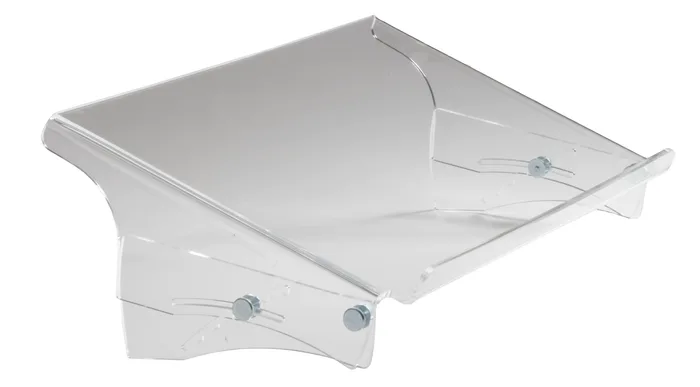
BakkerElkhuizen Q-doc 515
Buy itA rigid acrylic tray that sits in the gap between keyboard and monitor and publishes an actual height and angle range.
- Tilt is stated as 12 to 46 degrees, so you can match it to your screen rather than guess.
- Seven height steps from 120 to 240 mm cover low monitors and raised ones.
- The 515 by 290 mm surface takes A4, A3 and heavy files up to 5 kg.
- No line guide and no clip, so loose single sheets rely on the sliding edge alone.
- Height and angle change by loosening four screws, not a lever, so it is not a mid-task adjustment.
- Needs a real gap between keyboard and monitor, which shallow desks do not have.
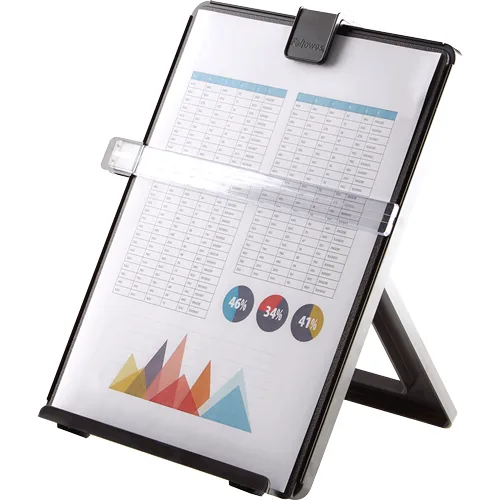
Fellowes Non-Magnetic Copyholder
Buy itThe plain folding easel that does the beside-the-screen job properly and holds a genuine stack of paper.
- Holds up to 125 sheets of letter size paper, more than most easels this size.
- Includes a line guide for keeping your place on the page.
- Folding easel design that can be put away when you are done.
- Fellowes does not publish a tilt range in degrees or a height range, so you cannot check the fit before buying.
- As a freestanding easel it takes real desk space beside the monitor.
- It is an easel, so it parks the page to the side of the screen rather than under it.
Side by side
The 8 criteria below are the ones our full comparison judged every product on, narrowed to these two.
| BakkerElkhuizen Q-doc 515 Our pick | Fellowes Non-Magnetic Copyholder | |
|---|---|---|
| Our verdict | Buy | Buy |
| Best for | Someone who reads and types at the same time all day and wants the page set at a known angle under the screen. | Most people, and anyone who wants to find out whether a copyholder helps before spending real money. |
| Price tier | $$$ · premium | $ · budget |
| Format | In-line, between keyboard and monitor | Freestanding easel beside the screen |
| Stated dimensions | 515 x 290 mm surface | Not shown on maker page |
| Paper capacity | Not published; rated to 5 kg | Up to 125 letter sheets |
| Angle adjustment | 12 to 46 degrees | Range not published |
| Height adjustment | 120 to 240 mm, seven steps | Adjustable; range not published |
| Line guide or clip | Neither; sliding edge only | Line guide |
| Build material | 100% recycled cast acrylic | Plastic |
| Warranty | Not published on the product page | Not shown on maker page |
Which one is right for you?
Pick the BakkerElkhuizen Q-doc 515 if
someone who reads and types at the same time all day and wants the page set at a known angle under the screen.
Know before buying: no line guide and no clip, so loose single sheets rely on the sliding edge alone.
Pick the Fellowes Non-Magnetic Copyholder if
most people, and anyone who wants to find out whether a copyholder helps before spending real money.
Know before buying: fellowes does not publish a tilt range in degrees or a height range, so you cannot check the fit before buying.
The bottom line
Our overall pick is the BakkerElkhuizen Q-doc 515 - A rigid acrylic tray that sits in the gap between keyboard and monitor and publishes an actual height and angle range. Choose the Fellowes Non-Magnetic Copyholder instead if most people, and anyone who wants to find out whether a copyholder helps before spending real money.
Want the full picture, including the other options we compared and the popular one we'd skip? Read the complete The Best Copyholders: 4 Compared (and One to Skip).