Explained
Copyholders, Explained
After reading, you'll understand which copyholder shape suits your desk, which specs are worth checking, and which ones brands routinely leave out.
In this guide
Copyholders look like the simplest thing you can buy for a desk, and the listings are unhelpful in a specific way: they say 'adjustable' without saying how far, and they quote sheet capacity when what you actually care about is whether a binder will stay upright. First-time buyers usually get caught by geometry rather than quality, ordering an in-line holder for a desk with no gap between keyboard and monitor, or an easel so wide it pushes the mouse off the edge. The other common surprise is that this is a shrinking category, and several well-known models are now discontinued even though listings for them persist.
The 30-second version
- Placement is the whole point, so aim for the page at roughly the same height, distance and angle as your screen.
- Shape is decided by your desk, specifically the gap between the back of your keyboard and the front of your monitor base.
- 'Adjustable' means nothing on its own, and a published tilt or height range in real units is worth paying for.
- Sheet capacity and load rating are different specs, and the load rating is the one that tells you whether a bound manual will work.
- Cheap is a reasonable first move, because a budget easel tells you within a week whether you want the in-line version.
The products this guide is about
Our verdict on each, with the full reasoning on the companion review.
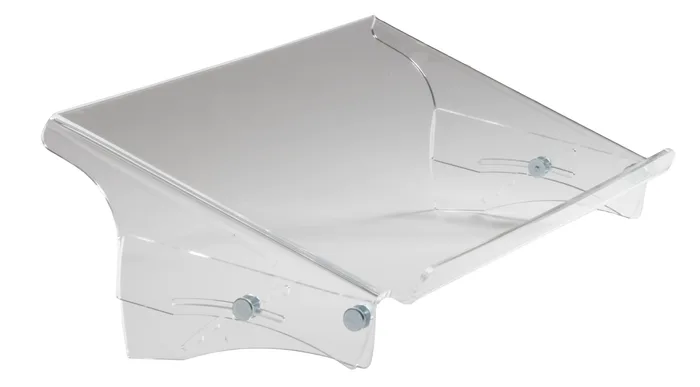
- Buy BakkerElkhuizen Q-doc 515 A rigid acrylic tray that sits in the gap between keyboard and monitor and publishes an actual height and angle range. Amazon
- Buy Fellowes Non-Magnetic Copyholder The plain folding easel that does the beside-the-screen job properly and holds a genuine stack of paper. Amazon
- It depends Vu Ryte MemoScape PRO An 18 inch wide in-line easel built to be written on as well as read from, if your desk has the depth for it. Amazon
- Skip Fellowes Metal Copyholder A metal version of a job that plastic already does, at the top of Fellowes' own copyholder pricing. Amazon
What actually matters
- In-line placement - putting the document in the same line of sight as the screen is what the ergonomics guidance actually describes. It only works if you have physical room for the holder between keyboard and monitor.
- Tilt range - the angle the surface can be set to, ideally quoted in degrees. Without a number you cannot tell whether the page will face you or face the ceiling.
- Height range - how far the top edge of the holder can be raised. This is what lets you match a monitor on a riser or an arm rather than one sitting flat on the desk.
- Load rating - the maximum weight the surface will hold, usually in kilograms or pounds. It matters far more than sheet count if you work from binders, manuals or textbooks.
- Stability - the guidance specifically asks that a holder stay stable when loaded with heavier documents. A wide base with non-slip feet is the practical version of that.
- Page retention - the lip, clip, wire, side arm or line guide that stops paper sliding. Which one suits you depends on whether you flip pages constantly or leave one up.
- Footprint - the desk area the holder occupies, including the depth of the surface and the base. This is the spec people underestimate most often.
The specs, in plain English
Green flags vs red flags
Green flags
- The listing gives a tilt range in degrees and a height range in millimetres or inches.
- There is a stated load rating in kilograms or pounds, not just a sheet count.
- The surface dimensions are published separately from the overall product dimensions.
- The base is wide, has non-slip feet, and the brand describes stability under heavier documents.
- The page retention hardware, whether that is a lip, clip, line guide or side arm, is described as removable or repositionable.
Red flags
- The word 'adjustable' appears with no range attached anywhere on the page.
- No footprint or surface size is given, only a packaging or shipping dimension.
- It clamps to a monitor bezel and the listing shows it overlapping part of the screen.
- The manufacturer's own page has gone, or the model is marked discontinued while retailer listings continue.
- The only specs offered are colour and paper size, with nothing about angle, height or load.
Who's who: the brands
- BakkerElkhuizen - A Dutch office ergonomics specialist whose Q-doc and FlexDesk lines are the in-line and writing-slope end of the market, and which publishes unusually complete adjustment ranges.
- Fellowes - The mainstream office-supply option, with a small range of plastic and metal easel copyholders; check Fellowes' current warranty terms per item.
- Vu Ryte - A small US manufacturer focused mainly on in-line desktop easels, which also sells monitor arms and stands, sold direct and made in the USA.
- Kensington - A long-standing office accessories brand that has carried copyholders for decades, though most of its copyholder listings are now marked discontinued, so check availability before settling on a model.
How to read a listing without getting fooled
Start at the bottom of the spec list rather than the top, because the marketing bullets rarely contain the numbers. Look for three things: the surface size, the adjustment ranges, and a load or capacity figure. If the listing gives you overall product dimensions but not the surface size, you cannot work out whether an A4 page will fit without overhang. If it says 'adjustable tilt' with no degrees, treat that as unknown rather than as a feature. Sheet capacity is usually quoted for letter or A4 and applies to the clip, not the whole holder. Anything quoted in a weight unit is a load rating and covers bound material. Finally, check the manufacturer's own page rather than a retailer's; in this category retailer listings routinely outlive the products, and specs get copied across from older models.
How much should you spend?
Budget buys you a folding plastic easel that props a page up beside the screen, adjusts by an unspecified amount, and usually includes a line guide. That is a genuine improvement over paper flat on the desk and is the right place to start if you have never used one. Mid-range gets you a larger surface, better stability, a base wide enough to trust with a binder, and sometimes a surface you can write on. Premium is where the published adjustment ranges appear, along with rigid acrylic or metal construction and in-line geometry designed around a specific keyboard-to-monitor gap. Be aware that premium pricing in this category does not always mean premium capability; some metal easels cost as much as a fully adjustable in-line holder while doing the simpler job. Judge by the published numbers, not the material.
Questions, answered
Will an in-line copyholder fit my desk?
Measure the distance from the back edge of your keyboard to the front of your monitor base. In-line holders typically need at least 6 inches, and larger ones need more than that. If the gap is smaller, an in-line holder will force your keyboard forward and make your typing posture worse than it was.
Can I use a copyholder with a laptop?
Yes, but only if the laptop is on a stand with a separate keyboard, because otherwise there is no gap to work with. With a laptop flat on the desk, an easel beside the screen is the workable option. Some wide in-line easels are marketed for laptop use and will hold a phone or tablet alongside the paper.
Do I need a line guide?
It depends on the work. If you are transcribing dense text or numbers line by line, a movable guide genuinely helps you keep your place. If you are glancing at a form or an invoice, it just gets in the way. Look for one that is removable so you can decide after the fact.
Why do so many copyholder models seem to be discontinued?
The category has shrunk as more work moved fully on-screen, and several long-running lines from mainstream accessory brands have been retired. Retailer listings often outlive the product, so a page that looks current may be selling old stock. Check the manufacturer's own site for the model before you commit, especially for clip-on and monitor-mount designs.
Or jump to the head-to-head: BakkerElkhuizen Q-doc 515 vs Fellowes Non-Magnetic Copyholder.