Explained
Ergonomic Keyboards, Explained
After reading, you will know which ergonomic features genuinely reduce wrist strain and which are just marketing, so you can shop by shape rather than by hype.
In this guide
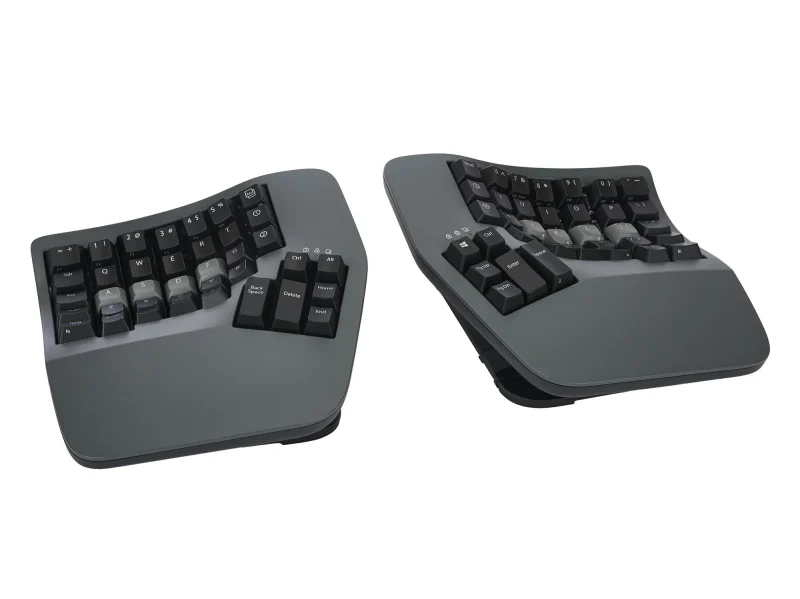
An ergonomic keyboard is meant to let your hands, wrists, and forearms sit in a more natural position while you type, easing the strain that builds over long days at a desk. The category is crowded with terms like split, tented, contoured, and columnar, and the trap most first-time buyers fall into is assuming that anything with a gap down the middle will help. Real comfort comes from the combination of splitting, tilting, and thumb use, not the seam alone, and often at the cost of relearning how you type.
The 30-second version
- A split alone is not enough. The comfort comes from tenting and spacing that straighten your wrists, so judge the shape and tilt, not just whether the board looks divided.
- Expect a learning curve on the aggressive designs. Contoured and columnar boards can cost you weeks of typing speed before muscle memory catches up, while curved staggered boards need almost no adjustment.
- Match the board to your symptoms. Sideways wrist bend and tired pinkies point toward contouring and thumb clusters; general prevention is well served by a curved board with a wrist lift.
- Switch type is about feel, not posture. Membrane versus mechanical changes the sound and feedback you enjoy, but it does not affect whether the keyboard protects your wrists.
- Customization depth matters more the deeper you go. Remappable keys and thumb clusters let heavy users move strain off weak fingers, which is where much repetitive-typing fatigue originates.
The products this guide is about
Our verdict on each, with the full reasoning on the companion review.
- Buy Kinesis Advantage360 Professional The most aggressive ergonomic correction here, with concave keywells and dual thumb clusters that cut finger travel and wrist deviation. Amazon
- Buy Logitech Ergo K860 The easiest on-ramp to ergonomic typing: a curved split layout with a cushioned wrist rest and almost no learning curve. Amazon
- It depends ZSA Moonlander A fully separable columnar split with optional tenting and the deepest configurator, aimed squarely at tinkerers.
- Skip Keychron Q11 A superb split-style mechanical board that turns out to be only lightly ergonomic once you look past the marketing.
What actually matters
- Tenting raises the middle of the board so your palms tilt into a natural handshake angle, easing forearm rotation. It is one of the single largest comfort factors, so prioritize boards that either build it in or let you adjust it.
- Splitting and spacing let each hand sit at shoulder width so your wrists point straight ahead rather than angling inward. Fully separable halves allow true spacing; one-piece boards only approximate it.
- Thumb use on boards with dedicated thumb clusters moves Enter, Backspace, and modifier keys off your weaker pinkies, which is the biggest relief for anyone whose little fingers ache by afternoon.
- Learning curve is a real cost, not a footnote. Columnar and contoured layouts reshape where every key sits, so honestly weigh how much slow-typing time you can tolerate before the comfort pays off.
- Layout style, meaning staggered rows versus straight ortholinear columns, determines how much relearning you face. Staggered feels familiar; columnar aligns with your finger travel but takes weeks to master.
- Build and support matter because these are keyboards you keep for years. Firmware updates, replacement parts, and continued production protect the investment on a board you may adapt your typing around.
- Wrist support, such as a cushioned rest or reverse tilt feet, lifts your palms and keeps wrists neutral, and it delivers immediate comfort even on boards that ask for no relearning.
The specs, in plain English
Green flags vs red flags
Green flags
- Genuine tenting or contouring that visibly tilts or scoops the typing surface, not just a flat board with a gap
- Halves that fully separate, or clear adjustment for spacing and tilt so you can fit the board to your body
- Thumb clusters or thoughtful thumb-key placement that move load off the pinkies
- Still in production and supported by the maker, with firmware updates and available replacement parts
- Honest documentation of the learning curve rather than a promise of instant comfort
Red flags
- Marketing that leans on the word ergonomic while the board stays flat with no tenting or tilt
- A short, fixed interconnect cable that limits how far apart you can place the two halves
- A heavy body with no meaningful posture features, sold mainly on looks or typing feel
- Claims of medical or pain-curing benefits, which no keyboard can responsibly promise
- No firmware support or remapping on a board whose layout would benefit from customization
Who's who: the brands
- Kinesis - Long-established maker of contoured keywell boards aimed at the most aggressive ergonomic correction.
- Logitech - Mainstream peripheral brand whose curved, one-piece split boards offer easy comfort with no learning curve.
- ZSA - Enthusiast maker of fully separable columnar splits with optional tenting accessories and deep configuration tools.
- Keychron - Popular mechanical keyboard brand known for build quality and customization, with split-style boards that lean more aesthetic than ergonomic.
- Microsoft - Longtime maker of curved, one-piece ergonomic boards that popularized the accessible, no-relearning approach.
How to read a listing without getting fooled
When you read an ergonomic keyboard listing, look past the headline word and hunt for the mechanics. Confirm whether the board actually tents or contours, because a flat split does little for your wrists. Check whether the halves truly separate or are fused in one piece, and if they connect by cable, note how long that cable is, since a short one caps how far apart you can place them. Read for thumb-key placement, remapping depth, and switch type, but remember that switches change feel rather than posture. Finally, treat any mention of speed or comfort claims against a stated learning curve: a board that reshapes your typing will make you slower before it makes you comfortable, and a listing that hides that is selling the look more than the ergonomics.
How much should you spend?
Spending more on an ergonomic keyboard mainly buys more aggressive posture correction, deeper customization, and sturdier build. The most affordable genuinely helpful boards are curved, one-piece splits with a wrist rest, and for many office and home users that is enough to relieve everyday strain without relearning anything. The value sweet spot for most people sits with those curved boards, since they deliver most of the comfort with none of the friction. Paying up for fully separable, tented, or contoured boards makes sense when you already have wrist or finger pain, type heavily for a living, or want to tune the layout to your hands, and you are willing to invest weeks adapting. Paying a premium for a beautifully built mechanical board that lacks tenting is worth it only if you want the typing feel, not if wrist relief is your real goal.
Questions, answered
Are ergonomic keyboards actually worth it?
For many people, yes. Splitting, tilting, and tenting let your forearms and wrists sit straighter, which reduces the sideways bend behind most typing discomfort. The benefit depends on real tenting and spacing rather than a split appearance alone, and on giving yourself time to adapt to the new shape.
How long does it take to get used to an ergonomic keyboard?
It depends on how radical the design is. Curved staggered boards need little to no adjustment, so you type at full speed the same day. Contoured or columnar boards typically take a few weeks to feel comfortable and longer to reach your old speed.
Do I need mechanical switches to get the ergonomic benefit?
No. Switch type affects only how the keys feel and sound, not your wrist posture. A comfortable membrane board can protect your wrists just as well as a mechanical one. Choose switches based on the feel you prefer, then judge ergonomics on shape, tenting, and thumb use.
What is tenting and why does everyone mention it?
Tenting raises the middle of the keyboard so your palms tilt inward toward a handshake position, easing the forearm rotation that causes fatigue. It is one of the largest comfort factors, which is why boards that either build it in or let you adjust it tend to feel best.
Will an ergonomic keyboard fix my wrist pain?
This is general information, not medical advice, so consult a healthcare professional about persistent pain. A well-chosen ergonomic keyboard can reduce the strain of typing by improving your posture, but it is one part of a setup that also includes chair height, desk position, and breaks, and no keyboard can promise to cure an injury.
Do the two halves really need to separate?
Only if you want true shoulder-width spacing, which helps people with broader shoulders keep their wrists straight. One-piece curved boards approximate a good position for most users, while fully separable boards let you place each hand exactly where it is most comfortable.
Or jump to the head-to-head: Kinesis Advantage360 Professional vs Logitech Ergo K860.