Explained
Headphone Stands, Explained
After reading this you will be able to look at any headphone stand and tell within seconds whether it will protect your headband or dent it.
In this guide
Every headphone stand holds headphones. The difference between a good one and a bad one only shows up after a year, in the shape of your headband. Buyers usually shop on looks, price, or feature lists, and the single specification that decides whether padding survives is the one nobody prints on the box: how wide the surface is where the band actually rests.
The 30-second version
- Contact width is the whole game. A wide contoured yoke spreads headphone weight across several inches of band, while a narrow post or thin hook concentrates it on a patch smaller than a fingertip, which is exactly how padding flattens and dents.
- Stability comes from mass or from area, and they cost different things. A dense compact base resists tipping without stealing desk space, whereas a light wide base buys the same stability by taking room you may not have.
- Under-desk hangers have a footprint of zero. They use space beneath the desk lip you were never going to use, at the cost of a narrower contact arm and a one-time adhesive commitment.
- Built-in USB hubs, lighting, and audio processing are a downgrade, not a bonus. They turn a passive object into a powered accessory with driver software, an occupied port, and several new ways to fail, none of which protect your headphones.
- One-piece construction has no joint to loosen. Screw-together post-and-base designs are the ones owners report loosening over time, and a continuous formed shape avoids that problem.
The products this guide is about
Our verdict on each, with the full reasoning on the companion review.
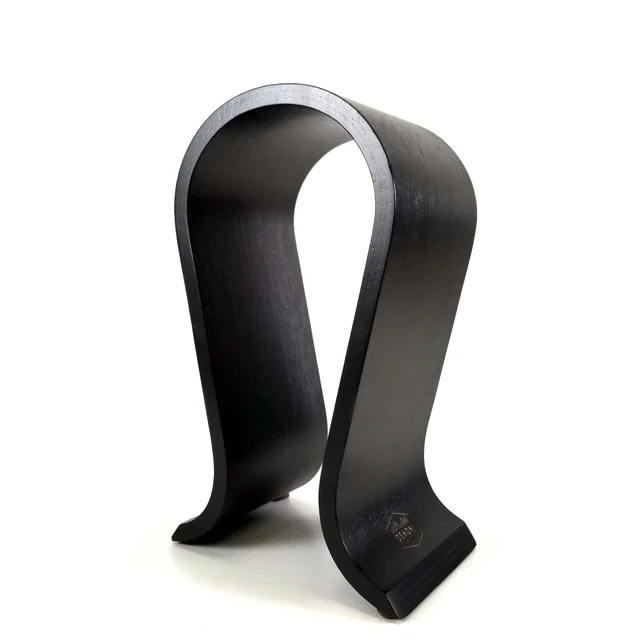
- Buy Dekoni Audio Dekoni Omega Headphone Stand A single piece of bent wood shaped into the widest, gentlest headband surface in this comparison. Amazon
- Buy ElevationLab AnchorPro Sticks under the desk lip and gives you a headphone home with a footprint of exactly zero.
- It depends Meze Audio Manta Headphone Stand A beautifully made sculptural stand that protects headphones no better than options costing a fraction as much.
- Skip Corsair ST100 RGB Premium Headset Stand Ports, lighting, and surround processing bolted to the worst headband geometry in this group. Amazon
What actually matters
- Contact width and curvature. The band surface should be broad and gently curved so the headband load spreads across inches. This is the one design choice that decides whether your padding is intact in three years, and it costs manufacturers almost nothing to get right.
- Base type: mass versus area. Weighted compact bases and splayed feet both prevent tipping, but on a crowded desk the dense compact base is the better trade because it buys stability with weight instead of surface area.
- Form factor. Desktop arches display headphones and protect them best, weighted posts split the difference, and under-desk mounts win outright on space while giving up a little contact width.
- Build and joints. One-piece bent wood, molded composite, or cast metal have nothing to loosen. Multi-part stands with a threaded post and separate base are the ones that wobble after a year of daily use.
- Load capacity and band clearance. Heavy closed-back and planar headphones are the models most likely to leave a mark, and thick gaming headsets can exceed the maximum band width some clamp-on and hanging mounts quote.
- Cable management. A channel, fin, or spare hook keeps a wired cable taut and out of your knees. It is a genuine convenience, unlike electronics, because it adds nothing that can break.
- Restraint on features. Treat integrated ports, amps, and lighting as a cost to justify rather than value to pay for. Every one is a component that can fail and leave you with a broken accessory instead of a working stand.
The specs, in plain English
Green flags vs red flags
Green flags
- A broad, gently curved top surface that a headband can rest across rather than balance on
- One-piece or molded construction with no threaded joint between post and base
- A dense compact base or splayed feet, so stability does not cost you desk area
- A soft or padded saddle facing, such as leather or foam, on top of a wide shape
- A cable channel, groove, or spare hook, with no electronics attached
- Clear surface guidance for adhesive mounts, including what materials it will not stick to
Red flags
- A narrow flat hook, thin post top, or single peg carrying the whole headphone weight
- A feature list that leads with USB ports, lighting zones, or virtual surround instead of shape
- A large squared base on a desk stand, which is stability paid for entirely in space
- Any function that depends on manufacturer control software staying installed and supported
- Screw-together post-and-base assembly with no mention of how the joint is secured
- Flagship pricing justified by materials and finish alone in a category where good shape is cheap
Who's who: the brands
- Dekoni Audio - Earpad and accessory specialist whose stands favor wide bent-wood arches, which is the geometry that actually protects headbands.
- ElevationLab - Desk accessory maker known for under-desk adhesive mounts, aimed at people whose desks are already full.
- Meze Audio - Boutique audio brand making sculptural cast zinc alloy stands with PU leather headrests, priced for setups where the stand is meant to match flagship headphones.
- Corsair - Gaming peripheral maker whose stands bundle USB ports, lighting, and audio processing onto a post, usually with a narrow hook at the top.
- Brainwavz - Budget-focused audio accessory brand offering simple hangers and desktop stands where the value depends entirely on which shape you pick.
How to read a listing without getting fooled
Ignore the bullet list and look at the product photo with the headphones on it. Find the point where the band meets the stand and ask how many inches of band are supported. If the answer is less than a couple of fingers wide, that stand will leave a mark on padded headbands no matter what else it does. Next, look at the base in the same photo: a small heavy base and a wide light base look similar in a spec sheet and behave very differently on a full desk, so check the stated footprint dimensions rather than trusting the render, which is usually shot on an empty surface. Then read the feature list backwards. Anything mechanical, like a cord channel, folding fin, or spare hook, is a real benefit that cannot fail. Anything electrical is a dependency you are agreeing to maintain. Finally, check whether the stand ships assembled or as a post that screws into a base, since the joint is where wobble comes from. Weight limits and band width limits, when quoted, are worth taking seriously for heavy planar and closed-back models and for thick gaming headsets.
How much should you spend?
This is a category where the good version is cheap and the expensive version is mostly material. A well-shaped bent-wood arch or a reinforced composite under-desk mount sits comfortably in the budget to mid-range band, and either one delivers the full protective benefit. The value sweet spot is a simple, wide, one-piece desktop stand, and under-desk hangers usually cost less than desktop stands while solving the space problem outright. Spending into premium territory buys you sculpted metal, leather facings, and finish quality you notice every time you touch it, which is a legitimate reason to buy but not a functional one. Spending into premium territory for built-in ports, lighting, and audio processing is the one genuinely poor trade here, because you pay more for a stand that holds headphones worse and adds software that can stop working. If the budget is tight, buy shape first and finish later. If money is not the constraint, a flagship stand is an ornament purchase, and it is worth being clear with yourself that is what you are buying.
Questions, answered
Can a headphone stand really damage my headphones?
The stand will not break anything, but a narrow cradle can permanently deform the headband. All the weight of the headphones rests on whatever the stand touches, and if that is a thin post or a small flat hook, the pressure lands on a patch smaller than a fingertip. Owners with padded headbands consistently report flattened foam, shiny wear marks, and visible dents after a year or two of nightly use. A wide contoured yoke spreads the same weight across several inches and the problem largely disappears. Heavy closed-back and planar models suffer most because they weigh the most.
Is an under-desk hanger as good as a desktop stand?
On space it is better, because it uses area you were never going to use anyway. On headband protection it is usually a small step down, since hanging arms are narrower than desktop yokes. The gap matters most for heavy headphones left hanging continuously for months. A sensible split is a desktop stand for the pair you care about and an under-desk mount for a second or lighter pair. Under-desk mounts also keep headphones somewhere they cannot be knocked over, and many include a cable channel.
Are stands with built-in USB hubs, amps, or lighting worth it?
Rarely. A stand is a passive object with one job, and adding ports, audio processing, and lighting turns it into a powered accessory with driver software, a permanently occupied port, and several new failure modes. Owner reports on these models cluster around the same complaints: lighting settings that reset, software conflicts after updates, and a stand that reverts to a plain hook once support ends. A separate hub you can replace independently is almost always the better purchase, and the built-in audio outputs generally are not an upgrade over a decent onboard output or a small external dongle.
Will the adhesive on an under-desk mount hold, and will it wreck my desk?
Industrial adhesive of the kind used on these mounts holds heavy over-ear headphones without trouble if you prepare the surface. It grips smooth finished laminate, glass, and sealed wood well, and grips textured, raw, or oily surfaces poorly. Clean with alcohol, press firmly, and let it cure before hanging anything. Removal is the real caveat: it comes off with patience and heat, but it can lift a thin veneer or an unsealed finish, and repositioning means buying a fresh adhesive kit.
Should I keep headphones on a stand or in their case?
A stand for daily use, a case for travel and long-term storage. A stand keeps the pads off the desk, protects them from knocks and spills, and lets air circulate, which is better for earpads than a sealed case. A case wins if you are storing headphones for months, moving them around, or living somewhere very dusty. Neither prevents earpad wear, which comes from skin oils and use rather than storage, and pads are a replaceable consumable on most decent headphones.
How much desk space does a stand actually need?
More than the render suggests. Product photos are shot on empty desks, so check the stated base dimensions and then account for the headphones themselves, which overhang the base by a few inches on each side. A weighted compact base is the smallest true footprint among desktop options, splayed-foot arches sit in the middle, and large squared bases with electronics take the biggest bite. If your desk is genuinely full, the under-desk mount is the only option with a footprint of zero.
Or jump to the head-to-head: Dekoni Audio Dekoni Omega Headphone Stand vs ElevationLab AnchorPro.