

Office & WFH
The Best Headphone Stands: 4 Compared (and One to Skip)
We compared four current desk stands and under-desk hangers on headband contact width, footprint, stability, and whether built-in electronics earn their place.
The short version
Buy the Dekoni Omega Headphone Stand. Its wide bent-wood arch spreads the headband load across inches rather than a single point, which is the one design choice that keeps padding from denting, and the one-piece build has no joint to work loose. Buy the ElevationLab AnchorPro instead, or as well, if your desk is full: it mounts underneath, manages the cable, and costs less than most desktop stands. The Meze Audio Manta is a lovely object at flagship pricing that protects headphones no better than far cheaper stands, so it depends entirely on whether you want the object. Skip the Corsair ST100 RGB, which pairs the narrowest headband hook here with USB ports, lighting, and audio processing that add software dependencies and failure points without addressing the actual problem. Best for: over-ear headphone owners who want their headband intact in three years and their desk usable today.
Our picks at a glance
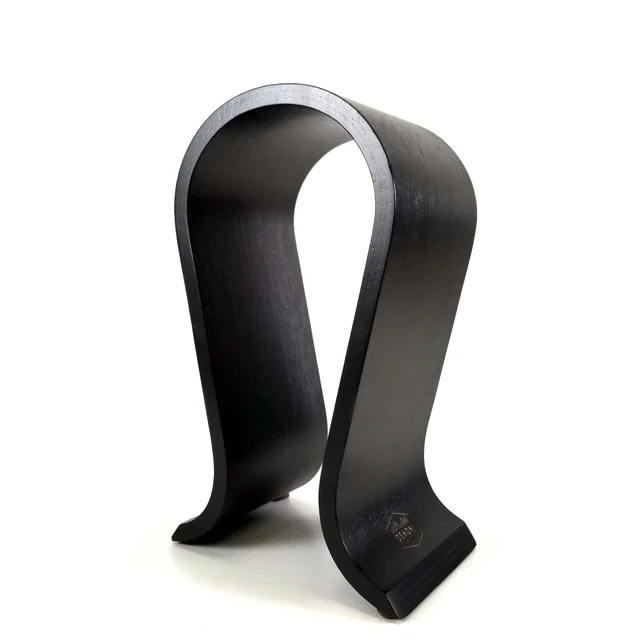
- Dekoni Audio Dekoni Omega Headphone Stand - Buy. A single piece of bent wood shaped into the widest, gentlest headband surface in this comparison.
- ElevationLab AnchorPro - Buy. Sticks under the desk lip and gives you a headphone home with a footprint of exactly zero.
- Meze Audio Manta Headphone Stand - It depends. A beautifully made sculptural stand that protects headphones no better than options costing a fraction as much.
- Corsair ST100 RGB Premium Headset Stand - Skip. Ports, lighting, and surround processing bolted to the worst headband geometry in this group.
The verdict in 30 seconds
What mattered most
- Headband contact
- Form factor
- Desk footprint
- Build
- Cable management
- Setup
Almost every headphone stand holds headphones. The difference is what it does to them over a year. Narrow cradles and thin hooks concentrate the full weight onto one small patch of the headband, and owners report flattened padding and permanent dents as a result. We looked at four current options across three form factors, and the verdicts come down to contact width, desk footprint, and how much unnecessary electronics each one carries.
A single piece of bent wood shaped into the widest, gentlest headband surface in this comparison.
Best for: Anyone with heavy or softly padded over-ear headphones who has room for a proper desktop stand and wants the headband protected.
- Broad contoured arch spreads headband weight across inches instead of a single point
- One-piece construction has no joint to loosen or wobble over time
- Splayed feet give a stable stance without a large slab base
- Matte black wood finish suits a work desk rather than a gaming rig
- Handles heavy over-ear and planar models without complaint
- Takes real desktop space, more than a slim post stand
- No cable channel, so a wired cord hangs loose unless you route it
- Zero adjustability, and only one colorway
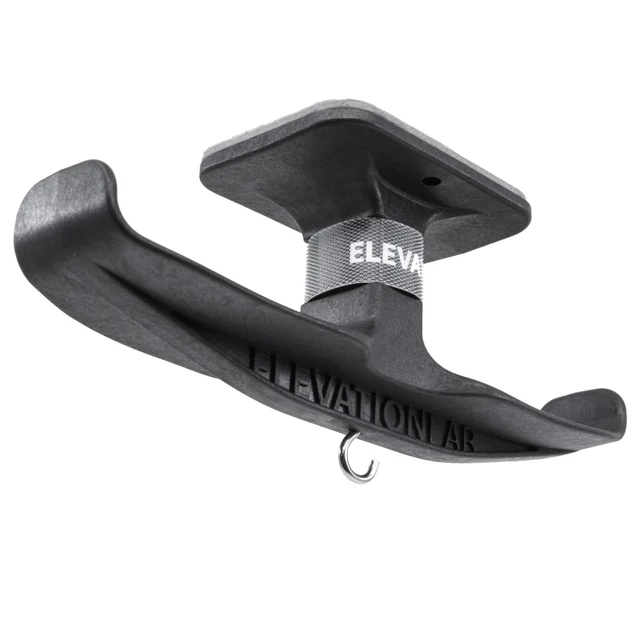
Sticks under the desk lip and gives you a headphone home with a footprint of exactly zero.
Best for: Crowded desks, and anyone who wants headphones stored out of the way rather than displayed.
- Uses space under the desk you were never going to use anyway
- Owners report it holds heavy audiophile headphones without flexing
- Mounts with an adhesive pad, so no screws or clamps are needed
- Built-in cord channel keeps a wired cable taut and clear of your legs
- Secondary hook takes keys, a lanyard, or a second cable
- Costs less than most desktop stands
- Hanging arm is narrower than a desktop yoke, so the contact patch is smaller
- Adhesive needs a smooth clean surface and grips textured or raw wood poorly
- Repositioning means buying a replacement adhesive kit
- Headphones are out of sight, which some people dislike
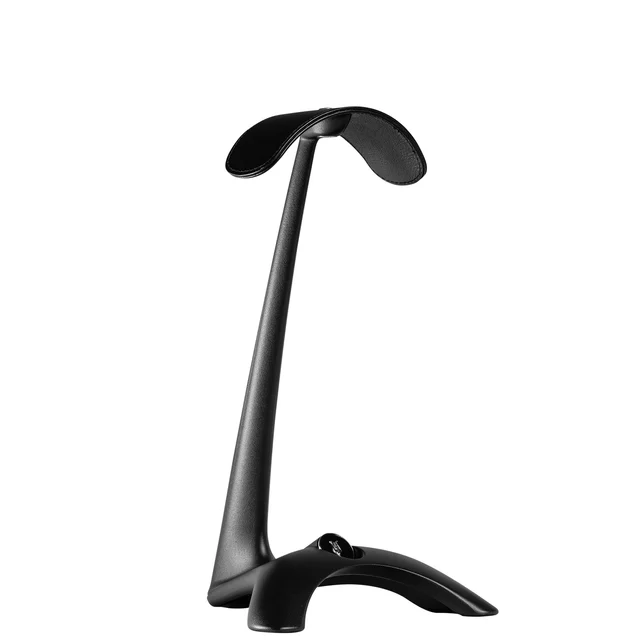
A beautifully made sculptural stand that protects headphones no better than options costing a fraction as much.
Best for: Listening setups where flagship headphones and a dedicated amplifier are already on the desk and the stand is meant to match them.
- Wide PU leather headrest is genuinely kind to headbands
- Weighted base stays planted without a large footprint
- Folding fin tucks a cable neatly out of sight
- Material and finish quality you notice every time you touch it
- Flagship pricing in a category where good shape costs very little
- No functional storage advantage over a well-shaped bent-wood arch
- Looks out of place next to mid-priced headphones
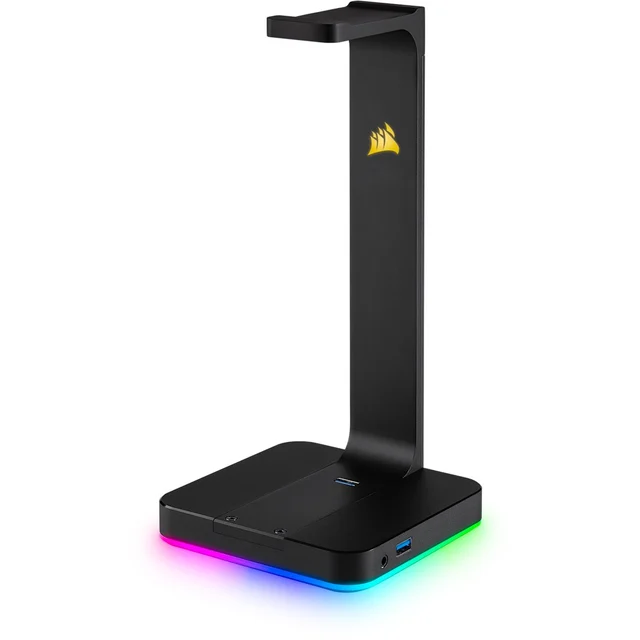
Ports, lighting, and surround processing bolted to the worst headband geometry in this group.
Best for: Gaming setups already committed to the manufacturer's lighting ecosystem, where the stand is meant to be a lit centerpiece.
- Solid aluminum post and a heavy, planted base
- Two USB Type-A ports are convenient if you are short on them
- Lighting integrates with the wider ecosystem if you already run it
- Narrow flat hook concentrates headband load exactly where dents form
- Lighting and surround processing depend on control software running
- Permanently occupies a USB port and adds a power dependency
- Large squared base takes a real bite out of desk space
- Built-in audio path is not an upgrade over a decent onboard output
- Among the most expensive options here
| Criteria | Dekoni Omega Headphone Stand Top pick | ElevationLab AnchorPro | Meze Audio Manta Headphone Stand | Corsair ST100 RGB Premium Headset Stand |
|---|---|---|---|---|
| Verdict | Buy it | Buy it | It depends | Skip it |
| Best for | Anyone with heavy or softly padded over-ear headphones who has room for a proper desktop stand and wants the headband protected. | Crowded desks, and anyone who wants headphones stored out of the way rather than displayed. | Listening setups where flagship headphones and a dedicated amplifier are already on the desk and the stand is meant to match them. | Gaming setups already committed to the manufacturer's lighting ecosystem, where the stand is meant to be a lit centerpiece. |
| Price tier | $ · mid-range | $ · budget | $$ · flagship | $$ · premium |
| Headband contact | Wide contoured arch, best in group | Moderate hanging arm, narrower than a desktop yoke | Wide PU leather headrest | Narrow flat hook, worst in group |
| Form factor | Desktop arch stand | Under-desk adhesive mount | Desktop post with weighted base | Desktop post with electronics base |
| Desk footprint | Moderate, splayed feet | None, mounts beneath the desk | Small, mass rather than area | Large squared base |
| Build | One-piece bent wood, no joints | Adhesive under-desk mount | Cast zinc alloy with PU leather headrest | Aluminum post on a rubberized base |
| Cable management | None | Cord channel plus a spare hook | Folding fin conceals the cable | Routed past the port cluster |
| Setup | Place it on the desk | Clean surface, stick, let it cure | Place it on the desk | Place it, then plug in and install software |
| Built-in electronics | None | None | None | USB ports, audio processing, lighting |
| Price tier | $ · mid-range | $ · budget | $$ · flagship | $$ · premium |
Which one is right for you?
- Anyone with heavy or softly padded over-ear headphones who has room for a proper desktop stand and wants the headband protected. Buy it Dekoni Audio Dekoni Omega Headphone Stand
- Crowded desks, and anyone who wants headphones stored out of the way rather than displayed. Buy it ElevationLab AnchorPro
- Listening setups where flagship headphones and a dedicated amplifier are already on the desk and the stand is meant to match them. It depends Meze Audio Manta Headphone Stand
- Gaming setups already committed to the manufacturer's lighting ecosystem, where the stand is meant to be a lit centerpiece. Skip it Corsair ST100 RGB Premium Headset Stand
How we judged the field
Headphone stands look interchangeable in listings, so we ignored the marketing and focused on the two things that actually change your experience: how the stand carries the headband, and how much desk it eats. We synthesized independent teardown-style write-ups, manufacturer specifications, and aggregated owner reports from long-term users who keep expensive headphones parked on a stand every night.
The criterion that mattered most was contact area. A stand with a narrow post or a thin flat hook concentrates the entire weight of the headphones onto roughly a fingertip-sized patch of the headband. Owners of padded headbands consistently report the same outcome after a year or two: a visible dent, flattened foam, or a shiny wear mark exactly where the stand touched. A wide contoured yoke spreads that same weight across several inches of the band and the problem largely disappears. Heavy planar and closed-back models make this worse, because they are the headphones most likely to weigh enough to leave a mark.
Second was the footprint tradeoff. Stability comes from mass or from a wide base, and on a crowded desk those are different costs. A heavy compact base buys you tip resistance without stealing space. A light wide base steals space instead. Under-desk mounts sidestep the question entirely by using surface you were never going to use anyway.
Third was restraint. Stands with built-in USB hubs, headphone amps, or lighting controllers add ports, cables, driver software, and a power dependency to a product whose job is to hold an object still. Every one of those is a component that can fail, and when it does you own a broken accessory instead of a working stand. We treated integrated electronics as a cost to be justified, not a feature to be rewarded.
We did not run our own lab. What follows is a synthesis of published testing, published specifications, and the patterns that show up repeatedly in owner reports.
The Omega is a single piece of bent wood formed into a broad arch, and that shape does almost all the work. The top of the arch is wide and gently curved, so a headband rests across a generous span rather than balancing on a point. This is exactly the geometry that protects padding, and it is why the Omega suits heavy headphones better than most stands that cost the same.
The one-piece construction has a second benefit that owners bring up often: there is nothing to loosen. Multi-part stands with a screwed post and a separate base develop a wobble over time as the joint works loose. The Omega has no joint. The splayed feet give it a stable stance without a slab base, and the finish is matte black wood rather than plastic, which reads better on a desk than most gaming-styled alternatives.
The compromises are real but mild. It occupies genuine desk space, more than a slim post stand does, and there is no cable channel, so a wired headphone cord will hang loose unless you route it yourself. It also has no adjustability whatsoever. What you see is the only configuration.
For most people with over-ear headphones they care about, this is the correct default. It solves the failure mode that actually damages headphones and it does not ask you to manage software.
The AnchorPro takes the opposite approach: it gives up the desk entirely. The mount adheres under the front lip of your desk with an adhesive pad, and the headphones hang below, out of sight and out of the way. If your desk is crowded, no desktop stand can compete with a footprint of zero.
Owner reports say it holds heavy audiophile headphones without flex or sag. A cord channel keeps a wired cable taut under the desk instead of dangling into your knees, and a secondary hook takes keys or a lanyard.
Two caveats. The hanging arm is narrower than a desktop yoke, so the contact patch is smaller than the Omega’s, which matters if your headband padding is soft and you leave heavy headphones hanging permanently. And adhesive mounting is a commitment. It sticks properly to smooth finished surfaces and poorly to raw wood, textured laminate, or anything oily, and repositioning means buying a replacement adhesive kit. Clean the surface properly and let it cure before loading it.
Buy this one if desk space is your binding constraint, or buy it alongside a desktop stand and let it hold the second pair.
The Manta is the nicest object in this comparison and the hardest to justify. It is a sculpted cast zinc alloy stand with a PU leather headrest at the top, a heavy base (Meze lists the stand at 1,588 g) that keeps it planted, and a folding fin that tucks a cable out of sight. The saddle is wide and soft, which puts it in the same protective category as the Omega, and the build quality is the sort you notice every time you touch it.
The problem is arithmetic. It sits at flagship pricing for a category where a well-shaped stand costs a fraction of that. Nothing about the Manta stores headphones better than a good bent-wood arch does. You are paying for material, finish, and design, and whether that is worth it depends entirely on what it is sitting next to. On a desk with flagship headphones and a dedicated amplifier, it fits. Next to a mid-priced closed-back pair, it looks like the most expensive thing in the setup by a wide margin.
Buy it if you want the object. Do not buy it expecting better headphone protection than a stand costing far less already delivers.
The ST100 is the clearest illustration of why feature lists mislead in this category. It packs in two USB Type-A ports, a headphone jack with virtual surround processing, and nine zones of software-controlled lighting. It also has the worst headband geometry here: a narrow flat hook at the top of an aluminum post, which concentrates the load exactly where you do not want it concentrated. Owners of padded headsets report the predictable dent.
The integrated electronics compound the problem rather than offsetting it. The lighting and the surround processing both depend on the manufacturer’s control software running, which means a stand that needs a driver stack and a permanently occupied USB port. Owners report the usual consequences: lighting profiles that reset, software conflicts after updates, and a stand that becomes an ordinary post with a hook the moment support lapses. The base is large and squared off, so it takes a real bite out of desk space, and the built-in audio path is not an upgrade over a decent motherboard or a separate dongle.
If you specifically want a lit centerpiece for a gaming setup and you already run the ecosystem software, the appeal is understandable. As a device for storing headphones without damaging them, it is the weakest option here and among the most expensive.
Dekoni Omega vs ElevationLab AnchorPro: which should you buy?
These two solve different problems, which is why they are both worth owning rather than a coin flip.
Pick the Omega if headband protection is your priority and you have room for it. The wide bent-wood arch is the best headband interface in this group, it never needs tightening, and it displays headphones rather than hiding them. Choose it if you own heavy over-ear models with soft padding, if you swap headphones often enough that reaching for them matters, or if the desk is the point.
Pick the AnchorPro if space is the constraint. It costs less, takes zero desktop area, keeps the cable managed under the desk, and puts the headphones somewhere they cannot be knocked over. Choose it if your desk is already full, if you want the headphones out of sight, or if you need a second parking spot for a pair you use less.
The narrower hanging arm is the AnchorPro’s only meaningful concession, and it matters mainly for very heavy headphones left hanging for months at a time. If that describes you, put the heavy pair on the Omega and hang the lighter pair underneath.
What to look for
- Contact width above everything. Look for a broad contoured yoke or saddle that spreads the headband load across inches, not a narrow post, thin hook, or single peg. This is the one design choice that decides whether your padding survives.
- Mass or base area, and know which you are paying for. A dense compact base gives stability without stealing desk space. A light wide base gives stability by taking space instead. On a crowded desk, weight is the better currency.
- One-piece or properly engineered joints. Screw-together post-and-base stands are the ones owners report developing a wobble. A continuous form has nothing to loosen.
- Treat built-in USB hubs and DACs as a negative. They add a power dependency, driver software, and failure points to a passive object. A separate hub you can replace is almost always the better buy.
- Check the adhesive surface before buying an under-desk mount. Industrial adhesive grips smooth finished surfaces well and textured or raw ones poorly. Clean thoroughly, press firmly, and let it cure before hanging anything.
- Measure your headband width if the stand quotes a limit. Clamp-on and under-desk hangers often specify a maximum band width, and thick gaming headsets can exceed it.
- Skip the earpad question. No stand prevents earpad wear, which comes from skin oils and use. A stand protects the headband, keeps the pads off the desk, and stops knocks. That is the whole job.
Our final take
The best headphone stand is the one that carries the headband across a wide, soft, curved surface and then gets out of the way. The Dekoni Omega does that better than anything else at sensible money, and its one-piece bent-wood construction means it will still be steady years from now. It is our pick for anyone with over-ear headphones worth protecting.
If your desk is the scarce resource, the ElevationLab AnchorPro is the smarter buy and the cheaper one. It costs less than most desktop stands, occupies no usable space, manages the cable, and puts the headphones somewhere they cannot be knocked over. Many people should own both.
The Meze Manta is a genuinely lovely object that protects headphones about as well as a stand costing a small fraction as much. That is a fine reason to buy it and a poor reason to recommend it broadly. The Corsair ST100 is the cautionary tale: a narrow hook where the padding meets the stand, wrapped in ports and lighting that add failure points without solving the problem the product exists to solve. Buy shape, not features.
Questions, answered
Can a headphone stand actually damage my headphones?
The stand itself will not break anything, but a narrow cradle can permanently deform the headband. All the weight of the headphones rests on whatever the stand touches, and if that is a thin post or a small flat hook, the pressure sits on a patch smaller than a fingertip. Owners of padded headbands report flattened foam, shiny wear marks, and visible dents after a year or two of nightly use. A wide contoured yoke spreads the same weight across several inches and the problem largely goes away. Heavy closed-back and planar models are the most affected because they weigh the most.
Is an under-desk hanger as good as a desktop stand?
For space, it is better, since it uses area you were never going to use. For headband protection it is usually a small step down, because hanging arms are narrower than desktop yokes. In practice the difference matters most for heavy headphones left hanging continuously for months. A reasonable approach is to use a desktop stand for the pair you care about and an under-desk mount for the second pair, or for a lightweight set.
Are stands with built-in USB hubs or headphone amps worth it?
Rarely. A stand is a passive object with one job, and adding ports, audio processing, and lighting turns it into a powered accessory with driver software, a permanently occupied USB port, and several new ways to fail. Owner reports on these models cluster around the same complaints: lighting settings that reset, software conflicts after updates, and a stand that reverts to a plain hook when support ends. A separate hub you can replace independently is almost always the better purchase, and the built-in audio outputs generally are not an upgrade over a decent onboard output or a small external dongle.
Will the adhesive on an under-desk mount hold heavy headphones, and will it damage my desk?
Industrial adhesive of the kind used on these mounts holds heavy over-ear headphones without trouble, provided you prepare the surface. It grips smooth finished laminate, glass, and sealed wood well, and grips textured, raw, or oily surfaces poorly. Clean with alcohol, press firmly, and leave it to cure before hanging anything. Removal is the real caveat: it comes off with patience and heat, but it can lift a thin veneer or an unsealed finish, and repositioning requires a fresh adhesive kit.
Should I store headphones on a stand or in their case?
A stand for daily use, a case for travel and long-term storage. A stand keeps the pads off the desk, protects them from knocks and spills, and lets air circulate, which is better for earpads than a sealed case. A case is better if you are storing headphones for months, moving them around, or living somewhere very dusty. Neither prevents earpad wear, which comes from skin oils and use rather than storage, and pads are a replaceable consumable on most decent headphones.
Deciding between the top two? See our head-to-head: Dekoni Audio Dekoni Omega Headphone Stand vs ElevationLab AnchorPro.
More Office & WFH reviews
 The Best Home Printers: 4 Compared (and One to Skip)
  The Best Keyboard Switches: 4 Compared (and One to Skip)
  The Best Under-Desk Keyboard Trays: 4 Compared (and One to Skip)
  The Best Keycap Sets: 4 Compared (and One to Skip)
  The Best KVM Switches for Multi-Computer Desks: 4 Compared (and One to Skip)
  The Best Label Printers: 4 Compared (and One to Skip)