

Office & WFH
The Best Home Printers: 4 Compared (and One to Skip)
We compared four current all-in-one inkjets on running cost, print quality, features, and connection reliability for real home use.
The short version
For most homes we'd buy the Epson EcoTank ET-4950: its refillable tanks make cheap-per-page printing the default and there's no subscription to enroll in, though you pay more upfront. If you'd rather spend less today, the Brother MFC-J4355DW is the value play - it has the same office features, ships with high-yield cartridges, and costs far less upfront. The Canon PIXMA TR8620a earns its place only for photo-leaning, lower-volume homes, since cartridge costs climb with heavy use. We'd skip the HP OfficeJet Pro 9125e for most buyers because its dynamic security limits your cartridge choices and its best pricing depends on an ongoing subscription. Best for: buyers who want low long-term ink cost without supply lock-in.
Our picks at a glance
- Epson EcoTank ET-4950 - Buy. A cartridge-free tank that makes cheap-per-page printing the default, not a subscription.
- Brother MFC-J4355DW - Buy. The low-cost document workhorse: full office features and high-yield INKvestment cartridges for far less upfront.
- Canon PIXMA TR8620a - It depends. The best-looking prints of the bunch - as long as you don't print in high volume.
- HP OfficeJet Pro 9125e - Skip. Fast and sharp, but the supply lock-in and subscription math undercut it for most homes.
The verdict in 30 seconds
What mattered most
- Ink system
- Running cost per page
- Office features (ADF, duplex, fax)
- Photo quality
- Connection reliability (owner reports)
- Supply freedom
An all-in-one inkjet still earns its keep at home: print, scan, copy, and usually fax from one box. But the sticker price hides the real story, which is what the ink costs you over years and whether the machine locks you into buying supplies its way. We weighed a cartridge-free tank printer, a hybrid tank, a photo-friendly cartridge model, and a fast office unit. Two are easy buys, one suits a specific household, and one we'd steer most people away from.
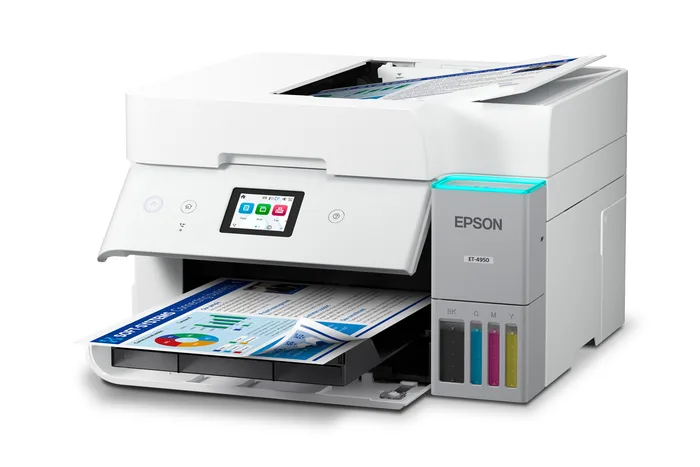
A cartridge-free tank that makes cheap-per-page printing the default, not a subscription.
Best for: Households and home offices that print enough to care about long-term ink cost and want zero subscription strings.
- Refillable ink tanks cut running cost dramatically versus cartridges, and Epson rates the bottles in the box at up to 3 years of ink at about 150 pages a month, or up to 6,600 black and 5,500 color pages
- Full feature set: auto document feeder, auto two-sided printing, a 250-sheet tray, 2.4-inch color display, Ethernet, and fax
- Refills come in keyed EcoFit bottles with no subscription or enrollment required
- Highest upfront price of the group, so the savings take time to pay back
- Epson's own fine print says included-bottle yields are lower than replacement bottles because part of the ink goes to initial setup
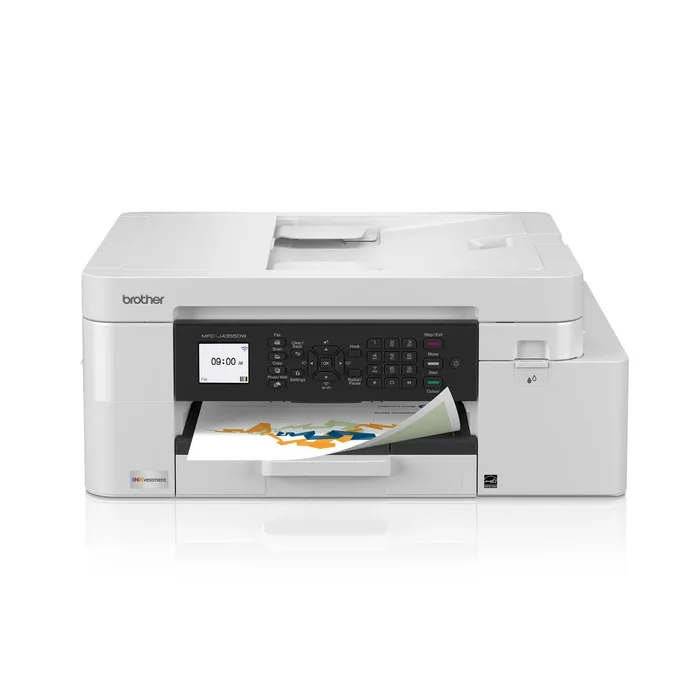
The low-cost document workhorse: full office features and high-yield INKvestment cartridges for far less upfront.
Best for: Anyone who mostly prints documents and wants the least fuss and lowest cost without a big upfront outlay.
- Ships with one 1,800-page black cartridge and one 750-page cartridge for each color, per Brother
- Auto two-sided printing, a 20-sheet single-sided document feeder, a 150-sheet tray and fax
- Dual-band Wi-Fi, Wi-Fi Direct and a 2-year limited warranty
- Small 1.8-inch color display feels dated next to rivals
- Still a cartridge printer, so it cannot match a tank's cost per page
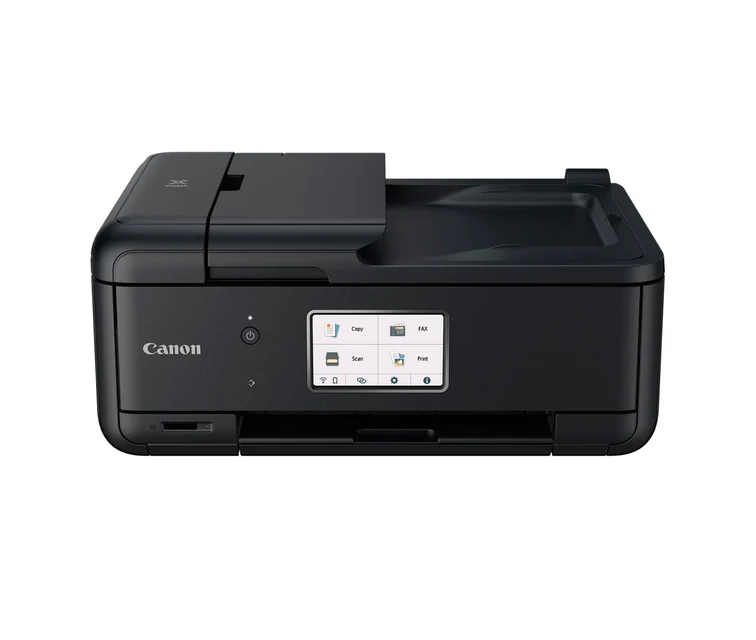
The best-looking prints of the bunch - as long as you don't print in high volume.
Best for: Lower-to-moderate volume homes that value photo quality and a full feature set over rock-bottom running cost.
- Independent testing and owners praise its photo and glossy-paper output for the price
- Well-equipped: touchscreen, document feeder, fax, dual paper feeding, and an SD card slot
- Reliable wireless connection in owner reports
- Cartridge-based, so cost per page climbs quickly if you print a lot
- Small individual cartridges mean more frequent replacements than the tank printers
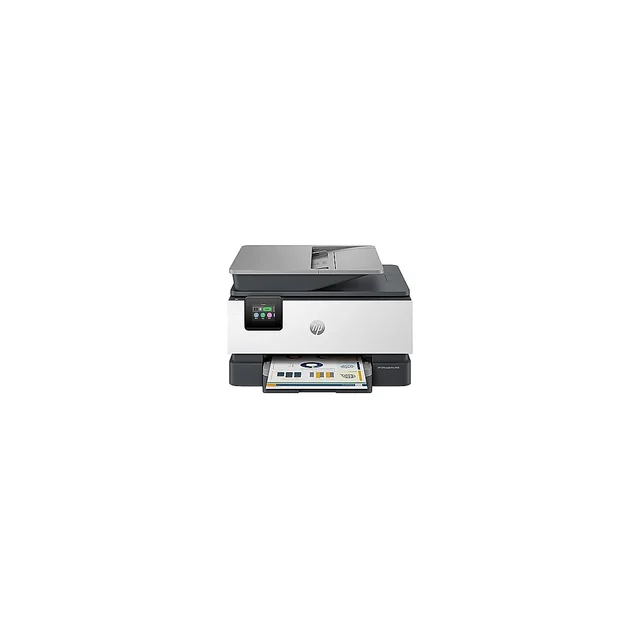
Fast and sharp, but the supply lock-in and subscription math undercut it for most homes.
Best for: Buyers who genuinely want a managed ink subscription and won't mind being tied to HP supplies.
- Quick, with crisp text and a solid build
- Full office feature set: document feeder, auto two-sided printing, fax, and a touchscreen
- Dynamic security firmware is designed to block non-HP cartridges, limiting your supply choices
- Its best-case ink cost leans on an ongoing Instant Ink subscription, and owners cite connectivity quirks
| Criteria | Epson EcoTank ET-4950 Top pick Buy it Buy | Brother MFC-J4355DW Buy it Buy | Canon PIXMA TR8620a It depends Buy | HP OfficeJet Pro 9125e Skip it Buy |
|---|---|---|---|---|
| Best for | Households and home offices that print enough to care about long-term ink cost and want zero subscription strings. | Anyone who mostly prints documents and wants the least fuss and lowest cost without a big upfront outlay. | Lower-to-moderate volume homes that value photo quality and a full feature set over rock-bottom running cost. | Buyers who genuinely want a managed ink subscription and won't mind being tied to HP supplies. |
| Price tier | $$$ · premium | $$ · mid-range | $$ · mid-range | $$ · mid-range |
| Ink system | Refillable tanks (cartridge-free) | High-yield INKvestment cartridges | Standard cartridges | Standard cartridges + subscription |
| Running cost per page | Lowest | Low | Moderate to high | Low with subscription, else high |
| Office features (ADF, duplex, fax) | All included | All included | All included | All included |
| Photo quality | Good | Fair | Best in group | Good |
| Connection reliability (owner reports) | Mostly good, some drops | New model, short owner record | Strong | Mixed |
| Supply freedom | Keyed EcoFit bottles, no subscription | Brother INKvestment cartridges | Open - standard cartridges | Restricted by dynamic security |
| Upfront cost vs long-run value | High cost, best long-run value | Low cost, strong value | Moderate, volume-dependent | Moderate, subscription-dependent |
| Price tier | $$$ · premium | $$ · mid-range | $$ · mid-range | $$ · mid-range |
Which one is right for you?
- Households and home offices that print enough to care about long-term ink cost and want zero subscription strings. Buy it Epson EcoTank ET-4950
- Anyone who mostly prints documents and wants the least fuss and lowest cost without a big upfront outlay. Buy it Brother MFC-J4355DW
- Lower-to-moderate volume homes that value photo quality and a full feature set over rock-bottom running cost. It depends Canon PIXMA TR8620a
- Buyers who genuinely want a managed ink subscription and won't mind being tied to HP supplies. Skip it HP OfficeJet Pro 9125e
How we judged the field
We don’t run our own print lab. Instead we synthesize independent testing and a large volume of owner reports, then weight the factors that actually shape years of ownership rather than a spec sheet. Four things did most of the deciding.
First, total ink cost, not the purchase price - the cheapest printer to buy is often the most expensive to feed. Second, supply freedom: whether you can buy ink from anyone or are steered toward one brand’s cartridges or a subscription. Third, the everyday feature set - an automatic document feeder, two-sided printing, a usable screen, and fax still matter in a home office. Fourth, reliability and connection stability, because the most common owner complaint about any inkjet is a dropped Wi-Fi link or a clogged head, not print quality. All four machines here print, scan, copy, and fax; the differences are in how they charge you and how little they get in your way.
Epson EcoTank ET-4950
Buy itThis is the one that changes the math. Instead of cartridges, it has refillable tanks you fill from bottles, and Epson rates the bottles in the box at up to 3 years of ink at about 150 pages a month, or up to 6,600 black and 5,500 color pages, with replacement bottles it says save up to 90% against cartridges. You also get the full office kit: an automatic document feeder, auto two-sided printing, a 250-sheet tray, a 2.4-inch color display, Ethernet, and fax, at 18 black and 9 color ISO pages per minute. There’s no plan to enroll in; refills come in keyed EcoFit bottles that only fit the right tank. The catch is the highest upfront price of the group, so it rewards people who print enough to earn the savings back, and Epson’s own fine print notes that the included bottles yield less than replacements because some ink goes to setup. For most homes that print regularly, it’s the soundest long-term buy here.
Brother MFC-J4355DW
Buy itIf the EcoTank’s upfront cost gives you pause, this is the value answer, and it is the model Brother now points buyers to from the discontinued MFC-J4335DW. It uses INKvestment cartridges, which Brother says hold more ink than traditional ones, and ships with one 1,800-page black cartridge and one 750-page cartridge for each color. You get the full office set: auto two-sided printing, a 20-sheet single-sided document feeder, a 150-sheet tray, a manual feed slot and fax, plus dual-band Wi-Fi and Wi-Fi Direct, backed by a 2-year limited warranty. Compromises are modest: the small 1.8-inch color display feels dated, it is still a cartridge printer so it cannot match a tank on cost per page, and as a newer model it has a shorter owner record than its predecessor. As a document-first workhorse at a friendly price, it’s hard to argue with.
Canon PIXMA TR8620a
It dependsThe Canon is the picture-maker of the group. Reviewers and owners single out its photo and glossy-paper output as the best here, and it’s generously equipped with a touchscreen, document feeder, fax, dual paper feeding, and an SD card slot, with a reliable wireless connection to boot. The reason it’s a conditional pick rather than a flat buy is running cost: it uses standard cartridges, and smaller individual tanks mean the cost per page - and the frequency of buying ink - climbs if you print in volume. Match it to the right household and it’s excellent; use it as a high-volume document printer and the ink bills will nag.
HP OfficeJet Pro 9125e
Skip itOn raw performance the HP is easy to like: it’s quick, text is crisp, and the build is solid, with the same document feeder, duplex, and fax as the rest. Our hesitation is about ownership, not output. Its firmware uses dynamic security designed to block cartridges that lack an approved HP chip, which narrows your ink choices and has, on HP printers generally, refused cartridges after updates. And its most attractive ink cost leans on staying enrolled in an ongoing subscription rather than simply buying supplies as needed; owner reports also cite connectivity quirks. If a managed subscription is exactly what you want, it can work - but for most people the strings attached make it the one to pass on.
Epson EcoTank ET-4950 vs Brother MFC-J4355DW: which should you buy?
These are the two we’d hand most people, and the choice comes down to how you’d rather pay. The Epson EcoTank ET-4950 costs the most upfront and gives back the lowest running cost of anything here, with bottled ink, no subscription and Ethernet. The Brother MFC-J4355DW flips it: spend far less today, get the same document feeder, duplex printing and fax, and buy high-yield cartridges as you go.
Buy the Epson if you print enough that ink cost dominates the decision and you want the lowest possible cost per page for years, with no subscription. Buy the Brother if you want to spend less now and mostly print documents where a bigger screen and top photo quality don’t matter. Neither is a wrong answer - the Epson wins on long-run economics, the Brother on upfront value and simplicity.
What to look for
- Cost per page, not sticker price - a cheap printer with pricey ink is the classic trap; tank systems win the long game.
- Supply freedom - check whether the printer restricts third-party ink or pushes a subscription before you commit.
- An automatic document feeder - the most-used extra in a home office for multi-page scans and copies.
- Auto two-sided printing - saves paper and hassle; all four here include it.
- Connection reliability - read owner reports for Wi-Fi complaints, and plan to keep the printer near your router.
- Photo needs - if you print images often, prioritize a model rated for photo output rather than one tuned only for documents.
Our final take
Buy the Epson EcoTank ET-4950 if you print regularly and want the lowest long-term ink cost with no subscription - it’s the best all-around value once you look past the higher purchase price. If you’d rather keep the upfront spend low, the Brother MFC-J4355DW is the smart choice that keeps the office features for less. Choose the Canon PIXMA TR8620a only if photos matter and your volume is modest. And unless you specifically want a managed ink plan, we’d skip the HP OfficeJet Pro 9125e - it prints well, but the supply restrictions and subscription-dependent pricing make it the weakest fit for most homes.
Questions, answered
Are ink-tank printers really cheaper than cartridge ones?
Over time, usually yes. Tank models like the Epson EcoTank use bottled ink that costs far less per page than cartridges, and Brother's INKvestment cartridges hold more ink than standard ones. The tradeoff is a higher purchase price, so the savings depend on how much you print - heavier printers reach payback faster.
What is 'dynamic security' and why does it matter?
It's firmware, used on the HP model here, that is designed to reject cartridges without an approved HP chip. Practically, it limits your ability to shop around for cheaper third-party ink and can cause a working printer to refuse a cartridge after an update. If supply freedom matters to you, favor the tank printers or a cartridge model without those restrictions.
Do I still need one that faxes and has a document feeder?
All four include an automatic document feeder and fax, which is handy for scanning or copying multi-page stacks even if you never send a fax. If you only ever print single pages, you can drop to a simpler model, but the feeder is one of the most-used extras in a home office.
Which of these is best for printing photos?
The Canon PIXMA TR8620a gets the strongest marks for photo and glossy-paper output in independent testing and owner reports. The others print perfectly acceptable photos, but Canon is the one to prioritize if images matter more than document volume.
How do I keep any inkjet from clogging or dropping off Wi-Fi?
Print at least a little every week or two so the heads don't dry out - tank printers especially benefit from occasional use. For connectivity, place the printer within solid range of your router and keep its firmware current; several owners trace drops to weak signal or skipped updates rather than a faulty unit.
Deciding between the top two? See our head-to-head: Epson EcoTank ET-4950 vs Brother MFC-J4355DW.
More in Office & WFH
Home Printers, Explained Plain-English guide → Epson EcoTank ET-4950 vs Brother MFC-J4355DW Head-to-head →  The Best Keyboard Switches: 4 Compared (and One to Skip)
  The Best Under-Desk Keyboard Trays: 4 Compared (and One to Skip)
  The Best Keycap Sets: 4 Compared (and One to Skip)
  The Best KVM Switches for Multi-Computer Desks: 4 Compared (and One to Skip)