

Office & WFH
The Best Under-Desk Keyboard Trays: 4 Compared (and One to Skip)
Four under-desk keyboard trays compared on mounting method, negative tilt, track length, platform stiffness, and long-term owner reports.
The short version
Buy the 3M Adjustable Keyboard Tray AKT90LE if your desk has a flat, clear underside about 23 inches deep. It is the only tray here with a printed height and tilt scale, its wood platform does not bounce, and the arm carries a lifetime warranty. Buy the HUANUO Under Desk Keyboard Tray if you have an electric standing desk with a cross beam in the way, because its bracket kit is the only thing in this group that will physically mount, and its 22 degree negative tilt is the steepest on offer. Consider the VIVO clamp-on only if drilling is genuinely impossible, and go in knowing it sits flat and that owners report clamps working loose. Skip the Kensington drawer entirely: it asks for holes in your desk and adjusts in no direction. Best for: anyone who has measured the underside of their desk first and wants real negative tilt rather than just a lower keyboard.
Our picks at a glance
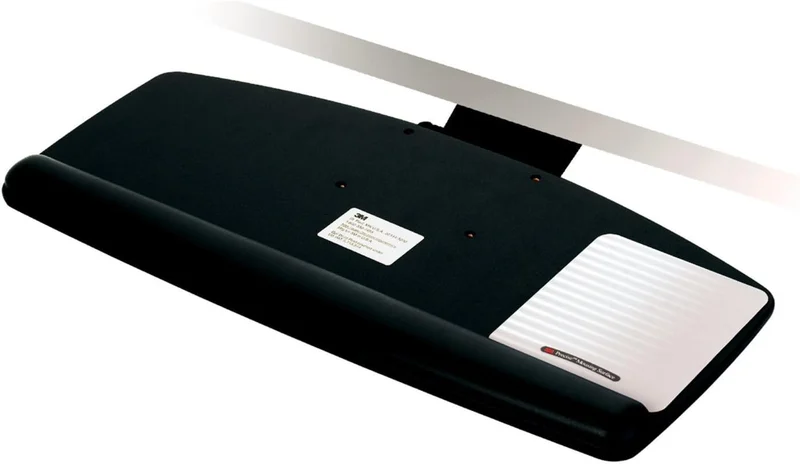
- 3M Adjustable Keyboard Tray AKT90LE - Buy. The reference under-desk tray: a lift-to-set arm with printed height and tilt scales, 15 degrees of negative tilt, and a 23 inch track that swallows it whole.
- HUANUO Under Desk Keyboard Tray for Flat Bottom and Cross Beam Desks - Buy. The tray that mounts to a standing desk frame, with bracket hardware for cross beams and more negative tilt than anything else here.
- VIVO Large Clamp-on Keyboard and Mouse Tray (MOUNT-KB05E) - It depends. The no-drilling answer for rentals and desks you will not put screws into, as long as you accept a tray that only sits flat.
- Kensington Underdesk Basic Keyboard Drawer (K60009US) - Skip. A plastic drawer that still wants holes in your desk but adjusts in no direction and leaves your mouse up on the desktop.
The verdict in 30 seconds
What mattered most
- Mounting method
- Negative tilt
- Height adjustment
- Track length and stow
- Platform size and material
- Mouse support
An under-desk keyboard tray lives or dies on two things: whether it can physically mount to your desk, and whether it tilts. Screw-in trays need a flat, unobstructed underside; clamp-on trays skip the drilling and give up rigidity. We compared four current trays and found two worth buying, one worth considering only if drilling is impossible, and one that takes the holes in your desk without giving anything back.
The reference under-desk tray: a lift-to-set arm with printed height and tilt scales, 15 degrees of negative tilt, and a 23 inch track that swallows it whole.
Best for: Anyone with a conventional desk that has a flat, clear underside who wants to set a tray once and forget about it.
- Tilt runs 10 degrees up to 15 degrees down, with a printed scale so you can find a position again
- Height adjusts roughly 4.5 inches above to 6 inches below the mounting surface by lifting the front edge
- Wood platform at 25.5 by 12 inches resists the bounce that plagues thin plastic trays
- 23 inch track lets the tray stow completely under the desk, and the platform swivels 360 degrees
- Gel wrist rest and a mousing surface that mounts on either side, plus a lifetime warranty on the arm
- Needs about 23 inches of unobstructed depth under the desk, which rules out shallow desks and most cross-beam standing desk frames
- Assembly instructions draw steady criticism for being vague, and the install is a genuine project
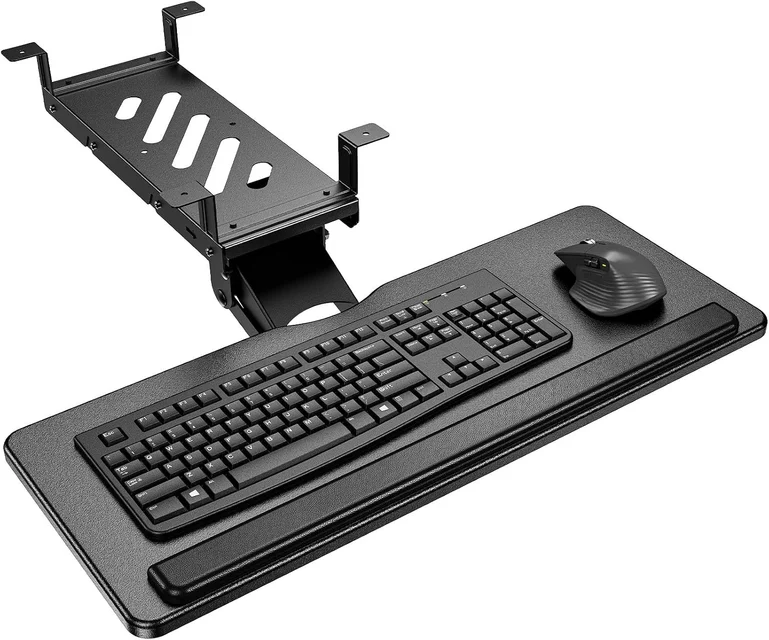
The tray that mounts to a standing desk frame, with bracket hardware for cross beams and more negative tilt than anything else here.
Best for: Sit-stand desk owners whose frame cross beam blocks every conventional tray, and anyone who needs a steep negative angle.
- Includes two brackets that bridge a cross beam up to 2 inches tall, so electric standing desks are no longer a dealbreaker
- Tilt goes 6 degrees up to 22 degrees down, the steepest negative angle in this group
- 6.3 inches of height travel plus 180 degrees of swivel covers both seated and standing positions
- Metal roller slide rated by the manufacturer for 20,000 cycles, and early owner reports back the build quality
- Fit rules are strict: desktop thicker than 0.6 inches, wood, plywood or particle board only, and 35 inches of clear width for full swivel
- The 25 by 9.84 inch platform is shallower than the 3M board, so a keyboard with a bulky wrist rest plus a mouse gets tight
- Recent listing, so the long-term owner record is still thin and reports split on how smoothly the slide runs
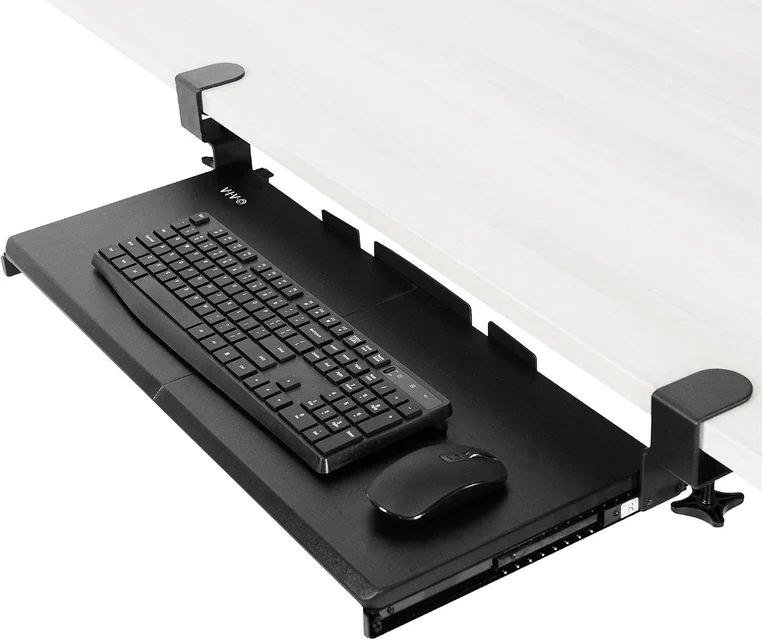
The no-drilling answer for rentals and desks you will not put screws into, as long as you accept a tray that only sits flat.
Best for: Renters and anyone who cannot drill, who mainly wants the keyboard off the desktop rather than a change in typing angle.
- C-clamps install in minutes and leave no holes, which makes it the practical choice for rented or borrowed desks
- Largest platform in this group at 26.8 by 11 inches, with room for a full size keyboard and a mouse side by side
- Steel track feels solid on day one and the tray extends 8.5 inches from the desk edge
- No tilt and no height adjustment, so it lowers your keyboard without improving your wrist angle
- Needs a desktop 0.5 to 1.25 inches thick and 32.5 inches of completely clear span, which excludes most desks with a pedestal or side drawer
- Durability is the weakest theme in owner reports, with clamps working loose and mounting screws backing out over time
- Clearance under the desk is tight, so check fit before pairing it with a tall sculpted keyboard or a vertical mouse
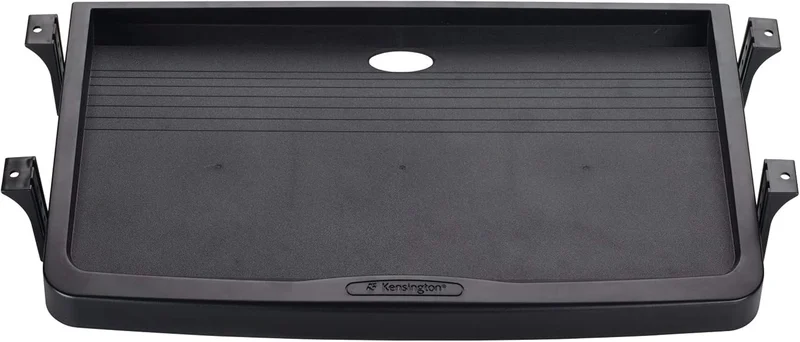
A plastic drawer that still wants holes in your desk but adjusts in no direction and leaves your mouse up on the desktop.
Best for: Almost nobody. Consider it only if hiding a keyboard is the entire goal and comfort is not part of the decision.
- Cheap, simple, and it does get a keyboard out of sight when you are not typing
- Mounts 2 to 3 inches below the desk, with the height picked at install time
- The molded lip keeps a full size keyboard from sliding around
- No tilt at all and no adjustment after installation, so it costs you desk height and returns nothing ergonomically
- No dedicated mouse area, and the most common owner complaint is that a mouse simply does not fit alongside the keyboard
- Durability and stability both skew negative in owner reports, with flimsy plastic and drawers that slide out crooked
- You still have to drill into your desk, taking on all the commitment of a real tray for none of the benefit
| Criteria | 3M Adjustable Keyboard Tray AKT90LE Top pick | HUANUO Under Desk Keyboard Tray for Flat Bottom and Cross Beam Desks | VIVO Large Clamp-on Keyboard and Mouse Tray (MOUNT-KB05E) | Kensington Underdesk Basic Keyboard Drawer (K60009US) |
|---|---|---|---|---|
| Verdict | Buy it | Buy it | It depends | Skip it |
| Best for | Anyone with a conventional desk that has a flat, clear underside who wants to set a tray once and forget about it. | Sit-stand desk owners whose frame cross beam blocks every conventional tray, and anyone who needs a steep negative angle. | Renters and anyone who cannot drill, who mainly wants the keyboard off the desktop rather than a change in typing angle. | Almost nobody. Consider it only if hiding a keyboard is the entire goal and comfort is not part of the decision. |
| Price tier | $$ · premium | $ · mid-range | $ · budget | $ · budget |
| Mounting method | Screws into a flat, solid underside | Screws to a flat underside or over a cross beam with included brackets | C-clamps, no drilling required | Screws into a flat, solid underside |
| Negative tilt | Yes, to 15 degrees down (10 degrees up) | Yes, to 22 degrees down (6 degrees up) | None, the platform sits flat | None, the platform sits flat |
| Height adjustment | About 4.5 inches up to 6 inches below the mounting surface | 6.3 inches of travel | None once clamped | Fixed 2 to 3 inches below the desk, no adjustment after install |
| Track length and stow | 23 inch track, stows completely under the desk | Roller slide, needs about 2.56 inches of edge clearance to retract fully | 12.3 inch track, extends 8.5 inches from the edge | Short drawer slide, protrudes at the desk edge |
| Platform size and material | 25.5 by 12 inches, wood, with gel wrist rest | 25 by 9.84 inches, with wrist rest pad | 26.8 by 11 inches, flat board | 20.4 by 12 inches, molded plastic |
| Mouse support | Dedicated mousing surface that mounts left or right | Space beside the keyboard on the tray | Space beside the keyboard on the same board | No dedicated mouse area, owners report a mouse does not fit |
| Desk requirements | About 23 inches of unobstructed depth, flat solid underside | Thicker than 0.6 inches, wood or particle board, 35 inches wide for full swivel | Top 0.5 to 1.25 inches thick, 32.5 inches of clear span | Flat underside clear of drawers and aprons |
| Price tier | $$ · premium | $ · mid-range | $ · budget | $ · budget |
Which one is right for you?
- Anyone with a conventional desk that has a flat, clear underside who wants to set a tray once and forget about it. Buy it 3M Adjustable Keyboard Tray AKT90LE
- Sit-stand desk owners whose frame cross beam blocks every conventional tray, and anyone who needs a steep negative angle. Buy it HUANUO Under Desk Keyboard Tray for Flat Bottom and Cross Beam Desks
- Renters and anyone who cannot drill, who mainly wants the keyboard off the desktop rather than a change in typing angle. It depends VIVO Large Clamp-on Keyboard and Mouse Tray (MOUNT-KB05E)
- Almost nobody. Consider it only if hiding a keyboard is the entire goal and comfort is not part of the decision. Skip it Kensington Underdesk Basic Keyboard Drawer (K60009US)
How we judged the field
We do not run a lab. What we do is read across independent testing, manufacturer specifications, and the pattern of aggregated owner reports for each tray, then weight the things that decide whether a tray is worth installing at all.
Four criteria mattered most.
Mounting. This is the whole decision. A screw-mounted tray needs a flat, solid underside with enough thickness to take wood screws, and it needs that area clear of drawers, aprons, and standing desk cross beams. If your desk fails that test, half the good trays on the market are simply not options for you. Clamp-on trays skip the drilling, and they pay for it in rigidity.
Negative tilt. A tray that only sits flat has moved your keyboard down a few inches and taken away the desk surface underneath it. The ergonomic point of a tray is tilting the front edge up and the back edge down so your wrists stay neutral instead of extending upward. Trays without tilt are furniture, not ergonomics.
Track length. A tray on a short track sticks out under the desk edge when stowed, which means you bark your knees on it and lose the desktop above it anyway. A long track lets the platform disappear.
Owner reports on stability and durability over time. Every tray feels fine on day one. The reports that matter are the ones from six months in: does it bounce while you type, do the clamps creep, do the mounting screws back out.
This is the tray the ergonomics world has quietly standardized on, and the reason is the arm rather than the platform. The mechanism has a printed height scale and a printed tilt scale, so you can set a specific position and get back to it. Height runs about 4.5 inches above the mounting surface to 6 inches below it, and tilt runs from 10 degrees up to 15 degrees down. That 15 degrees of negative tilt is the number that justifies buying a tray in the first place.
Adjustment is deliberately low friction: lift the front edge of the platform to change height and it locks where you release it, then turn a knob to set tilt. No levers to fumble for under the desk. The platform swivels 360 degrees, and the 23 inch track lets the whole assembly stow completely out of the way when you want the desk back.
The platform itself is a 25.5 by 12 inch wood board rather than a thin plastic sheet, which is why owners consistently describe it as not bouncing while they type. Sturdiness is by some distance the strongest theme in owner reports. It ships with a leatherette gel wrist rest and a mousing surface that mounts on either side, so left handed users are not stuck. The arm carries a lifetime warranty, which is the kind of backing that tells you where the manufacturer thinks the failure risk is.
The catch is size. A 23 inch track needs 23 inches of unobstructed depth under your desk, and owners with shallow desks report the tray does not tuck all the way in. Installation instructions draw regular criticism for being vague, so budget an afternoon and pre-drill your holes.
The problem this one solves is specific and common: electric standing desks almost all have a steel cross beam running under the desktop exactly where a keyboard tray wants to mount. Most screw-in trays simply cannot be installed on one. This tray ships with two purpose-built brackets that bridge a cross beam up to 2 inches tall, so a sit-stand frame stops being a dealbreaker.
The adjustment range is genuinely good for the money. You get 6.3 inches of height travel, 180 degrees of swivel, and tilt from 6 degrees up to 22 degrees down. That is more negative tilt than the 3M offers, which matters if you type with a tall mechanical keyboard and need to steepen the angle. The slide uses a metal roller track the manufacturer rates for 20,000 cycles, and early owner reports back that up on build quality and installation.
Read the fit requirements before you order, because they are strict. Your desktop needs to be thicker than 0.6 inches so the screws stay hidden, the material has to be wood, plywood, or particle board, and full 360 degree swivel wants at least 35 inches of clear width underneath. You also need to leave about 2.56 inches of space at the desk edge for the tray to retract fully.
The reservations are real but modest. The 25 by 9.84 inch platform is shallower than the 3M board, so a keyboard with a bulky attached wrist rest plus a mouse gets tight. The listing is recent, so the long-term owner record is thinner than we would like. And owners split on how smoothly the slide runs, which is the usual story with roller tracks that need a break-in period.
This is the tray you buy when drilling is off the table: a rental, a desk you do not own, a glass or laminate top you will not put screws into. Two C-clamps grip the desktop and the platform slides on a steel track. Nothing gets damaged, and installation takes minutes rather than an afternoon.
The platform is the largest here at 26.8 by 11 inches, which is enough for a full size keyboard and a mouse side by side. Capacity is 11 pounds, the track is 12.3 inches, and the tray extends 8.5 inches from the desk edge.
Now the compromises, and they are the ones the category always makes. The tray sits flat. There is no tilt and no height adjustment, so you are lowering your keyboard a couple of inches and nothing more. The clamps need a desktop between 0.5 and 1.25 inches thick and 32.5 inches of completely clear span, which rules out most desks with a pedestal or a side drawer. Clearance is tight, so check the fit before pairing it with a tall sculpted keyboard or a vertical mouse.
Owner reports are where the picture sharpens. On stability, owner opinion splits, with a lean toward complaints. Durability is the weakest theme by a wide margin: the recurring failures are clamps working loose over time and mounting screws backing out. That is the physics of clamping rather than a manufacturing defect, and it is why we call this one a compromise instead of a recommendation. If you can drill, drill.
The name is accurate. This is a molded plastic drawer, 20.4 by 12 inches, that screws to the underside of a desk 2 to 3 inches below the top and slides in and out. That is the entire feature set.
There is no tilt. There is no height adjustment once you have picked a mounting hole. There is no separate mouse platform, and the most common owner complaint is that there is no room for a mouse on the drawer at all, which means your hand travels back up to the desktop every few seconds and you have reintroduced exactly the shoulder reach a tray is supposed to eliminate.
Owner reports on durability and stability both skew negative, with “flimsy” recurring and several people describing drawers that slide out crooked. You still have to drill holes in your desk to install it, so you take on all the commitment of a screw-mounted tray and get none of the adjustability that makes one worth the holes.
If your only goal is stashing a keyboard out of sight when you are not using it, this does that. If your goal is wrist and shoulder comfort, it does not move the needle, and the money is better spent on a tray with a real arm.
3M Adjustable Keyboard Tray AKT90LE vs HUANUO Under Desk Keyboard Tray: which should you buy?
Your desk decides this more than your preferences do.
Go to the underside of your desk with a tape measure. If you have a flat, solid, unobstructed area at least 23 inches deep behind the front edge, buy the 3M. The arm is the better mechanism, the wood platform is the more stable surface, the printed scales make it repeatable, and the warranty is in a different class. It is the tray you install once and stop thinking about.
If there is a cross beam in the way, and there will be on most electric standing desks, buy the HUANUO. Its bracket kit is the point of the product, and no amount of preference for the 3M arm helps you when the tray physically cannot mount. The HUANUO also wins on two smaller counts: more negative tilt at 22 degrees, and bracket hardware that suits sit-stand frames.
The tiebreaker if both fit: the 3M’s larger platform and integrated mousing surface make it the better choice for anyone who keeps a keyboard and mouse on the tray all day. The HUANUO is the better choice for a tall mechanical keyboard that needs a steep angle, or for a sit-stand setup where you will be raising and lowering the tray often.
What to look for
- Measure the underside first, not the platform. You need depth for the track, width for the swivel, and a run of flat material with no drawer box, apron, or cross beam in it. This measurement eliminates more trays than any spec sheet.
- Insist on negative tilt. Somewhere between 10 and 20 degrees of front-edge-up tilt is the whole reason to mount a tray. A flat tray is a drawer.
- Check the track length against how much you want it to disappear. Under 12 inches and it will protrude when stowed. Over 20 inches and it can vanish, if your desk is deep enough to swallow it.
- Confirm desktop thickness for clamp-on models. Most clamps top out around 1.25 inches, and thick butcher block or many standing desk tops exceed that.
- Look at platform material. Wood and thick steel resist bounce. Thin plastic transmits every keystroke into a wobble you will notice within a week.
- Make sure the mouse rides on the tray. If the mouse stays on the desktop, your shoulder still reaches up and forward all day and you have solved half the problem.
- Account for keyboard height. Sculpted ergonomic boards and tall mechanical keyboards need clearance the spec sheet may not mention, especially on clamp-on trays.
- Weigh the warranty. Arms fail before platforms do. A long warranty on the arm is a real signal.
Our final take
Keyboard trays are one of the few ergonomics purchases where the product is not the hard part. Measuring your desk is.
For most people with a conventional desk, the 3M Adjustable Keyboard Tray AKT90LE is the answer and has been for years: a repeatable mechanism, 15 degrees of negative tilt, a platform stiff enough not to bounce, and a warranty that outlasts the desk. For the growing number of people on electric standing desks with a cross beam in the way, the HUANUO tray is the one that will actually mount, and it gives up very little to get there.
The VIVO clamp-on is a legitimate answer to a legitimate constraint, but be clear about what you are buying: a lower keyboard, not better posture, with clamps that owners report need re-tightening. And the Kensington drawer asks you to drill into your desk for a platform that adjusts in no direction and has nowhere to put your mouse. Skip it.
Questions, answered
Is negative tilt actually necessary, or is a flat tray good enough?
Negative tilt is the reason to mount a tray at all. Tipping the front edge up and the back edge down keeps your wrists closer to neutral instead of bent upward, which is the position a flat desktop forces. A tray that only sits flat has done one thing: moved your keyboard down two or three inches and taken away the desk surface you used to have there. If the tray you are looking at has no tilt adjustment, you are buying storage, not ergonomics. This is general product information rather than medical advice, so if you already have wrist or nerve pain, talk to a professional before assuming a piece of hardware will fix it.
How do I know whether a keyboard tray will fit my desk?
Get under the desk with a tape measure before you shop. Measure three things: the depth of flat, solid material behind the front edge (this has to exceed the tray's track length), the width of clear space (swivelling trays want 30 to 35 inches), and the thickness of the desktop itself. Then look for obstructions: a drawer box, a decorative apron, a modesty panel, or the steel cross beam on an electric standing desk frame. Any one of those in the mounting zone will stop a screw-in tray dead.
Should I get a clamp-on tray to avoid drilling into my desk?
Only if you truly cannot drill, such as a rental, a glass top, or a desk you do not own. Clamps trade rigidity for reversibility, and it shows: aggregated owner reports for clamp-on trays are dominated by complaints about clamps loosening and screws backing out over months of use, and almost none of them offer tilt or height adjustment. A screw-mounted tray puts four to eight small holes in the underside of a desk where nobody will ever see them, and gets you a mechanism that stays put.
Can I put a keyboard tray on a standing desk?
Sometimes, and the deciding factor is the frame. Most electric sit-stand desks run a steel cross beam directly under the desktop where a tray would mount, which blocks a conventional tray outright. Some trays ship with spacer or bridge brackets specifically for this, and that hardware is the thing to look for. Also check the desktop thickness and material, since many sit-stand tops are thicker than clamp-on trays can grip and some are too thin to hide mounting screws.
Will a tray fit a mechanical or split ergonomic keyboard?
Check the vertical clearance, not just the platform dimensions. Tall mechanical boards and sculpted ergonomic keyboards need more room between the tray and the underside of the desk than a slim membrane keyboard, and clamp-on trays are the tightest here, so check the clearance before pairing one with a sculpted keyboard or a vertical mouse. If you run a tall keyboard, favour a tray with real height adjustment so you can drop the platform further, and check that the platform is deep enough for the keyboard plus any attached wrist rest.
Deciding between the top two? See our head-to-head: 3M Adjustable Keyboard Tray AKT90LE vs HUANUO Under Desk Keyboard Tray for Flat Bottom and Cross Beam Desks.
More Office & WFH reviews
 The Best Keycap Sets: 4 Compared (and One to Skip)
  The Best KVM Switches for Multi-Computer Desks: 4 Compared (and One to Skip)
  The Best Label Printers: 4 Compared (and One to Skip)
  The Best Laminators: 4 Compared (and One to Skip)
  The Best Lap Desks: 4 Compared (and One to Skip)
  The Best Laptop Backpacks for Commuting: 4 Compared (and One to Skip)