

Office & WFH
The Best Label Printers: 4 Compared (and One to Skip)
We compared four label makers and label printers on label durability, media lock-in, running cost, connectivity, and standalone use.
The short version
Buy the Brother P-touch PT-D610BT if you want one label maker that does everything: it has a real keyboard, prints over Bluetooth too, and its laminated TZe tape survives water, sun, and years of handling. Buy the MUNBYN RealWriter 403B if you mostly print parcel labels, because it takes standard four by six thermal labels from any seller and has no cartridge to lock you in. The Brother QL-1100c is fast and takes wide rolls, but it is USB only and its DK roll system is the most restrictive media catalogue here. Skip the DYMO LetraTag 200B: it is cheap to buy, app-dependent, and its unlaminated tape peels and scuffs, which makes it the most expensive label per label you actually keep. Judge these machines by the consumable first, because the tape or roll is where the money goes. Best for: durable everyday labelling, buy the PT-D610BT; for weekly shipping, buy the RealWriter 403B.
Our picks at a glance
- Brother P-touch PT-D610BT - Buy. The all-rounder: keyboard, Bluetooth, and laminated tape that outlives everything else here.
- MUNBYN RealWriter 403B - Buy. The shipping-label pick that skips cartridges entirely and lets you buy media from anyone.
- Brother QL-1100c - It depends. Fast, wide, and excellent at volume, as long as you accept renting your label supply from Brother.
- DYMO LetraTag 200B - Skip. Cheap, tidy, phone-friendly, and printing the least durable label in this comparison.
The verdict in 30 seconds
What mattered most
- Label technology
- Media and lock-in
- Label durability
- Maximum label width
- Connectivity
- Works without a phone or PC
Label printers are sold on the machine and monetised on the tape, so the cheapest box is rarely the cheapest labelling habit. We looked at four current options across the two technologies that matter, laminated tape and direct thermal, and weighted heavily toward who controls the label supply. Two are easy recommendations for different jobs, one is a fast office workhorse with a catch, and one is a cheap buy that costs more than it looks.
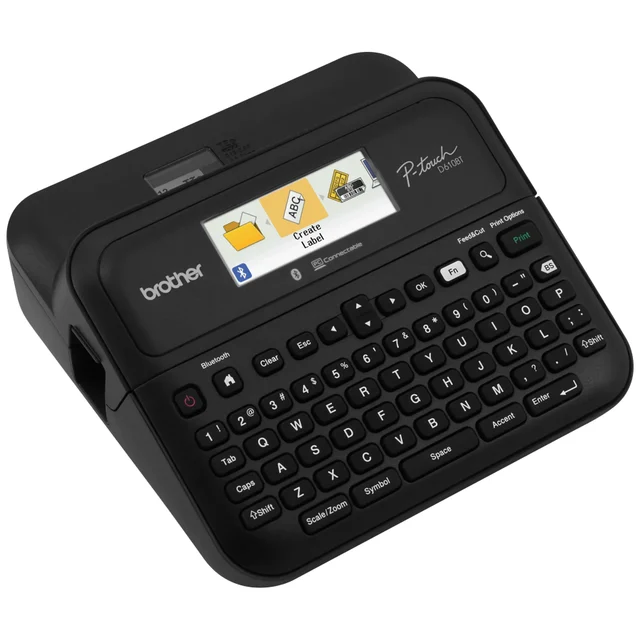
The all-rounder: keyboard, Bluetooth, and laminated tape that outlives everything else here.
Best for: Anyone who wants one label maker for the whole house or office and needs labels that survive heat, moisture, and handling.
- Laminated TZe tape resists water, sunlight, and chemicals, so labels stay legible for years
- Works standalone with a QWERTY keyboard and colour screen, or over Bluetooth from a phone or computer
- Takes TZe tape up to 24mm (about an inch) wide, covering cable flags through shelf headers
- TZe is one of the most widely stocked and widely cloned label formats, which keeps the lock-in survivable
- Genuine tape cartridges are expensive, and cost per label is the highest of the recommended picks
- A bulky desktop unit with no carry handle, and happiest on the included AC adapter rather than six AA batteries
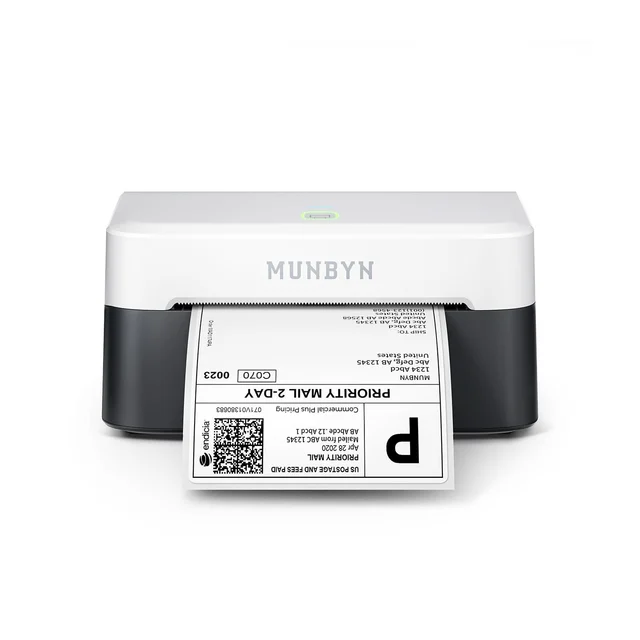
The shipping-label pick that skips cartridges entirely and lets you buy media from anyone.
Best for: Home shippers and small sellers printing parcel labels every week who do not want a cartridge subscription.
- Uses standard four by six direct thermal labels in rolls or fanfold stacks, so there is no proprietary cartridge to buy
- Bluetooth and USB, and it plays nicely with the common selling and postage platforms
- Barcodes and QR codes print sharp enough to scan first time at the carrier
- No ink, toner, or ribbon, and auto-calibration handles new label batches without fuss
- Built for wide thermal labels: no keyboard, no screen, and nothing narrower than about 1.6 inches, so no cable flags
- Direct thermal output fades in sunlight and heat, so it is wrong for permanent asset tags
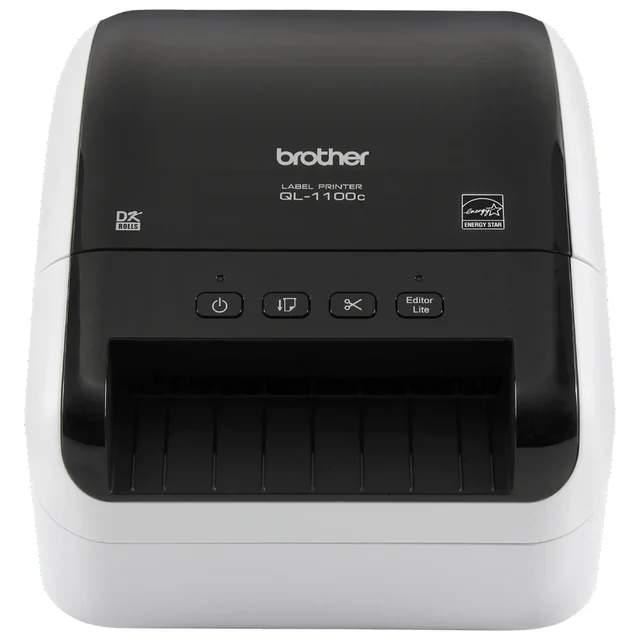
Fast, wide, and excellent at volume, as long as you accept renting your label supply from Brother.
Best for: Busy desks and back offices printing high volumes of fixed-size labels from a computer.
- Fast, rated at up to 69 standard address labels per minute, with a built-in auto cutter
- Takes drop-in rolls up to four inches wide, so address labels, badges, and parcel labels all fit
- 300 dpi output that keeps small text and barcodes crisp
- Windows and macOS support, with drop-in rolls that load in seconds
- USB only, so phone printing is limited to Android over a separately sold USB OTG cable, and no easy sharing without a computer attached
- DK rolls are the tightest lock-in here: Brother sizes, Brother spools, and a thin third-party market
- Direct thermal, so printed labels fade with sun and heat
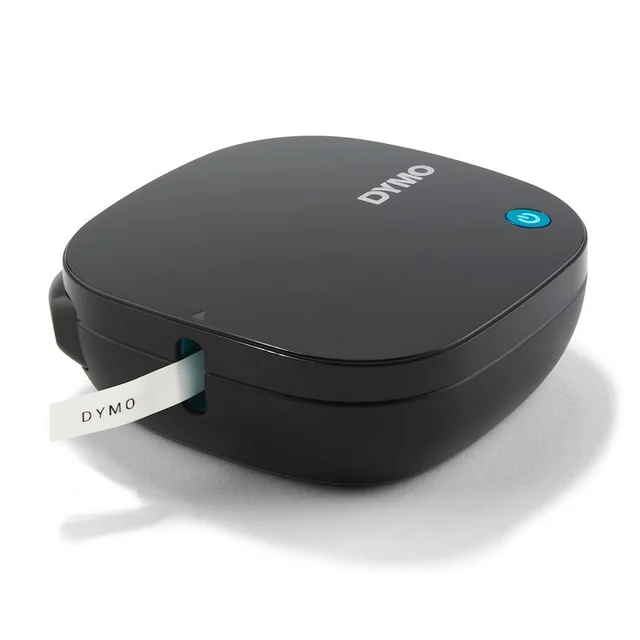
Cheap, tidy, phone-friendly, and printing the least durable label in this comparison.
Best for: A one-afternoon pantry tidy-up where nothing needs to survive a year.
- Small, light, and simple to pair, with a friendly app stocked with icons and frames
- Lowest purchase price here, and a range of tape colours including iron-on for fabric
- LT tape is not laminated, and owners report labels scuffing, curling, and lifting in warm or damp rooms
- App-only with no keyboard, so a flat phone or a dropped Bluetooth link means no labels
- Short cartridges and a thinner third-party supply push the real cost per usable label above the recommended picks
- Noticeably fewer text and styling options than DYMO's own keyboard models
| Criteria | Brother P-touch PT-D610BT Top pick | MUNBYN RealWriter 403B | Brother QL-1100c | DYMO LetraTag 200B |
|---|---|---|---|---|
| Verdict | Buy it | Buy it | It depends | Skip it |
| Best for | Anyone who wants one label maker for the whole house or office and needs labels that survive heat, moisture, and handling. | Home shippers and small sellers printing parcel labels every week who do not want a cartridge subscription. | Busy desks and back offices printing high volumes of fixed-size labels from a computer. | A one-afternoon pantry tidy-up where nothing needs to survive a year. |
| Price tier | $ · mid-range | $ · mid-range | $$ · premium | $ · budget |
| Label technology | Thermal transfer onto laminated tape | Direct thermal | Direct thermal | Thermal onto non-laminated tape |
| Media and lock-in | Proprietary TZe cartridges, huge third-party supply | Standard 4x6 labels, no proprietary media | Proprietary DK rolls, thin third-party supply | Proprietary LT cartridges, limited third-party supply |
| Label durability | Excellent, resists water, sun, and chemicals | Fades in sun and heat | Fades in sun and heat | Poor, scuffs and lifts in warm or damp spots |
| Maximum label width | 24mm (about one inch) of tape | Four inch shipping labels (1.57 inches minimum) | Four inch rolls | Narrow tape only |
| Connectivity | Bluetooth plus USB | Bluetooth plus USB | USB only | Bluetooth only |
| Works without a phone or PC | Yes, built-in keyboard and screen | No | No | No |
| Best job | Everyday durable labelling | Parcel and shipping labels | High-volume office labels | Quick temporary labels |
| Price tier | $ · mid-range | $ · mid-range | $$ · premium | $ · budget |
Which one is right for you?
- Anyone who wants one label maker for the whole house or office and needs labels that survive heat, moisture, and handling. Buy it Brother P-touch PT-D610BT
- Home shippers and small sellers printing parcel labels every week who do not want a cartridge subscription. Buy it MUNBYN RealWriter 403B
- Busy desks and back offices printing high volumes of fixed-size labels from a computer. It depends Brother QL-1100c
- A one-afternoon pantry tidy-up where nothing needs to survive a year. Skip it DYMO LetraTag 200B
How we judged the field
We do not run a lab. What we do is read across independent testing, manufacturer specifications, and the pattern that shows up in owner reports once a machine has spent a year in a kitchen, a workshop, or a spare-room shipping station. Four things decided this ranking.
The first is what the label is actually made of. A laminated tape sandwiches the printed layer between two films, so it shrugs off dishwashers, sunlight, solvents, and thumbs. A direct thermal label has the image burned into a heat-sensitive paper coating, and independent durability checks keep finding the same weakness: heat, sunlight, and abrasion make that image go grey. Labels left in a sunny window fade far faster than the same labels stored indoors, and MUNBYN itself advises keeping thermal labels away from heat, sunlight, and moisture. If you are labelling a freezer bin or a cable run, that difference decides the purchase. If you are printing a shipping label that gets scanned tomorrow, it does not matter at all.
The second is who controls the media, which in this category is the real long-run cost. The printer is a one-time purchase. The cartridge is a subscription you did not sign up for. Every brand here except one uses a proprietary consumable that only fits its own machines, and some of those consumables carry a chip or spool sensor that the printer checks. Owners consistently report that the sticker shock arrives on the third or fourth cartridge, not at checkout. We weighted heavily toward formats with deep third-party supply and wide retail availability, and we marked down formats where you are effectively renting the label supply from one company for the life of the machine.
The third is whether the thing works without a phone. App-only label makers are cheaper and slimmer, and they are genuinely pleasant when the app cooperates. Owner reports also fill up with Bluetooth dropouts, forced app updates, and accounts that suddenly want a login before they will print. A built-in keyboard is dull and it never stops working.
The fourth is throughput and finishing: print speed, whether there is an auto cutter, how wide a label the machine will take, and whether the output is sharp enough for a barcode a carrier scanner has to read on the first pass.
This is the machine to buy if you want one label maker that will still be useful in five years. It has a QWERTY keyboard, a colour screen, an auto cutter, Bluetooth, and USB, so you can thumb out a quick label at the desk or lay out something more elaborate in Brother’s editor on a phone or computer and send it over. It takes TZe tape up to 24mm, about an inch wide, which covers everything from a cable flag to a shelf header.
TZe is the reason it wins. The tape is laminated, and manufacturer claims of resistance to water, fading, and chemicals line up with what owners report years later: labels on freezer containers, outdoor tool boxes, and lab bottles that are still legible when cheaper labels have gone blank. Print resolution is 180 by 360 dpi, enough that small text and barcodes come out clean rather than furry.
On cost: TZe cartridges are not cheap, and Brother has no incentive to make them cheap. The saving grace is that TZe is one of the most widely cloned label formats on the market. Compatible cartridges are everywhere, owners report most of them printing close to the original, and genuine tape is stocked in ordinary office stores rather than ordered from one website. That combination is what keeps a locked format survivable.
The complaints are fair and small. It is a chunky desktop unit with no carry handle, it is happiest plugged in rather than on six AA batteries, and Brother’s software has more menus than anyone needs.
If most of your labels are shipping labels, this is the one that saves you real money over time, and it does so by refusing to lock you in. It is a 203 dpi desktop direct thermal printer for standard four by six inch labels (and widths down to 1.57 inches), rated at one four by six label per second, connecting over Bluetooth or USB, and it works with the usual selling and postage platforms without a fight.
The important part is the media. It does not take a cartridge. It takes plain four by six direct thermal labels, on a roll or in a fanfold stack, from whichever supplier is cheapest that month. Nothing on the labels is chipped, no single company controls the size, and if one vendor gets greedy you buy from the next one. Across a year of steady shipping, that open supply is worth more than any feature on the spec sheet.
Output is sharp enough that carrier barcodes and QR codes scan first time, which is the only quality bar that matters here. Owners report quick setup, reliable auto-calibration between label batches, and no ink, toner, or ribbon to think about.
The limits are obvious. It is built for labels 1.57 inches wide and up. It has no keyboard and no screen, so it is useless for a quick label at the workbench. And because it is direct thermal, anything it prints will fade if it lives in sunlight or heat, so it is for parcels and bins, not for permanent asset tags.
This is the volume machine. It takes drop-in Brother DK rolls up to four inches wide, prints at 300 dpi with a built-in auto cutter, and Brother rates it at up to 69 standard address labels per minute. For an office running address labels, name badges, file spines, and the occasional shipping label from a computer, it is built for exactly that job.
Two things stop it being a straight recommendation. It is USB only, so phone printing is limited to Android over a separately sold USB OTG cable, and there is no sharing it across a room without a computer attached. And the DK roll system is the tightest lock-in in this comparison. Rolls come die-cut to Brother’s sizes or as Brother continuous tape on Brother’s spools, the printer expects to see them, and the third-party market is thinner and fussier than it is for TZe tape. You are choosing Brother’s label catalogue for the lifetime of the machine, and if the size you rely on gets rationalised away, you have no fallback.
It is also direct thermal, so the same fading caveat applies. It handles text and barcodes well; it is not a photo printer.
Buy it if you print a lot of labels in fixed sizes from a desktop and the media catalogue covers you. Skip it if you want wireless, or if you want the freedom to shop around for labels.
The pitch is appealing: a small, light, tidy little box that pairs with your phone, prints from a simple app with a good stock of icons and frames, and costs less than anything else here. It genuinely is easy to set up, and for a drawer of spice jars it will do the job this afternoon.
The problem is the tape. LetraTag LT cartridges are not laminated, and owners report exactly what that predicts: labels that scuff, curl, and lift off in warm or damp spots such as bathrooms and kitchens. The cartridges are short, the format is narrow, and third-party supply is thinner than for the better-known Dymo and Brother formats, so the cost per usable label ends up higher than the cheap purchase price suggests. You are paying a premium for the least durable label in the group.
The rest of the compromises stack on top. There is no keyboard, so a dead phone or a sulking Bluetooth connection means no labels. Text styling is noticeably more limited than on Dymo’s own keyboard models. It is a fine impulse buy and a poor thing to build a labelling habit on.
Brother P-touch PT-D610BT vs MUNBYN RealWriter 403B: which should you buy?
These two are the strongest picks here and they barely overlap, so the choice is really about which pile of labels is bigger in your life.
Buy the PT-D610BT if your labels need to survive. Cables, breaker panels, storage bins, tool drawers, dishwasher-bound containers, kids’ gear. It is standalone, it prints on laminated tape that lasts, and the tape format is common enough that you will never struggle to buy more. The running cost per label is the highest of the two, but you are buying something you print once and never re-do.
Buy the RealWriter 403B if your labels are parcels. If you post orders every week, the open four by six media supply quietly beats every cartridge system in this comparison on long-run cost, and the printer pays for itself in avoided sheet labels and jammed inkjets. It will not label a single cable for you.
If you do both, and plenty of people do, the sensible answer is the RealWriter first because the savings are immediate, then the P-touch when you next find yourself writing on masking tape.
What to look for
- Laminated tape or direct thermal. Laminated tape for anything permanent, exposed to sun, heat, or moisture. Direct thermal for shipping labels and short-life bin tags. Getting this wrong is a common regret in owner reports.
- Who supplies the labels. Before buying, look up the consumable and check how many sellers offer it and whether third-party versions exist. A common format with a deep compatible market is a very different long-term proposition to a proprietary roll from one company.
- Chips and spool sensors. Some cartridge systems verify the media. This does not always block third-party supplies, but it makes them more fragile and more likely to break with a firmware update.
- Keyboard or app. A built-in keyboard costs more and looks dated, and it also works when your phone is flat, the app has been rewritten, or the Bluetooth is sulking.
- Maximum label width. Narrow tape is fine for cables and spice jars. Shelf headers, address labels, and shipping labels need real width, and no printer will exceed the width it was designed for.
- Auto cutter and print speed. For more than a handful of labels at a time, a built-in cutter and a fast engine change the experience completely.
- Connectivity that matches the job. USB only is fine for a desktop workhorse and useless for a shared machine or a phone-first workflow.
Our final take
Label printers are a consumables business with a machine attached, so buy the media first and the hardware second. The Brother P-touch PT-D610BT is the best all-round pick because laminated TZe tape genuinely lasts and the format is stocked and cloned widely enough that the lock-in stays tolerable. The MUNBYN RealWriter 403B is the value pick for anyone who ships, precisely because it has no cartridge to be locked into. The Brother QL-1100c is a fast, capable office machine that asks you to accept the tightest media lock-in here and no wireless, which is a fair trade for some offices and a bad one for most homes. The DYMO LetraTag 200B is the one to skip: cheap up front, unlaminated, app-dependent, and the most expensive label in the group once you count how often you reprint it.
Questions, answered
What is the difference between laminated tape and direct thermal labels?
Laminated tape prints the image and then seals it between layers of clear film, so the label resists water, sunlight, cleaning products, and rubbing. Direct thermal burns the image into a heat-sensitive paper coating with no protective layer, which is why independent durability checks show it fading when it sits in sun or heat. Use laminated tape for anything you want to still read next year, and direct thermal for parcels and short-life bin labels.
Are third-party compatible tapes and labels worth using?
For the widely cloned formats they usually are, and owners report compatible cartridges printing close to the original. Two cautions apply. Some systems check a chip or spool sensor, so a firmware update can occasionally break compatibility, and cheaper adhesive sometimes lifts sooner on curved or cold surfaces. The safer play is to check third-party availability for a given format before you buy the printer, not after.
Which of these is cheapest to run over a few years?
The printer that does not use a cartridge. A four by six direct thermal printer takes commodity labels sold by many suppliers, so competition keeps the price down and no single company can discontinue your size. Among cartridge systems, the widely stocked laminated tape formats work out better than the narrow, short, proprietary ones, because supply is deep enough to shop around.
Do I need a label maker with a keyboard, or is an app-only model fine?
App-only models are cheaper, smaller, and pleasant when everything works. They also fail in ways a keyboard cannot: a flat phone, a Bluetooth dropout, an app rewrite, or a new login requirement all stop you printing. If the machine is for occasional craft and pantry labels, app-only is fine. If it is a tool you rely on, get the keyboard.
Can one machine handle both shipping labels and small organising labels?
Not really, and that is the main reason two picks share the top here. Tape-based label makers top out between about one and one and a half inches wide, which is far too narrow for a carrier shipping label. Four inch thermal printers take shipping labels but cannot produce a slim cable flag, and their output is not durable enough for permanent tags. Most people who need both end up with one of each.
Deciding between the top two? See our head-to-head: Brother P-touch PT-D610BT vs MUNBYN RealWriter 403B.
More Office & WFH reviews
 The Best Laminators: 4 Compared (and One to Skip)
  The Best Lap Desks: 4 Compared (and One to Skip)
  The Best Laptop Backpacks for Commuting: 4 Compared (and One to Skip)
  The Best Laptop Stands: 4 Compared (and One to Skip)
  The Best Laser Printers: 4 Compared (and One to Skip)
  The Best LED Desk Lamps: 4 Compared (and One to Skip)