

Office & WFH
The Best Laptop Stands: 4 Compared (and One to Skip)
We compared four popular desk risers on how high they lift the screen, how steady they stay, and which laptops they actually fit.
The short version
For raising a laptop screen to eye level, the Twelve South Curve Flex is the most complete choice: it adjusts from a small lift up to full eye level, changes angle, and folds flat to pack. The Rain Design mStand is steadier still but fixed at roughly six inches, which suits a set desk more than a tall user. The Lamicall is a sturdy budget riser with a smaller range and a two-handed adjustment. Skip the MOFT adhesive stand for this purpose - it is a superb travel accessory but lifts only two to three inches, well short of eye level. Best for: WFH users who want their screen at eye level and will add an external keyboard and mouse.
Our picks at a glance
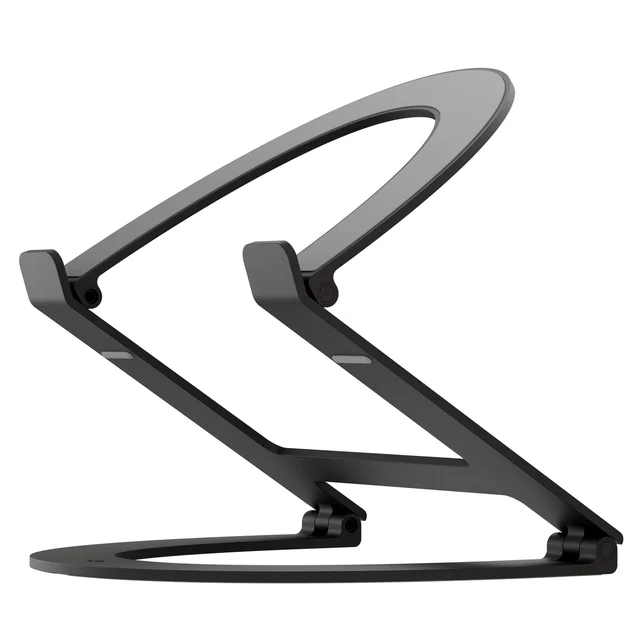
- Twelve South Curve Flex - Buy. The most flexible riser here - it adjusts from a slight lift all the way to true eye level and folds flat for travel.
- Rain Design mStand - Buy. A single block of aluminum that is as steady as a desk riser gets - as long as its fixed height suits you.
- Lamicall Adjustable Laptop Stand - It depends. A sturdy, foldable budget riser that adjusts within a modest range but asks for two hands to do it.
- MOFT Adhesive Laptop Stand - Skip. A brilliantly portable slim lift that sticks to your laptop - but it never gets the screen anywhere near eye level.
The verdict in 30 seconds
What mattered most
- Height range
- Adjustable
- Stability / typing flex
- Portability
- Fits laptop size
- Reaches eye level
A laptop stand has one real job: get the top of your screen up near eye level so your neck stops craning down. We read the independent testing that measures lift height, typing wobble and stability, then weighed it against what owners report after months of daily use. The picks below split cleanly into true eye-level risers and one popular option that only looks like one. Note up front: raising the screen only helps if you pair the stand with an external keyboard and mouse.
The most flexible riser here - it adjusts from a slight lift all the way to true eye level and folds flat for travel.
Best for: Anyone who wants one stand that dials in exact eye-level height at the desk and still travels.
- Height adjusts from about 1 inch folded to about 10.8 inches, so it reaches eye level for almost any sitter
- Angle adjusts too, and it folds flat into an included pouch
- Open-arch arm leaves the laptop underside open to air and looks clean
- Reviewers measured slightly more screen deflection when typing than the stiffest fixed stands
- Premium price for what is still a single-laptop stand
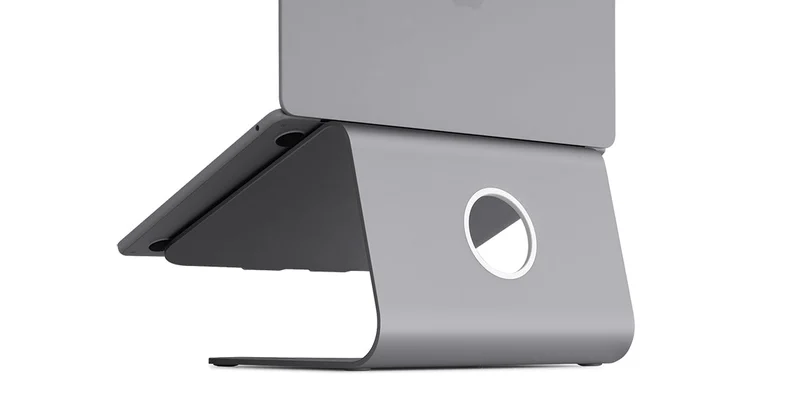
A single block of aluminum that is as steady as a desk riser gets - as long as its fixed height suits you.
Best for: A permanent desk setup where you sit at the right height and value rock-solid stability over adjustability.
- A single solid aluminum plate; owners describe very little typing flex
- Cable hole at the back keeps the desk tidy
- Owners report it lasting many years with no wobble developing
- Fixed ~6-inch lift can sit too low for taller users and never adjusts
- Rigid and fairly heavy, so it does not travel
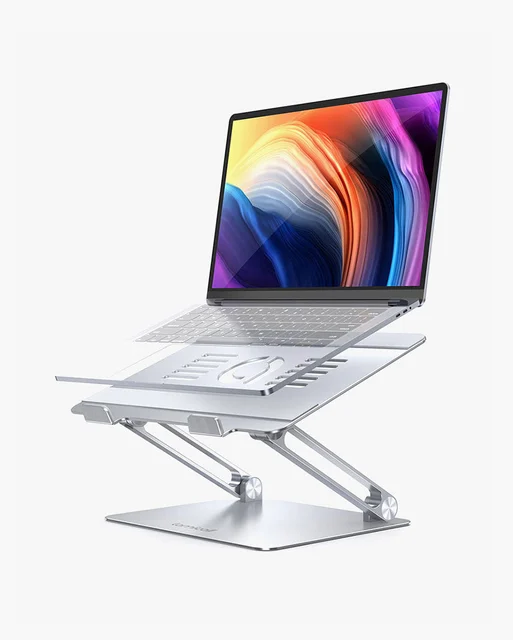
A sturdy, foldable budget riser that adjusts within a modest range but asks for two hands to do it.
Best for: Budget-minded workers of average height who want a solid folding riser and rarely change the height once set.
- Aluminum build with a heavy base; owners consistently call it sturdy with little shake
- Adjustable height and angle, and it folds flat to pack
- Far cheaper than the premium picks, with a one-year warranty
- Lamicall does not publish a height range, so tall users should check it reaches full eye level
- Changing height takes two hands and real effort - not a quick tweak
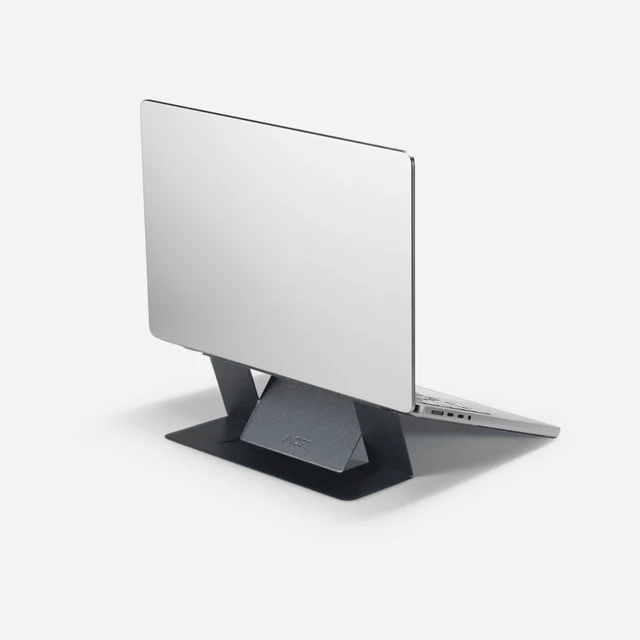
A brilliantly portable slim lift that sticks to your laptop - but it never gets the screen anywhere near eye level.
Best for: Travelers who want a small posture nudge on the go, not a desk riser that reaches eye level.
- About 3 mm thin and 3 oz; stays attached to the laptop underside and adds almost no bulk
- Two preset heights (2 or 3 inches) improve posture slightly over a flat desk
- Genuinely useful for cafes, trains and tight bags
- Lifts only about 2 to 3 inches - nowhere near eye level, which defeats the purpose of a riser
- Owners note a bit of shake when typing on the built-in keyboard
- Adhesive-on-the-laptop design is not what most people picture as a desk stand
| Criteria | Twelve South Curve Flex Top pick | Rain Design mStand | Lamicall Adjustable Laptop Stand | MOFT Adhesive Laptop Stand |
|---|---|---|---|---|
| Verdict | Buy it | Buy it | It depends | Skip it |
| Best for | Anyone who wants one stand that dials in exact eye-level height at the desk and still travels. | A permanent desk setup where you sit at the right height and value rock-solid stability over adjustability. | Budget-minded workers of average height who want a solid folding riser and rarely change the height once set. | Travelers who want a small posture nudge on the go, not a desk riser that reaches eye level. |
| Price tier | $$$ · premium | $$$ · premium | $ · budget | $$ · mid-range |
| Height range | ~1 to 10.8 in (reaches eye level) | Fixed ~5.9 in | Adjustable (range not published) | 2 or 3 in only |
| Adjustable | Height + angle | No - fixed | Height + angle | 2 preset heights |
| Stability / typing flex | Very stable, slight flex | Rock-solid, lowest flex | Sturdy, little shake | Light, some shake |
| Portability | Folds flat, pouch | No - rigid | Folds flat | Ultra-slim, sticks to laptop base |
| Fits laptop size | Up to 7 lb | Most laptops, incl. 16 in MacBook Pro | 10 to 17.3 in | 11.6 to 16 in |
| Reaches eye level | Yes, for most | Only if you sit high | Partly | No |
Which one is right for you?
- Anyone who wants one stand that dials in exact eye-level height at the desk and still travels. Buy it Twelve South Curve Flex
- A permanent desk setup where you sit at the right height and value rock-solid stability over adjustability. Buy it Rain Design mStand
- Budget-minded workers of average height who want a solid folding riser and rarely change the height once set. It depends Lamicall Adjustable Laptop Stand
- Travelers who want a small posture nudge on the go, not a desk riser that reaches eye level. Skip it MOFT Adhesive Laptop Stand
How we judged the field
We don’t run a lab, and we won’t pretend to. What we do is read the independent testing that measures the things that matter for a desk riser - how high it lifts the screen, how much it flexes when you type, whether it stays planted - and pair that with what owners report after months of daily use. For a stand whose entire job is getting your screen to eye level, three questions decided the order below. Does it actually reach eye level for a real person? Does it stay steady under typing? And will it fit the laptop and the desk you already own? Cooling, footprint, portability and cable routing broke the ties.
One rule shapes all of it: a riser only helps your posture if you also switch to an external keyboard and mouse. The whole idea is a high screen and a low keyboard. Raise the laptop and keep typing on its built-in keyboard, and you’ve simply swapped a sore neck for sore wrists. Every verdict here assumes you’ll do this.
Twelve South Curve Flex
Buy itThis is the stand that best matches the job. Its arm adjusts across a wide range, from about an inch folded flat up to nearly eleven inches, so it reaches genuine eye level for short and tall sitters alike, and it adjusts angle on top of height. Reviewers who care about ergonomics like that it doesn’t force you into one factory-set position, and owners point out it folds flat into the included pouch, so the same stand that lives on your desk goes in a bag on travel days.
The honest trade-off shows up in stability. Independent testing found the open-arch design flexes a little more at the screen top during hard typing than the stiffest fixed slabs - a small amount, felt more than seen, and easily tamed with an external keyboard. That same open arch is a plus for cooling, leaving most of the laptop’s underside exposed to air. It costs premium money for a single-laptop stand, but it’s the one here that does everything the category promises.
Rain Design mStand
Buy itThe mStand is the veteran, and it earns its reputation. It’s built from a single solid aluminum plate, and owners describe very little typing flex. Owners routinely report keeping one for years without a hint of sag, and the cable hole at the back is a small touch that keeps a desk looking deliberate rather than tangled.
The reason it’s the runner-up and not the pick is height. The lift is fixed at about six inches and never changes. For someone of average height sitting at a standard desk, that can land the screen right where it should be. For a taller person, or anyone on a higher chair, six inches leaves the screen sitting too low, and there’s nothing to be done about it. It’s also rigid and heavy, so it stays home. If your height and desk suit it, though, nothing here feels sturdier.
Lamicall Adjustable Laptop Stand
It dependsThe Lamicall is the value play, and it’s a legitimately good one. It’s aluminum with a heavy base, and owners overwhelmingly describe it as sturdy - reviewers note little to no shake even during quick typing, which is not a given at this price. It adjusts both height and angle, folds flat for packing, and comes with a one-year warranty.
Two things keep it out of the top spot. Lamicall does not publish its height range, so taller users should confirm it reaches full eye level. And adjusting it is a two-handed, deliberate affair - you brace the base and push or pull the top section - so it’s fine to set once and leave, less fun to tweak through the day. For a budget-conscious buyer of average height, it’s an easy recommendation with clear eyes about the ceiling.
MOFT Adhesive Laptop Stand
Skip itThe MOFT is a clever, likeable product that’s wrong for this particular job. It’s a slim panel that sticks to the bottom of your laptop and folds out to one of two heights, adding almost no weight or bulk. As a travel accessory it’s hard to beat - it goes everywhere the laptop goes and gives you a small posture improvement in a cafe or on a train.
But the topic here is raising the screen to eye level, and the MOFT lifts the laptop only about two to three inches. That’s a nudge, not a riser; the screen stays far below where your eyes want it. Owners also mention a little shake when typing on the built-in keyboard at the higher setting. None of this makes it a bad product - it makes it the wrong tool. If you specifically want your screen at eye level on a desk, this isn’t it.
Twelve South Curve Flex vs Rain Design mStand: which should you buy?
This is the real decision, and it comes down to one word: adjustability. The Curve Flex reaches eye level for essentially anyone because you set the height yourself, and it collapses for travel. The mStand is the steadier object - very little typing flex and a tidy cable hole - but its lift is fixed at about six inches and it doesn’t travel.
Buy the Curve Flex if you’re unsure of your ideal height, if you’re taller than average, or if the stand needs to move between home and office. Buy the mStand if you sit at a fixed desk at a height that six inches already suits, and you’d rather have the single most rock-solid stand than the most flexible one. Both are genuinely good; they simply solve the problem for different people.
What to look for
- Height range: The top third of the screen should meet your eyes. Adjustable stands make this easy; with a fixed stand, confirm the lift matches how you sit before you buy.
- Adjustable vs fixed: Adjustable wins for shared desks, tall users and travel. Fixed wins for maximum steadiness and simplicity.
- Stability: A little flex is normal and harmless once you’re on an external keyboard. Owners are the best guide here - persistent complaints about wobble are a red flag.
- Footprint and fit: Check the supported screen size and weight, and make sure the base fits your desk and doesn’t crowd your keyboard.
- Portability: If the stand needs to travel, prioritize ones that fold flat and pack; if it lives on one desk, a rigid stand is fine.
- The keyboard rule: Budget for an external keyboard and mouse. Without them, no riser actually fixes your posture.
Our final take
If you want your laptop screen at eye level, buy the Twelve South Curve Flex - it’s the one stand here that adjusts high enough for anyone and still folds away. Choose the Rain Design mStand instead if you already sit at the right height and want the steadiest possible desk fixture, or the Lamicall if you want most of the benefit for far less money and don’t mind a smaller range. Skip the MOFT for this purpose; keep it in mind as a travel accessory. Whichever you pick, add an external keyboard and mouse - that’s the step that turns a raised screen into a genuinely better workday.
Questions, answered
How high should a laptop stand lift the screen?
Aim to get the top third of the screen level with your eyes when you sit up straight. For most people that means several inches of lift, which is why an adjustable stand like the Curve Flex is easier to get right than a fixed-height one.
Do I still need an external keyboard with a laptop stand?
Yes. Raising the screen also raises the built-in keyboard out of a comfortable typing position, so you should add an external keyboard and mouse. Without them, a riser trades a neck problem for a wrist and shoulder one.
Are fixed-height stands like the mStand a bad idea?
Not at all. Fixed stands are typically the steadiest and tidiest option. The catch is that the height has to match how you sit; taller users or anyone on a high chair may find a fixed ~6-inch lift leaves the screen too low.
Why is the MOFT a skip when so many people like it?
It is genuinely good at what it is - a near-invisible, ultra-portable slight lift. But it only raises the laptop two to three inches, so it cannot bring the screen to eye level. For travel it is great; as a desk riser it misses the point.
Which stand is best if I move between home and the office?
The Curve Flex folds flat and ships with a pouch, so it travels while still reaching full desk height. The Lamicall also folds and costs far less if you want a cheaper packable option.
Deciding between the top two? See our head-to-head: Twelve South Curve Flex vs Rain Design mStand.
More Office & WFH reviews
 The Best Laser Printers: 4 Compared (and One to Skip)
  The Best LED Desk Lamps: 4 Compared (and One to Skip)
  The Best Monitor Arms for Office and WFH Desks (2026)
  The Best Monitor Light Bars: 4 Compared (and One to Skip)
  The Best Monitor Privacy Screens: 4 Compared (and One to Skip)
  The Best Monitor Stands and Risers: 4 Compared (and One to Skip)