

Office & WFH
The Best Monitor Stands and Risers: 4 Compared (and One to Skip)
We compared four monitor stands and desktop shelves on stability, storage, footprint and value to find the ones worth your desk space.
The short version
A good monitor stand raises your screen to eye level and gives back the desk underneath. After weighing independent testing and owner reports, the Oakywood Desk Shelf is our top pick: a rock-solid, wide solid-wood shelf with real under-shelf storage. The clamp-on Branch Monitor Stand is the value choice, floating over the desk edge to free space and hide a second storage tier. The Ugmonk Gather is a lovely single-monitor riser with a tray, but only if its small size and premium price suit you. Skip the Grovemade Wood Monitor Stand - beautiful, but flagship money for a plain slab that does less than the rest. Best for: WFH and office desks that want a monitor lifted to eye level with less clutter and more usable space.
Our picks at a glance
- Oakywood Desk Shelf - Buy. A wide, genuinely premium solid-wood shelf that turns the space under your monitor into usable storage.
- Branch Monitor Stand - Buy. A clamp-on steel shelf that floats your monitor over the desk edge and hides a second storage tier underneath.
- Ugmonk Gather Small Monitor Stand - It depends. A beautifully made steel-and-walnut riser with an integrated tray, if your setup is compact enough to suit it.
- Grovemade Wood Monitor Stand - Skip. Genuinely gorgeous bent-wood design, but you pay flagship money for a plain slab with no storage and no USB.
The verdict in 30 seconds
What mattered most
- Build & materials
- Storage
- Footprint & fit
- Stability under load
- Height adjustment
- Built-in USB / cable mgmt
A monitor stand should lift your screen to eye level and hand back the desk underneath it - not wobble, scratch or clutter. We weighed independent testing and owner reports on four current risers and desktop shelves, from a wide solid-wood shelf to a clamp-on steel one with hidden storage. Two are clear buys, one is a great fit only for the right setup, and one gorgeous option is a value trap we'd skip.
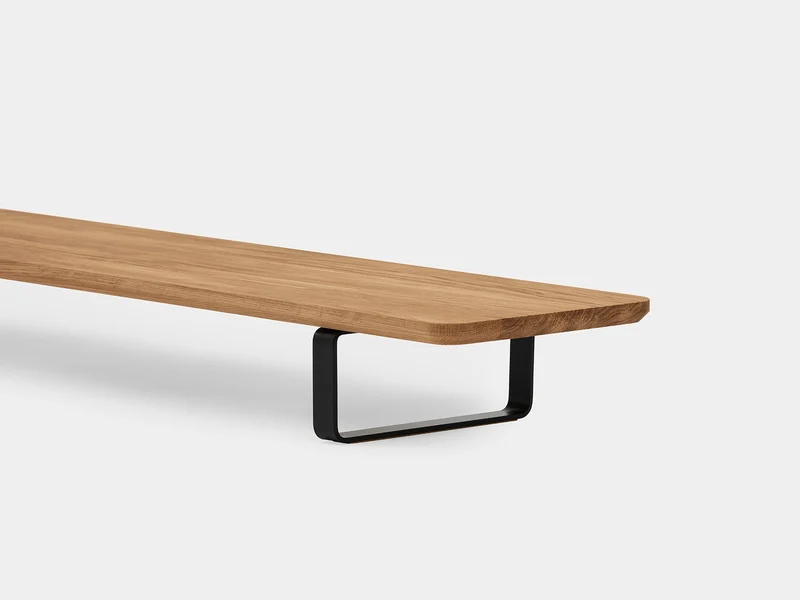
A wide, genuinely premium solid-wood shelf that turns the space under your monitor into usable storage.
Best for: Anyone who wants one handsome shelf to lift a large or dual-monitor setup and reclaim the desk beneath it.
- Solid oak or walnut (veneer plywood also offered) on powder-coated steel legs feels rock-solid and looks the part
- Wide platform easily spans a large single, ultrawide or dual-monitor setup
- About 9 cm (3.5 in) of clearance underneath fits a keyboard, notebooks and clutter
- Rated to 100 kg (220 lb), so no flex or wobble even under a heavy display
- Premium price, and a large footprint that needs a deep desk
- Fixed height only, so you can't fine-tune ergonomics
- No built-in cable management or USB
Amazon had no buyable listing for this when we last checked. The link still works if it returns.
Find it on Amazon Read our detailed assessmentOwn the Oakywood Desk Shelf? Tell us how it held up.
Thanks. Counted, and shown once enough owners have weighed in.
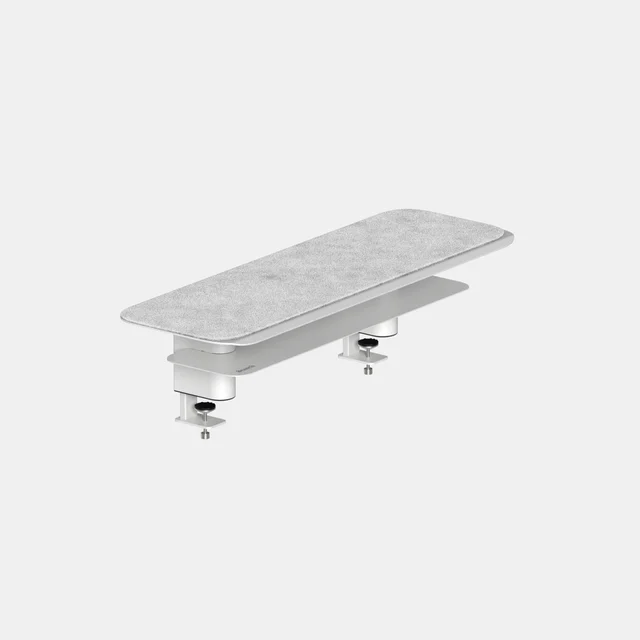
A clamp-on steel shelf that floats your monitor over the desk edge and hides a second storage tier underneath.
Best for: Small or clutter-prone desks that need storage and free surface area without splurging.
- Powder-coated steel is stable and built to last
- Clamp mount lifts the monitor while leaving the desk surface below completely clear
- Hidden lower tier and felt top add real, tidy storage
- Three colors and two sizes (24 or 36 inches wide) at a fair mid-range price
- Needs a compatible desk edge for the clamp
- Fixed height and no built-in USB
- The floating, industrial look won't suit every desk
Own the Branch Monitor Stand? Tell us how it held up.
Thanks. Counted, and shown once enough owners have weighed in.
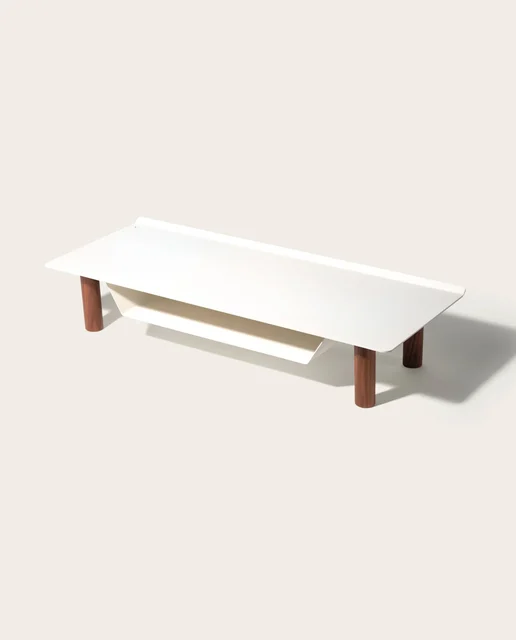
A beautifully made steel-and-walnut riser with an integrated tray, if your setup is compact enough to suit it.
Best for: A tidy single-monitor or laptop setup where craftsmanship and a built-in tray matter more than width.
- Steel and walnut construction with excellent fit and finish
- Integrated tray neatly stows a laptop, tablet or papers under the screen
- Felt lining protects the monitor foot and softens the look
- Small footprint suits a single, compact monitor - not wide or dual setups
- Premium price for the modest size
- Fixed height and no USB
Own the Ugmonk Gather Small Monitor Stand? Tell us how it held up.
Thanks. Counted, and shown once enough owners have weighed in.
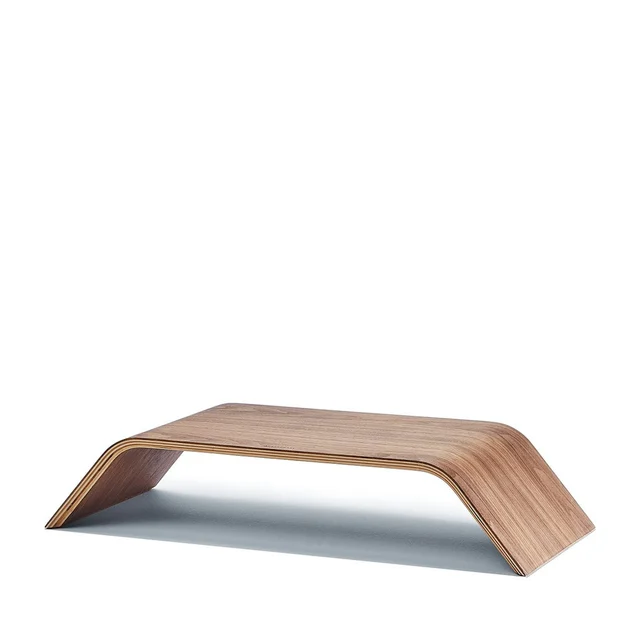
Genuinely gorgeous bent-wood design, but you pay flagship money for a plain slab with no storage and no USB.
Best for: Design-led desks where looks are the whole point and budget is no object - most people get more from a cheaper stand.
- Stunning molded 7-ply walnut or maple plywood, arguably the best-looking riser you can buy
- Smooth, minimal form with a finish that ages well
- Flagship price for what is functionally a plain, fixed-height platform
- No storage tier, cable management or USB
- Narrow top isn't ideal for wide or dual monitors
Own the Grovemade Wood Monitor Stand? Tell us how it held up.
Thanks. Counted, and shown once enough owners have weighed in.
| Criteria | Oakywood Desk Shelf Top pick Buy it | Branch Monitor Stand Buy it Buy | Ugmonk Gather Small Monitor Stand It depends Buy | Grovemade Wood Monitor Stand Skip it Buy |
|---|---|---|---|---|
| Best for | Anyone who wants one handsome shelf to lift a large or dual-monitor setup and reclaim the desk beneath it. | Small or clutter-prone desks that need storage and free surface area without splurging. | A tidy single-monitor or laptop setup where craftsmanship and a built-in tray matter more than width. | Design-led desks where looks are the whole point and budget is no object - most people get more from a cheaper stand. |
| Price tier | $$$ · premium | $$ · mid-range | $$$ · premium | $$$$ · flagship |
| Build & materials | Solid oak/walnut or veneer ply on steel legs | Powder-coated steel with felt top | Steel + walnut, felt lining | Bent walnut or maple plywood |
| Storage | Open bay under the shelf | Hidden lower second tier | Integrated under-screen tray | None (open underside only) |
| Footprint & fit | Very wide (105 cm), fits dual/ultrawide | Clamps to edge, frees desk space | Compact - single monitor | Mid-width - single monitor |
| Stability under load | Excellent, rated to 100 kg (220 lb) | Excellent, rated to 40 lb | Solid | Rated to 200 lb, but a small top |
| Height adjustment | Fixed | Fixed | Fixed | Fixed |
| Built-in USB / cable mgmt | None | Cord/note edge; no USB | Tray hides some cables; no USB | None |
| Mounting | Freestanding | Clamp-on desk edge | Freestanding | Freestanding |
| Price tier | $$$ · premium | $$ · mid-range | $$$ · premium | $$$$ · flagship |
Which one is right for you?
- Anyone who wants one handsome shelf to lift a large or dual-monitor setup and reclaim the desk beneath it. Buy it Oakywood Desk Shelf
- Small or clutter-prone desks that need storage and free surface area without splurging. Buy it Branch Monitor Stand
- A tidy single-monitor or laptop setup where craftsmanship and a built-in tray matter more than width. It depends Ugmonk Gather Small Monitor Stand
- Design-led desks where looks are the whole point and budget is no object - most people get more from a cheaper stand. Skip it Grovemade Wood Monitor Stand
How we judged the field
We don’t run our own lab. Instead we synthesize independent testing and a large pool of owner reports, then weigh the things that actually decide whether a monitor stand earns its desk space: how sturdy it feels under a real display, whether it lifts the screen to a genuinely ergonomic height, how much usable storage or desk space it gives back, the footprint and fit for single versus wide or dual setups, build materials and finish, and honest value for money. Because this category is deliberately separate from our monitor-arm and laptop-stand guides, we only looked at risers and desktop shelves that sit on (or clamp to) the desk. Owners consistently tell us the same thing: a stand that wobbles, scratches, or hogs the desk gets returned, while a solid one that tidies the space beneath the screen gets kept for years.
Oakywood Desk Shelf
Buy itThis is the one we’d hand most people who want a single, handsome upgrade. It’s solid oak or walnut (or a cheaper veneer plywood) on powder-coated steel legs, rated to 100 kg, and both independent testing and owner reports describe it as genuinely rock-solid - no creak or flex even under a heavy display. The platform is wide enough to span a big single monitor, an ultrawide, or a dual setup, and the clearance underneath is the real trick: it swallows a keyboard, a notebook and general clutter, so you reclaim the desk you covered. The trade-offs are honest ones. It’s a premium purchase, it needs a reasonably deep desk, and the height is fixed, so you can’t fine-tune ergonomics the way an arm would. There’s no built-in cable channel or USB either. For a set-and-forget shelf that looks the part, none of that dents the recommendation.
Branch Monitor Stand
Buy itThe value pick, and the most clever design here. Rather than sitting on the desk, it clamps to the front edge and floats the shelf out over the surface, so your monitor goes up while the space underneath stays completely clear. The powder-coated steel is stable and built to last, the felt top protects the monitor foot and gives a spot for sticky notes, and there’s a hidden lower tier for genuine, tidy storage. It comes in two widths (24 or 36 inches), three colors, a 40 lb load rating and a 2-year warranty at a fair mid-range price, which is why owners rate it so highly for small or clutter-prone desks. The catch is the clamp: you need a compatible desk edge, and the floating look won’t suit every room. Height is fixed and there’s no USB. But for the money, it does more than anything else in this comparison.
Ugmonk Gather Small Monitor Stand
It dependsA lovely object that’s right for a specific person. It’s steel and walnut, lined with felt, and the fit and finish are a step above the mass-market crowd. The integrated tray tucks a laptop, tablet or papers under the screen, which is a smart use of the space. The reason it lands at “it depends” is size: this is the small model, sized for a single, compact monitor. On a wide or dual setup it simply won’t span, and you’re paying a premium for a modest footprint. If your desk is tidy and single-screen and you value craftsmanship and a built-in tray, it’s easy to love; if you need width, look elsewhere.
Grovemade Wood Monitor Stand
Skip itLet’s be fair first: this is arguably the best-looking riser you can buy. The molded walnut or maple plywood form is beautiful and it ages well, and Grovemade rates it to 200 lb. But this is an honest guide, and functionally it’s a plain, fixed-height platform at a flagship price. There’s no storage tier, no cable management and no USB, so you’re paying top money purely for the aesthetic. The 14 by 9.2 inch top also isn’t well suited to wide or dual monitors. If a gorgeous slab of wood is the entire point of your desk and budget is no object, buy it with our blessing - but most people get more day-to-day usefulness from a cheaper, wider, storage-friendly stand.
Sources
Specs in this review come from these pages.
Oakywood Desk Shelf vs Branch Monitor Stand: which should you buy?
These are our two picks, and they solve the same problem from opposite ends. The Oakywood Desk Shelf is the premium, do-it-all shelf: wide enough for almost any setup, beautiful solid wood, and a big open bay underneath for a keyboard and clutter. You pay for that, and it eats desk depth. The Branch Monitor Stand is the value-and-cleverness choice: it clamps to the desk edge and floats, so it frees the surface entirely, adds a hidden storage tier, and costs meaningfully less - but you need a suitable desk edge and you accept its more utilitarian, industrial look. Put simply: choose the Oakywood if you want the nicest-looking wide shelf and have the desk for it; choose the Branch if you want maximum reclaimed space and storage for the money, and your desk can take a clamp.
What to look for
- Stability first. A stand that flexes or wobbles under your monitor is worse than none. Steel and solid wood outperform thin particleboard and tempered glass, which owners most often complain about.
- Match the width to your monitor(s). Compact stands suit a single small screen; wide shelves are what you need for large, ultrawide or dual displays.
- Decide what the space underneath is for. Open clearance (for a keyboard), a hidden second tier, or an integrated tray all beat a plain slab if you want to cut clutter.
- Check the height. Almost all of these are fixed-height, so confirm the lift actually brings the top of the screen to roughly eye level for you.
- Be skeptical of built-in USB. USB-hub risers exist, but many use slow, older USB and become the weak link; a great stand paired with a proper dock usually beats a mediocre all-in-one.
- Mind the mounting. Clamp-on shelves free desk space but need a compatible edge; freestanding stands work anywhere but occupy the desktop.
Our final take
Most people should buy the Oakywood Desk Shelf: it’s the sturdiest, best-looking way to lift a large or dual-monitor setup and reclaim the desk beneath it. If you want to spend less and free up even more surface area, the Branch Monitor Stand’s clamp-on design and hidden storage make it the smart-value alternative. The Ugmonk Gather is a genuinely lovely single-monitor riser with a handy tray, but only if its small size and premium price fit your setup. And the Grovemade is the one to skip for value reasons alone - stunning, but you’re paying flagship money for a plain slab that does less than the others.
Questions, answered
Does a monitor stand actually help my posture?
It can, indirectly. Raising the top of your screen to roughly eye level stops you hunching down to look at it, which is a common cause of neck and upper-back strain. The key is height: measure so the stand brings the top third of the display level with your eyes. If a fixed-height stand doesn't get you there, add or remove it accordingly, or consider an adjustable arm instead.
Monitor stand or monitor arm - which should I get?
A stand (or desktop shelf) is simpler, cheaper, needs no clamping know-how, and often adds storage underneath, but the height is fixed. An arm floats the screen off the desk with full height, tilt and depth adjustment and frees the most space, at a higher price and with a slightly more involved install. If you want storage and simplicity, choose a stand; if you want fine ergonomic control, see our monitor-arm guide.
Are monitor stands with a built-in USB hub worth it?
Sometimes, but be careful. Many budget USB-hub risers use older, slower USB and can become an unreliable weak link between your computer and devices. Owners frequently report flaky connections on the cheapest ones. If fast, dependable ports matter to you, a great stand paired with a dedicated dock or hub usually works out better than an all-in-one that compromises on both.
Will these stands fit an ultrawide or a dual-monitor setup?
It depends on width. The Oakywood Desk Shelf is deliberately wide and is the best fit here for ultrawide or dual monitors. The Branch Monitor Stand comes in a larger size that helps too. The Ugmonk Gather (small) and the Grovemade are sized for a single, more compact display, so measure your monitor's base or combined footprint before buying.
How much weight can a monitor stand hold?
It varies widely, so always check the rating against your monitor's weight. The solid-wood and steel options here (Oakywood and Branch) are the most reassuring for heavy or large displays. The Oakywood is rated to 100 kg (220 lb) and the Branch to 40 lb. The Grovemade is rated to 200 lb, though its small top suits a single display. Thin glass or particleboard stands are where owners most often report sagging or cracking under load.
Deciding between the top two? See our head-to-head: Oakywood Desk Shelf vs Branch Monitor Stand.
More in Office & WFH
Monitor Stands, Explained Plain-English guide → Oakywood Desk Shelf vs Branch Monitor Stand Head-to-head →  The Best Notebooks: 4 Compared (and One to Skip)
  The Best Office Chair Casters: 4 Compared (and One to Skip)
  The Best Home Office Desks: 4 Compared (and One to Skip)
  Which Office Headset Should You Buy? 7 Compared