

Office & WFH
The Best LED Desk Lamps: 4 Compared (and One to Skip)
We compared four current LED desk lamps on brightness, color-temperature range, glare control, controls, and desk footprint.
The short version
If you work at a monitor, the BenQ ScreenBar Halo 2 is the standout: it clamps to your screen, casts no glare, and returns your entire desk surface while offering a full 2700K-6500K range. The Xiaomi Mi LED Desk Lamp 1S is the smart, affordable freestanding pick with smooth dimming and voice control, held back only by its cooler 5000K ceiling. The Dyson Solarcycle Morph is genuinely the best light in the group with true daylight tracking, but its flagship price and large footprint make it a specialist buy. The Lepro is a fine budget lamp but its stepped controls and narrow beam are beaten by cheaper smart rivals, so we skip it. Best for: most home-office monitor users, the BenQ ScreenBar Halo 2 is the one to buy.
Our picks at a glance
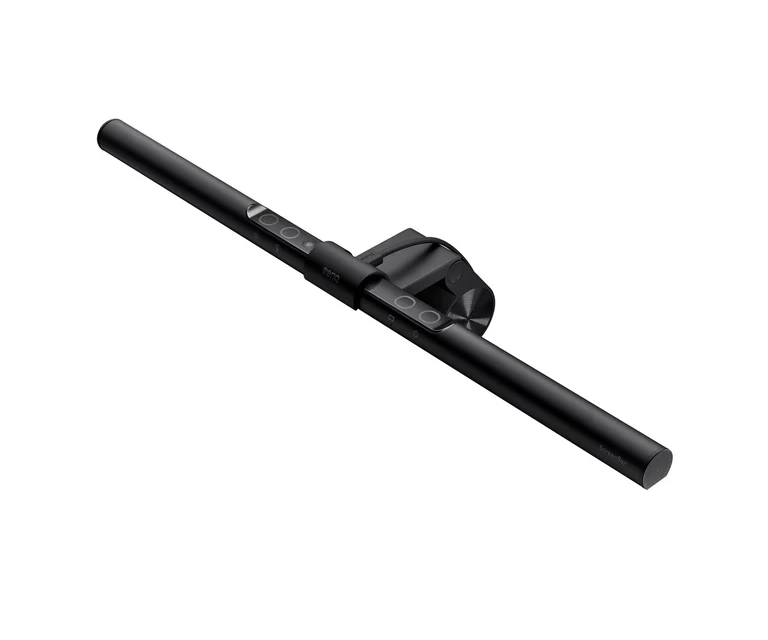
- BenQ ScreenBar Halo 2 - Buy. A monitor-mounted light bar that lights your desk brilliantly while occupying zero desk space and casting no screen glare.
- Xiaomi Mi LED Desk Lamp 1S - Buy. A flicker-free freestanding lamp with app and voice control that costs a fraction of the premium options.
- Dyson Solarcycle Morph Desk - It depends. A brilliant, endlessly adjustable circadian lamp whose flagship price and large footprint only suit a specific buyer.
- Lepro LED Desk Lamp (9.5W Metal) - Skip. A competent, inexpensive metal lamp let down by stepped controls and a narrow pool of light.
The verdict in 30 seconds
What mattered most
- Light type & placement
- Brightness
- Color temperature range
- Glare & eye comfort
- Controls
- Desk footprint
LED desk lighting now splits into two camps: monitor-mounted light bars that free your desk entirely, and traditional freestanding lamps that light a wider area. We lined up a premium light bar, a flagship circadian arm lamp, and two freestanding options to see which genuinely reduce eye strain and which just add glare. The result is two easy recommendations, one lamp that only makes sense for a specific buyer, and one you can safely skip.
A monitor-mounted light bar that lights your desk brilliantly while occupying zero desk space and casting no screen glare.
Best for: Monitor-based knowledge workers who want glare-free task light and their whole desk surface back.
- Asymmetric optics push light onto the desk, not the screen, so reviewers report effectively no monitor glare
- Wide 2700K-6500K range with high color-fidelity LEDs (BenQ quotes Rf above 96) that owners find easy on the eyes for long sessions
- Clamps to the top of the monitor and takes up no desk footprint at all
- Wireless dial controller plus a motion sensor and an auto-dimming ambient backlight
- Premium price for what is still a single light bar
- Only useful if you work in front of a monitor; it cannot light a wide craft or paperwork area
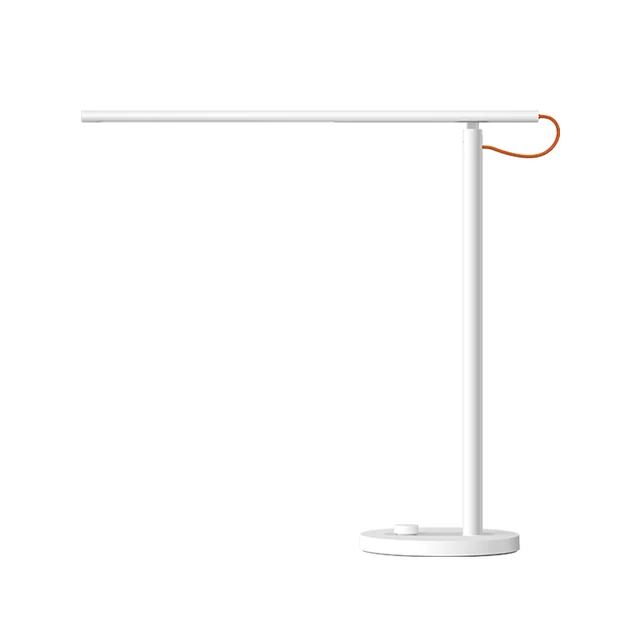
A flicker-free freestanding lamp with app and voice control that costs a fraction of the premium options.
Best for: Value-focused buyers who want smart controls and clean, adjustable light without a premium outlay.
- Genuinely smooth 1-100% dimming and a physical dial that owners praise for its simplicity
- Flicker-free operation and around 520 lumens, enough for most desk tasks
- App scheduling plus Google Assistant and Alexa voice control at a modest price
- Compact, tidy freestanding base
- Color temperature tops out at 5000K, cooler than the 6500K rivals
- Single arm pivot limits how far you can reposition the head
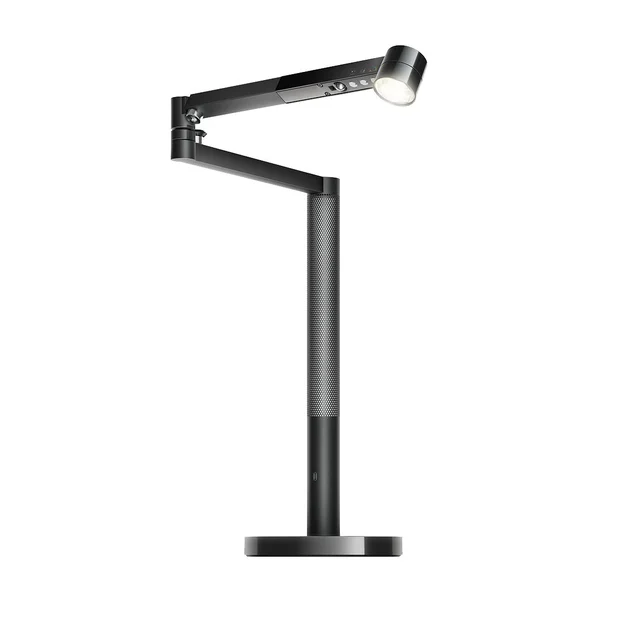
A brilliant, endlessly adjustable circadian lamp whose flagship price and large footprint only suit a specific buyer.
Best for: Buyers with the budget who specifically want automatic circadian lighting and a design showpiece.
- Daylight-tracking algorithm adjusts brightness and warmth to local time, and reviewers rate the light quality among the best available
- Four distinct modes (task, indirect, feature, ambient) and a 360-degree optical head with wide reach
- Dyson claims its LEDs maintain light quality for 60 years (L70, 8 hours a day)
- App and motion-sensor control feel genuinely premium
- Flagship pricing that is many times the cost of the other three lamps here
- Tall arm and weighted base take up real desk space, and it is heavy to reposition
- Most of the automation is overkill for a simple task-lighting need
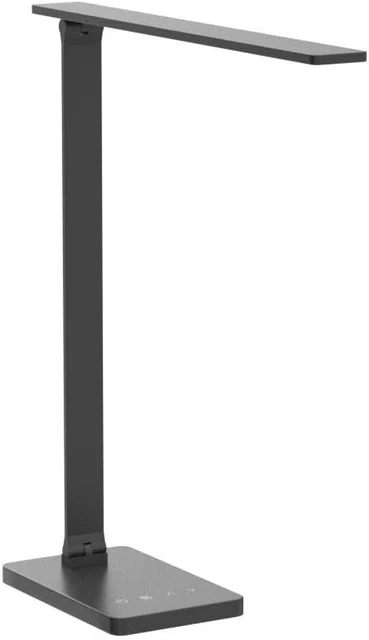
A competent, inexpensive metal lamp let down by stepped controls and a narrow pool of light.
Best for: A no-frills backup or dorm lamp where price is the only priority.
- Solid metal build and touch controls at a budget price
- Reasonable 3000K-6500K range across five color modes
- Around 800 lumens on the brightest setting
- Only five fixed brightness levels and five color modes rather than smooth adjustment
- No smart, app, or scheduling features
- Owners note the light pool is relatively narrow, and cheaper smart rivals offer more for similar money
| Criteria | BenQ ScreenBar Halo 2 Top pick | Xiaomi Mi LED Desk Lamp 1S | Dyson Solarcycle Morph Desk | Lepro LED Desk Lamp (9.5W Metal) |
|---|---|---|---|---|
| Verdict | Buy it | Buy it | It depends | Skip it |
| Best for | Monitor-based knowledge workers who want glare-free task light and their whole desk surface back. | Value-focused buyers who want smart controls and clean, adjustable light without a premium outlay. | Buyers with the budget who specifically want automatic circadian lighting and a design showpiece. | A no-frills backup or dorm lamp where price is the only priority. |
| Price tier | $$$ · premium | $$ · mid-range | $$$$ · flagship | $ · budget |
| Light type & placement | Monitor-mounted light bar | Freestanding single-arm lamp | Freestanding articulated arm lamp | Freestanding folding lamp |
| Brightness | Bright, even desk coverage (~500 lx across a wide zone) | Ample for most tasks (~520 lumens) | Very bright with the widest reach | Adequate (~800 lumens) but a narrow pool |
| Color temperature range | 2700K-6500K | 2600K-5000K | Warm-to-cool, daylight-tracked | 3000K-6500K |
| Glare & eye comfort | Asymmetric optics, no screen glare, flicker-free, Rf 96+ | Flicker-free, diffused | High color rendering, flicker-managed | Diffused, but basic eye-care spec |
| Controls | Wireless dial, motion sensor, auto-dim | Physical dial plus app and voice | App, motion sensor, on-lamp touch | On-lamp touch only, fixed steps |
| Desk footprint | None (clamps to monitor) | Small freestanding base | Large weighted base and tall arm | Small folding base |
| Smart / circadian features | Ambient auto-dimming backlight | Scheduling, Google/Alexa voice | Full daylight-tracking circadian mode | None |
| Price tier | $$$ · premium | $$ · mid-range | $$$$ · flagship | $ · budget |
Which one is right for you?
- Monitor-based knowledge workers who want glare-free task light and their whole desk surface back. Buy it BenQ ScreenBar Halo 2
- Value-focused buyers who want smart controls and clean, adjustable light without a premium outlay. Buy it Xiaomi Mi LED Desk Lamp 1S
- Buyers with the budget who specifically want automatic circadian lighting and a design showpiece. It depends Dyson Solarcycle Morph Desk
- A no-frills backup or dorm lamp where price is the only priority. Skip it Lepro LED Desk Lamp (9.5W Metal)
How we judged the field
We do not run our own lighting lab. Instead, we synthesized independent testing, expert reviews, and aggregated owner reports for each lamp, then weighed them against the criteria that actually matter on a working desk: usable brightness and how evenly it spreads, the width of the color-temperature range, glare and eye comfort (including flicker-free operation and how well the design keeps light off your screen), the quality of the controls, and how much desk space the lamp demands. We also factored in smart and circadian features, but only where they earn their keep rather than padding a spec sheet. Prices are given as qualitative tiers because street prices move constantly.
Our pool deliberately spans the market: a monitor-mounted light bar, a flagship circadian arm lamp, and two freestanding lamps at very different prices. That mix let us test the real question most buyers face, which is whether to free up the desk with a light bar or stick with a traditional lamp.
BenQ ScreenBar Halo 2
Buy itThe ScreenBar Halo 2 is the lamp we would fit to most home-office desks. It clamps to the top edge of a monitor, so it consumes no desk space, and its asymmetric optical design throws light down onto the keyboard and desk while keeping it off the screen. Owners repeatedly describe the result as bright, even task light with none of the reflected glare a conventional lamp can create. The front light offers a full 2700K-6500K range and high color-fidelity LEDs (Rf above 96) that reviewers find comfortable for long stretches, and it is engineered to be flicker-free. A wireless dial handles brightness and warmth, a motion sensor can wake it when you sit down, and a tunable ambient backlight softens the contrast behind the screen. The price sits in premium territory, and it only makes sense if you work at a monitor, but within that use case nothing else here matches it.
Xiaomi Mi LED Desk Lamp 1S
Buy itThe Mi LED Desk Lamp 1S is the value standout. It delivers around 520 lumens of flicker-free light, dims smoothly across the full 1-100% range from a satisfying physical dial, and adds app scheduling plus Google Assistant and Alexa voice control at a price well below the premium options. Owners like its clean, unfussy design and small freestanding base. The compromises are honest: color temperature tops out at 5000K rather than the 6500K daylight some rivals reach, and the single arm pivot limits how far you can reposition the head. For anyone who wants a genuinely useful smart lamp without spending a lot, it is an easy recommendation.
Dyson Solarcycle Morph Desk
It dependsThe Solarcycle Morph is the best light in this group and also the hardest to recommend. Its headline feature is a daylight-tracking algorithm that adjusts brightness and warmth to your local time, and reviewers rate both the light quality and the four modes (task, indirect, feature, and ambient) highly. The 360-degree optical head reaches almost anywhere on the desk, and Dyson claims its LEDs keep their light quality for 60 years. The catch is the flagship price, which runs many times the cost of the other three, and a tall arm on a weighted base that takes up real space and is heavy to move. If you specifically want automatic circadian lighting and a design showpiece, it is superb; for straightforward task lighting, it is far more lamp than most people need.
Lepro LED Desk Lamp (9.5W Metal)
Skip itThe Lepro is a perfectly competent budget lamp with a solid metal build, touch controls, a 3000K-6500K range, and around 800 lumens at its brightest. The problem is that it only offers five fixed brightness levels and five color modes rather than smooth adjustment, has no smart features at all, and owners note a relatively narrow pool of light. At its price point, smart rivals such as the Xiaomi give you continuous dimming and app control for similar money. It is not a bad lamp, but there is little reason to choose it over the alternatives, so we skip it.
BenQ ScreenBar Halo 2 vs Xiaomi Mi LED Desk Lamp 1S: which should you buy?
These are our two recommendations, and they suit different desks. The BenQ wins on glare control and space: because it mounts to the monitor and aims light away from the screen, it keeps your desk completely clear and avoids reflections, and its high-fidelity LEDs (Rf above 96, versus the Xiaomi’s Ra 90) make it the more color-accurate of the two. The Xiaomi wins on value and flexibility away from a screen: it costs far less, adds voice and app control, and works anywhere on the desk rather than depending on a monitor to clamp to. If your work is monitor-centric and you want the cleanest possible lighting, pay up for the BenQ. If you want a smart, affordable lamp that lights a general work area, the Xiaomi does almost everything most people need for a fraction of the price.
What to look for
- Placement: Decide between a monitor light bar (no desk footprint, glare-free screen work) and a freestanding lamp (lights a wider area for paperwork and crafts).
- Color-temperature range: Look for adjustability from warm (around 2700K) to cool (up to 6500K) so you can match the light to the time of day and task.
- Glare and flicker: Prioritize flicker-free operation and designs that keep light off your screen; high color rendering (CRI) adds comfort over long sessions.
- Controls: Smooth continuous dimming beats a handful of fixed steps; a physical dial or wireless controller is usually nicer to use than on-lamp taps.
- Footprint and smarts: Check the base size against your desk, and only pay for app, voice, or circadian features if you will actually use them.
Our final take
Most people working at a monitor should buy the BenQ ScreenBar Halo 2: it lights the desk beautifully, casts no screen glare, and gives you your whole surface back, which no freestanding lamp here can match. If you want smart control and clean light for far less money, or you need to light an area away from a screen, the Xiaomi Mi LED Desk Lamp 1S is the value pick. The Dyson Solarcycle Morph is the finest light in the group but a specialist purchase justified only by its circadian automation and design. And the Lepro, while competent, is comfortably out-featured by cheaper smart rivals, so we would skip it.
Questions, answered
Are monitor light bars actually better than a normal desk lamp?
For screen-based work, yes for most people. Independent testing and owner reports consistently note that a well-designed light bar such as the BenQ lights the desk and keyboard without spilling onto the monitor, so you avoid the reflections a conventional lamp can create. A freestanding lamp remains the better choice if you need to light a wide area for paperwork, crafts, or reading away from a screen.
What color temperature should I use at a desk?
A cooler white in the 4000K-5000K range suits focused daytime work, while a warmer 2700K-3000K is more comfortable in the evening. All four lamps here are adjustable; the BenQ and Lepro reach 6500K for the coolest daylight look, while the Xiaomi tops out at a still-usable 5000K.
Does a high CRI matter for a desk lamp?
It matters most if color accuracy is part of your work, such as photo editing, design, or detailed craft. A high color-rendering light like the BenQ's high-fidelity LEDs (Rf above 96) make colors look truer. For general reading and typing, any of these lamps is fine, but higher color rendering is generally easier on the eyes over long sessions.
Is the Dyson worth its flagship price?
Only for a specific buyer. Reviewers rate its light quality and daylight-tracking automation at the top of the field, and Dyson claims a very long LED lifespan. But it costs many times more than the other lamps and takes up meaningful desk space, so it makes sense mainly if you specifically want automatic circadian lighting and treat the lamp as a design piece.
Do these lamps flicker or cause eye strain?
The BenQ and Xiaomi are designed to be flicker-free, which reduces the subtle eye fatigue some cheap LEDs cause; the Dyson is also engineered for high-quality, flicker-managed output. Beyond the hardware, the biggest comfort factors are avoiding glare and matching brightness to your surroundings, which is why the BenQ's anti-glare optics stand out.
Deciding between the top two? See our head-to-head: BenQ ScreenBar Halo 2 vs Xiaomi Mi LED Desk Lamp 1S.
More Office & WFH reviews
 The Best Monitor Arms for Office and WFH Desks (2026)
  The Best Monitor Light Bars: 4 Compared (and One to Skip)
  The Best Monitor Privacy Screens: 4 Compared (and One to Skip)
  The Best Monitor Stands and Risers: 4 Compared (and One to Skip)
  The Best Notebooks: 4 Compared (and One to Skip)
  The Best Office Chair Casters: 4 Compared (and One to Skip)