

Office & WFH
The Best Monitor Light Bars: 4 Compared (and One to Skip)
We compared four current monitor light bars on glare control, coverage, controls, and eye-care features to find the best desk lighting for most people.
The short version
A monitor light bar is the cleanest fix for screen glare and desk-lamp clutter, and every bar here is built around asymmetric, glare-free lighting. The BenQ ScreenBar Halo 2 is the best overall: the widest, most even light, a wireless desk dial, a tri-zone ambient backlight, and auto-dimming that means you rarely touch it. The Quntis Monitor Light Bar Focus 51 cm is the value champion, matching the wireless control and auto-dimming for a fraction of the cost. The Xiaomi Mi bar is a well-built budget pick if you want a wireless remote but can live without automation, while the Yeelight Pura Monitor Light Bar Lite is sized for 24 inch and smaller screens and runs on a single touch button, so most desk setups should skip it. Best for: most people who work long hours at a desk and want less eye strain without adding a lamp.
Our picks at a glance
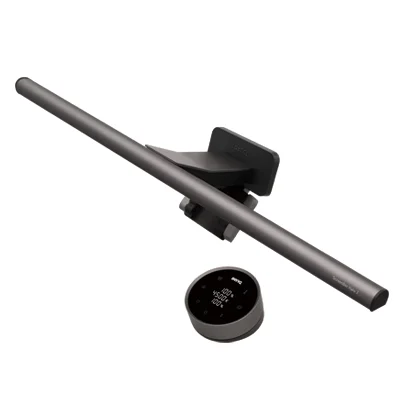
- BenQ ScreenBar Halo 2 - Buy. The most refined light bar you can buy, with a wireless dial, a wide ambient backlight, and hands-off auto-dimming.
- Quntis Monitor Light Bar Focus 51 cm - Buy. Delivers the premium feature set - wireless dial, auto-dimming, high-CRI asymmetric light - at a fraction of the flagship price.
- Xiaomi Mi Computer Monitor Light Bar - It depends. A solid, well-built budget bar with a proper wireless remote - but no auto-dimming and no backlight.
- Yeelight Pura Monitor Light Bar Lite - Skip. A cheap, curve-friendly bar that is sized for small screens and runs everything through one touch button on the bar itself.
The verdict in 30 seconds
What mattered most
- Glare control & light quality
- Brightness & desk coverage
- Controls
- Auto-dimming sensor
- Rear ambient backlight
- Mount / curved-monitor fit
A monitor light bar clamps to the top of your screen and throws warm, glare-free light onto your desk without adding a lamp footprint or bouncing reflections into your eyes. The category now runs from budget touch-control bars to premium bars with wireless dials, ambient backlights, and auto-dimming light sensors. We looked at four of the most-recommended options in 2026: two we'd buy without hesitation, one that only makes sense for a specific buyer, and one we'd pass on unless price is the only thing that matters.
The most refined light bar you can buy, with a wireless dial, a wide ambient backlight, and hands-off auto-dimming.
Best for: People who work long hours at the screen and want the calmest, most automatic desk-lighting experience regardless of price.
- Asymmetric front optics keep light on the desk and off the screen, so reviewers report essentially zero reflected glare
- Wireless puck controller sits on the desk for instant brightness and color-temperature changes without reaching up
- Tri-zone rear backlight plus a motion/auto-dim sensor that eases the bar to a comfortable level as room light changes
- High color accuracy and flicker-free, blue-light-hazard-free LEDs that owners credit for reduced eye fatigue on long days
- Clearly the most expensive option here, and the extra features are overkill for casual use
- The wide backlight and controller add clutter some minimalist desks don't want
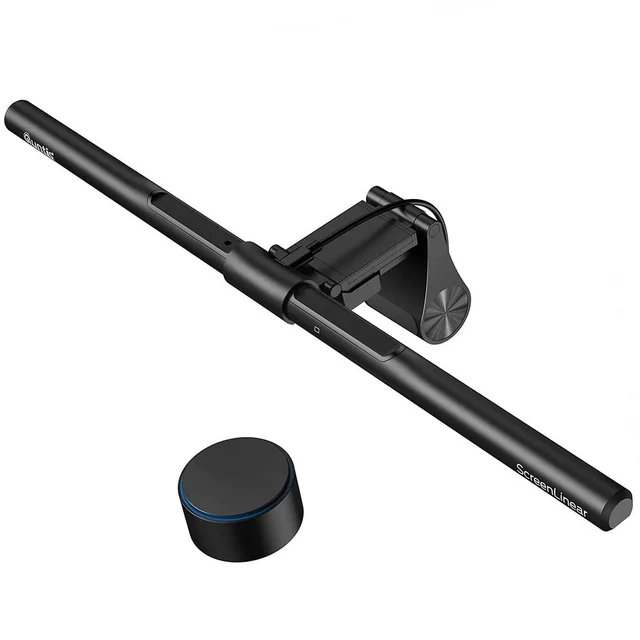
Delivers the premium feature set - wireless dial, auto-dimming, high-CRI asymmetric light - at a fraction of the flagship price.
Best for: Value-focused buyers who want auto-dimming and wireless control without paying flagship money.
- Wireless puck gives stepless brightness and color-temperature control that reviewers say feels close to bars costing far more
- Built-in ambient light sensor auto-dims through the day, a feature usually reserved for premium models
- Asymmetric beam and CRI 95 light spread evenly across a full keyboard-and-notebook area with no screen reflections
- Weighted, upgraded clip holds steady on flat and curved monitors and resists wobble
- No rear ambient backlight, so it lacks the atmospheric glow of the top pick
- Brand is less established, and long-term reliability reports are thinner than for bigger names
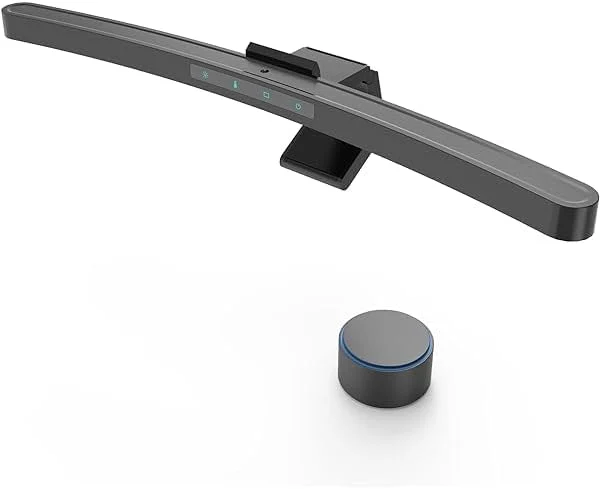
A solid, well-built budget bar with a proper wireless remote - but no auto-dimming and no backlight.
Best for: Budget buyers who specifically want a wireless remote and a premium-feeling metal bar, and don't care about auto-dimming.
- Metal body and a weighted, stable base that owners consistently praise at this price
- 2.4GHz wireless dial for quick brightness and 2700K-6500K color-temperature changes
- Ra95 color rendering and flicker-free light that handle everyday work and casual editing well
- Magnetic tilt mount adapts to thin, thick, and lightly curved monitors
- No ambient light sensor, so brightness never adjusts on its own
- No rear backlight and slightly narrower, less even coverage than the pricier bars
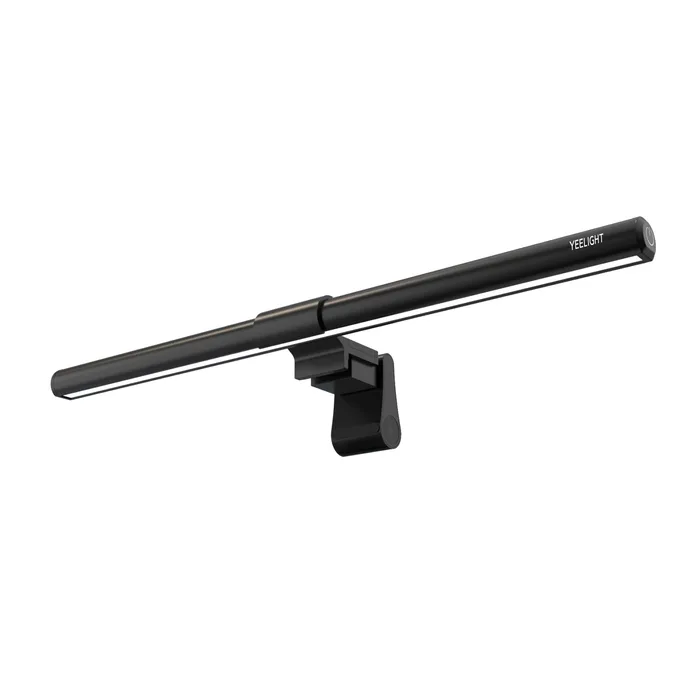
A cheap, curve-friendly bar that is sized for small screens and runs everything through one touch button on the bar itself.
Best for: Someone with a laptop or a 24 inch or smaller monitor who wants basic glare-free desk light and will rarely change the settings.
- Anti-glare design aims light down at the desk, with 1100 lux of task lighting claimed by Yeelight
- Clip handles curved screens from 1800R to 1000R and panels 0.20 to 3.54 inches thick
- Stepless dimming and simple USB-C power at a low price
- Yeelight sizes it for 13.8 to 24 inch screens, so it is not made for the 27 inch and larger monitors many desks now use
- One touch button on the end of the bar handles power, dimming, and color, with no remote or desk dial, so you reach up over the monitor to adjust it
- Only three fixed whites (3000K, 5000K, 6500K) instead of a stepless color-temperature range
- Yeelight's page lists no CRI figure and no auto-dimming sensor or rear backlight
| Criteria | BenQ ScreenBar Halo 2 Top pick Buy it Buy | Quntis Monitor Light Bar Focus 51 cm Buy it Buy | Xiaomi Mi Computer Monitor Light Bar It depends Buy | Yeelight Pura Monitor Light Bar Lite Skip it Buy |
|---|---|---|---|---|
| Best for | People who work long hours at the screen and want the calmest, most automatic desk-lighting experience regardless of price. | Value-focused buyers who want auto-dimming and wireless control without paying flagship money. | Budget buyers who specifically want a wireless remote and a premium-feeling metal bar, and don't care about auto-dimming. | Someone with a laptop or a 24 inch or smaller monitor who wants basic glare-free desk light and will rarely change the settings. |
| Price tier | $$$$ · flagship | $$ · mid-range | $ · budget | $ · budget |
| Glare control & light quality | Excellent - asymmetric optics, high CRI | Excellent - asymmetric, CRI 95 | Very good - asymmetric, Ra95 | Anti-glare design claimed, CRI not listed |
| Brightness & desk coverage | Widest, most even | Wide and even | Good, slightly narrower | 1100 lux claimed, sized for 13.8-24 inch screens |
| Controls | Wireless desk dial | Wireless desk dial | Wireless remote dial | One touch button on the bar |
| Auto-dimming sensor | Yes | Yes | No | Not listed |
| Rear ambient backlight | Yes - tri-zone | No | No | Not listed |
| Mount / curved-monitor fit | Flat & curved | Flat & curved | Flat & lightly curved | Flat & curved (1800R-1000R), 13.8-24 inch screens |
| Price tier | $$$$ · flagship | $$ · mid-range | $ · budget | $ · budget |
Which one is right for you?
- People who work long hours at the screen and want the calmest, most automatic desk-lighting experience regardless of price. Buy it BenQ ScreenBar Halo 2
- Value-focused buyers who want auto-dimming and wireless control without paying flagship money. Buy it Quntis Monitor Light Bar Focus 51 cm
- Budget buyers who specifically want a wireless remote and a premium-feeling metal bar, and don't care about auto-dimming. It depends Xiaomi Mi Computer Monitor Light Bar
- Someone with a laptop or a 24 inch or smaller monitor who wants basic glare-free desk light and will rarely change the settings. Skip it Yeelight Pura Monitor Light Bar Lite
How we judged the field
We don’t run our own lighting lab. Instead, we synthesized independent testing and aggregated owner reports for the most-recommended monitor light bars on sale in 2026, then weighed them on the things that actually change your day at the desk. Four criteria did most of the sorting.
First, glare and light quality: every serious bar now uses an asymmetric optical design that aims light onto the desk and keeps it off the screen, but coverage width, evenness, and color accuracy (CRI/Ra) still separate them. Second, controls: a wireless desk dial is far nicer to live with than reaching over your monitor to a touch strip. Third, automation: an ambient light sensor that auto-dims through the day removes the last bit of fiddling. Fourth, build and fit: a stable, weighted clip that handles flat and curved panels matters more than spec sheets suggest. Price then decided how forgiving we were about missing features.
BenQ ScreenBar Halo 2
Buy itThis is the bar the others are measured against. Reviewers consistently describe it as the most refined option: the asymmetric front light is wide and even, the tri-zone rear backlight adds a calm glow behind the monitor, and a motion and ambient-light sensor eases brightness to a comfortable level without input. The wireless puck controller lives on your desk, so brightness and color-temperature changes never mean reaching up to the screen. Owners repeatedly credit the flicker-free, blue-light-hazard-free light for less fatigue on long days. It is the priciest bar here and genuinely more than a casual user needs - but nothing else combines this much light quality, control, and automation.
Quntis Monitor Light Bar Focus 51 cm
Buy itThe Quntis is the value story of the category, and for most buyers it is the smart pick. It bundles the two features that usually cost a lot - a wireless dial and a light-sensor auto-dim - into a mid-range package, and pairs them with a CRI 95 asymmetric beam that independent reviews say spreads cleanly across a full keyboard-and-notebook area with no screen reflections. The upgraded weighted clip holds steady on flat and curved monitors. What you give up versus the top pick is the rear ambient backlight and the track record of a bigger brand. If you don’t need the atmospheric glow, you’re getting most of the flagship experience for far less.
Xiaomi Mi Computer Monitor Light Bar
It dependsThe Xiaomi punches above its budget price on hardware: a metal-bodied bar, a weighted base, Ra95 flicker-free light, and a proper 2.4GHz wireless dial that responds instantly. For a lot of people that’s plenty. The catch is what it leaves out - there’s no ambient light sensor, so it never dims itself, and there’s no rear backlight, with coverage that’s a touch narrower and less even than the pricier bars. It earns a qualified recommendation: buy it if you specifically want a premium-feeling metal bar with a wireless remote at a budget price, and skip it if hands-off auto-dimming is on your list.
Yeelight Pura Monitor Light Bar Lite
Skip itThe Yeelight isn’t a bad light for the right setup. Yeelight shows an anti-glare design that aims light at the desk, claims 1100 lux of task lighting, and the clip handles curved screens from 1800R to 1000R, all at a budget price. The problem is fit and control for a typical desk. Yeelight’s own sizing chart lists 13.8 to 24 inch screens, so it is not built for the 27 inch and larger monitors many people now work on. Everything runs through one touch button on the end of the bar: a tap for power and color, a long press for dimming, which means reaching over the monitor every time. Color is limited to three fixed whites, and the page lists no CRI figure, no auto-dimming, and no backlight. Since the Xiaomi adds a wireless dial and Ra95 light for a small step up, we’d pass on this unless your screen is 24 inches or smaller and you’ll set it once.
BenQ ScreenBar Halo 2 vs Quntis Monitor Light Bar Focus 51 cm: which should you buy?
These are the two we’d actually buy, and the decision comes down to budget and how much you value atmosphere. Both give you asymmetric glare-free light, a wireless desk dial, and auto-dimming - the core of a great experience. The BenQ pulls ahead with the widest and most even coverage, the highest polish, and a tri-zone rear backlight that makes the desk feel calmer in a dark room, all backed by a well-established brand. The Quntis matches the control and automation for a fraction of the price and gives up mainly the backlight and the brand pedigree.
If you’re at the screen for hours every day and want the best, most automatic setup regardless of cost, the ScreenBar Halo 2 is worth it. If you want 90% of that experience and would rather keep the money, the Focus 51 cm is the easy call - and it’s the bar we’d steer most people toward.
What to look for
- Asymmetric optics. Non-negotiable - the light should aim at your desk, not your screen. The bars here do this; a random cheap bar may not.
- Wireless or desk-level controls. A puck or dial you don’t have to reach over the monitor for makes the bar far nicer to live with.
- Auto-dimming sensor. A genuine convenience if your room light changes through the day; skippable if it doesn’t.
- Color accuracy (CRI/Ra 95+). Matters if you edit photos or care about how colors and paper look under the light.
- Flicker-free, low blue-light LEDs. Standard on good bars and the features most tied to reduced eye fatigue in owner reports.
- Clip and curve fit. Check it supports your panel thickness and any curve, and that the clip is weighted enough to stay put.
- USB power. All of these run off USB, so no extra wall plug - just a free port on your monitor, dock, or charger.
Our final take
Every bar here solves the basic problem: less glare, less eye strain, and no desk lamp eating your space. The difference is how much the extras smooth out daily use. The BenQ ScreenBar Halo 2 is the best of the bunch and the one to buy if price isn’t the deciding factor - the widest light, a wireless dial, an ambient backlight, and auto-dimming that means you set it once and forget it. For most people, the Quntis Monitor Light Bar Focus 51 cm is the smarter buy, delivering wireless control and auto-dimming for far less. The Xiaomi Mi bar is a well-built budget choice if you want a remote but not automation, and the Yeelight Pura Monitor Light Bar Lite is the one we’d skip, because it is sized for 24 inch and smaller screens and for a little more you get controls that make the whole category worth it.
Questions, answered
Do monitor light bars actually reduce eye strain?
They can help. By adding even, glare-free light to your desk, a light bar reduces the harsh contrast between a bright screen and a dark room, which is a common cause of eye fatigue during long sessions. Independent testing and owner reports both point to asymmetric optics (light aimed at the desk, not the screen), high color accuracy, and flicker-free LEDs as the features that matter most. This is general product information, not medical advice - if you have persistent eye strain or headaches, consult an eye-care professional.
Will a light bar cause reflections or glare on my screen?
A well-designed one won't. The whole point of the asymmetric optical design used across these bars is to throw light forward and down onto your keyboard and desk while keeping it off the display. Cheaper or poorly aimed lights can bounce into the screen, so the asymmetric beam is the single most important thing to look for.
Do I need auto-dimming, or is a manual dial enough?
A manual dial is genuinely fine for many people. Auto-dimming, using a built-in light sensor to adjust brightness as your room changes through the day, is a real convenience but a nice-to-have rather than a necessity. If you rarely change lighting conditions or don't mind a quick tap on a dial, you can save money and skip it.
Will these fit a curved or very thin monitor?
Most modern bars, including the ones here, use a weighted clip or tilting mount that handles a wide range of panel thicknesses and at least gentle curves. If you have a strongly curved ultrawide, check that the model lists curved-monitor support or ships a curved-fit adapter, since a flat bar can leave uneven coverage on a deep curve.
How are monitor light bars powered?
By USB. They draw power from a USB-A or USB-C port on your monitor, laptop, dock, or a phone charger, so there's no extra wall plug and the bar typically turns on and off with your setup. That USB power draw is also why they stay cool.
Deciding between the top two? See our head-to-head: BenQ ScreenBar Halo 2 vs Quntis Monitor Light Bar Focus 51 cm.
More in Office & WFH
Monitor Light Bars, Explained Plain-English guide → BenQ ScreenBar Halo 2 vs Quntis Monitor Light Bar Focus 51 cm Head-to-head →  The Best Monitor Privacy Screens: 4 Compared (and One to Skip)
  The Best Monitor Stands and Risers: 4 Compared (and One to Skip)
  The Best Notebooks: 4 Compared (and One to Skip)
  The Best Office Chair Casters: 4 Compared (and One to Skip)