

Office & WFH
The Best Laser Printers: 4 Compared (and One to Skip)
We compared four current mono and color laser printers on running cost, speed, toner freedom, and all-in-one features to find the best home-office pick.
The short version
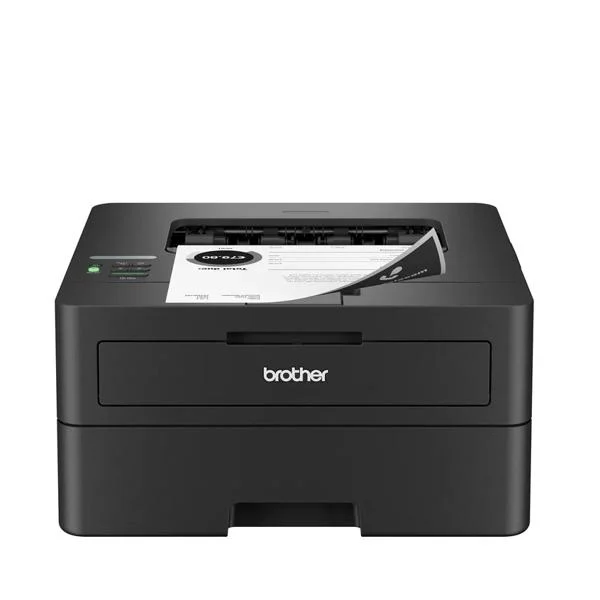
Laser printers win a home office on running cost and reliability, and the field splits cleanly. The Brother HL-L2460DW is the value champion: fast mono printing, the lowest cost per page, and freedom to use affordable compatible toner. If you need color and all-in-one features, the Canon Color imageCLASS MF656Cdw offers strong color accuracy and a full scan, copy and fax feature set. The Brother MFC-L2820DW is a good mono all-in-one only if you never print color, and we'd skip the HP Color LaserJet Pro MFP 3301fdw because its firmware can block cheaper third-party toner and color pages cost too much. Best for: a home office that wants dependable printing at the lowest long-term cost, starting with the Brother HL-L2460DW.
Our picks at a glance
- Brother HL-L2460DW - Buy. The cheapest, most fuss-free way to get reliable black-and-white laser printing, and it takes affordable third-party toner.
- Canon Color imageCLASS MF656Cdw - Buy. The color all-in-one to get if you need vivid color and scan/copy/fax in one machine.
- Brother MFC-L2820DW - It depends. A mono all-in-one that copies, scans, and faxes cheaply, but only makes sense if you never need color.
- HP Color LaserJet Pro MFP 3301fdw - Skip. A capable color all-in-one undermined by high color running costs and firmware that fights third-party toner.
The verdict in 30 seconds
What mattered most
- Output
- Functions
- Print speed
- Running cost
- Third-party toner
- Warranty
Laser printers are the workhorse choice for a home office: they wake up fast, resist dry-out during the weeks you don't print, and cost a fraction of an inkjet per page over their life. We looked at four models you can actually buy in 2026 across two brands' mono lines and two color all-in-ones. Two are easy recommendations, one is a solid buy only if you need its specific extras, and one we'd steer most people away from.
The cheapest, most fuss-free way to get reliable black-and-white laser printing, and it takes affordable third-party toner.
Best for: Anyone who mainly prints documents, shipping labels, and forms and wants the lowest cost per page.
- Fast for the class at roughly 36 pages per minute with automatic two-sided printing
- Genuinely low running cost, and it accepts inexpensive compatible toner without lockouts
- Compact single-function body that fits a shelf or small desk
- Print-only, so no scanning, copying, or faxing
- Black-and-white only
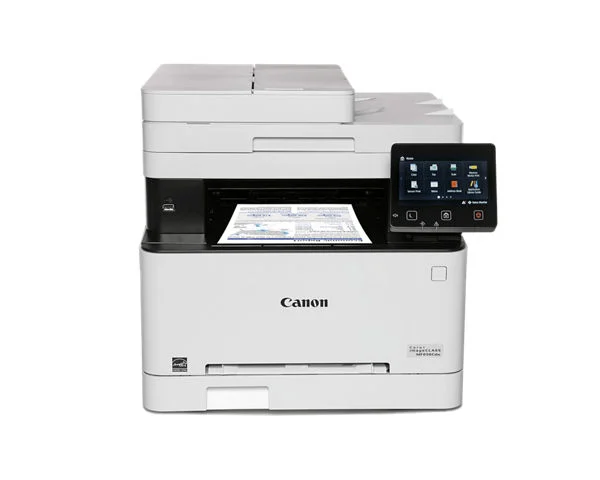
The color all-in-one to get if you need vivid color and scan/copy/fax in one machine.
Best for: Home offices that occasionally need color and want a capable all-in-one in one machine.
- Independent testing rates its color accuracy highly
- Full print, copy, scan, and fax with an automatic document feeder and a color touchscreen
- Color toner is a meaningful ongoing expense
- Larger and heavier than a plain mono unit
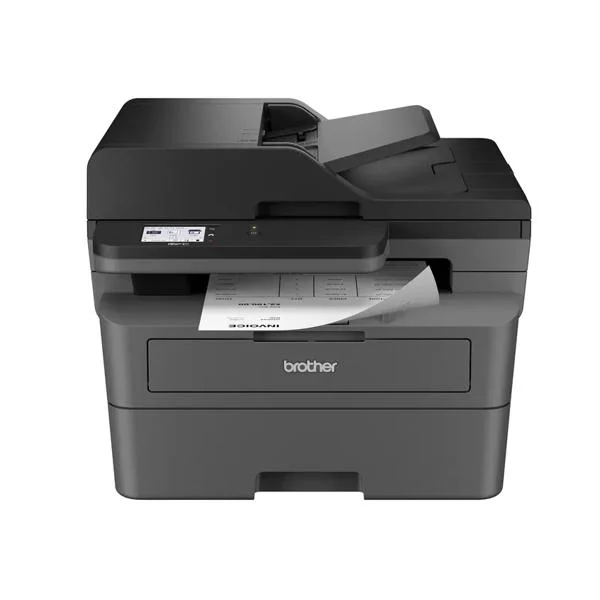
A mono all-in-one that copies, scans, and faxes cheaply, but only makes sense if you never need color.
Best for: Buyers who need scanning and copying but genuinely never print in color.
- Adds copy, scan, and fax plus an automatic document feeder over the print-only Brother
- Low per-page cost and tolerant of affordable compatible toner
- Fast document printing around 34 pages per minute
- Black-and-white only, so no color output at all
- Its 2.7-inch touchscreen is small next to larger-screen rivals, and scanning and copying are one-sided only
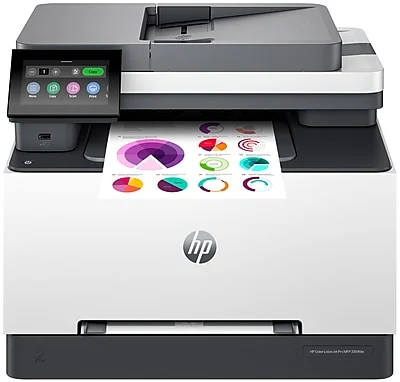
A capable color all-in-one undermined by high color running costs and firmware that fights third-party toner.
Best for: Committed HP-ecosystem users who plan to buy only genuine HP toner and don't mind the cost.
- Sharp, well-tuned color output and a slick touchscreen setup
- Complete all-in-one feature set with duplex printing and scanning
- Quick, guided wireless setup
- Dynamic Security firmware can block cartridges without HP chips, locking you into pricier toner
- Color running cost is high, and owners report the up-front price runs steep for the class
| Criteria | Brother HL-L2460DW Top pick Buy it Buy | Canon Color imageCLASS MF656Cdw Buy it Buy | Brother MFC-L2820DW It depends Buy | HP Color LaserJet Pro MFP 3301fdw Skip it Buy |
|---|---|---|---|---|
| Best for | Anyone who mainly prints documents, shipping labels, and forms and wants the lowest cost per page. | Home offices that occasionally need color and want a capable all-in-one in one machine. | Buyers who need scanning and copying but genuinely never print in color. | Committed HP-ecosystem users who plan to buy only genuine HP toner and don't mind the cost. |
| Price tier | $ · budget | $$$ · premium | $$ · mid-range | $$$ · premium |
| Output | Mono only | Color | Mono only | Color |
| Functions | Print only | Print / copy / scan / fax | Print / copy / scan / fax | Print / copy / scan / fax |
| Print speed | Fastest (~36 ppm) | Moderate | Fast (~34 ppm) | Moderate |
| Running cost | Lowest | Higher (color toner) | Low | Highest (color toner) |
| Third-party toner | Accepted | Generally accepted | Accepted | Often blocked by firmware |
| Warranty | 1 year limited | Check Canon terms | 1 year limited | Check HP terms |
| Price tier | $ · budget | $$$ · premium | $$ · mid-range | $$$ · premium |
Which one is right for you?
- Anyone who mainly prints documents, shipping labels, and forms and wants the lowest cost per page. Buy it Brother HL-L2460DW
- Home offices that occasionally need color and want a capable all-in-one in one machine. Buy it Canon Color imageCLASS MF656Cdw
- Buyers who need scanning and copying but genuinely never print in color. It depends Brother MFC-L2820DW
- Committed HP-ecosystem users who plan to buy only genuine HP toner and don't mind the cost. Skip it HP Color LaserJet Pro MFP 3301fdw
How we judged the field
We don’t run our own print lab. Instead we synthesize independent testing, expert teardowns, and aggregated owner reports, then weigh the factors that actually decide whether you’ll be happy a year in. For laser printers that means real running cost more than sticker price, toner policy (does the machine accept affordable third-party cartridges or fight them?), print speed and duplexing, output quality, and whether the all-in-one extras like scanning and faxing are worth their bulk. We also favor models that are current and easy to buy in 2026, so you’re not chasing a discontinued unit or orphaned toner supply.
The field sorts into two useful groups: lean mono machines that keep cost per page rock-bottom, and color all-in-ones that do everything at a higher price. We picked the strongest of each and one to avoid.
Brother HL-L2460DW
Buy itThis is the printer we’d put in most home offices. It’s a compact, print-only mono laser that independent testing and owner reports agree is fast for its class at around 36 pages per minute, with automatic two-sided printing built in. The real win is cost: high-yield toner keeps the per-page price among the lowest of any model here, and crucially Brother’s mono units are tolerant of affordable compatible cartridges, so you’re not held hostage to official toner. The trade-off is honest and simple: no scanning, copying, or color. If all you need is dependable black-and-white documents, nothing here beats its value.
Canon Color imageCLASS MF656Cdw
Buy itWhen you genuinely need color and all-in-one features, this is the one to get. Reviewers rate its color accuracy highly, and it’s a complete workhorse: print, copy, scan, and fax, with an automatic document feeder and a color touchscreen that makes walk-up tasks painless. The catch is running cost, because color toner draws from four cartridges and adds up, and it’s a bigger, heavier machine than a plain mono unit. For an office that occasionally needs a polished color page, it earns its premium.
Brother MFC-L2820DW
It dependsThink of this as the HL-L2460DW’s all-in-one sibling: same low-cost, toner-friendly mono engine, but with copy, scan, fax, and an automatic document feeder added on. It prints quickly at around 34 pages per minute and keeps the same appealing per-page economics. Whether it’s right for you hinges entirely on one question: do you ever need color? If the answer is a firm no, this is a smart, economical hub for a home office. If there’s any chance you’ll want a color page, its mono-only output will start to feel restrictive, even though it does have a small 2.7-inch color touchscreen.
HP Color LaserJet Pro MFP 3301fdw
Skip itOn paper this is a capable color all-in-one with sharp output, a slick touchscreen, and quick guided setup. We steer most buyers away for two reasons that show up repeatedly in owner reports. First, it’s a Dynamic Security printer, meaning firmware can block cartridges without HP chips, so the affordable third-party toner route may be closed to you now or after a future update. Second, color running cost is high and the up-front price runs steep for the class. If you’re already committed to buying only genuine HP toner and value the ecosystem, it works, but for everyone else the economics don’t favor it.
Brother HL-L2460DW vs Canon Color imageCLASS MF656Cdw: which should you buy?
This is really a question about what you print, not which machine is “better.” The Brother HL-L2460DW wins on everything cost-related: it’s cheaper to buy, cheaper per page, faster at plain documents, and it won’t argue with a bargain toner cartridge. But it does exactly one thing, in black and white.
The Canon MF656Cdw asks you to pay more up front and more per page, and in return you get accurate color plus a full scan/copy/fax station with an automatic document feeder. If your printing is 95 percent documents, the Brother saves you money for years. If you regularly need color, need to scan and copy, or want one machine to cover every office chore, the Canon is worth the step up. When in doubt, buy the cheaper Brother and add a dedicated scanner later only if you find you miss it.
What to look for
- Cost per page, not sticker price. A cheap printer with expensive toner costs more over its life. High-yield cartridges and mono output keep it lowest.
- Toner freedom. Check whether the model tolerates affordable third-party cartridges or uses firmware that can block them. This single factor can sharply raise your running cost.
- Mono vs color. Be realistic about how often you print color. Mono lasers are cheaper to buy and run; only pay for color if you’ll use it.
- All-in-one or print-only. Scanning, copying, and faxing add real convenience and real bulk. Skip them if a print-only unit covers your needs.
- Duplexing and an automatic document feeder. Two-sided printing saves paper, and an ADF makes multi-page scanning and copying painless.
- Wireless and mobile printing. Wi-Fi and phone printing are standard here; confirm your network band is supported before you buy.
Our final take
Most home offices should start with the Brother HL-L2460DW. It’s the cheapest to buy, the cheapest to run, fast, and refreshingly free of toner lockouts, which makes it the easiest recommendation in the group. Step up to the Canon Color imageCLASS MF656Cdw when you truly need color plus scan, copy, and fax, in one machine. The Brother MFC-L2820DW is a fine mono all-in-one for anyone who never prints color, and we’d pass on the HP Color LaserJet Pro MFP 3301fdw because its firmware and color costs work against you. Buy for how you actually print, and the choice gets simple.
Questions, answered
Is a laser printer better than an inkjet for a home office?
For text documents, labels, and anything you print in bursts, usually yes. Laser toner doesn't dry out between uses, pages come out fast and smudge-proof, and the cost per page is typically far lower than inkjet ink. Inkjets still win for glossy photos, so the right answer depends on what you print most.
Do I need a color laser printer or is mono enough?
Be honest about how often you actually print color. If it's mostly contracts, forms, and shipping labels, a mono model like the Brother HL-L2460DW is cheaper to buy and run. Color lasers such as the Canon MF656Cdw make sense for marketing pages, charts, or schoolwork, but you pay for it in both hardware and toner.
What is Dynamic Security and why does it matter?
It's firmware some printers use to check a cartridge's chip and potentially refuse to print with non-branded toner. Owners report it can turn an affordable third-party cartridge into a paperweight after an update, which locks you into pricier official toner. It's the main reason we flagged the HP model; the Brother units in this comparison are far more tolerant of compatible toner.
How much does laser toner really cost over time?
Look past the sticker price at the cost per page. Mono lasers with high-yield cartridges are among the cheapest to run, and reviewers consistently rate the Brother models here as low cost per page. Color pages always cost more because they draw from four toners, so a color all-in-one is a bigger long-term commitment.
Do these printers work with phones and cloud printing?
Yes. All four offer Wi-Fi and support standard mobile printing from phones and tablets, plus each brand's own app for setup and scanning on the all-in-ones. If wireless matters to you, confirm your home network is on a supported band, but every model here covers the common phone and laptop printing paths.
Deciding between the top two? See our head-to-head: Brother HL-L2460DW vs Canon Color imageCLASS MF656Cdw.
More in Office & WFH
Laser Printers, Explained Plain-English guide → Brother HL-L2460DW vs Canon Color imageCLASS MF656Cdw Head-to-head →  The Best LED Desk Lamps: 4 Compared (and One to Skip)
  The Best Monitor Arms for Office and WFH Desks (2026)
  The Best Monitor Light Bars: 4 Compared (and One to Skip)
  The Best Monitor Privacy Screens: 4 Compared (and One to Skip)