Explained
Laptop Stands, Explained
After reading this you will know exactly what a laptop stand needs to do, which specs actually matter, and how to avoid buying one that lifts your screen too little.
In this guide
A laptop stand exists to raise the top of your screen up toward eye level so you stop craning your neck downward. The category looks simple, but buyers get tripped up by two things: risers that only lift an inch or two (nowhere near eye level), and the fact that raising the screen alone does not fix your posture unless you also add an external keyboard and mouse. This guide decodes the specs so you can tell a genuine eye-level riser from a travel gadget.
The 30-second version
- Lift height is the whole point. A stand only helps if it can bring the top third of your screen level with your eyes, which for most people means several inches of rise.
- Adjustable beats fixed for most people, because your ideal height depends on your chair, desk and torso, and only an adjustable stand lets you dial it in.
- A riser is only half the setup. Raising the screen also raises the built-in keyboard, so you must pair the stand with an external keyboard and mouse or you simply trade a sore neck for sore wrists.
- Stability matters but is easy to over-worry about. A little flex while typing is harmless once you are on an external keyboard; persistent owner complaints about wobble are the real red flag.
- Match the stand to the job. A rigid stand is fine for one permanent desk, while a fold-flat model earns its place if it needs to travel between home and office.
The products this guide is about
Our verdict on each, with the full reasoning on the companion review.
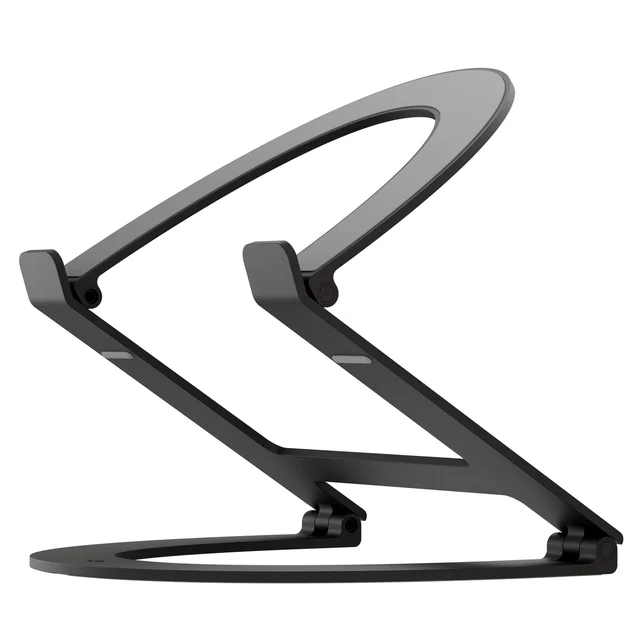
- Buy Twelve South Curve Flex The most flexible riser here - it adjusts from a slight lift all the way to true eye level and folds flat for travel.
- Buy Rain Design mStand A single block of aluminum that is as steady as a desk riser gets - as long as its fixed height suits you. Amazon
- It depends Lamicall Adjustable Laptop Stand A sturdy, foldable budget riser that adjusts within a modest range but asks for two hands to do it. Amazon
- Skip MOFT Adhesive Laptop Stand A brilliantly portable slim lift that sticks to your laptop - but it never gets the screen anywhere near eye level. Amazon
What actually matters
- Lift height / range - how far the stand raises the top of the screen. This is the single most important spec; if it cannot reach eye level for how you sit, nothing else redeems it.
- Adjustable versus fixed - adjustable stands suit shared desks, tall users and travel, while fixed stands trade flexibility for maximum steadiness and a lower price.
- Stability and typing flex - how much the screen shakes or deflects when you type. Fixed one-piece stands flex least; open-arm adjustable stands flex slightly more but remain fine in practice.
- Fit for your laptop - the supported screen size and maximum weight. A stand rated below your machine's size or weight can feel precarious or slip.
- Footprint and desk fit - the base needs to sit on your desk without crowding your keyboard, monitor or mouse space.
- Portability - whether it folds flat and packs. This only matters if the stand needs to move; for a permanent desk it is irrelevant.
- Cooling and cable routing - open-frame designs leave the laptop's underside exposed to air, and a built-in cable channel keeps the desk tidy.
The specs, in plain English
Green flags vs red flags
Green flags
- Height range that clearly reaches several inches of lift, ideally with an adjustable top end for taller users
- Both height and angle adjust, so you can fine-tune the exact position
- Owners consistently describe it as sturdy with little shake over months of use
- Metal construction with a heavy or grippy base that stays planted
- Folds flat and ships with a pouch if you need it to travel
- Clearly stated supported screen size and weight that comfortably fit your laptop
Red flags
- Lift of only two to three inches marketed as an eye-level or ergonomic stand - it is a travel gadget, not a riser
- No stated height range or supported laptop size at all
- Repeated owner reports of wobble, slipping or the mechanism failing to hold height
- A fixed height with no indication of how high it actually lifts
- Flimsy plastic build or a narrow base that tips under a larger laptop
- Adjustment described as a fight that needs two hands and real force, if you plan to change height often
Who's who: the brands
- Twelve South - Known for premium Apple-friendly accessories; its adjustable arm stands reach true eye level and fold for travel.
- Rain Design - The veteran of single-piece aluminum stands, prized for rock-solid stability and a tidy cable channel at a fixed height.
- Lamicall - A value brand making sturdy folding aluminum risers with adjustable height and angle at budget prices.
- MOFT - Specialists in ultra-slim adhesive stands that stick to the underside of the laptop, superb for travel but only a slight lift, not eye level.
- Nulaxy - Popular for affordable adjustable ergonomic risers aimed at desk use.
How to read a listing without getting fooled
Start with the height number and ignore the marketing adjectives. A listing that says 'ergonomic' or 'eye-level' but only quotes a two-to-three-inch lift is a travel accessory dressed up as a riser; a genuine desk stand states a range that climbs to several inches or more. Next confirm whether it is adjustable or fixed, and if fixed, check the exact lift against how you sit before buying. Read the supported screen size and weight to be sure your laptop fits, and treat portability claims as relevant only if you actually need to pack it. Finally, weigh a handful of long-term owner comments over any single glowing headline - persistent mentions of wobble, slipping or a stiff mechanism tell you more than the spec sheet does.
How much should you spend?
You are paying mostly for materials and adjustability. Budget aluminum risers are already sturdy and adjustable enough for most people of average height, and they are an easy recommendation if you set a height once and leave it. Spending more buys a wider height range that reaches eye level for taller sitters, smoother one-handed adjustment, cleaner cooling from an open frame, and a fold-flat design with a travel pouch - worth it if the stand must move between locations or if a fixed height will not suit you. Spending up does not buy more stability; in fact the steadiest stands are often the simplest fixed one-piece designs. The one place it is never worth economizing is lift: a cheap stand that cannot reach eye level fails at the only job that matters, no matter how little it costs.
Questions, answered
How high should a laptop stand lift my screen?
Aim to get the top third of the screen level with your eyes when you sit up straight. For most people that is several inches of lift, which is why an adjustable stand is easier to get right than a fixed-height one.
Do I really need an external keyboard with a laptop stand?
Yes. Raising the screen also raises the built-in keyboard out of a comfortable typing position, so you should add an external keyboard and mouse. Without them a riser trades a neck problem for a wrist and shoulder one.
Are fixed-height stands a bad choice?
Not at all. Fixed one-piece stands are usually the steadiest and tidiest option. The catch is that the height must match how you sit; taller users or anyone on a high chair may find a fixed lift leaves the screen too low, and there is no way to raise it.
Why are the slim stick-on stands not recommended for eye level?
Adhesive fold-out panels that attach to the underside of the laptop are excellent, near-invisible travel accessories, but they lift the machine only about two to three inches. That is a small posture nudge, not enough to bring the screen anywhere near eye level on a desk.
Will a laptop stand hurt cooling?
Generally the opposite. Lifting the laptop off the desk lets air reach the underside, and open-frame stands leave most of the base exposed, which usually helps rather than harms airflow.
Which stand is best if I move between home and the office?
Prioritise a model that folds flat and packs while still reaching full desk height when set up. Adjustable folding risers give you that flexibility; rigid one-piece stands are better left on a single permanent desk.
Or jump to the head-to-head: Twelve South Curve Flex vs Rain Design mStand.