Explained
Monitor Privacy Screens, Explained
After reading this you will know which privacy filter spec decides whether a seatmate can read your screen, what the filter costs you in brightness and colour, and how to size one correctly the first time.
In this guide
A monitor privacy filter is a thin panel of microscopic vertical louvers, like a tiny venetian blind laid over your screen, that lets light through straight ahead and blocks it to the sides. The category looks simple because almost every serious product narrows the view to roughly 30 degrees each side, so buyers assume the products are interchangeable. They are not. The real differences are how much brightness and colour accuracy the filter takes from you, how it attaches, and whether the size you ordered actually matches your panel.
The 30-second version
- Every filter dims your screen. Louvers block off-axis light physically, and they cannot do that without absorbing some of the light aimed at your eyes, so expect to nudge display brightness up after fitting one.
- Viewing angle is the only privacy spec that matters. Look for an explicit figure, usually 30 degrees each side or 60 degrees total, and treat any product that claims privacy without publishing a cutoff angle as an anti-glare film with marketing attached.
- The attachment method decides whether you keep using it. Magnetic frames come off in seconds, adhesive strips and slide-in tabs are effectively permanent, and cling films are the least secure, so pick based on how often you genuinely need to share your screen.
- Size by viewable area, not the number on the box. Filters are cut to the visible glass, and a 24 inch 16:9 filter is a different product from a 24 inch 16:10 filter, so measure width and height with a tape before ordering.
- A big blue light reduction number is a tradeoff, not a bonus. It means extra tint stacked on top of the louvers, which compounds the dimming and pushes your colours warmer.
The products this guide is about
Our verdict on each, with the full reasoning on the companion review.
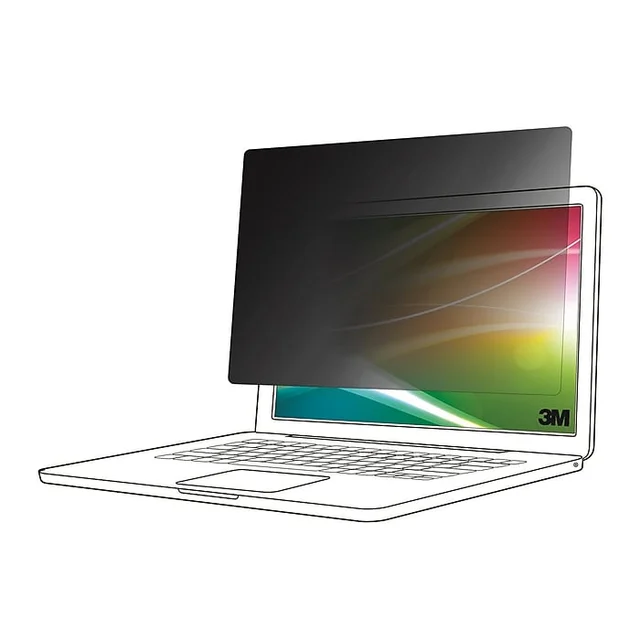
- Buy 3M Bright Screen Privacy Filter A brighter louver filter, with the same 30 degree cutoff and far less of the murk. Amazon
- Buy Kensington MagPro Magnetic Privacy Screen A magnetic frame turns the filter into something you actually take off, which is why it stays in use. Amazon
- It depends Targus 4Vu Privacy Screen The value pick with the widest size coverage, as long as the filter is going on once and staying there. Amazon
- Skip Belkin ScreenForce TruePrivacy Screen Protector Well made, but it fits a short list of MacBooks and charges a premium for the weakest mounting method here. Amazon
What actually matters
- Stated viewing angle cutoff. This is the number that decides whether the person in the next seat or at the next desk can read your screen. Roughly 30 degrees each side is the category standard and it works well for side-on viewers. Nothing in this category protects you from someone standing directly behind you.
- Brightness cost. The louver structure eats light heading toward you as well as light heading sideways. Premium brighter constructions reduce that penalty rather than remove it. If you work in a dim room or on a laptop panel that was never bright to begin with, this is where the extra money does the most good.
- Colour shift. Filters that add a heavy tint layer, often sold as blue light reduction, warm the image noticeably. Fine if you like a warm screen, a real nuisance if you edit photos, grade video, or match brand colours.
- Attachment method. Adhesive strips, slide-in tabs, magnetic bezel frames and cling films are not interchangeable. Magnetic frames adhere once and then let the panel snap on and off. Adhesive and tab systems sit lower and hold better but are a fit-and-forget install. The most common reason a filter ends up in a drawer is that removing it was annoying.
- Correct sizing. Size codes are cut to the panel's viewable area and specific aspect ratios. Many brands publish exact millimetre dimensions per size code, and matching those beats matching the inch figure. Ultrawide and curved panels need cuts made specifically for them.
- Reversible finish. Matte kills reflections under overhead office lighting, glossy keeps contrast punchier. A panel you can flip means you do not have to guess right at purchase.
- What is in the box. A cleaning cloth and a storage sleeve sound like padding until you take the filter off in a meeting room and have nowhere clean to put it. Filters that live off the screen half the time scratch fast without one.
The specs, in plain English
Green flags vs red flags
Green flags
- A cutoff angle published in degrees, right in the specifications rather than buried in marketing copy
- Exact millimetre dimensions listed for each size code, so you can match your measured viewable area
- A reversible matte and glossy panel, which means you are not locked into one finish
- An attachment method described plainly, including whether it is meant to be removed regularly
- Explicit curved and ultrawide cuts if you have that kind of panel, rather than a flat filter sold as compatible
- A storage sleeve or cleaning cloth included, a sign the brand expects the filter to come off sometimes
Red flags
- Privacy claimed with no viewing angle figure anywhere on the listing
- Sizing given only as an inch diagonal, with no aspect ratio and no millimetre dimensions
- A very large blue light reduction percentage used as the headline selling point
- One universal size sold as fitting every monitor in a range
- Cling or static mounting sold at a premium price tier, since it is the least secure method
- Fit lists limited to a few specific laptop models when the price sits at the top of the category
Who's who: the brands
- 3M - A long-established maker of microlouver privacy filters, and its brighter constructions give up the least light for the same cutoff angle.
- Kensington - Office accessory specialist whose magnetic bezel frames make a filter genuinely easy to remove, which is the single biggest usability win here.
- Targus - Value-focused with the widest size coverage in the category, including cuts for curved ultrawides that most brands do not make.
- Belkin - Well built cling-mounted films aimed at a short list of laptop models, priced at the premium end for a mounting method that is the weakest of the three.
- Dell, HP and Lenovo first-party filters - Sold as accessories cut for their own machines, which removes sizing guesswork.
How to read a listing without getting fooled
Start at the specifications table and look for one number: the cutoff angle in degrees. If it is not there, close the tab, because a genuine louver filter should publish it and an anti-glare film with a privacy claim usually does not. Next find the sizing detail. A good listing gives a size code with exact width and height in millimetres and names the aspect ratio; a weak one gives an inch diagonal and nothing else. Compare those millimetres to your own tape measurement of the visible glass, not to what the monitor box says. Then read the mounting section carefully and translate it into your own habits: adhesive strips and slide-in tabs mean this goes on once, a magnetic frame means it comes off in seconds, cling means it comes off and shows dust. Treat brightness claims as relative rather than absolute, since brands compare against their own older products rather than a common standard, and treat a headline blue light reduction figure as a warning about colour shift rather than a bonus. Finally, check the fit list. Laptop filters are often model-specific, and a premium price attached to a narrow fit list is a bad deal unless your exact machine is on it.
How much should you spend?
This is a category where the entry-level and premium products deliver nearly the same privacy, because the cutoff angle is close to standardised across the field. What you buy with more money is less brightness loss, more neutral colour, a thinner panel, and better mounting. That makes the value calculation unusually clear. If the filter is going on a fixed desk monitor and staying there, a mid-tier product with a stated cutoff angle and correct sizing does everything you need, and spending up buys you refinement you may not notice. Pay premium in two situations: when you work in a dim room or on a laptop panel that was never bright, where a brighter construction is the difference between a usable screen and a murky one; and when you take the filter off regularly, where a magnetic frame is worth every bit of its markup because it is the reason the filter stays in use instead of living in a drawer. Avoid paying top of market for a filter whose only distinction is a narrow device fit list or an unusual mounting style, since neither buys you more privacy. And if you have a curved or ultrawide panel, budget for the correctly shaped cut rather than saving money on a flat filter that will bow at the edges.
Questions, answered
How much brightness will I actually lose?
Enough to notice. The louvers block off-axis light physically, and they cannot do that without absorbing some of the light heading straight at you. Owners commonly report raising display brightness a step or two after fitting one. Premium brighter constructions reduce the penalty rather than eliminate it, so the question is not whether you lose brightness but how much you are willing to lose. On a laptop, remember that compensating with higher brightness costs battery life.
Will a privacy filter stop someone standing behind me?
No. Louver filters block the view from the sides, which is what protects you from an adjacent airline seat or the next desk over. Someone directly behind you is looking straight down the same cone you are, so they see what you see. If shoulder surfing from behind is your actual threat, the fix is where you sit and which way you face, not a filter.
How do I get the size right?
Measure the panel's visible glass, width and height, with a tape measure, and confirm the aspect ratio. Do not rely on the diagonal printed on the monitor box. A 24 inch 16:9 filter and a 24 inch 16:10 filter are different products and will not substitute for each other. Many brands publish exact millimetre dimensions for every size code, and matching those numbers is far more reliable than matching an inch figure. If you have a curved or ultrawide panel, buy a cut explicitly listed as compatible with it.
Adhesive strips, slide-in tabs, magnetic frame or cling: which should I pick?
Decide by how often the filter comes off. A magnetic frame adheres to the bezel once and then lets the filter snap on and off in seconds, which suits shared screens, hot desking and anyone who presents regularly. Adhesive strips and slide-in tabs sit lower and hold more securely but are effectively a permanent installation. Cling films are the least secure and show every trapped dust speck. Be realistic about your own habits, because the most common reason a filter stops being used is that removing it was a chore.
Do filters that also cut blue light give me more for my money?
Not really. A large advertised blue light reduction figure means the filter is adding tint on top of the louver layer, which compounds the dimming and pushes the picture warmer. That is fine if you want a warmer screen and a problem if you do any colour-sensitive work. This is general product information rather than health advice, and the evidence for blue light filtering as an eye health intervention is not settled.
Can I leave a filter on a laptop and still close the lid?
Usually yes, if it is a filter designed for laptops. Thin panels, typically well under a millimetre, and low-profile mounting are made for exactly that, and good laptop filters keep the lid closing and the machine sleeping normally. Thicker monitor-oriented filters or bulky frames can hold the lid slightly open, which stresses the hinge and can keep the display awake. Check the quoted thickness and whether the listing says the lid closes.
Or jump to the head-to-head: 3M Bright Screen Privacy Filter vs Kensington MagPro Magnetic Privacy Screen.