Explained
Office Headsets, Explained
After reading, you'll understand what actually makes an office headset good for calls, and how to tell a genuine call-first headset from a repurposed gaming or music one.
In this guide
An office headset has one job most others don't: making you sound clear to the people on the other end of a call, hour after hour, without wearing out your ears. First-time buyers usually shop for how a headset sounds to them (music, bass, noise cancellation) when the thing that matters most is how you sound to everyone else. The trap is that gaming headsets, earbuds, and music cans all look like options, but a true call-first headset is built around a boom mic and all-day comfort instead.
The 30-second version
- The mic matters more than the speakers. An office headset is judged by how clearly you come across on a call, so a dedicated boom mic near your mouth beats any earcup or laptop mic.
- Wireless with a USB dongle is the sweet spot. Bluetooth plus a bundled adapter lets you roam, connect to a laptop and phone at once, and hold a rock-solid link for meetings.
- Active noise cancellation is optional, not essential. ANC earns its keep only in genuinely loud rooms; in a quiet space it just adds weight and shortens battery for no real gain.
- Comfort is a spec you can't see on the box. Weight, clamp force, and on-ear vs over-ear decide whether you make it through back-to-back meetings, and matter more than any headline feature.
- Certification affects buttons, not basic compatibility. Any USB or Bluetooth headset works with Teams, Zoom, and Meet; a certified variant mainly improves the dedicated call and mute controls.
The products this guide is about
Our verdict on each, with the full reasoning on the companion review.
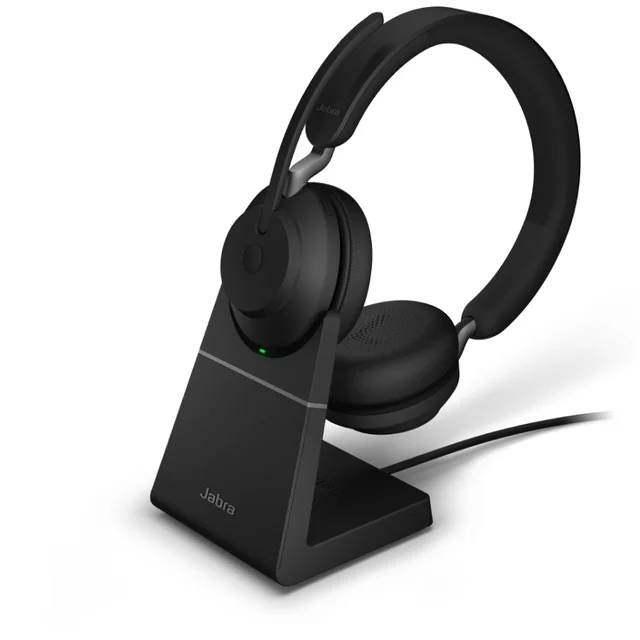
- Buy Jabra Evolve2 65 The default all-day call headset: light, comfortable, and a flip-boom mic that just works. Amazon
- Buy Poly Voyager Focus 2 Adds real hybrid ANC and a standout boom mic when you need to block out the room. Amazon
- Buy Yealink BH70 A three-mic boom, a USB dongle and 35 hours of rated talk time for mid-range money, without ANC.
- It depends Logitech Zone Wireless 2 Excellent AI-processed mic and ANC, but you pay flagship money and lean on the software. Amazon
- It depends Shokz OpenComm2 UC An open-ear bone conduction headset with a real boom mic, for people who need to hear the room.
- It depends Avantree Aria Pro 3 ANC headphones with a detachable boom and a USB-C dongle, built for work and play rather than all-day calls.
- Skip Logitech H390 A cheap wired USB headset that's fine in a pinch but outclassed the moment you take meetings seriously. Amazon
What actually matters
- Microphone clarity is the whole point: the person on the other end should hear a clean voice, not your room, keyboard, or the street outside.
- All-day comfort decides whether the headset survives real workdays, so check weight, clamp pressure, and whether on-ear or over-ear cushions suit you.
- Connection type and reliability determine how you actually use it: wireless freedom versus a wired tether, and whether the link stays stable across a laptop and phone.
- Noise handling splits into passive isolation (the cushions block some sound) and active noise cancellation (electronics quiet steady hum), and you only need the latter in loud spaces.
- Battery life matters for wireless models, and running ANC noticeably shortens how long a charge lasts, so weigh it against how loud your room really is.
- Call controls like flip-to-mute, a physical mute button, and a busylight save you from the classic on-mute moment and signal to others that you're on a call.
- Platform fit covers whether it works cleanly with your meeting apps, which nearly all do, with certified variants smoothing button integration.
The specs, in plain English
Green flags vs red flags
Green flags
- A true boom mic that reaches toward your mouth, not a mic tucked inside the earcup
- Wireless with a bundled USB dongle, ideally able to connect to a laptop and phone at once
- Independent testing and owner reports that specifically praise voice clarity to the listener
- Light weight and gentle clamp force noted by owners for all-day wear
- Simple physical controls: flip-to-mute or a dedicated mute button, plus a busylight
- Certification or tested compatibility with the meeting apps you actually use
Red flags
- Marketing that hypes bass, gaming, or how music sounds instead of call and mic quality
- No boom mic, relying on a mic buried in the earcup or a dangling inline mic
- Wired-only when you need to move around for video meetings (fine only as a fixed-desk spare)
- Best mic results that depend heavily on running companion software some owners find over-aggressive
- Complaints about a heavy build or strong clamp that gets tiring after a couple of hours
- Short battery life once ANC is switched on, if your day runs long between charges
Who's who: the brands
- Jabra - Danish audio maker known for light, comfortable call-first headsets with clear flip-boom mics that are a common default in offices.
- Poly (HP) - The merged Plantronics/Polycom line, now under HP, known for strong boom-mic isolation and business headsets with real ANC.
- Logitech - Broad computer-peripherals brand whose Zone line targets polished on-camera meetings with AI-processed mics, plus simple wired USB options.
- EPOS / Sennheiser - Spun out of Sennheiser's enterprise audio business, respected for natural voice quality in professional call headsets.
- Microsoft - Has sold its own Teams-tuned headsets designed to integrate with its meeting software's controls; check current availability.
How to read a listing without getting fooled
When you scan a product listing, sort the claims into how you sound versus how it sounds to you, and weight the first far more heavily. Look first for a dedicated boom mic and any language about voice clarity, mic isolation, or noise rejection backed by independent testing and owner reports, not just a big number of drivers or promises of deep bass. Check the connection line carefully: wireless usually means Bluetooth plus a bundled USB dongle (best for meetings), while wired means USB-only and tethered. Treat active noise cancellation as a situational bonus rather than proof of quality, and read comfort notes closely, since weight, clamp force, and on-ear vs over-ear decide whether you'll actually wear it all day. Finally, don't be swayed by platform certification badges alone; nearly everything works with Teams, Zoom, and Meet, and certification mostly polishes the buttons.
How much should you spend?
You don't have to buy the most expensive headset to be heard clearly. The value sweet spot sits at the mainstream wireless tier: comfortable all-day headsets with a proven boom mic and a reliable dual connection to laptop and phone, which cover what most people on calls all day actually need. Spending more buys real hybrid ANC (worth it if your room is genuinely loud) or the most polished on-camera mic processing, but those upgrades matter only if noise or heavy on-camera time is your daily reality, not a rare occasion. Going very cheap usually means a wired, plasticky headset that beats a laptop mic but trails on comfort, wireless freedom, and voice quality, so it makes sense as a spare or fixed-desk stopgap rather than the tool you rely on. In short: match the spend to your room and how much of your day is calls, and resist paying flagship money for features you'll rarely use.
Questions, answered
Wireless or wired USB, which is better for office calls?
For most people, wireless (Bluetooth plus a bundled USB dongle) is the better daily driver because you can stand, stretch, or grab coffee mid-call without dropping the connection, and many models link to a laptop and phone at once. Wired USB avoids charging and pairing entirely and costs far less, which makes it a sensible spare or a fit for a fixed desk, but it tethers you to the machine.
Do I actually need active noise cancellation?
Only if your environment is loud. ANC helps you concentrate and hear callers in an open office or noisy home, but in a quiet room the passive isolation of a lighter headset is plenty, and skipping ANC usually buys you less weight and longer battery life. Match it to your room, not to the spec sheet.
Why is a boom mic better than my laptop mic or earbuds?
A boom mic sits close to your mouth and is tuned for speech, so it picks up your voice and rejects room noise far better than a distant laptop mic or open earbuds. Owners and independent testing repeatedly note that the boom mics on office headsets sound noticeably clearer and more consistent to the people on the other end of the call.
Will these work with Teams, Zoom, and Google Meet?
Yes. Office headsets are standard USB or Bluetooth audio devices that work with Teams, Zoom, Meet, and similar apps out of the box. Some are also sold in variants certified for specific platforms, but certification mainly improves how the dedicated call and mute buttons integrate, not basic compatibility.
On-ear or over-ear, which should I choose?
It comes down to your room and your comfort. On-ear headsets are lighter and cooler, which many people prefer for back-to-back call days, while over-ear cups seal out more sound and double as focus headphones between calls but weigh more. If you're often in a loud space, lean over-ear with ANC; if comfort over long days is the priority, lean light on-ear.
Is a flagship headset worth the extra money?
For most people, no. The most expensive models add excellent AI-processed mics and ANC, but mainstream wireless headsets cover the same core calling jobs for less. Consider a flagship only if you spend a lot of time on camera and want the most polished mic-and-noise package, and don't mind relying on companion software to get the best results.
Or jump to the head-to-head: Jabra Evolve2 65 vs Poly Voyager Focus 2.