Explained
Photo Printers, Explained
After reading this, you'll know which photo-printing technology matches how you actually print - and how to spot the specs that matter versus the ones that are marketing.
In this guide
Photo printers split into two very different worlds: serious desktop machines that rival lab prints, and pocketable instant printers built for fun. The catch is that they all get marketed with the same glossy sample photos, so buyers routinely pay for the wrong technology - a pocket printer when they wanted album-quality prints, or a big inkjet when all they needed was durable 4x6 snapshots. This guide decodes the technologies and specs so you can pick your lane before you pick a model.
The 30-second version
- The technology matters more than the brand. Refillable-tank inkjet, dye-sublimation, instant film, and ZINK produce wildly different results - decide which process fits your use before comparing models.
- Price the prints, not the printer. A cheap printer with expensive media costs more within a year of regular use than a pricier printer with cheap refills.
- ZINK is the trap category. Zero-ink pocket printers are cheap and cute, but independent testing consistently finds washed-out color, soft detail, and prints that fade - the weakest output of any technology.
- Longevity is a real spec. Laminated dye-sub prints and quality inkjet prints on good paper survive decades in albums; ZINK prints can visibly shift and fade within years.
- Max print size sets your ceiling. If you'll never print past 4x6, don't pay for 13x19 capability - and if you dream of wall prints, no compact printer will get you there.
The products this guide is about
Our verdict on each, with the full reasoning on the companion review.
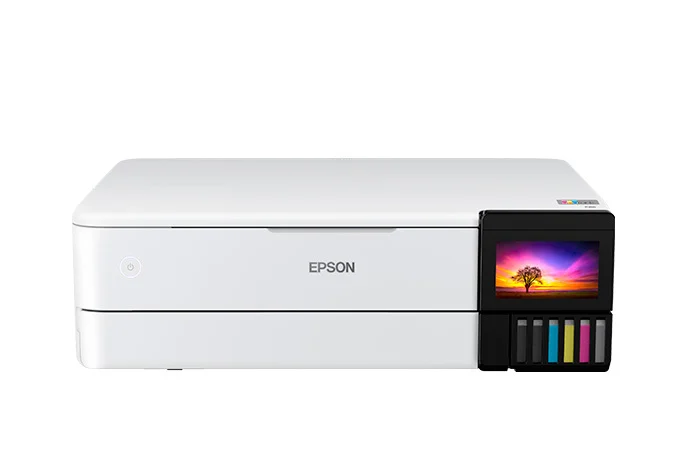
- Buy Epson EcoTank Photo ET-8550 The closest thing to a photo lab on your desk, with refillable tanks that make big, gorgeous prints feel almost free per sheet. Amazon
- Buy Canon SELPHY CP1500 The consensus best 4x6 snapshot printer: dye-sub prints that come out laminated, water-resistant, and built to outlive most albums. Amazon
- It depends Fujifilm Instax Mini Link 3 A pocket party machine that prints your phone photos onto real Instax film - charming keepsakes, but a costly way to print photos. Amazon
- Skip Canon IVY 2 Mini Photo Printer Pocketable and cheap, but ZINK zero-ink prints are the weakest photo output you can buy - washed-out now, faded later. Amazon
What actually matters
- Print technology - this is the single biggest decision. Refillable-tank inkjet gives the best quality and lowest per-print cost at volume; dye-sublimation gives durable, laminated 4x6s; instant film gives charming keepsakes; ZINK gives convenience at a real quality cost.
- Running cost per print - the sticker price is only the down payment. Ink bottles, dye-sub packs, film cartridges, and ZINK paper all have very different per-photo economics, and heavy printing multiplies the difference fast.
- Maximum print size - compact dye-sub and instant printers top out at postcard size or smaller; only desktop inkjets do enlargements. Match the ceiling to what you'll actually frame.
- Print durability - dye-sub's protective laminate and archival inkjet papers resist water, fingerprints, and fading; ZINK output is the least archival option owners report on.
- Number of ink colors (for inkjets) - dedicated photo inkjets add extra inks like photo black and gray beyond the standard four, which is what produces smooth skin tones, deep blacks, and clean gradients.
- Connectivity - pocket printers are usually Bluetooth-app-only, which is fine for phones. If you shoot on a real camera or print from a computer, you want Wi-Fi, USB, or an SD slot.
- Whether it also prints documents - only conventional inkjets double as a household document printer; dye-sub, instant, and ZINK machines print photos and nothing else.
The specs, in plain English
Green flags vs red flags
Green flags
- Refillable ink tanks or matched ink-and-paper packs - both mean predictable, low per-print costs
- Dye-sub prints with a protective laminate layer, or six-plus ink colors on an inkjet
- A published archival or print-permanence rating measured in decades
- Multiple ways to print: Wi-Fi, USB, SD card, and a decent app - not Bluetooth only
- Owners specifically praising how prints look after months in albums or on fridges
Red flags
- "Zero ink" or ZINK technology marketed on convenience with no mention of print quality or longevity
- A very cheap printer whose paper or film refills cost nearly as much per print as far better technologies
- Sample photos everywhere but no spec for ink system, print process, or permanence
- Bluetooth-app-only connectivity on a printer you plan to use with a camera or computer
- Owner reports of prints fading, shifting color, or banding within the first year
- Buying enlargement capability (or paying for it) when your entire use case is 4x6 snapshots
Who's who: the brands
- Epson - The reference for serious home photo inkjets - its refillable EcoTank photo models pair near-lab quality with the lowest per-print running costs.
- Canon - Plays in every lane: strong photo inkjets, the long-running SELPHY dye-sub compacts for durable 4x6s, and IVY-branded ZINK pocket printers at the budget end.
- Fujifilm - Owner of the Instax instant-film ecosystem - its Link printers put phone photos onto real instant film, prized for keepsakes rather than accuracy.
- HP - Best known for document printers, with Sprocket ZINK pocket printers on the photo side - fun-first devices rather than quality-first ones.
- Kodak - Licenses its name across many compact photo printers, both dye-sub and ZINK - check which technology a given model actually uses before assuming quality.
How to read a listing without getting fooled
Start with the print process, because listings often bury it: search the spec sheet for "dye-sublimation", "ZINK", "Instax", or the ink configuration. If a compact printer never names its technology and leans on words like "zero ink" or "no cartridges", it's almost certainly ZINK - the weakest image quality of the bunch. For inkjets, count the ink colors (four means document-first, six or more means photo-serious) and check whether it uses refillable tanks or cartridges, which decides your long-term costs. Ignore inflated dpi numbers; they stopped being meaningful differentiators years ago. Then find the real per-print cost: divide the price of a refill pack, film pack, or ink set by the number of prints it yields. Finally, check the maximum print size and the connectivity list - "app required" plus Bluetooth-only tells you it's a phone accessory, not a general-purpose printer.
How much should you spend?
What you pay tracks the technology, not the brand. Pocket instant and ZINK printers sit at the affordable end, dye-sub compacts in the middle, and serious tank-based photo inkjets at the top - but the upfront price is the smaller half of the story. The real money is in media: instant film is the most expensive per shot, ZINK paper costs nearly as much per print as far better dye-sub output, dye-sub packs are a low fixed cost per photo, and tank inkjets are the cheapest per print by a wide margin once you own one. The value sweet spot for most families is a dye-sub compact: modest outlay, durable prints, predictable costs. Spending up on a tank photo inkjet is worth it only if you print often, print large, or want one machine for photos and documents - if you print a handful of snapshots a year, that capability is wasted. Spending down on ZINK to save money is usually a false economy, since the prints disappoint on day one and fade from there.
Questions, answered
What's actually the difference between a photo printer and a regular printer?
Regular all-in-one printers are tuned for documents first, usually with four inks, and photos come out acceptable but flat. Dedicated photo printers either add extra ink colors for smoother gradients, better skin tones, and deeper blacks, or use an entirely different process like dye-sublimation. They also properly support photo papers and borderless sizes. If you'd frame the result, you want a dedicated photo printer.
Dye-sub, inkjet, Instax, or ZINK - which should I pick?
Match the process to the job. Refillable-tank inkjet if you want the best quality, enlargements, and low per-print costs at volume. Dye-sub if you want durable, water-resistant 4x6 snapshots with zero fuss. Instax if you want the instant-film keepsake look at parties and in scrapbooks. ZINK only if removable sticker prints on a strict budget are your entire use case - for actual photo quality it trails everything else.
Is printing photos at home cheaper than using a lab?
For occasional 4x6s, not really - labs stay competitive per print, and home printing is more about convenience and control. Home printing wins in two cases: high volume on a tank inkjet, where per-print costs get very low, and enlargements, where a big home print costs far less than the lab equivalent. Instant printers are different economics entirely - you're paying a premium for the physical, in-the-moment format.
How long do home photo prints actually last?
It depends on the technology. Dye-sub prints get a clear laminate as the final pass, so they resist water, fingerprints, and fading. Quality inkjet prints on good photo paper also last decades if kept sensibly. Instax film holds up well out of direct sunlight. ZINK is the weak link: both independent testing and owner reports flag color shift and fading over time.
Do megapixels or dpi decide print quality?
Less than marketing suggests. Any modern phone photo has plenty of resolution for a 4x6, and printer dpi numbers beyond a reasonable threshold are indistinguishable to the eye. What actually separates prints is the process - ink colors, dye-sub lamination, paper quality - and how well the printer handles color. That's why a modest dye-sub print usually beats a high-dpi ZINK print.
Do I need a photo printer if I already have an instant camera?
They solve different problems. An instant camera commits one unrepeatable frame to film; an instant printer lets you pick the best shot from your phone, edit it, and print it - or reprint it as many times as you like. If you mostly shoot on your phone, a printer wastes far fewer frames per pack of film.
Or jump to the head-to-head: Epson EcoTank Photo ET-8550 vs Canon SELPHY CP1500.