Explained
Standing Desks, Explained: What to Look For
Understand what actually makes an electric standing desk stable, quiet, and a good fit for your body - before you shop.
In this guide
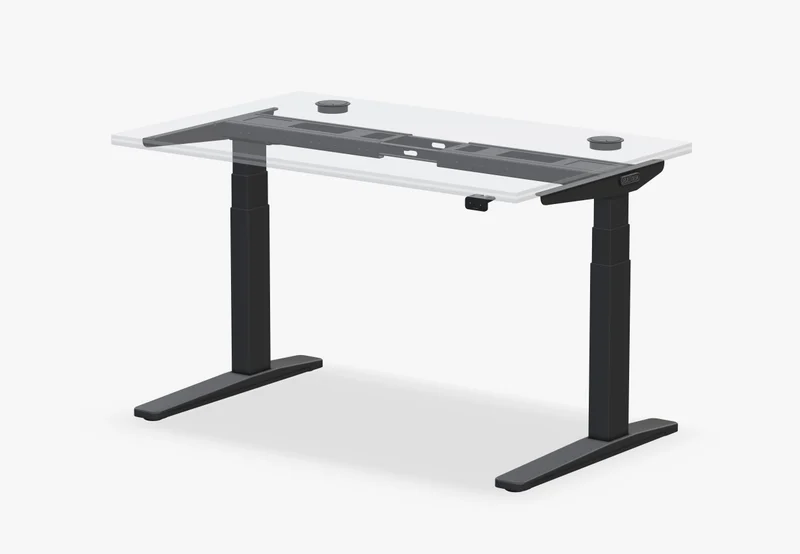
An electric standing desk raises and lowers a motorized frame at the push of a button so you can switch between sitting and standing through the day. This guide explains the parts that matter, in plain terms, without naming products or picking winners.
The 30-second version
- Fit for your height comes first. A desk that can't reach your correct standing height, or won't drop low enough to sit, is uncomfortable no matter how nice the frame is. Check the height range against your body, not the marketing photo.
- Stability at full height is the real test. Most desks feel solid when low. Wobble shows up when the legs are extended tall, which is exactly where you'll stand. A stiff frame and a good leg design matter more than any single spec number.
- Dual motor is smoother, but not automatically 'better.' Two motors usually mean quieter, faster, more even lifting and higher load capacity. A well-made single-motor desk can still be plenty for a light setup. Match the motor to your load and use, not the label.
- Memory presets and anti-collision are quality-of-life features. Presets save your sit and stand heights so you switch with one tap. Anti-collision stops the desk when it hits something. Both are nice; neither fixes a wobbly or undersized frame.
- Warranty length tells you what the maker expects. Frames and motors are the parts that fail over years. A long, specific warranty on the frame and mechanism is a stronger signal than a glossy desktop or a long feature list.
The products this guide is about
Our verdict on each, with the full reasoning on the companion review.
- Buy Uplift Desk Uplift V3 The new pick - a reinforced frame, faster ~2 in/sec dual motors, and a full 15-year warranty make it the steadiest, most future-proof desk here. Amazon
- Buy Flexispot E7 The value champion - near-Uplift stability and specs for less, especially the four-leg E7 Plus.
- It depends Vari Electric Standing Desk Ships mostly assembled and built like a tank with a lifetime warranty - but you pay more for less capacity and customization. Amazon
- Skip FEZIBO Electric Standing Desk (single-motor) The ultra-cheap desk that's everywhere online - but its single-motor frame tends to wobble once you stand it up.
What actually matters
- Height range that fits your body. The desk must reach your correct standing elbow height and also drop to a proper seated height. Taller and shorter people get squeezed at the ends of the range, so this is the first thing to check, not the last.
- Stability at full extension. A standing desk lives or dies on how little it shakes when raised. Look for a stiff frame, wider leg profiles, and crossbar or bracing design. Typing-induced wobble at standing height is the most common regret.
- Load capacity with headroom. The rated weight must comfortably clear your monitors, arms, laptop, and accessories with room to spare. Running a motor near its limit wears it faster and slows the lift.
- Motor setup for your use. Single vs dual motor affects speed, noise, smoothness, and how much weight the desk lifts evenly. Heavier or multi-monitor setups lean toward dual motor; a light minimal desk can be fine on one.
- Desktop size, shape, and material. The top has to fit your room and your gear without overhang stress. Material affects durability and feel - solid surfaces resist sag and wear better than thin particleboard over a large span.
- Warranty on frame and motor. These are the expensive, hard-to-replace parts. A long warranty specifically covering the frame and lifting mechanism signals the maker trusts the engineering.
The specs, in plain English
Green flags vs red flags
Green flags
- Height range clearly covers your correct sit and stand heights, with room at both ends
- Load capacity leaves a comfortable margin over your actual gear weight
- Long, specific warranty on the frame and motor, not just the desktop
- Three-stage legs or a well-braced frame described as stable at full height
- Memory presets and anti-collision included rather than sold as add-ons
- Honest transit speed and noise figures instead of vague 'quiet, fast' claims
Red flags
- Height range that barely reaches standing height for a tall user, or won't drop low enough to sit
- Load rating close to your setup's weight with little headroom
- Reviews mentioning wobble or shake while typing at standing height
- Short or vague warranty, or one that only covers the desktop
- Thin particleboard top over a wide span, prone to sagging
- Feature list padded with gadgets while the frame and motor go undescribed
Who's who: the brands
- Uplift - Known for adjustable, stability-focused frames and long warranties; a common reference point for solidly built desks.
- Vari (VariDesk) - Focuses on simple setup and sturdy pre-configured desks; popular in offices for ease over deep customization.
- Fully (Jarvis) - The Jarvis frame is a long-standing enthusiast favorite; now part of a larger furniture group.
- FlexiSpot - Wide range of frames and price tiers, including many DIY frame-only options for pairing with your own top.
- Autonomous - Offers approachable all-in-one electric desks aimed at home offices, with a focus on value and quick setup.
- Branch - Design-led office furniture brand offering clean-looking sit-stand desks aimed at modern workspaces.
- Herman Miller / Steelcase - Established contract-furniture makers whose sit-stand desks emphasize ergonomics, engineering, and long-term support.
- IKEA (Bekant / Idasen) - Widely available electric desks at the accessible end; simpler frames, useful for lighter setups and tighter rooms.
How to read a listing without getting fooled
Start with fit, then stability, then the rest. Measure your correct sitting and standing heights and confirm the desk's range covers both with margin - remember to add the desktop's thickness to the frame's lowest point. Next, hunt specifically for how the desk behaves at full standing height, since that's where weak frames reveal themselves; owner reviews describing typing wobble are worth more than any spec sheet. Then weigh your actual gear against the load rating and leave headroom. Treat presets, anti-collision, speed, and noise as comfort features that make a good desk pleasant but can't rescue a wobbly or undersized one.
How much should you spend?
Spending more on a standing desk usually buys frame stiffness, load capacity, a wider and more usable height range, quieter dual motors, and a longer warranty - the things that determine whether the desk still feels solid in a few years. Entry-level desks can work well for light, single-monitor setups in smaller spaces, but they more often show wobble at standing height, thinner tops that sag over wide spans, and shorter coverage if something fails. Mid-tier desks are where stability and warranty tend to become dependable. The most expensive tier adds refinement, materials, and contract-grade support rather than a fundamentally different function. Buy for the load and height range you actually need, not for the longest feature list.
Questions, answered
Is a dual-motor desk worth it over single-motor?
Often yes for heavier or multi-monitor setups. Dual motors lift more weight, move faster and quieter, and keep the top level. For a light, minimal desk, a well-built single-motor frame can be perfectly fine. Match the motor to your load, not to the label.
Why does my standing desk wobble when I type standing up?
Wobble at full height comes from frame stiffness and leg design, not the motor. Raised legs act like a lever, so any looseness in the telescoping sections or a weak crossbar gets amplified. A stiffer frame with well-fitted legs is the fix; specs alone won't tell you.
How do I know a desk fits my height?
Measure your correct standing elbow height and seated elbow height, then check both fall inside the desk's range with a little room to spare. Add the desktop's thickness to the frame's lowest point to find the true minimum. Tall and short users get squeezed at the extremes.
Do I really need memory presets?
No, but they help. Presets let you jump to your saved sit and stand heights with one tap instead of holding a button and eyeballing it. That convenience makes you actually switch positions more often, which is the whole point. It's a comfort feature, not a structural one.
What load capacity should I look for?
Enough to clear your full setup - monitors, arms, laptop, and accessories - with comfortable headroom. Running a motor near its rated limit wears it faster and slows the lift. If your gear is heavy or you expect to add monitors, favor a higher rating rather than one that just barely fits.
Is a longer warranty a meaningful signal?
Yes. Frames and motors are the parts that fail over years and are hardest to replace, so a long warranty specifically covering them tells you the maker trusts the engineering. Be cautious of warranties that sound long but really only cover the desktop surface.
Or jump to the head-to-head: Uplift Desk Uplift V3 vs Flexispot E7.