Explained
Mechanical Keyboards, Explained: What to Look For
Understand switches, layouts, and keycaps well enough to buy the right board without decoding hobbyist jargon.
In this guide
Mechanical keyboards use individual spring-loaded switches under each key instead of one rubber sheet, which changes how typing feels and how long the board lasts. This guide explains the terms so you can match a keyboard to how you actually type.
The 30-second version
- Switch feel is the real decision. Linear, tactile, and clicky describe how a key press feels, not how good it is. Pick the feel you like; everything else is secondary.
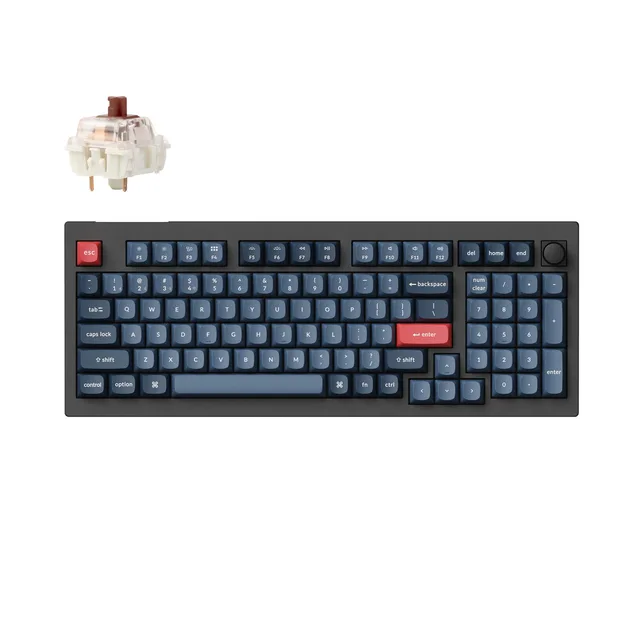
- Layout size is about desk space and habits. Smaller boards free up room for the mouse but move or drop keys like arrows and numbers. Choose based on what you use daily, not what looks tidy.
- Hot-swap sockets save you from commitment. A hot-swappable board lets you pull and replace switches by hand, so a wrong feel choice is fixable later without soldering.
- Keycap material quietly affects daily life. PBT plastic resists the greasy shine that ABS develops over months. It is a small spec with a long-term payoff.
- Ignore most of the marketing. RGB lighting, gaming branding, and headline polling-rate numbers rarely change whether a keyboard is pleasant to type on.
The products this guide is about
Our verdict on each, with the full reasoning on the companion review.
- Buy Keychron V5 Max A standout budget pick - a gasket-mounted, wireless, hot-swap board with features usually found on far pricier customs. Amazon
- Buy Keychron C2 Pro The value champion - a full-size, hot-swap, PBT-keycap board at a budget price. Amazon
- It depends Akko 3098B Reviewers called the typing experience 'world-class' - a tank-like 96% tri-mode board, if you can live with its quirks. Amazon
- Skip Razer Ornata V3 Popular and heavily marketed, but it's a mecha-membrane hybrid - not a true mechanical keyboard. Amazon
What actually matters
- Switch type over switch brand. Whether a switch is linear (smooth), tactile (a small bump), or clicky (a bump plus a click sound) matters far more than which company made it. Try to identify which of the three you prefer before comparing models.
- Layout that fits your tasks. A board without a number pad is compact and mouse-friendly, but it is a poor fit if you enter numbers all day. Match the layout to your actual work, not to a photo.
- Hot-swappability if you're unsure. If you can't confidently name the switch feel you want, a hot-swap board removes the risk by letting you change switches later without tools or soldering.
- Keycap quality and material. Thicker PBT keycaps with legends that won't wear off feel better under the fingers and age more gracefully than thin, shiny ABS.
- Stabilizer quality on big keys. The spacebar, Enter, and Shift ride on stabilizers. Cheap ones rattle and feel mushy, and this is one of the most common complaints on inexpensive boards.
- Connection type for your setup. Wired is simplest and lag-free; 2.4GHz wireless is nearly as responsive; Bluetooth is convenient for phones and tablets but can lag or drop. Decide which you need before paying for all three.
The specs, in plain English
Green flags vs red flags
Green flags
- The listing clearly states the switch type (linear, tactile, or clicky) instead of only a color
- Keycaps are described as PBT with legends that are molded or dye-based rather than printed on top
- Stabilizers are mentioned as tuned, lubed, or upgraded, suggesting the big keys won't rattle
- The board is hot-swappable, giving you room to change your mind on switch feel later
- The layout is named plainly (TKL, 75%, 65%) so you know exactly which keys you're getting
- Reviews from real owners mention sound and feel after weeks of use, not just unboxing
Red flags
- The switch type is hidden behind vague words like 'premium' or 'gaming-grade' with no linear/tactile/clicky label
- Heavy emphasis on RGB lighting and branding while the switches and keycaps go undescribed
- No mention of keycap material, which usually means thin ABS that will shine quickly
- Owner reviews repeatedly cite spacebar or Enter rattle, a sign of poor stabilizers
- The spec sheet leads with an enormous polling-rate number as the main selling point
- Bluetooth-only wireless marketed for gaming, where lag and dropouts are most noticeable
Who's who: the brands
- Keychron - Widely known for accessible boards across many layouts, often with hot-swap and wireless options.
- Royal Kludge (RK) - Common at the affordable end, frequently offering hot-swap sockets and triple-mode connectivity.
- Redragon - A budget-focused name often bundling mechanical switches and lighting at low cost.
- Epomaker - Sells enthusiast-flavored features like gasket mounts and PBT caps at approachable prices.
- Akko - Known for distinctive keycap sets and its own switch lineup on mid-range boards.
- Glorious (GMMK) - Popular for modular, hot-swap boards aimed at people who like to tinker.
- Logitech - A mainstream brand whose mechanical models emphasize reliability and software support.
- Ducky - Long-standing reputation for solid build quality, usually without wireless or hot-swap frills.
How to read a listing without getting fooled
Start with the one thing only you can decide: which switch feel you like. If you can't say, favor a hot-swap board so you can experiment cheaply later. From there, pick a layout that matches the keys you actually use every day, then check the boring details that shape daily life, keycap material, stabilizer quality, and connection type. Treat lighting, branding, and headline polling numbers as tie-breakers at most, not reasons to buy. Owner reviews written weeks after purchase tell you more than any spec sheet.
How much should you spend?
Entry-level mechanical boards get you real switches and a usable typing experience, but often with thin ABS keycaps, rattly stabilizers, and no hot-swap. Mid-tier boards are where the practical wins cluster: PBT caps, better-tuned stabilizers, hot-swap sockets, and flexible wireless. Higher tiers add refinements like gasket mounts, premium materials, and a more cushioned feel that enthusiasts value but casual typists may not notice. Spending more mostly buys longevity and comfort, not new abilities, so match the tier to how much time you'll spend at the keyboard rather than to the longest feature list.
Questions, answered
Which switch type should a first-time buyer choose?
Tactile switches (often brown) are the common middle ground: a small bump confirms each press without a loud click, so they suit both typing and quiet offices. Choose linear for smooth silence or clicky if you want audible feedback and won't bother anyone nearby.
Are mechanical keyboards too loud for an office?
It depends on the switch. Clicky switches are genuinely loud and can annoy coworkers. Linear and tactile switches are much quieter, and some boards add sound-dampening foam. If noise is a concern, avoid clicky and look for 'silent' switch versions.
Is a smaller layout worth losing keys?
Only if you rarely use the missing keys. Compact layouts free desk space and bring the mouse closer, which many people find comfortable. But if you type numbers often or rely on arrow keys, dropping them creates daily friction that outweighs the tidier look.
Does hot-swappable really matter?
It matters most if you're unsure which switch feel you'll like. Hot-swap lets you replace switches by hand, no soldering, so a wrong guess is fixable and cheap. If you already know your preference and won't tinker, it's a nice-to-have, not essential.
Wired or wireless for a mechanical keyboard?
Wired is simplest and never lags, ideal for a fixed desk. For a clean setup or gaming, 2.4GHz wireless via a dongle is nearly as responsive. Bluetooth is best for switching between a laptop, tablet, and phone, but can occasionally lag or drop.
Do PBT keycaps actually make a difference?
Yes, over time. ABS keycaps develop a shiny, slick surface within months of regular use, while PBT keeps its texture and resists that wear. The typing feel difference is subtle at first, but PBT ages far better and its legends rarely fade.
Or jump to the head-to-head: Keychron V5 Max vs Keychron C2 Pro.