Explained
Standing Desk Converters, Explained
After reading, you will know what every converter spec means and how to match a riser to your desk, your monitors and your body.
In this guide
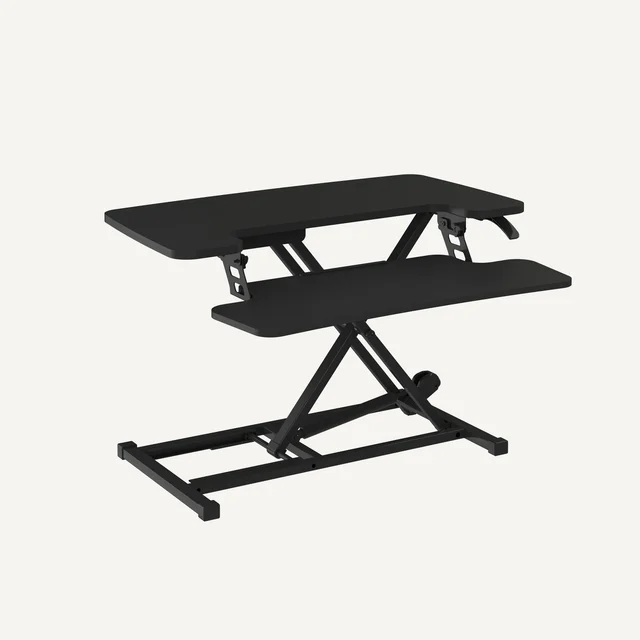
A standing desk converter is a platform that sits on the desk you already own and lifts your monitor and keyboard up to standing height, letting you alternate between sitting and standing without buying a full electric desk. The category looks simple, but three things quietly decide whether you love or resent the thing: how steady it feels when you type, how much desk it eats, and whether the keyboard sits at the right height. First-time buyers usually fixate on price and surface size and get surprised by wobble and lost desk space instead.
The 30-second version
- Stability is the make-or-break spec. A converter is a tall platform balanced on your desk, so the heavier and better-braced it is, the less it sways when you type at full height.
- Footprint matters as much as surface size. Risers occupy real desk depth even when lowered, so measure how deep your desk is before you fall in love with a wide top.
- The lift mechanism sets the daily feel. A good gas-spring or spring-assisted lift rises with one hand in seconds and holds at any height, which you will do dozens of times a week.
- Keyboard-tray design drives ergonomics. A lower tray that can drop below desk level keeps your wrists straight; fixed two-tier layouts can sit too high for taller people.
- Buy weight-capacity headroom, not the limit. Leave margin above the combined weight of your monitors and peripherals rather than buying a riser rated right at your load.
The products this guide is about
Our verdict on each, with the full reasoning on the companion review.
- Buy FlexiSpot M7 Series (35") Standing Desk Converter The best all-round balance of surface size, one-hand lift and a removable tray at a fair price. Amazon
- Buy VariDesk Pro Plus 36 The most rock-solid, zero-assembly riser here, if you can live with the footprint and the price. Amazon
- It depends FEZIBO 36" Standing Desk Converter A capable budget riser that is fine for light setups but reveals its price when you load it up.
- Skip Ergotron WorkFit-T Stable and fully assembled, but a premium price buys a narrow keyboard tray and the heaviest frame here. Amazon
What actually matters
- Stability at standing height - the single most common complaint; a tall riser under a dual-monitor load can shimmy when you rest your hands, and heavier weighted-base designs stay planted where light ones wobble.
- Lift mechanism and feel - how smoothly it rises, whether it locks anywhere in the range without creeping, and how much effort a single one-handed lift takes.
- Footprint and desk depth - how much desk the base and keyboard tray consume even when parked low, and whether it pushes your monitors uncomfortably far back.
- Keyboard tray - its width, whether it removes, and whether it can sit low enough for a straight-wrist typing posture while standing.
- Weight capacity and surface size - enough rated load and width for one or two monitors plus a keyboard, mouse and the odd accessory, with margin to spare.
- Setup and warranty - whether it ships assembled or needs tools, and how long the frame warranty runs as a signal of the maker's confidence.
- Build quality - whether surfaces are solid or budget MDF and whether hardware feels durable, since a riser takes repeated stress every day.
The specs, in plain English
Green flags vs red flags
Green flags
- A weighted or heavy steel base that owners consistently describe as steady at full height
- A one-hand lift that stops and stays anywhere without slowly creeping down
- A keyboard tray that removes or can sit low enough for straight wrists
- A listed minimum desk depth that fits the desk you actually have
- Ships fully assembled or near-ready, with a multi-year frame warranty
- Weight rating with clear headroom above your monitor-and-peripheral load
Red flags
- Owner reports of noticeable sway or wobble once two monitors are loaded
- A very deep base that requires an unusually deep desk to fit
- A fixed keyboard tray that cannot drop below desk level for taller users
- Premium pricing on a bare riser with no meaningful extras to justify it
- Thin MDF surfaces or flimsy hardware that feels a rung below the price
- A lift that needs two hands or heavy effort to raise every time
Who's who: the brands
- FlexiSpot - Value-focused sit-stand specialist known for smooth gas-spring risers that balance surface size and stability at mid-range prices.
- Vari (VariDesk) - Premium brand whose fully-assembled, weighted risers are prized for rock-solid stability and zero-tool setup, at a higher price.
- Ergotron - Ergonomics engineering brand with fully assembled, straight-lift risers, though some models pair premium pricing with heavy frames and compact keyboard trays.
- FEZIBO - Budget-oriented maker offering wide dual-tier risers that suit lighter single-monitor setups but reveal more sway when fully loaded.
How to read a listing without getting fooled
Read a converter listing from the base up, not from the marketing photo down. Start with the numbers the maker cannot fudge: the base depth and any minimum desk depth it requires, because a wide top on a deep base can be a poor fit on a shallow desk. Next find the lift type and whether it locks at any height or only at fixed stops, then the weight capacity and whether that covers your monitors with margin. Treat the headline surface width as the least important spec, since it tells you nothing about stability or footprint. For the qualities specs cannot show you, namely sway at full height and long-term build quality, lean on independent testing and aggregated owner reports rather than the product description, and specifically look for feedback from people running the same number of monitors you do.
How much should you spend?
Spending is mostly a story about stability, build and convenience rather than raw features. Budget risers can be perfectly fine for a light, single-monitor desk, but they tend to sway more at full height and use cheaper surfaces, so they reward buyers who will not load them heavily. The mid-range is where the value sweet spot usually sits: you get a smooth one-hand lift, a solid frame and a considerate footprint without paying a brand premium. Stepping up to premium is worth it mainly when you specifically want the steadiest possible platform, a fully-assembled no-tools setup, or engineered ergonomics, and it stops being worth it when you are paying a premium for a bare riser with no extras or for a footprint your desk cannot even accommodate. Match the spend to your load and your desk, not to the widest top you can find.
Questions, answered
Are standing desk converters as stable as a full standing desk?
No riser is quite as planted as a good four-legged electric desk, because a converter is a tall platform balanced on your existing desk surface. That said, the better models feel genuinely solid at typing height. Independent testing and owner reports consistently rank heavier, weighted-base designs and straight-lift mechanisms as the steadiest, while lighter budget risers show more sway at full extension.
Do I need a deep desk to use a converter?
Often, yes. Converters occupy real depth because the keyboard tray extends toward you and the frame needs a stable base behind it, and some models are designed for desks of a certain minimum depth. If your desk is shallow, favor a compact-footprint riser and measure your available depth before buying.
Should I choose a manual spring lift or an electric converter?
For most people a spring or gas-assisted lift is fine: it raises with one hand in a couple of seconds and never needs a power outlet. Electric converters remove the physical effort and make sense if you have limited arm strength or a very heavy monitor load, but they cost more and add cables to manage.
Will a converter hold two monitors?
Most 35- to 36-inch models are wide enough for two standard monitors or a monitor-and-laptop combination, and typical weight ratings of roughly 35 pounds and up cover common displays. The real question is stability: heavier-framed risers stay steady under a dual-monitor load, while lighter budget units can wobble at full height.
How high should the keyboard sit for good ergonomics?
Your elbows should rest at roughly a 90-degree angle with wrists straight while standing, which usually means the keyboard sitting a little below the monitor deck. Two-tier converters place the keyboard on a lower shelf to help, but be aware that some designs cannot drop the keyboard below desk level, which can sit too high for taller users.
How much desk space will a converter take up when it is lowered?
More than most people expect. Even in the sitting position the base and keyboard tray occupy a fixed block of desk depth, and if the tray does not remove, that footprint is permanent. Look at the base-depth spec, not just the surface width, and picture the back half of your desk being occupied before you buy.
Or jump to the head-to-head: FlexiSpot M7 Series (35") Standing Desk Converter vs VariDesk Pro Plus 36.