Explained
Trackball Mice, Explained
After reading, you'll know whether a thumb or finger trackball fits your hand, and you'll be able to read any listing without getting tripped up by the jargon.
In this guide
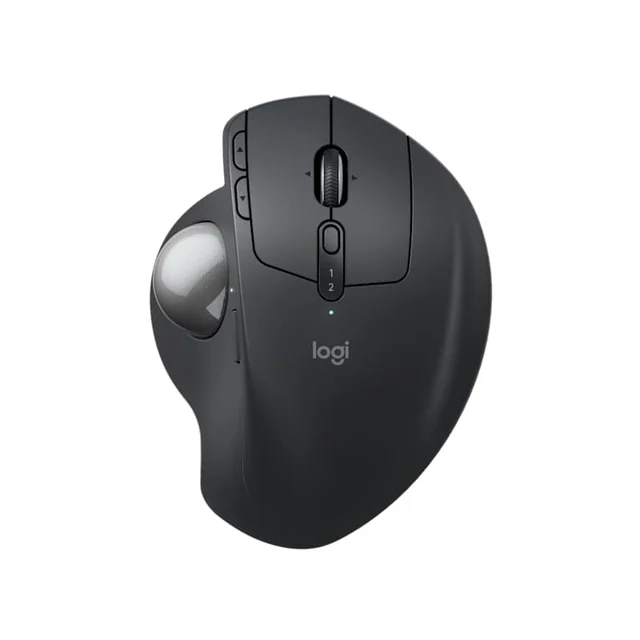
A trackball keeps your hand parked in one place and moves the cursor with a rolling ball instead of sliding the whole device around, which is why so many people switch after wrist or shoulder trouble. The catch is that 'trackball' covers two very different tools, thumb-operated and finger-operated, and most buyers pick the wrong one because nobody explained the difference. This guide decodes the terms so you can choose with confidence.
The 30-second version
- Thumb versus finger is the first fork. A thumb ball feels mouse-like and is the easiest switch; a finger ball uses several fingers on a bigger ball and is usually ambidextrous.
- A real tilt beats a merely 'sculpted' shell. Genuine adjustable angle rotates your forearm into a neutral position, while a flat 'ergonomic' body mostly just looks the part.
- Scrolling style is a make-or-break preference. A normal wheel is predictable, but twist-to-scroll balls and scroll rings are acquired tastes worth trying before you commit.
- Every trackball needs occasional cleaning. Dust and skin oil collect on the tiny support bearings under the ball, so plan to pop it out and wipe them now and then.
- Hand orientation quietly rules out options. Many thumb models are right-hand only, so left-handers should steer toward an ambidextrous finger ball from the start.
The products this guide is about
Our verdict on each, with the full reasoning on the companion review.
- Buy Logitech MX Ergo S The most complete thumb trackball, and the only one here with an adjustable tilt that actually eases wrist strain. Amazon
- Buy Logitech ERGO M575S The easiest, cheapest way to find out whether a trackball is for you, with none of the frustrations that spoil bargain models. Amazon
- It depends Kensington SlimBlade Pro EQ A precise, ambidextrous 55mm finger-ball for people who dislike thumb control, if you can live with a flat body and twist-to-scroll. Amazon
- Skip Kensington Orbit Wireless Trackball with Scroll Ring A cheap wireless finger-ball with a scroll ring, but a small 40mm ball and no published battery details; spend a little more on the M575S. Amazon
What actually matters
- Operation style (thumb vs finger) decides how the device feels in daily use; thumb models transition most naturally from a regular mouse, while finger balls suit people who dislike thumb control or want ambidextrous use.
- Ergonomic tilt is the feature that most affects long-day comfort; an adjustable hinge that sets a real angle does far more for the wrist than a flat body with a curvy shell.
- Hand orientation matters before anything else if you're left-handed, since a right-hand-only body simply won't work no matter how good it is otherwise.
- Pointer precision and sensitivity control determine how well the cursor behaves for detailed work; a dedicated precision button that drops sensitivity on demand is a genuine help for photo editing and fine selections.
- Scrolling method shapes everyday satisfaction; decide whether you want a conventional wheel or are willing to learn a twist-the-ball or scroll-ring approach.
- Connectivity and power affect reliability and desk clutter; look for both Bluetooth and a USB receiver, and prefer rechargeable or long battery life over a wired-only tether.
- Build and maintenance influence how the ball feels over months; smooth, well-supported bearings that are easy to clean keep movement crisp instead of gritty.
The specs, in plain English
Green flags vs red flags
Green flags
- An adjustable tilt or hinge, not just a curvy shell marketed as 'ergonomic'
- Both Bluetooth and a USB receiver, so it works reliably across different computers
- A dedicated precision or sensitivity button for detailed cursor work
- A ball that pops out easily for cleaning the support bearings
- Clear labeling of hand orientation, and an ambidextrous option if you're left-handed
- Well-supported software for remapping buttons and tuning behavior
Red flags
- A flat, low body sold as 'ergonomic' with no real tilt or wrist support
- Wired-only connection at a price where wireless is common
- Only two buttons with no forward/back and little customization
- A scroll ring or twist-scroll as the only option, with no chance to try it first
- Vague or gritty ball movement mentioned repeatedly by owners
- Right-hand-only shape when you actually need a left-handed or ambidextrous fit
Who's who: the brands
- Logitech - The mainstream leader in thumb trackballs, known for comfortable shapes, dependable software, and models spanning value to premium.
- Kensington - The best-known name in finger-operated balls, including large ambidextrous designs favored by people who dislike thumb control.
- Elecom - A Japanese brand with an unusually wide range of trackballs, including left-handed and multi-button options that are harder to find elsewhere.
- ProtoArc - A newer value-focused brand offering wireless trackballs with modern touches like USB-C at lower prices.
How to read a listing without getting fooled
Start by finding two facts a listing often buries: whether it's a thumb or finger ball, and whether it's right-hand only or ambidextrous. Those two decide most of your shortlist before any other spec matters. Next, treat the word 'ergonomic' with suspicion and look for a specific, adjustable tilt angle rather than vague talk of a 'sculpted' shape; a photo from the side tells you more than the marketing copy. Check how it scrolls, because a scroll ring or twist-to-scroll is a very different experience from a wheel and is easy to overlook in a bullet list. Confirm it offers both Bluetooth and a receiver if you move between machines, and note the power source. Finally, discount raw DPI numbers; the useful feature is on-demand sensitivity control, not a big headline figure.
How much should you spend?
Spending more on a trackball mostly buys ergonomic adjustability, richer customization, and better scrolling, rather than a fundamentally different cursor. The value sweet spot sits with a well-made mid-range thumb model that nails the basics, comfortable shape, smooth ball, reliable wireless, and long battery life, because that's enough to reveal whether a trackball suits you at all. Stepping up to premium is worth it if you're at a desk all day and a genuine adjustable tilt or a precision button will pay off in comfort and fine control. Going too cheap is usually a false economy: the bargain finger balls tend to cut the very things that make a trackball pleasant, leaving you with a vague scroll, few buttons, and a flat body you outgrow quickly.
Questions, answered
Should I get a thumb trackball or a finger trackball?
For most first-time buyers, a thumb model is the safer choice because it keeps your hand in a familiar, mouse-like posture and is the easiest switch. Choose a finger ball if you specifically dislike thumb control, want more fingers sharing the work, or need an ambidextrous shape, for example if you're left-handed.
Are trackballs actually easier on the wrist and arm?
Because the device stays still and only the ball moves, trackballs remove the repetitive dragging motion of a normal mouse, and many owners say that helps. That said, this is general product information and not medical advice; if you have persistent pain or a diagnosed condition, consult a qualified professional before relying on any device as a remedy.
Is there a good left-handed option?
Yes, but you'll usually need an ambidextrous finger ball, since many thumb models are right-hand only. Look for a symmetrical body explicitly described as ambidextrous, which works identically in either hand and also lets you switch hands to spread out fatigue.
Do trackballs need cleaning, and how often?
Occasionally, yes. Dust and skin oil collect on the small support bearings under the ball and can make movement feel gritty. Popping the ball out and wiping the bearings every few weeks keeps things rolling smoothly, and it takes under a minute.
Is a higher DPI number worth paying for?
Not on its own. What matters more than a big headline DPI figure is being able to lower sensitivity on demand for detailed work, ideally with a dedicated precision button. A moderate, adjustable sensitivity beats a high fixed one for real tasks.
Or jump to the head-to-head: Logitech MX Ergo S vs Logitech ERGO M575S.