

Office & WFH
The Best Trackball Mice: 4 Compared (and One to Skip)
We compared four current trackballs across thumb and finger operation on ergonomics, precision, scrolling, and long-day comfort.
The short version
Most people should buy the Logitech MX Ergo S: it is a thumb trackball with an adjustable tilt that genuinely reduces forearm strain, quiet clicks, and deep customization. If you want to spend less or are just trying a trackball for the first time, the Logitech ERGO M575S covers the essentials well. Prefer moving the ball with your fingers, or need an ambidextrous option for a left hand? The Kensington SlimBlade Pro EQ is the one to get, as long as you accept its flat profile and twist-to-scroll. Skip the cheap Kensington Orbit Wireless with Scroll Ring, whose 40mm ball is small and whose battery details are not published. Best for: right-handed desk workers wanting the most comfortable, adjustable thumb trackball.
Our picks at a glance
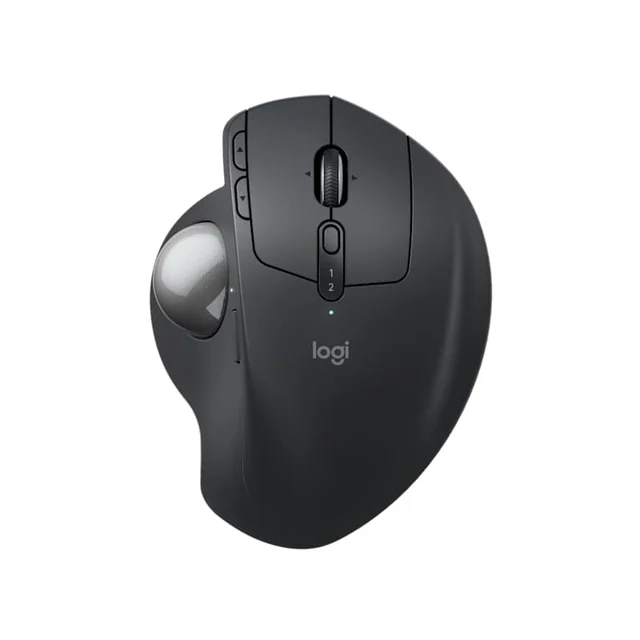
- Logitech MX Ergo S - Buy. The most complete thumb trackball, and the only one here with an adjustable tilt that actually eases wrist strain.
- Logitech ERGO M575S - Buy. The easiest, cheapest way to find out whether a trackball is for you, with none of the frustrations that spoil bargain models.
- Kensington SlimBlade Pro EQ - It depends. A precise, ambidextrous 55mm finger-ball for people who dislike thumb control, if you can live with a flat body and twist-to-scroll.
- Kensington Orbit Wireless Trackball with Scroll Ring - Skip. A cheap wireless finger-ball with a scroll ring, but a small 40mm ball and no published battery details; spend a little more on the M575S.
The verdict in 30 seconds
What mattered most
- Operation style
- Ergonomic tilt
- Hand orientation
- Connectivity & power
- Buttons & customization
- Scrolling
Trackballs keep your hand planted and move the cursor with a ball instead of the whole device, which is why so many desk workers switch after wrist trouble. But 'trackball' covers two very different tools: compact thumb-operated units and larger finger-operated balls. We synthesized independent testing and long-term owner reports to sort four current 2026 models into a clear ranking, including one popular pick we think most people should walk past.
The most complete thumb trackball, and the only one here with an adjustable tilt that actually eases wrist strain.
Best for: Right-handed desk workers who want the most refined thumb trackball and value adjustable ergonomics.
- Adjustable hinge lets you set the body flat or at a 20-degree tilt to reduce forearm twist
- Precision-mode button drops sensitivity for fine work like photo editing and detailed selections
- Quieter clicks than the older MX Ergo, plus deep button remapping and multi-computer control in Logi Options+
- Right-hand only, so lefties are out
- Premium price, and Logitech does not include a USB-C charging cable
Own the Logitech MX Ergo S? Tell us how it held up.
Thanks. Counted, and shown once enough owners have weighed in.
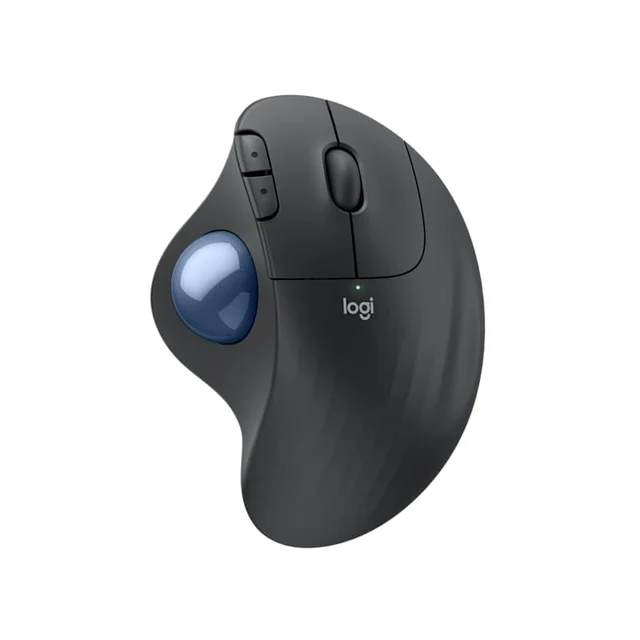
The easiest, cheapest way to find out whether a trackball is for you, with none of the frustrations that spoil bargain models.
Best for: First-time trackball buyers and anyone who wants a proven thumb model without paying premium money.
- Comfortable sculpted right-hand shape that most owners adapt to quickly
- Runs for months on a single AA battery and pairs over Bluetooth or the bundled USB receiver
- Smooth, well-supported ball movement with reliable Logitech software
- Fixed angle with no tilt adjustment
- Basic scroll wheel and fewer customizable buttons than the MX Ergo S
Own the Logitech ERGO M575S? Tell us how it held up.
Thanks. Counted, and shown once enough owners have weighed in.
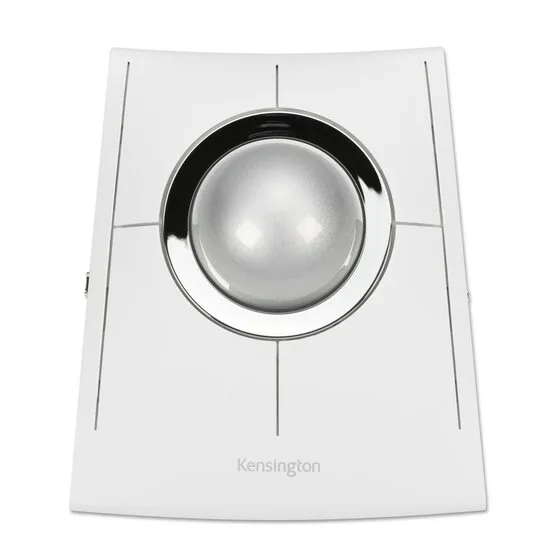
A precise, ambidextrous 55mm finger-ball for people who dislike thumb control, if you can live with a flat body and twist-to-scroll.
Best for: Finger-trackball fans, left-handers, and anyone who wants to alternate hands during the day.
- Large 55mm finger-operated ball, and an ambidextrous layout that works equally well for left or right hands
- Bluetooth, a 2.4GHz Nano receiver and a wired mode, with a rechargeable battery Kensington rates at up to 4 months per charge
- Free software for 8 sets of programmable buttons, and a 3-year limited warranty
- Kensington describes a low-profile footprint with no tilt, so it leans on a wrist rest to stay comfortable for long sessions
- Scrolling is done by twisting the ball, which is divisive and takes real practice to control smoothly
Own the Kensington SlimBlade Pro EQ? Tell us how it held up.
Thanks. Counted, and shown once enough owners have weighed in.
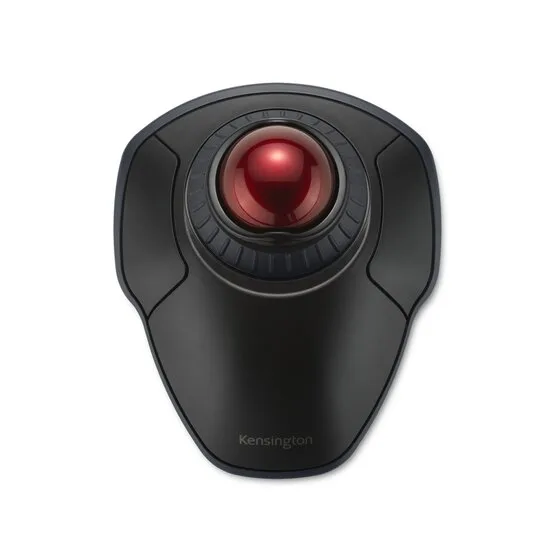
A cheap wireless finger-ball with a scroll ring, but a small 40mm ball and no published battery details; spend a little more on the M575S.
Best for: Only the most budget-constrained buyer who specifically wants a wireless finger ball and nothing more.
- Bluetooth LE and 2.4GHz wireless, four DPI settings from 400 to 1,600, and a detachable wrist rest
- Ambidextrous shape with a 3-year limited warranty
- A 40mm ball, against 55mm on the SlimBlade Pro EQ, so fine control relies on a smaller surface under the fingers
- Kensington's page does not state the battery type or battery life
- Scrolling runs through a ring around the ball rather than a wheel, an acquired taste like the SlimBlade's twist
Own the Kensington Orbit Wireless Trackball with Scroll Ring? Tell us how it held up.
Thanks. Counted, and shown once enough owners have weighed in.
| Criteria | Logitech MX Ergo S Top pick Buy it Buy | Logitech ERGO M575S Buy it Buy | Kensington SlimBlade Pro EQ It depends Buy | Kensington Orbit Wireless Trackball with Scroll Ring Skip it Buy |
|---|---|---|---|---|
| Best for | Right-handed desk workers who want the most refined thumb trackball and value adjustable ergonomics. | First-time trackball buyers and anyone who wants a proven thumb model without paying premium money. | Finger-trackball fans, left-handers, and anyone who wants to alternate hands during the day. | Only the most budget-constrained buyer who specifically wants a wireless finger ball and nothing more. |
| Price tier | $$$ · premium | $$ · mid-range | $$$ · premium | $ · budget |
| Operation style | Thumb ball | Thumb ball | Finger ball (large) | Finger ball, 40mm (scroll ring) |
| Ergonomic tilt | Adjustable, flat or 20-degree | Fixed sculpted angle | Flat, needs a wrist rest | Flat, detachable wrist rest |
| Hand orientation | Right-hand only | Right-hand only | Ambidextrous | Ambidextrous |
| Connectivity & power | Bluetooth + Logi Bolt receiver, rechargeable (USB-C) | Bluetooth + Logi Bolt receiver, AA battery | Bluetooth + 2.4GHz + wired, USB-C rechargeable | Bluetooth LE + 2.4GHz, battery not stated |
| Buttons & customization | Rich, with precision button | Moderate | Moderate, ambidextrous | Customizable buttons |
| Scrolling | Scroll wheel | Standard scroll wheel | Twist-the-ball scroll | Scroll ring |
| Best use | All-day pro desk work | Everyday value pick | Finger-ball and lefty users | Bare-bones budget only |
| Price tier | $$$ · premium | $$ · mid-range | $$$ · premium | $ · budget |
Which one is right for you?
- Right-handed desk workers who want the most refined thumb trackball and value adjustable ergonomics. Buy it Logitech MX Ergo S
- First-time trackball buyers and anyone who wants a proven thumb model without paying premium money. Buy it Logitech ERGO M575S
- Finger-trackball fans, left-handers, and anyone who wants to alternate hands during the day. It depends Kensington SlimBlade Pro EQ
- Only the most budget-constrained buyer who specifically wants a wireless finger ball and nothing more. Skip it Kensington Orbit Wireless Trackball with Scroll Ring
How we judged the field
We do not run our own lab. Instead we synthesize independent testing and long-term owner reports, then weigh them against the things that actually decide whether a trackball earns a permanent spot on your desk. The criteria that mattered most: comfort over a full working day, how quickly newcomers adapt, pointer precision for detailed work, the quality and predictability of scrolling, connectivity and power, and whether the shape genuinely supports the wrist or just looks like it does. We also separated the two families deliberately, because a thumb trackball and a finger trackball ask very different things of your hand, and the right answer depends on which motion suits you.
Logitech MX Ergo S
Buy itThis is the trackball we would hand to most right-handed desk workers. The stand-out feature is the adjustable hinge: you can run it flat or clip it to a 20-degree tilt, which rotates the forearm into a more neutral position and is the closest thing here to real ergonomic adjustability. Owners consistently praise the sculpted rest for the whole hand, the quieter clicks introduced on this S revision, and the precision button that temporarily drops sensitivity for fine cursor work. With Logi Options+ you can remap the generous button set and steer several computers from one device. The knocks are that it is right-hand only and that the USB-C charging cable is not included in the box. Neither undercuts what is otherwise the most complete package in the category.
Logitech ERGO M575S
Buy itThe M575S is the sensible way to discover whether a trackball suits you, and crucially it avoids the pitfalls that ruin cheaper models. The right-hand shape is comfortable, the ball movement is smooth and well supported, and it runs for months on a single AA battery while pairing over Bluetooth or the bundled receiver. You give up the MX Ergo S’s adjustable tilt, precision button, and richer customization, and the scroll wheel is ordinary. But for a fraction of the outlay you get most of the everyday comfort, which is exactly why it is our value pick and runner-up.
Kensington SlimBlade Pro EQ
It dependsIf you dislike thumb control, or you are left-handed, this is the finger ball to look at. The SlimBlade Pro EQ is the version Kensington currently lists in stock, with the same 55mm finger-operated ball and ambidextrous layout as the SlimBlade Pro, so you can switch hands to spread out fatigue. It connects over Bluetooth, a 2.4GHz Nano receiver or a cable, Kensington rates the rechargeable battery at up to 4 months per charge, its free software covers 8 sets of programmable buttons, and it carries a 3-year limited warranty. Two things hold it back from a straight buy. Kensington describes a low-profile footprint rather than a tilted one, so it really wants a wrist rest to stay comfortable across long sessions, and scrolling is done by physically twisting the ball, which is divisive and takes genuine practice before it feels controlled. Love that motion and want an ambidextrous ball, and it is excellent; if you expect a conventional scroll wheel, look elsewhere.
Kensington Orbit Wireless Trackball with Scroll Ring
Skip itThe Orbit is the one we would steer people away from. The wired Orbit with Scroll Ring is out of stock at Kensington, and the current version is the Orbit Wireless, which adds Bluetooth LE and a 2.4GHz receiver, four DPI settings from 400 to 1,600, a detachable wrist rest and a 3-year warranty. The weaknesses are on Kensington’s own page. The ball is 40mm, against 55mm on the SlimBlade Pro EQ, so there is less surface under your fingers for fine control. Kensington does not state the battery type or battery life. And scrolling runs through a ring around the ball, which, like the SlimBlade’s twist, is an acquired taste. It is not broken, but the modest jump to the ERGO M575S buys a more complete first trackball.
Sources
Specs in this review come from these pages.
Logitech MX Ergo S vs ERGO M575S: which should you buy?
These two Logitech thumb trackballs represent the most common real decision buyers face: spend up, or save. Both share the same fundamental thumb-driven layout that makes the transition from a normal mouse painless, and both connect over Bluetooth or a USB receiver. The MX Ergo S justifies its higher price with the adjustable tilt, the precision-mode button, quieter clicks, an internal rechargeable battery, and deeper customization, making it the better long-term tool for anyone at a desk all day. The M575S counters with a lower price, a comfortable fixed shape, and effortless months-long AA battery life. Our rule of thumb: if wrist comfort or heavy customization matters to you, pay for the MX Ergo S; if you mainly want a reliable, affordable trackball and can live with a fixed angle, the M575S will not disappoint.
What to look for
- Operation style: decide between a thumb ball (mouse-like, easiest switch) and a finger ball (larger ball, often ambidextrous, more precise for some).
- Ergonomic adjustability: a genuine tilt, like the MX Ergo S hinge, does more for the wrist than a merely ‘sculpted’ flat body.
- Hand orientation: the Logitech thumb models are right-hand only; left-handers need an ambidextrous finger ball.
- Scrolling: a normal wheel is predictable; twist-to-scroll and scroll rings are acquired tastes, so weigh them before buying.
- Connectivity and power: look for both Bluetooth and a receiver, and prefer rechargeable or long AA life over a wired-only tether.
- Maintenance: every trackball needs the ball popped out and the bearings wiped occasionally to stay smooth.
Our final take
For the majority of right-handed desk workers, the Logitech MX Ergo S is the trackball to buy: it is the most comfortable, most adjustable, and most customizable option here, and its few flaws are minor. Spending less is easy to justify with the ERGO M575S, which nails the essentials and makes a low-risk first trackball. If your fingers, not your thumb, want to drive, or you need a left-friendly ball, the Kensington SlimBlade Pro EQ is the pick with eyes open to its flat profile and twist-scroll. The one to leave on the shelf is the Kensington Orbit Wireless with Scroll Ring, whose small ball and unpublished battery details make the M575S the better cheap start.
Questions, answered
Thumb trackball or finger trackball, which should I get?
Thumb models like the MX Ergo S and ERGO M575S keep your hand in a mouse-like posture and are the easiest switch for most people. Finger balls like the SlimBlade Pro EQ use several fingers on a larger ball, which some find more precise and less tiring on the thumb, and they are usually ambidextrous. If you are unsure, a thumb model is the safer first purchase.
Are trackballs actually better for wrist and arm strain?
Because the device stays still and only the ball moves, trackballs remove the repetitive dragging motion of a normal mouse, which many owners say helps. That said, this is general product information and not medical advice; if you have persistent pain or a diagnosed condition, consult a qualified professional before relying on any device as a remedy.
Is there a good left-handed trackball here?
Yes. Both Logitech thumb models are right-hand only, so left-handers should look at the ambidextrous finger balls. The Kensington SlimBlade Pro EQ is the better of the two and works identically in either hand.
Do trackballs need cleaning?
Occasionally. Dust and skin oil collect on the small support bearings under the ball, which can make movement feel gritty. Popping the ball out and wiping the bearings every few weeks keeps all of these models rolling smoothly.
Why skip the Kensington Orbit Wireless with Scroll Ring?
It is cheap and it works, with Bluetooth, a 2.4GHz receiver and four DPI settings, but its 40mm ball is small next to the SlimBlade's 55mm, and Kensington's page does not state the battery type or battery life. For a modest step up, the ERGO M575S is the more complete first trackball, which makes the Orbit hard to recommend except on the tightest budget.
Deciding between the top two? See our head-to-head: Logitech MX Ergo S vs Logitech ERGO M575S.
More in Office & WFH
Trackball Mice, Explained Plain-English guide → Logitech MX Ergo S vs Logitech ERGO M575S Head-to-head →  The Best Under-Desk Ellipticals: 4 Compared (and One to Skip)
  The Best Under-Desk Footrests: 4 Compared (and One to Skip)
  The Best USB-C Docking Stations: 4 Compared (and One to Skip)
  The Best Vertical Mice for Wrist Comfort: 4 Compared (and One to Skip)