Explained
Office Desks, Explained
After reading this you will be able to look at any fixed height desk listing and tell whether the top will survive five years of real use.
In this guide
A desk looks like the simplest thing in a home office, which is exactly why buyers judge it on width, finish, and price and get burned on everything else. The specs that decide whether you still like the desk in five years are what sits under the surface, how the front edge is sealed, how deep the top is, and whether cables have anywhere to go. This guide decodes the listing language for fixed height desks so you can spot those four things in under a minute. Sit to stand desks are a separate decision with their own trade-offs, and we cover those separately.
The 30-second version
- The core material decides the failure mode. Solid wood, MDF, and particleboard all behave differently when moisture reaches them, and honeycomb paper filling behaves worst of all.
- Desks fail at the edges, not the middle. The front lip where your forearms rest and the corner where a mug once tipped are where a thin plastic banding strip lifts and lets water into the core.
- Depth matters more than width. Depth sets how far your monitor sits from your eyes, and no accessory fixes a desk that is too shallow, while width can always be extended with a side surface.
- Cable provision is decided before you buy. A grommet, a tray, or a routed channel is something the maker either designed in or did not, and retrofitting means drilling a laminate top or living with adhesive clips.
- A long stated warranty is a real signal. Ten years on a desktop surface means the maker expects that surface to still be intact a decade in, while a returns window promises nothing about durability.
The products this guide is about
Our verdict on each, with the full reasoning on the companion review.
- Buy Branch Office Desk A contract-grade laminate over MDF top with a beveled edge, a grommet already cut, and a ten year warranty behind it. Amazon
- Buy IKEA MITTZON Desk IKEA's office range, not its home range: real walnut veneer, a designed-in cable tray, the deepest top here, and the same ten year warranty for less money.
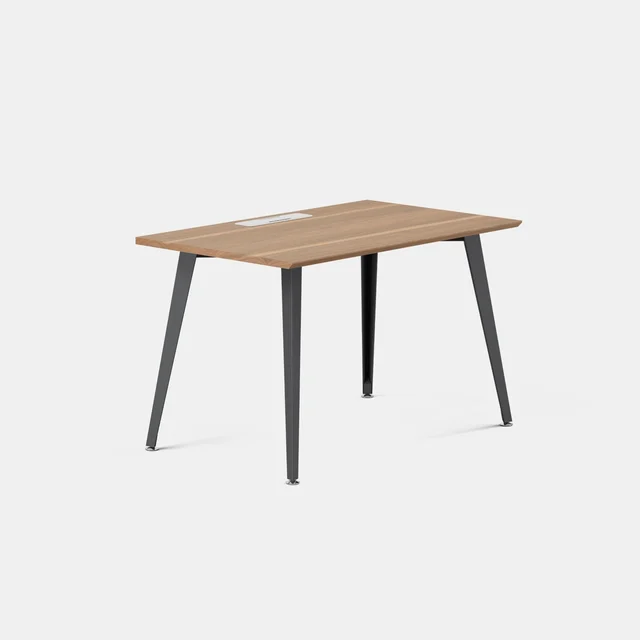
- It depends Thuma Studio Desk Solid wood rather than board with a surface applied to it, which changes how it ages, but it comes in a single size.
- Skip IKEA MICKE Desk Too shallow to work at and built from honeycomb paper board that does not recover from the first spill or stripped screw.
What actually matters
- Core material. Solid wood sands out damage and never swells. Dense MDF under a good laminate is close behind and cheaper. Particleboard is fine if it is properly sealed, which is why a veneered and lacquered particleboard top from an office range outlasts a painted one from a budget range. Honeycomb paper filling, a hollow lattice inside the panel, is the bottom of the ladder.
- Edge treatment. This is the single most predictive spec and almost nobody checks it. A beveled laminate lip, a thick lacquered veneer edge, or solid wood all seal the front. A thin adhesive strip of plastic banding is the part that peels first, and once it peels the core is exposed.
- Depth. Aim for at least 27 inches if you run a monitor, and 30 inches or more for a large screen or two. Anything near 20 inches puts a display at reading distance rather than viewing distance, and every size in that range shares the problem.
- Cable and power provision. Look for a factory-cut grommet, a lidded cable tray, or an available power module. A single hole at the back panel is the minimum, not a feature.
- Height, if you are not average. Most fixed desks land near 29 inches, which is too tall for a large share of adults. A desk whose legs set to a chosen height during assembly solves that far more cheaply than a motorized frame.
- Load rating. A clamp-mounted monitor arm, a desktop tower, and a person leaning on the front edge add up faster than the spec sheet suggests. Budget desks often state a total rating that a normal workstation will test.
- Stated warranty. Length and coverage tell you what the maker actually believes about the materials. Some brands, IKEA included, warrant their office range for a decade and state no warranty on their cheapest home desks.
The specs, in plain English
Green flags vs red flags
Green flags
- The listing states the core material and the surface separately, for example MDF with a stain resistant laminate, rather than saying wood effect
- The front edge is described as beveled, lacquered, or solid rather than as an edging strip
- A depth of 27 inches or more is offered in at least one configuration
- A grommet, a lidded cable tray, or an optional power module is standard rather than an accessory you source yourself
- A stated warranty of several years or more on the desktop surface, not just a returns window
- Leg height is set during assembly, which lets you fit the desk to your body without paying for a motor
Red flags
- Honeycomb paper filling, hollow core, or lightweight panel construction anywhere in the materials list
- Every size in the range is under about 24 inches deep, which no accessory fixes
- The finish is described as wood effect, foil, or printed, which means there is no real veneer
- Plastic edging strip listed among the materials, especially on a painted top
- A single cable hole in a back panel presented as cable management
- No warranty stated at all, or one that covers the frame but not the top, next to a load rating a clamp arm and a tower would test
Who's who: the brands
- Branch - Contract-grade office furniture sold direct, known for laminate over MDF tops, beveled edges, factory-cut grommets, and long warranties.
- IKEA - Two very different worlds under one name. The office ranges use real veneer, designed-in cable trays, and a ten year warranty. Cheap home desks such as MICKE use painted honeycomb board and state no warranty.
- Thuma - Solid wood furniture with hidden joinery and tool-free assembly, priced accordingly, aimed at desks that live in rooms guests see.
- Steelcase and Herman Miller - Commercial office makers whose home lines carry genuine contract engineering, long warranties, and prices to match. Often the best value bought used or refurbished.
- Fully and Uplift - Direct-to-consumer desk specialists best known for sit to stand frames, but they also sell tops separately, which is the usual route if you want a specific surface on your own base.
How to read a listing without getting fooled
Start at the materials list, not the photo. A listing that says solid wood, or MDF with a laminate, or particleboard with a wood veneer and lacquer, is telling you something real. A listing that says wood effect, engineered wood, or premium finish is avoiding the question, and the reason is usually printed foil over low-density board. Next, find the word that describes the front edge. Beveled, lacquered, or solid is good. Plastic edging strip is the failure point. Then go to the dimensions and read the depth, which is the second number and the one people skim past. Compare it against the monitor you actually own. After that, look for the word grommet, tray, or cable management in the feature list, and check whether a power module exists as an option. Finally, find the warranty and note whether it covers the desktop or only the frame, and whether it is a warranty at all rather than a returns window. Product photos are almost always shot with an empty desk and no cables, which is precisely why depth and cable routing look like non-issues until the desk is in your room.
How much should you spend?
Desks are one of the few categories where the cheapest option is a trap rather than a compromise, because the money saved comes out of the core material, and core material is the thing that decides whether the desk survives. The budget tier buys you a shallow painted top over hollow board, which is genuinely fine as a temporary laptop surface in a dorm or a guest room and genuinely wrong as the desk you work at every day. The mid tier is where the value sits: it is enough to buy a real veneer or a proper laminate, a sealed edge, adequate depth, designed-in cable routing, and a long warranty, and that combination is most of what a premium desk offers. Stepping up to the premium tier buys refinement rather than survival, meaning a cleaner edge treatment, a better grommet, an in-desk power module, easier assembly, and looks that suit a shared room. The flagship tier is almost entirely about solid wood and how a desk ages, since scratches and water rings sand out of solid wood and are permanent on laminate. That is worth paying for when the desk lives in a room people see, and hard to justify in a spare bedroom. If your budget is fixed, spend it on depth and surface quality first, and put whatever is left toward a better chair rather than toward a nicer leg finish.
Questions, answered
How deep does a desk really need to be?
At least 27 inches if you use a monitor, and 30 inches or more for a large screen or two screens. Depth controls how far the display sits from your eyes, and once a desk is too shallow nothing fixes it. Width is the easier problem because you can add a side surface or a return later.
Is particleboard always a dealbreaker?
No, but what is done with it matters enormously. Particleboard under a real veneer with a lacquered edge holds up far better than particleboard with a honeycomb paper core and painted surface. The failure mode is moisture reaching the fiber core, so the question is whether the surface and edges seal it out. A well-edged particleboard top that a maker will warrant for a decade is a reasonable buy.
What is the difference between veneer and laminate?
Veneer is a thin slice of real wood; laminate is a printed synthetic sheet. Veneer ages like wood and can be lightly refinished in some cases, but it is thin and a chip exposes the core. Laminate is tougher against impact and stains and easier to clean, but it cannot be refinished, so deep damage is permanent. Both are better than printed foil, which is neither.
Do I need a grommet if I only use a laptop?
Probably not today, but setups grow. A charger, a dock, a monitor, and a lamp is four cables. Retrofitting a hole into a laminate top risks chipping the surface around the cut, so if the desk you want has no route for cables, plan on an under-desk tray and adhesive clips from the start and check that the underside is flat enough to mount them.
Should I buy a standing desk instead?
That is a separate decision with its own trade-offs, which is why this guide sticks to fixed height desks. A motorized frame adds cost, weight, moving parts, and a stability penalty at full height. If you know you will use the standing position, buy for it deliberately. If you are buying it as an option you might use someday, the money usually does more good spent on depth, surface quality, and a better chair.
What actually kills a desk within five years?
Three things, in order. Moisture reaching a fiber core through a lifted edge strip or a chipped surface, which causes swelling that never reverses. Fasteners stripping out of a hollow or low-density panel, which makes the desk wobble and cannot be properly repaired. And surface wear at the front lip where forearms rest, which is why beveled and solid edges outlast thin applied banding. Depth and cable routing decide whether you like the desk. Material and edge quality decide whether you still own it.
Or jump to the head-to-head: Branch Office Desk vs IKEA MITTZON Desk.