Explained
Label Printers, Explained
You will understand the two printing technologies, how to spot a media format that will quietly cost you for years, and which specs actually change the label in your hand.
In this guide
Label printers look like a simple purchase and are not, because the machine is the cheap part and the tape or roll it eats is the expensive part. There are really only two printing technologies in this category, and picking the wrong one is the difference between a label you read in five years and a blank grey rectangle by next summer. The second trap is the consumable: most brands sell a proprietary cartridge that only fits their own printers, and you are signing up for that supply chain for the life of the machine.
The 30-second version
- There are only two technologies here. Direct thermal burns the image into heat-sensitive paper and fades with sun and heat. Thermal transfer melts ink from a ribbon or an internal film onto the label, and when that is sealed under lamination it lasts for years.
- Buy the consumable, not the printer. Before you pick a machine, look up its tape or roll format and count how many sellers stock it, because that is what you will be paying for every month after checkout.
- Cartridge-free is the cheapest habit. Printers that take plain four-by-six thermal labels are fed by a commodity market where anyone can undercut anyone, while proprietary cartridges are priced by one company that has no reason to be generous.
- Match durability to the job, not to your budget. Shipping labels get scanned tomorrow and thrown away, so direct thermal is perfect. Cable flags, freezer bins, and breaker panels are printed once and read for years, so they need laminated tape.
- Width is a hard ceiling. A tape-based label maker tops out between about one and one and a half inches and will never print a carrier shipping label, and a four-inch shipping printer cannot make a slim cable flag, which is why many people end up owning one of each.
The products this guide is about
Our verdict on each, with the full reasoning on the companion review.
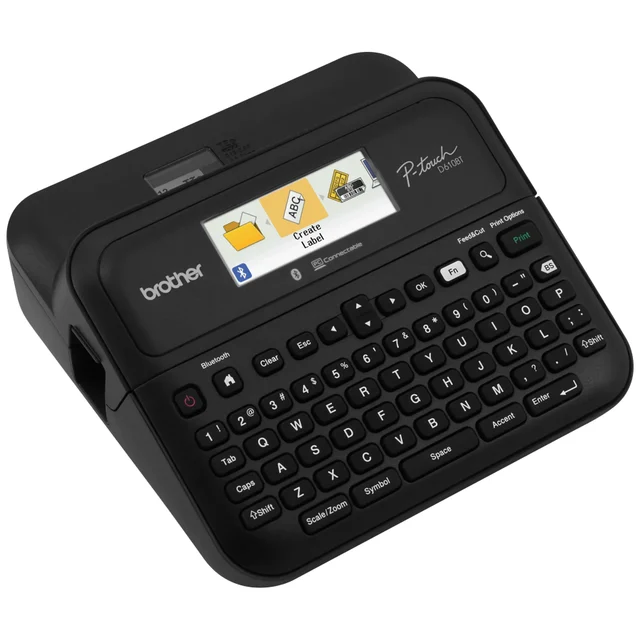
- Buy Brother P-touch PT-D610BT The all-rounder: keyboard, Bluetooth, and laminated tape that outlives everything else here. Amazon
- Buy MUNBYN RealWriter 403B The shipping-label pick that skips cartridges entirely and lets you buy media from anyone.
- It depends Brother QL-1100c Fast, wide, and excellent at volume, as long as you accept renting your label supply from Brother. Amazon
- Skip DYMO LetraTag 200B Cheap, tidy, phone-friendly, and printing the least durable label in this comparison. Amazon
What actually matters
- Print technology (direct thermal vs thermal transfer). This single choice decides whether your label is still legible next year. Direct thermal has no protective layer and greys out under sunlight, heat, and rubbing. Thermal transfer, especially onto laminated tape, survives dishwashers, sunlight, and cleaning products.
- Who controls the media. Some formats are effectively open, with dozens of suppliers selling compatible cartridges or plain rolls. Others come from exactly one company, in exactly the sizes it chooses to keep making. Check this before you buy, because you cannot change it afterwards.
- Maximum label width. Narrow tape handles cables, spice jars, and file tabs. Shelf headers, address labels, and parcel labels need real width. No printer will ever exceed the width it was built for, so buy for the widest label you actually need.
- Standalone use versus app-only. A built-in keyboard and screen looks dated and always works. An app-only machine is smaller and cheaper and stops working when your phone is flat, the Bluetooth sulks, or the app gets rewritten behind a new login.
- Print resolution and barcode quality. Higher resolution keeps small text and barcodes crisp rather than furry. If a carrier or a stock scanner has to read your labels first time, this matters more than it sounds.
- Auto cutter and speed. For one label a month, neither matters. For a batch of forty, a built-in cutter and a fast engine change the job from a chore into a minute.
- Connectivity that matches the workflow. USB-only is fine for a desk machine tethered to one computer and useless for a shared printer or a phone-first workflow. Bluetooth is convenient and occasionally flaky. Wi-Fi is the one that lets several people print without swapping cables.
- Adhesive type. Permanent, removable, freezer-grade, and fabric adhesives are different products. A label that keeps falling off a cold jar is usually the wrong adhesive rather than the wrong printer.
The specs, in plain English
Green flags vs red flags
Green flags
- The media format is sold by many suppliers, including third-party compatibles, and you can find it in an ordinary shop rather than one website
- The machine takes plain, standard-size labels with no cartridge at all, so nobody can discontinue your size
- Laminated tape, if anything you print needs to survive moisture, sun, or handling
- A built-in keyboard and screen, so the printer still works when your phone does not
- A built-in auto cutter and a stated print speed, if you print more than a handful of labels at a time
- A media catalogue that spans the widths you need, including the widest label you can imagine wanting
Red flags
- A cheap machine paired with short, narrow, proprietary cartridges, the classic razor-and-blades trap that tends to land on the third refill
- Unlaminated tape sold on colour and cuteness, which owners report scuffing, curling, and lifting in warm or damp rooms
- A media format with almost no third-party supply and a single seller
- App-only control with no keyboard fallback, especially if the app requires an account to print
- Direct thermal marketed for asset tags, cable labels, or anything that lives in sunlight
- USB-only connectivity on a machine you expect to share, or that you wanted to print to from a phone
Who's who: the brands
- Brother - The category's default. Its P-touch line uses laminated TZe tape, which is one of the most widely stocked and widely cloned tape formats around; its QL desktop line uses direct thermal DK rolls, which are faster and wider but a much tighter media catalogue.
- DYMO - The other household name, strongest on cheap, simple, phone-friendly label makers. Watch which tape family a given model takes, because the entry-level LetraTag LT cartridges are unlaminated and far less durable than the brand's better tapes.
- MUNBYN - One of several direct-to-consumer makers of cartridge-free four-by-six shipping label printers. The appeal is the open media supply rather than the badge on the front.
- Rollo - Another well-known cartridge-free shipping label printer brand, sold on the same premise: standard thermal labels from any supplier, with software aimed at people posting parcels.
- Zebra - The industrial and retail workhorse brand. Built for volume and available in both direct thermal and thermal transfer, with supplies sold as commodities. More printer than most homes need, but the reference point for durability.
- Epson - Sells both LabelWorks tape-based label makers and ColorWorks colour label printers. Worth knowing about if you specifically need colour labels rather than black-on-tape.
How to read a listing without getting fooled
Start at the bottom of the listing, not the top. Find the words 'direct thermal' or 'thermal transfer' and, if it is a tape machine, whether the tape is described as laminated. That one line tells you more about the product than the entire feature list. Next, find the media format's name or letter code and search for it on its own: if plenty of sellers and third-party compatibles come up, the lock-in is survivable, and if one company's own store is the only real source, you are renting your label supply. Then check the maximum label width against the widest label you actually need, because that number is a hard ceiling. Be sceptical of two common bits of listing theatre: a long list of fonts, frames, and emoji, which tells you nothing about whether the label survives a week in a kitchen; and 'wireless printing' that turns out to be Bluetooth to a phone app only, with no way to print from a computer or without the app. Finally, the standalone question: does it have a keyboard and a screen, or does it stop being a printer when your phone dies? Listings rarely say that plainly, so look at the photos.
How much should you spend?
Think in terms of cost per label you keep, not the number on the box. The cheapest machines in this category are cheap because the money is in the cartridge, and the sticker shock usually arrives on the third or fourth refill rather than at checkout. The value sweet spot is the mid-range: a laminated-tape label maker with a keyboard, a widely stocked tape format, and an auto cutter, which costs meaningfully more than a novelty label maker and will still be earning its keep in five years. If you mostly print parcel labels, the cartridge-free four-by-six printers are their own sweet spot, because the open media market keeps running costs low no matter what you paid for the printer. Spending more is genuinely worth it for lamination, a keyboard, a cutter, and extra width. Spending more is usually not worth it for higher resolution than your barcodes need, for speed you will never use at home, or for a fashionable brand with a narrow, thinly supplied tape catalogue. The one purchase to avoid entirely is a very cheap machine paired with short proprietary cartridges, which ends up the most expensive label in the room once you count the ones you reprint.
Questions, answered
What is the difference between direct thermal and thermal transfer?
Direct thermal has no ink. The printer heats special paper and the coating darkens, which is why there is nothing to replace but the labels, and why heat, sunlight, and rubbing will eventually fade or blacken the label. Thermal transfer melts pigment from a ribbon or film onto the label, so the image is real ink sitting on the surface. Laminated tape goes one step further and seals that ink between clear films. Use direct thermal for parcels and short-life bin tags; use thermal transfer, ideally laminated, for anything you want to still read next year.
Why is the tape so expensive when the printer was cheap?
Because that is the business model. Label printers are sold at thin margins and monetised on the consumable, which is why so many brands use a cartridge that only fits their own machines. The defence is to check the media before you buy the hardware: a format with deep third-party supply and wide retail availability stays affordable because sellers compete, while a proprietary roll from a single supplier is priced entirely by that supplier for the life of your printer.
Are third-party compatible tapes and labels safe to use?
For the widely copied formats, generally yes, and owners report compatible cartridges printing close to the original. Two cautions apply. Some systems verify the media with a chip or spool sensor, so a firmware update can occasionally break compatibility. And cheaper adhesive sometimes lifts sooner on cold or curved surfaces. The safer approach is to check third-party availability for a format before you buy the printer, not after.
Do I need a keyboard, or is an app-only label maker fine?
App-only models are cheaper, smaller, and pleasant when everything cooperates. They also fail in ways a keyboard cannot: a flat phone, a dropped Bluetooth link, an app rewrite, or a sudden login requirement all stop you printing. For occasional craft and pantry labels, app-only is fine. For a tool you rely on, the keyboard is the feature that never breaks.
Can one machine do both shipping labels and small organising labels?
Not really. Tape-based label makers top out between about one and one and a half inches wide, which is far too narrow for a carrier shipping label. Four-inch thermal printers handle parcels but cannot produce a slim cable flag, and their direct thermal output is not durable enough for permanent tags anyway. Most people who need both buy one of each, and usually the shipping printer first because the savings are immediate.
How long do printed labels actually last?
It depends entirely on the technology and where the label lives. Direct thermal labels kept indoors and out of sunlight stay readable for a long time, but independent durability checks and owner reports agree that sun and heat grey them out much faster. Laminated thermal transfer tape is the opposite story: manufacturer claims of water, chemical, and fade resistance line up with owners finding labels on freezer boxes and toolkits still legible years later. Unlaminated tape sits in between and tends to scuff and lift in warm or damp rooms.
Or jump to the head-to-head: Brother P-touch PT-D610BT vs MUNBYN RealWriter 403B.