Explained
Laptop Backpacks, Explained
After reading this, you will understand exactly which laptop backpack features matter for your commute and which are marketing noise.
In this guide
A laptop backpack has one non-negotiable job: get an expensive machine from home to desk and back without damage, comfortably, day after day. Shopping for one gets confusing fast because listings bury the few features that matter under a pile of specs, pocket counts, and vague weatherproofing claims. This guide translates the jargon so you can tell a genuinely protective, comfortable bag from one that only looks the part.
The 30-second version
- A suspended, padded laptop sleeve is the feature that matters most. It keeps the machine off the bottom of the bag so a drop is absorbed by padding rather than transmitted straight into the screen or corner.
- Match capacity to your real day, not the biggest number. Roughly 15 to 20 liters covers a laptop and essentials, while 26 to 30 liters suits people who also carry clothes or lots of tech; a half-empty large bag just sags.
- Comfort comes from straps and back panel, not spec sheets. Dual-density foam, a breathable back panel, and a sensible empty weight decide how the bag feels once loaded on a walk or a packed train.
- Expect water resistance, not waterproofing. Almost every commuter bag sheds light rain but lets moisture through zippers and seams in a sustained downpour, so plan a sleeve or cover if you ride through heavy weather.
- Durable hardware separates a bag that lasts years from one that frays. Quality zippers, reinforced stitching, and solid fabric matter far more over time than the number of pockets.
The products this guide is about
Our verdict on each, with the full reasoning on the companion review.
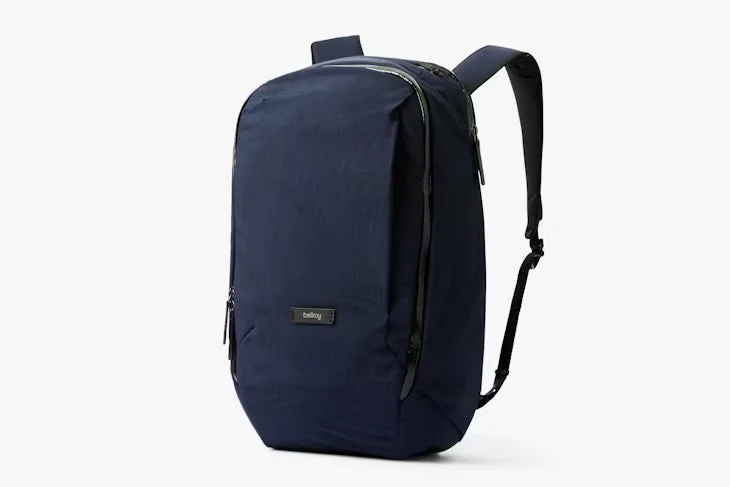
- Buy Bellroy Transit Workpack (Second Edition, 20L) The best all-round commuter here: slim, comfortable, and genuinely organized without looking like tech gear. Amazon
- Buy Incase A.R.C. Commuter Pack (26L) The value pick with reassuring laptop protection and a roomy, highly usable pocket layout. Amazon
- It depends Peak Design Everyday Backpack V3 (30L) A brilliantly engineered pack built around fast side access and camera-grade organization, but heavy and pricey for a plain laptop commute. Amazon
- Skip Nomatic Navigator Pack 15L Rugged and secure, but stiff, heavy for its size, and quirky enough that most commuters will be happier elsewhere.
What actually matters
- Laptop protection - a padded, suspended sleeve is one of the most important features because it isolates the device from impacts at the bottom of the bag, where drops land hardest.
- Right-sized capacity - enough room for a real day without carrying a large, mostly empty bag that sags, bulges on transit, and feels heavier than it should.
- Comfort under load - the strap and back-panel system, plus a reasonable empty weight, determine whether the bag stays tolerable across a walk or a standing commute.
- Organization that fits your gear - structured pockets for chargers, cables, and a water bottle are useful, but too many compartments make a bag fussy for simple daily use.
- Build quality and materials - zippers, fabric, and hardware are what survive years of daily abuse; cheap zippers are the first thing to fail.
- Water resistance - coated fabric and weather-resistant zippers keep light rain out, which is the realistic bar for a commuter bag.
- Everyday profile - a shape that looks appropriate in a meeting as well as on the platform matters if the bag doubles as office wear.
The specs, in plain English
Green flags vs red flags
Green flags
- A clearly padded, suspended laptop sleeve rated for your screen size (for example, a 16-inch sleeve for a 15- or 16-inch machine).
- Dual-density or well-padded straps and a breathable back panel described as comfortable when the bag is loaded.
- Weather-resistant zippers or a coated shell that owners say handles light rain without issue.
- A pocket layout that maps to your actual gear, with a dedicated spot for chargers and cables.
- Consistent owner reports of durable zippers and stitching after months or years of daily use.
- A sensible empty weight for the size, so the bag is not heavy before you pack anything.
Red flags
- A laptop pocket that sits flat against the base of the bag with little padding, offering no drop protection.
- Marketing that implies full waterproofing without naming a rating or sealed construction.
- Reviews that repeatedly call the bag stiff, fussy, or uncomfortable once loaded.
- Thin or unbranded zippers and reports of hardware failing early.
- A capacity far larger or smaller than your day requires, leading to a sagging or overstuffed carry.
- So many compartments that owners struggle to remember where things go for simple daily use.
Who's who: the brands
- Bellroy - Known for slim, office-appropriate bags with quiet, clever organization and premium, refined finishes.
- Incase - Long associated with padded tech protection; current bags focus on roomy, practical layouts at mid-range value.
- Peak Design - A photography-rooted brand famous for modular dividers, fast side access, and flagship build quality.
- Nomatic - Makes rugged, security-focused, structured bags with tough shells and tamper-resistant zippers.
- Thule - A durability-oriented brand offering protective, no-nonsense commuter and travel backpacks.
How to read a listing without getting fooled
Start with the laptop compartment: look for the words padded and suspended, and check the stated screen size against your machine, since a sleeve sized for a 16-inch laptop comfortably fits smaller ones. Read the capacity in liters and picture your real daily load rather than trusting the biggest number. Treat any weatherproofing claim skeptically unless the listing specifies water-resistant zippers or a coated shell, and assume zippers and seams will be the leak points in heavy rain. Count pockets only after confirming the essentials, because a long compartment list often masks a mediocre laptop sleeve or an uncomfortable strap system. Finally, weigh the empty-weight figure against the size, and cross-check the marketing copy against a broad read of owner reports, which reliably surface stiffness, comfort, and durability issues the spec sheet hides.
How much should you spend?
You are mostly paying for materials, comfort engineering, and refinement rather than raw protection, because even mid-range bags now offer well-padded, suspended laptop sleeves. The value sweet spot sits in the middle of the market, where you get reassuring protection, a usable pocket layout, and comfortable straps without flagship pricing. Spending more is worth it if you want a slimmer, better-looking profile, premium fabric and hardware that ages well, or specialist features like modular dividers and fast side access that genuinely fit your life. Spending more is not worth it when a bag charges a premium for ruggedness or capacity you will never use, since an over-built or oversized pack often adds weight and stiffness for a plain desk-to-transit routine. Cheaper bags can serve well short term, but thin zippers and stitching are usually where the savings show, so weigh how many years you expect the bag to last.
Questions, answered
How many liters do I actually need for commuting?
For a laptop, charger, notebook, and daily essentials, roughly 15 to 20 liters is plenty. Step up to 26 to 30 liters only if you regularly add gym clothes, a lunch box, or a lot of extra tech. A large bag carried half-empty sags, bulges awkwardly on transit, and feels bulkier than a right-sized one.
Are laptop backpacks waterproof?
Almost none are truly waterproof. The vast majority are water-resistant, meaning they shed light rain and brief drizzle but let moisture through zippers and seams in a sustained downpour. If you commute through heavy rain, keep your laptop in a separate sleeve inside the bag or add a rain cover.
What is a suspended laptop sleeve and why does it matter?
It is a padded compartment that holds the laptop slightly above the base of the bag rather than resting on it. When you set the bag down hard or drop it, the padding and the gap absorb the impact instead of transmitting it straight into the laptop's bottom edge. It is the most important protection feature to look for.
Is a more expensive backpack always more protective?
No. Protection has largely become a solved problem, and many mid-range bags offer excellent padded, suspended sleeves. Higher prices mostly buy nicer materials, a slimmer profile, better comfort engineering, and specialist features. Choose based on comfort, size, and build quality rather than assuming the priciest bag protects best.
How can I tell if a backpack will be comfortable before buying?
Comfort comes down to the strap and back-panel system and the empty weight, not the spec sheet. Look for dual-density or well-padded straps and a breathable back panel, and check the empty weight against the size. Owner reports are the most reliable guide, since they consistently flag bags that feel stiff or heavy once loaded.
Or jump to the head-to-head: Bellroy Transit Workpack (Second Edition, 20L) vs Incase A.R.C. Commuter Pack (26L).