Explained
Laminators, Explained
After reading, you'll understand what mil ratings, roller counts, feed width, warm-up time and carrier-free operation really mean, and which of them should decide your purchase.
In this guide
Most people buy a laminator on price and width, discover it takes five minutes to heat, and quietly stop using it. The specifications that predict satisfaction are not the ones printed largest on the box. Thermal pouch machines, cold roll machines and self-adhesive pouches are three different products that all get called laminating, and the jargon around film thickness is genuinely confusing because manufacturers describe it inconsistently. This guide untangles the terms so you can read a spec sheet in about a minute.
The 30-second version
- Warm-up time is the spec that decides use, because a machine that needs five or six minutes to heat is a machine you will stop reaching for.
- Feed width is a hard limit, so measure the largest thing you actually laminate before you look at anything else.
- The mil number is a stiffness scale, and your machine's maximum has to match the pouches you plan to buy.
- A single fixed heat setting is a red flag, since the same temperature cannot suit both a thin 3 mil pouch and a thicker 5 mil one.
- Jams are normal, not a defect, so buy the machine whose spec sheet tells you exactly how it lets you get the pouch back out.
The products this guide is about
Our verdict on each, with the full reasoning on the companion review.
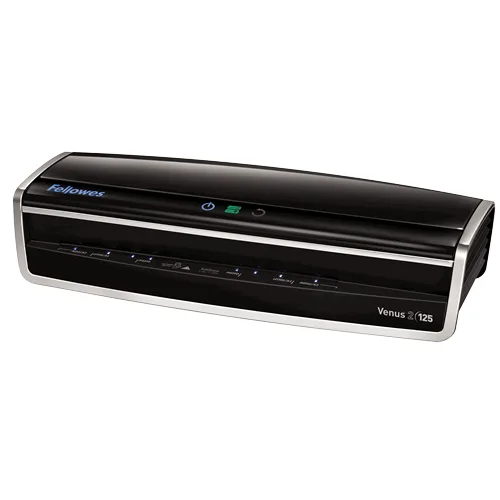
- Buy Fellowes Venus 2 125 Six published rollers, a 30 to 60 second warm-up and 10 mil pouches, at the steepest price here. Amazon
- Buy GBC Fusion 3000L (12 inch) A one minute warm-up and a three year warranty at mid-range money, with a 5 mil ceiling instead of 10.
- It depends Scotch Thermal Laminator TL906 A small, cheap 9 inch machine that makes you wait five to six minutes every time. Amazon
- Skip Swingline Inspire Plus (12.5 inch) Wide on paper, but one fixed heat setting, the slowest feed here and a 90 day warranty.
What actually matters
- Feed width - this is the widest sheet the machine will physically accept, and it is the one spec you cannot work around. Manufacturers usually name the model after it, so a '125' or '12 inch' machine takes roughly letter and legal work while a 13 inch machine is needed for tabloid and A3.
- Maximum pouch thickness - this sets how rigid the finished item can be. Machines capped at 5 mil produce flexible, sheet-like results, while a machine rated to 10 mil can make cards and tags that hold their own shape.
- Warm-up time - the wait between switching on and the ready light. It ranges from about 30 seconds on the fastest office machines to six minutes on cheap ones, and it is a strong predictor of whether the machine gets used.
- Roller count - more rollers means heat and pressure are applied more evenly over a longer path, which usually means fewer bubbles and less waviness. Read the wording carefully, though: manufacturers often publish a bare roller count without saying how many of those rollers are actually heated, and some machines heat the film with a fixed hot shoe and use the rollers only to press. Treat a stated six-roller system as a positive signal, treat a bare 'two rollers' as the budget norm, and treat a missing figure as unknown rather than bad.
- Temperature control - the ability to match the heat to the pouch. Separate 3 mil and 5 mil settings are the minimum worth having, and automatic pouch thickness detection does it for you.
- Cold or no-heat setting - a mode that runs the rollers without heating them, for pressure-sensitive self-adhesive pouches and for heat-sensitive originals like some inkjet photos, thermal receipts and old documents.
- Jam release - how you recover a crooked pouch. A mechanical lever that separates the rollers is the basic version, a reverse button is better, and a motorized auto reverse that detects the misfeed and backs it out on its own is the best.
The specs, in plain English
Green flags vs red flags
Green flags
- A published warm-up time of about one minute or less.
- Separate settings for different pouch thicknesses, or automatic thickness detection.
- A stated maximum pouch thickness that comfortably exceeds what you plan to use.
- A described jam response: a reverse button, or better, a motorized auto reverse.
- A multi-year warranty, which in this category usually tracks build quality closely.
Red flags
- A single fixed heat setting with no way to match temperature to pouch thickness.
- A warm-up time of four minutes or more, however good the other numbers look.
- A listing that quotes width and price but never states maximum pouch thickness.
- A warranty measured in days rather than years.
- No mention anywhere of how you clear a jam.
Who's who: the brands
- Fellowes - Its Venus 2 office laminator pairs fast InstaHeat warm-up with AutoSense pouch thickness detection, and Fellowes is unusual in publishing a roller count on the spec table, with the Venus 2 rated to 10 mil on a six-roller system.
- GBC - The print-finishing brand of ACCO Brands, with the Fusion pouch line for desks, and unusually complete published spec tables, though it does not publish roller counts on every model.
- Swingline - ACCO's more consumer-facing name, best known for the light, inexpensive Inspire Plus pouch machines aimed at occasional home use.
- Scotch (3M) - A familiar name in laminating pouches and small letter-size thermal machines, with detailed manuals that publish roller counts, entry widths and ready times.
How to read a listing without getting fooled
Start at the bottom of the spec table, not the top. Find maximum document width and check it against the largest thing you actually laminate, then find maximum pouch thickness and check it against the pouches you intend to buy. Next look for warm-up time, and treat anything over about two minutes as a machine you will use less than you expect. Then look for the words that describe temperature: 'two temperature settings', 'auto pouch thickness detection' and 'temperature control: yes' are all good, while a single power switch is not. Finally, scan for the jam language, because 'jam release lever', 'reverse button' and 'auto jam detection and motorized reverse' describe three genuinely different experiences. Anything the manufacturer does not publish, such as roller count on many consumer models, should be treated as unknown rather than assumed.
How much should you spend?
Budget machines are where the compromises live: expect a fixed heat setting or at best two, a four to six minute warm-up, a 5 mil ceiling and a warranty measured in months. Mid-range is where laminators start being pleasant, because that is where a one minute warm-up, proper temperature settings, a full 12 inch throat and a multi-year warranty first appear together, and for most homes and classrooms it is the tier that ends the search. Premium buys you the 10 mil ceiling, automatic pouch thickness detection, a motorized jam reverse and two to three times the feed speed, which pays off if you laminate in batches rather than one sheet at a time. The step from budget to mid-range is the one that changes your experience most; the step from mid-range to premium is a capability and volume upgrade, not a fix for a bad machine.
Questions, answered
Can I laminate a photo without ruining it?
Usually yes, but check what the print is. Traditional photographic prints and laser prints handle thermal lamination well, while some inkjet prints and anything on thermal paper can discolor or darken under heat. That is exactly what the cold setting exists for, using pressure-sensitive self-adhesive pouches rather than thermal ones. If the photo is irreplaceable, laminate a test print first, because lamination is permanent.
Why did my laminated sheet come out cloudy or wavy?
Cloudiness usually means the pouch did not get hot enough for long enough, which happens when a thick pouch is run on a thin-pouch setting or the machine was not fully warmed up. Waviness usually means the opposite, too much heat for the pouch, or feeding the item before the ready light settled. Running the sheet through a second time on the correct setting often clears a cloudy result. If it happens on every sheet, the rollers may need cleaning with the maker's roller wipes or cleaning sheet.
Is a wider machine always better?
No, and width is where budget machines tempt people into a bad trade. A wide throat on a machine with a fixed heat setting and a five minute warm-up will still produce mediocre results slowly. Buy the width you need and spend the rest of the budget on warm-up time and temperature control. If you genuinely need 13 inches for posters or certificates, shop for that specifically rather than hoping a 12.5 inch machine will stretch.
How do I keep a laminator working well?
Keep adhesive off the rollers. Use a carrier if the manufacturer does not describe the machine as carrier-free, leave a small clear margin around the document so the pouch seals properly, and never feed a pouch open-edge first. Manufacturers sell roller cleaning wipes or cleaning sheets, and Fellowes recommends using them regularly. Let the machine cool fully before you put it away.
Or jump to the head-to-head: Fellowes Venus 2 125 vs GBC Fusion 3000L (12 inch).