

Office & WFH
The Best Desk Mats: 4 Compared (and One to Skip)
We compared leather-style, felt, and large mousepad-style desk mats on protection, feel, mouse tracking, durability, and everyday cleanup.
The short version
After weighing independent testing and long-term owner reports, the Oakywood Felt & Cork Desk Mat is our top pick - it's the most protective and best-looking, with a merino wool felt top on a grippy cork base. The Orbitkey Desk Mat is the runner-up for anyone who wants a wipe-clean vegan-leather surface plus an included cable clip. The Logitech Desk Mat Studio Series is a smart budget buy only if you mainly want a large, excellent mouse surface and can live with almost no desk protection. Skip the Threshold Faux Leather Desk Mat: owners report its thin PU coating peeling and its edges curling, often within a year, so the low price is a false economy. Best for: buyers who want a mat that still looks good - and protects the desk - a year or two from now.
Our picks at a glance
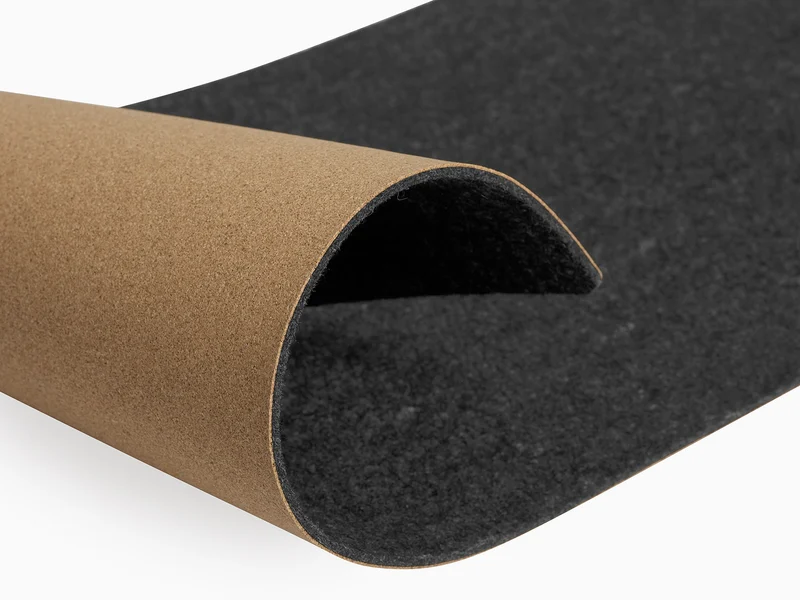
- Oakywood Felt & Cork Desk Mat - Buy. A merino wool felt pad on a thin cork base that feels premium and protects the desk without trying to be clever.
- Orbitkey Desk Mat - Buy. A wipeable vegan-leather mat with a rubber anti-slip base and an included cable clip for a tidy WFH setup.
- Logitech Desk Mat Studio Series - It depends. A big, cheap, spill-resistant cloth mat that's a superb mouse surface but barely a desk protector.
- Threshold Faux Leather Desk Mat - Skip. Looks the part on day one, then, by owner accounts, often peels and curls within a year.
The verdict in 30 seconds
What mattered most
- Material & feel
- Desk protection & cushioning
- Mouse tracking
- Spill & stain resistance
- Durability & aging
- Standout feature
A desk mat is the cheapest way to make a workspace feel finished while protecting the surface underneath. We pulled together independent testing and long-term owner reports across three popular styles: natural felt and cork, wipeable vegan leather, and big spill-resistant cloth. Two of these are easy recommendations, one is genuinely a 'depends,' and one is a false economy we'd steer you away from.
A merino wool felt pad on a thin cork base that feels premium and protects the desk without trying to be clever.
Best for: People who want a natural, warm, protective pad made from wool and cork.
- 100% merino wool felt on top and a thin natural cork base that grips the desk, in three sizes up to 100 x 40 cm and three colors
- Warm, quiet surface that owners say hides scratches and cushions a dropped pen or mug
- Natural, largely plastic-free materials and clean stitched-free edges that reviewers consistently call the best-looking in this group
- Felt attracts lint, crumbs and pet hair and can pill or flatten in high-traffic spots over time
- Not the surface for spills - liquids soak into felt rather than wiping away
Own the Oakywood Felt & Cork Desk Mat? Tell us how it held up.
Thanks. Counted, and shown once enough owners have weighed in.
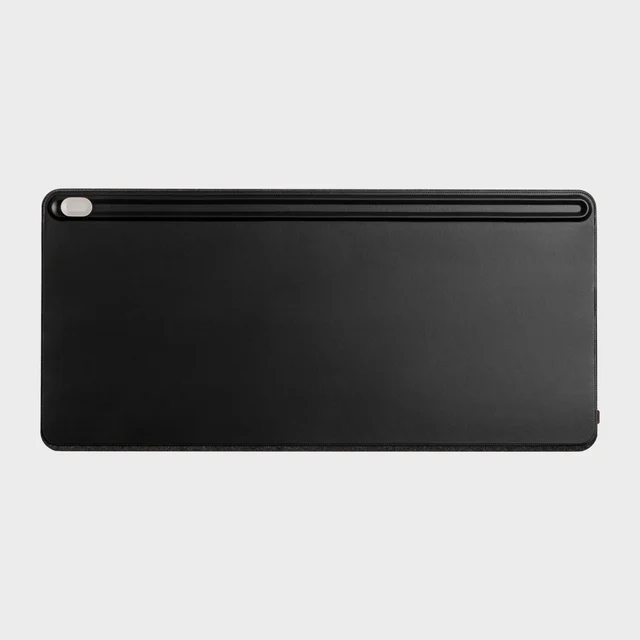
A wipeable vegan-leather mat with a rubber anti-slip base and an included cable clip for a tidy WFH setup.
Best for: Tidy home-office setups that want an easy-wipe surface plus a place to park a charging cable.
- Smooth PU vegan-leather top that Orbitkey sells as easy to clean, which owners appreciate around coffee and lunch at the desk
- An included cable clip attaches along the mat and parks one charging cable, up to about 5 mm thick, at the desk edge
- Clean minimalist finish, a rubber anti-slip base, and a two-year warranty
- It's polyurethane 'vegan leather,' not hide - it won't develop a patina and can scuff or peel after years of heavy use
- The clip holds one cable at a time, so it is a convenience rather than real cable management for a busy desk
Own the Orbitkey Desk Mat? Tell us how it held up.
Thanks. Counted, and shown once enough owners have weighed in.
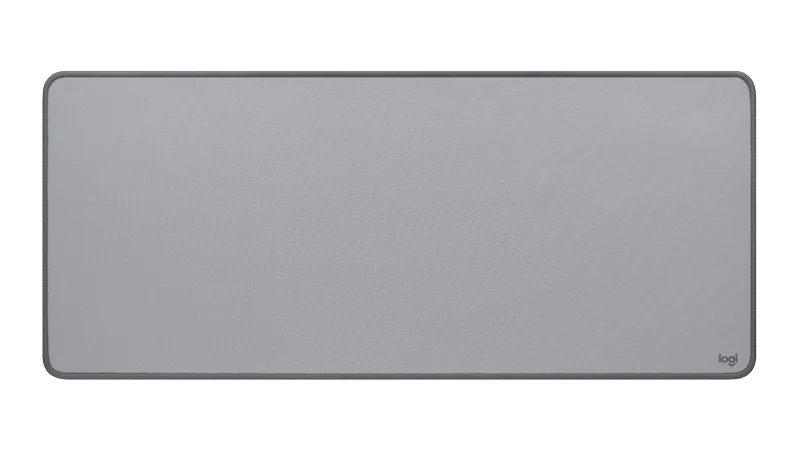
A big, cheap, spill-resistant cloth mat that's a superb mouse surface but barely a desk protector.
Best for: Anyone who mostly wants a large, reliable mouse surface and a splash of color on a budget.
- Large low-friction cloth gives excellent, consistent mouse tracking edge to edge
- Spill-resistant coating and a stitched border resist fraying, and owners report it cleans up easily
- Comes in several colors (Logitech lists Lavender, Dark Rose, Mid Gray and Lilac) and costs a fraction of the leather and felt options
- Very thin, so it offers little cushioning or real protection for the desk beneath it
- Fabric eventually picks up stains and shine in the busiest zones, and Logitech lists it as a limited edition, while supplies last
Own the Logitech Desk Mat Studio Series? Tell us how it held up.
Thanks. Counted, and shown once enough owners have weighed in.
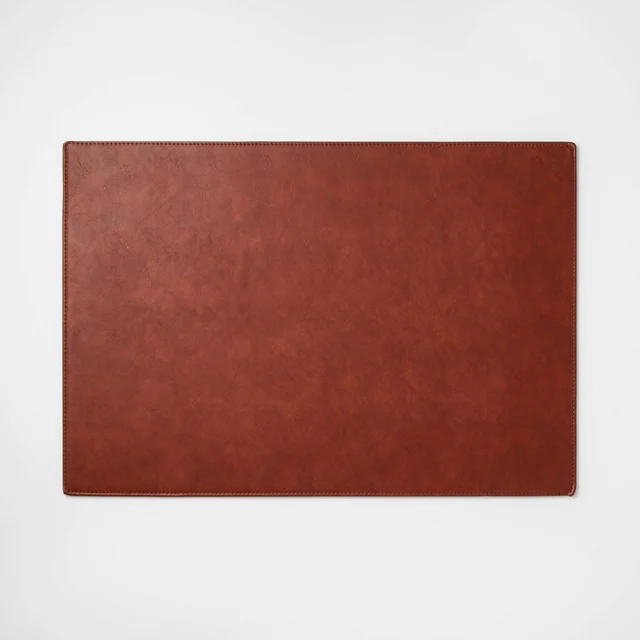
Looks the part on day one, then, by owner accounts, often peels and curls within a year.
Best for: A short-term or temporary desk where you accept you'll be replacing it soon.
- Inexpensive and easy to find, with a neutral leather-look finish out of the box
- Large enough to cover a keyboard-and-mouse zone
- The thin PU coating is widely reported to flake and peel after months of arm contact, leaving a shabby surface
- Edges curl and lift instead of lying flat, and there's almost no cushioning underneath
- Owners frequently mention a chemical smell when new and note it can't be repaired - it just gets replaced
Own the Threshold Faux Leather Desk Mat? Tell us how it held up.
Thanks. Counted, and shown once enough owners have weighed in.
| Criteria | Oakywood Felt & Cork Desk Mat Top pick Buy it Buy | Orbitkey Desk Mat Buy it Buy | Logitech Desk Mat Studio Series It depends Buy | Threshold Faux Leather Desk Mat Skip it Buy |
|---|---|---|---|---|
| Best for | People who want a natural, warm, protective pad made from wool and cork. | Tidy home-office setups that want an easy-wipe surface plus a place to park a charging cable. | Anyone who mostly wants a large, reliable mouse surface and a splash of color on a budget. | A short-term or temporary desk where you accept you'll be replacing it soon. |
| Price tier | $$$ · premium | $$$ · premium | $ · budget | $ · budget |
| Material & feel | Merino wool felt on a thin cork base | Smooth PU vegan leather, rubber base | Spill-resistant woven cloth | Thin PU faux leather |
| Desk protection & cushioning | High - soft and forgiving | Medium - firm but protective | Low - very thin | Low - thin and stiff |
| Mouse tracking | Good for everyday use, not built for fast gaming | Good | Excellent | Fair |
| Spill & stain resistance | Poor - felt absorbs liquid | Very good - wipes clean | Good - coated but fabric stains eventually | Fair at first, degrades fast |
| Durability & aging | Ages gracefully; felt may pill | Years of use; PU can scuff long-term | Long-lasting weave; picks up shine | Poor - owners report peeling and curling |
| Standout feature | Natural merino wool and cork | Included cable clip for one cable | Big low-friction mouse surface | None meaningful |
| Size options | Three, up to 100 x 40 cm | 700 x 320 mm or 900 x 380 mm | One size | Limited |
| Price tier | $$$ · premium | $$$ · premium | $ · budget | $ · budget |
Which one is right for you?
- People who want a natural, warm, protective pad made from wool and cork. Buy it Oakywood Felt & Cork Desk Mat
- Tidy home-office setups that want an easy-wipe surface plus a place to park a charging cable. Buy it Orbitkey Desk Mat
- Anyone who mostly wants a large, reliable mouse surface and a splash of color on a budget. It depends Logitech Desk Mat Studio Series
- A short-term or temporary desk where you accept you'll be replacing it soon. Skip it Threshold Faux Leather Desk Mat
How we judged the field
We don’t run our own lab. Instead we synthesized independent testing, expert write-ups, and a large pool of long-term owner reports, then weighed the things that actually decide whether you’re happy with a desk mat a year later. That means looking past the pretty product photos to five criteria: how well the mat protects and cushions the desk, how it feels under a mouse, how it copes with spills and stains, how it ages under daily arm and wrist contact, and whether any ‘extra’ features are genuinely useful or just marketing. We deliberately included three different material families - natural felt and cork, wipeable vegan leather, and large spill-resistant cloth - plus one budget faux-leather pad to show where cheaping out backfires. Prices are given only as broad tiers, because the right mat depends far more on your habits than on your budget.
Oakywood Felt & Cork Desk Mat
Buy itThis is the mat most people picture when they imagine a premium desk setup, and the reputation holds up. The top is 100% merino wool felt and the base is a thin layer of natural cork that keeps the mat from sliding, and it comes in three sizes up to 100 by 40 cm. Owners consistently praise how warm and quiet it makes typing and mousing feel, and reviewers single out its clean, borderless edges as the best-finished in this group. It’s also the most protective option here: the padding is forgiving enough to survive a dropped pen or a set-down mug. The trade-offs are the ones every felt mat shares - it collects lint, crumbs and pet hair, it can pill or flatten in the busiest spots over the years, and it is emphatically not the surface to have under a wobbly coffee cup, because liquid soaks in rather than wiping off. If those caveats don’t describe your desk, it’s an easy recommendation.
Orbitkey Desk Mat
Buy itThe Orbitkey takes the opposite approach and wins a lot of people over doing it. Its smooth PU vegan-leather top wipes clean easily, which owners who eat and drink at the desk say is the single best thing about it. The cable feature is modest: an included clip attaches along the mat and parks one charging cable, up to about 5 mm thick, at the desk edge so it stops sliding off every time you unplug your laptop. A rubber anti-slip base keeps it in place, and Orbitkey covers it with a two-year warranty. The honest caveats are that this is polyurethane ‘vegan leather,’ not hide, so it will never develop a patina and can scuff or begin to peel after years of hard use, and that the clip handles one cable, not a whole setup. If you want a surface you can wipe down, it’s worth it; if you don’t, the Oakywood is the better use of the same money.
Logitech Desk Mat Studio Series
It dependsThis is the value pick, and whether it’s right for you comes down to one question: do you want a mouse surface or a desk protector? As a mouse surface it’s excellent. The large low-friction cloth tracks consistently corner to corner, the spill-resistant coating and stitched border resist fraying, and it comes in several colors for a fraction of the price of the leather and felt options. But it’s very thin, so it does almost nothing to cushion or protect the desk underneath, and like all cloth mats it will eventually pick up stains and a worn shine in the zones your wrist and mouse live in. Logitech also lists it as a limited edition, so colors may disappear. Buy it if a big, reliable, affordable mousing surface is the goal; look elsewhere if you’re mainly trying to protect the desk itself.
Threshold Faux Leather Desk Mat
Skip itOn day one this looks like a bargain version of the Orbitkey, and that’s exactly the trap. The thin PU coating that gives it its leather look is the same thing that fails it: owners repeatedly report the surface flaking and peeling after just months of arm contact, leaving a shabby, patchy mat. The edges curl and lift instead of lying flat, there’s almost no cushioning, and several buyers mention a chemical smell when it’s new. Because the coating can’t be repaired, the only fix is to buy another one - which is why the low sticker price ends up being a false economy. Unless you specifically need something disposable for a short-term desk, spend a little more on a mat that will still look presentable next year.
Sources
Specs in this review come from these pages.
Oakywood Felt & Cork Desk Mat vs Orbitkey Desk Mat: which should you buy?
These are the two mats worth your money, and they suit different desks. Choose the Oakywood if you value natural materials, maximum protection, and natural wool and cork - it’s the more beautiful object and the kinder surface for the desk beneath it, as long as you keep drinks at arm’s length. Choose the Orbitkey if a wipe-clean surface and a parked charging cable matter more to you than natural texture; it’s the mat that shrugs off coffee and keeps your charger cable from disappearing behind the desk. Put simply: the Oakywood is the better mat to look at and to protect your desk, while the Orbitkey is the better mat to actually work and eat on. Neither is a wrong answer.
What to look for
- Match the material to your habits. Felt for warmth and protection, leather or vegan leather for wipeable spill resistance, cloth for the best budget mouse surface.
- Mind the thickness. A little padding protects the desk and dampens noise; ultra-thin mats look tidy but protect almost nothing.
- Check the edges and coating. Stitched, sealed or borderless edges last; thin bonded PU coatings on cheap mats are what peel and curl first.
- Size it to your desk, not the photo. Measure your usable depth, and go XL only if a monitor stand won’t eat the space.
- Think about cleanup. If you eat and drink at your desk, a wipeable surface will age far better than felt.
- Ignore gimmicks you won’t use. Cable slots and reversible sides are great only if they fit how you actually work.
Our final take
Spend on the Oakywood Felt & Cork Desk Mat if you want the most protective, best-looking pad in natural wool and cork - it’s our overall pick. Step to the Orbitkey Desk Mat if a wipe-clean vegan-leather top and an included cable clip fit your desk better than natural felt. The Logitech Desk Mat Studio Series is the honest budget answer for anyone who mainly needs a big, dependable mouse surface and isn’t counting on real desk protection. And whatever you do, skip the Threshold Faux Leather Desk Mat: paying twice because the first one peeled is the most expensive way to save money on a desk mat.
Questions, answered
Felt, leather, or cloth - which type of desk mat should I get?
Match it to what you value. Felt (like the Oakywood) is warm, quiet and the most protective, but it absorbs spills and collects lint. Vegan or real leather (like the Orbitkey) wipes clean and looks sharp, so it's best around food and drinks. Large cloth mats (like the Logitech) are the best pure mouse surface and the cheapest, but they're thin and stain over time. There's no single 'best' - there's a best for your desk habits.
Do desk mats actually protect the desk and help with the mouse?
Yes on both counts, to a point. A mat with some thickness cushions dropped pens, hides minor scratches, and dampens keyboard and mouse noise. For tracking, a low-friction cloth or felt surface gives most optical mice a more consistent glide than bare wood or glass. Very thin mats look tidy but do little to protect the surface underneath.
Is vegan or faux leather worth it, or will it just peel?
It depends heavily on quality. A well-made vegan-leather mat with a thick, well-bonded coating and well-finished edges (the Orbitkey is the example here) can last years and wipes clean easily. The cheapest faux-leather pads, like the Threshold, use a thin coating that owners report flaking and peeling within a year. If you want the leather look on a budget, spend a little more on the coating quality rather than chasing the lowest price.
What size desk mat should I buy?
For a keyboard-and-mouse zone, a mat around the size of a large cloth pad is enough. If you want to cover most of the desk in front of you, or you use a full-size keyboard plus a wide mouse sweep, step up to an XL or extra-large size. Measure your usable desk depth first - many mats look larger online than they feel once a monitor stand is in place.
How do I clean and maintain each type?
Leather and vegan-leather mats wipe down with a barely damp cloth; avoid soaking them and let them dry flat. Cloth mats can be spot-cleaned with mild soap and water, and many tolerate a gentle hand wash. Felt should be lint-rolled and vacuumed on a low setting rather than soaked, since liquid gets absorbed and dries slowly. Whatever the material, store it flat - rolling or folding a mat is what starts most edge-curling problems.
Deciding between the top two? See our head-to-head: Oakywood Felt & Cork Desk Mat vs Orbitkey Desk Mat.
More in Office & WFH
Desk Mats, Explained Plain-English guide → Oakywood Felt & Cork Desk Mat vs Orbitkey Desk Mat Head-to-head →  The Best Desk Organizers: 4 Compared (and One to Skip)
  The Best Document Scanners: 4 Compared (and One to Skip)
  The Best Drafting Chairs: 4 Compared (and One to Skip)
  Best Electric Standing Desks: The Honest Three-Way