Explained
USB Power Meters, Explained
After reading, you'll understand the difference between a meter that watches power and one that can interrogate a charger, and you'll be able to read a spec sheet without being misled by a resolution figure.
In this guide
Most people buy a USB meter after something charges slower than expected. They plug it in, see a lower wattage than the box promised, and are no closer to knowing why. The reason is that the interesting part of USB-C charging is a conversation, not a voltage, and only some meters can listen to it. Understanding that one distinction changes which meter you should buy and how much you need to spend.
The 30-second version
- Passive meters show the result, while protocol meters show the negotiation that produced it, and only the second kind can explain a slow charge.
- A trigger is the test tool, because it lets the meter ask a charger for a specific contract instead of waiting for a device that happens to request one.
- Resolution is not accuracy, so a six digit readout says nothing about how close the number is to the truth.
- The voltage ceiling decides a lot, since PD 3.1 uses 28V, 36V and 48V steps that a 24V or 26V meter cannot follow.
- E-marker reading answers the cable question, which is the single most common cause of a charge that is slower than the charger's rating.
The products this guide is about
Our verdict on each, with the full reasoning on the companion review.
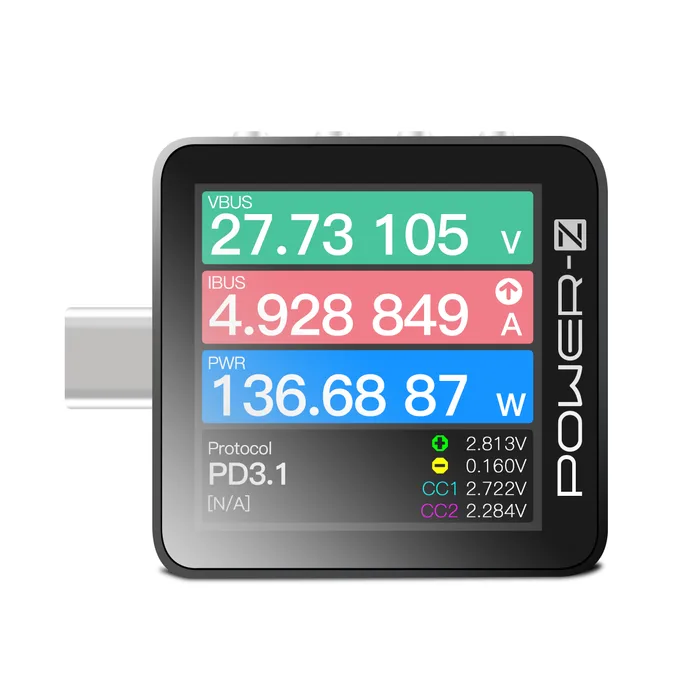
- Buy ChargerLAB POWER-Z KM003C The one meter here that both decodes the PD negotiation and forces a specific contract, with a published measurement tolerance behind it. Amazon
- Buy FNIRSI FNB58 A well equipped mid-range meter that reads E-marker chips, measures cable resistance and draws ripple, as long as nothing you test goes above 28V. Amazon
- It depends AVHzY C3 USB Power Meter The most openly specified meter of the four, with the finest ripple capture here, held back by a 26V ceiling.
- Skip ChargerLAB POWER-Z C240 A neat pocket readout that shows volts, amps and watts and nothing else, from a maker that openly tells accuracy-minded buyers to spend more. Amazon
What actually matters
- PD decoding - Watching the actual Power Delivery messages is how you find out which contracts a charger offered and which one the device chose. Without it you are guessing from a voltage reading, which cannot distinguish a stingy charger from a fussy device.
- PD trigger - A trigger lets the meter impersonate a device and request a specific voltage and current from a charger. That turns the meter from an observer into a test instrument you can use on any charger, without owning a device that draws the power you want to verify.
- Voltage and current ceiling - Every meter has a rated input window, and PD 3.1 Extended Power Range pushed charging up to 48V. A meter rated to 26V will not follow a high wattage laptop charger into its fastest contracts, no matter how good it is otherwise.
- Published accuracy tolerance - A tolerance tells you how far a reading can stray from the true value, usually stated as a gain error or a percentage plus a number of digits. Makers who publish one are telling you something checkable; makers who publish only resolution are not.
- E-marker and cable reading - USB-C cables rated above 3A carry a chip declaring their current and data capability, and a meter that reads it settles the cable question in seconds. Some meters also measure the cable's resistance directly, which catches a cable whose declaration is optimistic.
- Logging and software - Sampling rate, capture length and export format decide whether you can study a charging curve later or only watch it live. Check whether the software is Windows only, and whether the analysis features you want run on the device or only on a computer.
- Firmware path - These meters gain protocol support through firmware, so a device with a stalled or awkward update path slowly stops recognising new chargers. Some makers support Windows only, and a meter with no computer port cannot be updated at all.
The specs, in plain English
Green flags vs red flags
Green flags
- A specification table that lists a gain error or a percentage plus digits tolerance, not just a display resolution.
- An explicit list of which protocols the meter can trigger, kept separate from the list it can merely detect.
- A stated voltage ceiling of 48V or above if you own or plan to own a high wattage laptop charger.
- E-marker reading listed by name, ideally alongside a cable resistance measurement.
- A documented firmware update procedure with a downloadable tool and a version history you can read.
Red flags
- An accuracy claim expressed only as a number of digits or a resolution such as 0.00001V.
- A protocol list that mixes detection and triggering into one sentence so you cannot tell what the meter can actually do.
- Specification text that cites a USB version or generation that does not exist, which usually means the sheet was not checked.
- Several trim levels sold under the same model name, with no clear note of which features each one includes.
- No mention anywhere of how firmware is updated, or no port through which it could be.
Who's who: the brands
- ChargerLAB (POWER-Z) - A Chinese charging lab whose POWER-Z meters are the reference point for PD protocol work, and one of the few makers here that publishes a full specification table with tolerances.
- FNIRSI - High volume maker of budget test gear whose FNB series meters pack a lot of features per unit of cost, with documentation that is thinner than the hardware deserves.
- AVHzY - A small operation selling direct, known for meters with fine ripple capture and unusually explicit accuracy specifications.
- Alientek - Widely sold USB testers that may come in several trim levels under one model name, so confirm which variant a listing covers before buying.
- RDTech - Ruideng, known for the long running and inexpensive UM series that predates most USB-C fast charging work.
How to read a listing without getting fooled
Start at the bottom of the listing, not the top. The headline is almost always a wattage, and wattage tells you nothing about what the meter can do, only what it can survive. Find the input range first and check whether the top voltage clears 28V, because that one number decides whether the meter is relevant to modern laptop charging. Next find the protocol section and read it twice: makers routinely blend detect, monitor and trigger into a single list, and only trigger makes the meter a test tool. Then look for an accuracy figure and check whether it is a tolerance or a resolution; if the only number is a string of decimal places, treat the accuracy as unstated. Finally, look for E-marker reading, a computer port, and any mention of firmware updates. If a listing is silent on all three, you are looking at a readout rather than an instrument.
How much should you spend?
Budget tier buys a passive readout: a small screen showing volts, amps and watts, sometimes in a nice metal shell, with no protocol functions and no computer connection. Mid-range is where meters start reading E-marker chips, triggering common fast charge protocols and connecting to software for logging, and for most people this tier is the sweet spot. Premium buys the two things the cheaper tiers cannot provide: packet level decoding of the PD conversation, and a voltage ceiling high enough to follow PD 3.1 into its 36V and 48V contracts. It also tends to buy better documentation, which in this category is a real and underrated part of what you are paying for. If you are unsure, decide whether you need to know why something charges slowly or only how fast it charges, and let that pick the tier.
Questions, answered
Why do enthusiasts recommend brands I have never heard of?
Almost all serious USB meters come from small Chinese makers, because the market is too specialised for large instrument companies to bother with. Some of those makers are excellent and publish full specification tables. Others, including several names that circulate in forum threads, have no manufacturer website and no official product page at all, and their hardware reaches buyers only through marketplace resellers. That is worth knowing before you buy, because it means no warranty path, no documentation and no firmware source you can verify.
Do I need the app or PC software, or can I do everything on the device?
It varies more than you would expect, and it is worth checking before buying. Triggering protocols and reading E-marker chips are usually available on the device itself. Packet level PD decoding, long captures and data export generally require a computer, and on some meters the analysis you actually want only exists in the desktop software. If you want a self contained tool you can use in a drawer with no laptop, confirm which functions are standalone.
Can a USB meter damage my charger, my laptop or itself?
Passive measurement is low risk, but triggering is not. When you trigger a high voltage contract, that voltage really appears on the port, and connecting a device that was not expecting it can damage it. Manufacturers warn about this directly. Many meters have no reverse polarity protection, so wiring one backwards through an adapter can destroy it. Trigger into nothing or into a load, and never into a phone.
Is a more expensive meter more accurate?
Usually yes, but not always in the way you would expect, and price mostly buys capability rather than precision. One mid-range meter here publishes an accuracy figure comparable to the premium one, while another publishes none. What the extra money buys is protocol decoding, a higher voltage ceiling, better documentation and a firmware path that stays maintained. If accuracy alone is your concern, look for a published tolerance rather than a higher price.
Or jump to the head-to-head: ChargerLAB POWER-Z KM003C vs FNIRSI FNB58.