

Tech & Gadgets
The Best USB Power Meters: 4 Compared (and One to Skip)
We compared four USB-C power meters on whether they decode the USB PD negotiation, whether they can trigger a contract, how high they read, and whether the maker publishes a real accuracy tolerance.
The short version
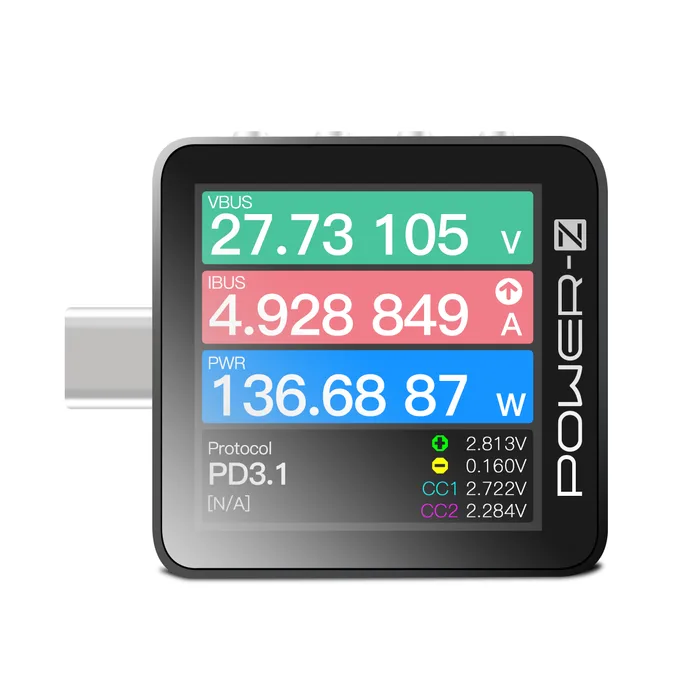
The ChargerLAB POWER-Z KM003C wins because it does the thing most meters cannot: it decodes the USB PD conversation packet by packet and triggers a specific contract, and its manual publishes a genuine measurement tolerance rather than just a resolution figure. The FNIRSI FNB58 is the value pick, with USB-A, Micro-USB and USB-C in one body, E-marker reading, cable resistance and a fast ripple view, though the maker rates it to 28V and PD 3.0 only. The AVHzY C3 suits a different buyer: it publishes a 0.1% plus 2 digit accuracy spec and an 8 million sample per second VBUS scope, but its 26V ceiling rules out high voltage EPR work. Skip the ChargerLAB POWER-Z C240 if diagnosis is the goal, because it has no buttons, no PC port and no protocol functions, and ChargerLAB itself points accuracy-minded buyers at the KM003C instead. Choose on what you need to see, not on the headline wattage. Best for: anyone who wants to prove why a charger, a cable or a laptop is not hitting the speed it promised.
Our picks at a glance
- ChargerLAB POWER-Z KM003C - Buy. The one meter here that both decodes the PD negotiation and forces a specific contract, with a published measurement tolerance behind it.
- FNIRSI FNB58 - Buy. A well equipped mid-range meter that reads E-marker chips, measures cable resistance and draws ripple, as long as nothing you test goes above 28V.
- AVHzY C3 USB Power Meter - It depends. The most openly specified meter of the four, with the finest ripple capture here, held back by a 26V ceiling.
- ChargerLAB POWER-Z C240 - Skip. A neat pocket readout that shows volts, amps and watts and nothing else, from a maker that openly tells accuracy-minded buyers to spend more.
The verdict in 30 seconds
What mattered most
- Stated measurement range
- Published accuracy tolerance
- PD packet decoding
- PD trigger (force a contract)
- E-marker and cable reading
- Ripple or scope capture
A USB power meter sits between a charger and a device and tells you what is actually flowing. The cheap ones do exactly that and stop there. The useful ones go further: they read the power contract the charger and the device negotiated, let you force a specific contract so you can prove a charger really hits its rating, and read the chip inside a USB-C cable. We picked four that are on sale now and judged them on what their makers actually publish, not on the wattage printed on the box.
The one meter here that both decodes the PD negotiation and forces a specific contract, with a published measurement tolerance behind it.
Best for: Anyone who needs to answer why a charger, cable or laptop is not negotiating the contract it should.
- Decodes USB PD traffic including SOP, SOP' and SOP'' packets, so you see the actual negotiation instead of inferring it from the voltage.
- Triggers PD 2.0, PPS and EPR contracts plus QC, AFC, FCP, SCP, UFCS and VOOC from the device itself, which is how you prove a charger delivers its rating.
- The manual states a voltage and current gain error of 0.05% typical and 0.25% maximum, a real tolerance rather than a resolution figure.
- Protocol analysis and firmware updates run through Windows PC software, with the Mac build still listed as a beta.
- Triggering a protocol needs a separate power source on the HID port, because a USB-C receptacle sits at 0V until something asks it to wake up.
- ChargerLAB's own manual says the built in cable simulation is not perfect and that protocol detection may not be completely accurate.
- Premium tier for a tool many people will reach for a handful of times a year.
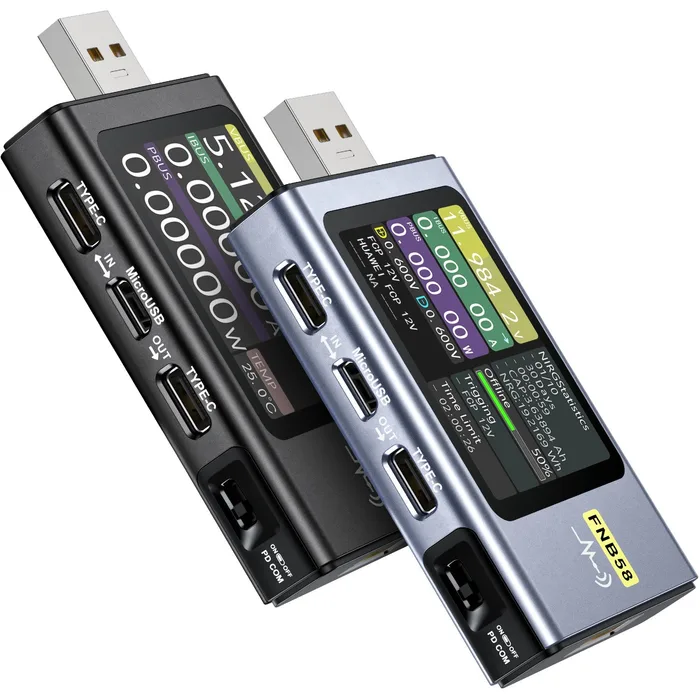
A well equipped mid-range meter that reads E-marker chips, measures cable resistance and draws ripple, as long as nothing you test goes above 28V.
Best for: Someone testing phones, power banks, cables and chargers inside its 140W rating who also wants ripple and cable checks.
- Carries USB-A, Micro-USB and USB-C in one body, so it reaches older chargers and cables that USB-C only meters cannot.
- Reads USB-C E-marker chips and measures cable resistance, which answers the usual question of whether the cable is the bottleneck.
- Draws ripple at up to 4 million samples per second and slow curves from 2 to 100 samples per second, with 10 switchable record sets held on the device.
- FNIRSI rates it 4 to 28V, 0 to 7A and 0 to 140W, so the 36V and 48V EPR steps of PD 3.1 are out of range.
- The product page lists PD 2.0 and PD 3.0 only, with no PD 3.1 or PD 3.2 claim.
- No plus or minus accuracy tolerance is published on the product page, only a six digit display resolution.
- Firmware updating and the full logging software run on a Windows PC, with no Mac route listed on the product page.
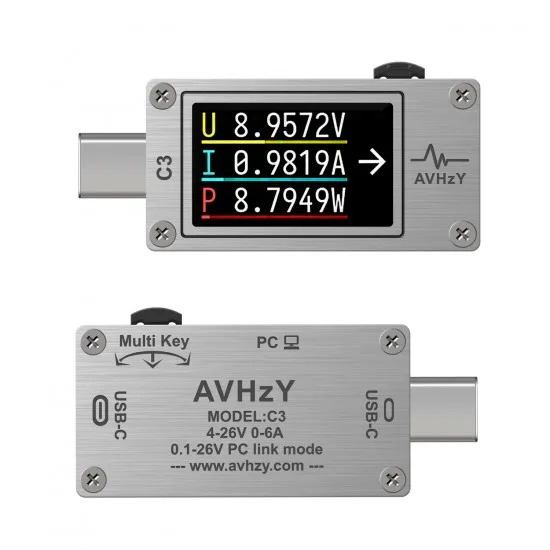
The most openly specified meter of the four, with the finest ripple capture here, held back by a 26V ceiling.
Best for: Someone who cares more about ripple detail and a stated tolerance than about covering high voltage laptop charging.
- Publishes 0.0001V and 0.0001A resolution together with a 0.1% plus 2 digit accuracy figure, which is more than most makers in this category state at all.
- The VBUS oscilloscope samples at 8 million points per second with 1 mV resolution, the finest ripple view in this group.
- Full 24 pin USB-C ports with 10Gbps pass through, an E-marker reader, and a PC tool suite with firmware upgrade, logging to 1000 samples per second and a PD listener.
- The stated range is 4 to 26V, dropping to 0.1V only when driven from the PC link, so PD 3.1 EPR contracts are out of reach.
- Sold mainly direct from AVHzY's own small storefront, so returns and support are thinner than with larger brands.
- The store page describes the pass through with a USB generation label the specification does not define, which is a fair warning about documentation care here.
- The 1.14 inch screen packs a lot in and is harder to read at a glance than the larger displays in this group.
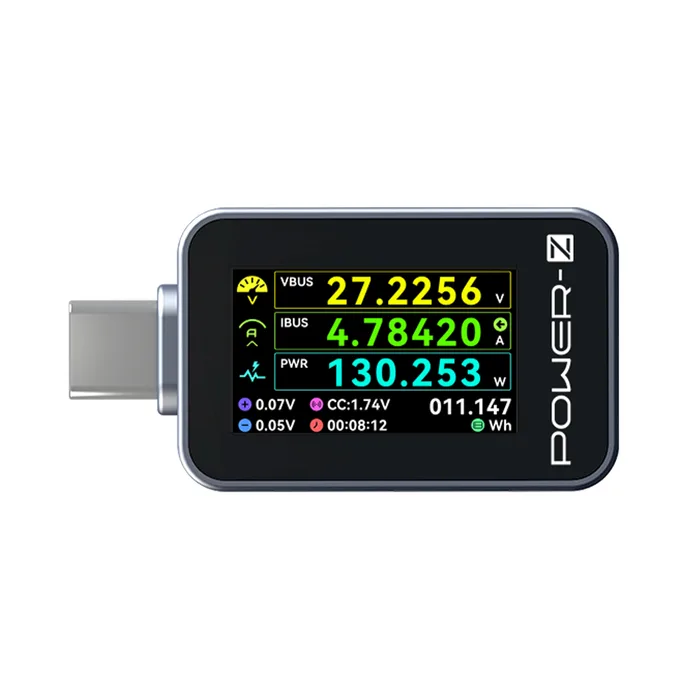
A neat pocket readout that shows volts, amps and watts and nothing else, from a maker that openly tells accuracy-minded buyers to spend more.
Best for: Someone who only wants a glanceable wattage readout and will never need to diagnose a negotiation.
- Shows voltage, current, power, direction, energy, a timer and the D+, D- and CC pin states on one 1.14 inch color screen with no buttons to press.
- CNC metal shell at 36.7 by 23.7 by 7.8 mm and 11.8 g, small enough to live in a bag permanently.
- Reads current in both directions, so it works for power bank discharge as well as charging.
- No PD protocol analysis and no trigger, so it cannot tell you why a negotiation failed or force a contract to test one.
- No E-marker or cable reading is listed, which leaves the most common cause of a slow charge unanswered.
- No HID or PC port, so there is no logging, no export and no documented firmware update path.
- ChargerLAB states its accuracy is relatively lower than the KM003C and recommends the KM003C for anyone with higher accuracy requirements.
| Criteria | POWER-Z KM003C Top pick | FNB58 | C3 USB Power Meter | POWER-Z C240 |
|---|---|---|---|---|
| Verdict | Buy it | Buy it | It depends | Skip it |
| Best for | Anyone who needs to answer why a charger, cable or laptop is not negotiating the contract it should. | Someone testing phones, power banks, cables and chargers inside its 140W rating who also wants ripple and cable checks. | Someone who cares more about ripple detail and a stated tolerance than about covering high voltage laptop charging. | Someone who only wants a glanceable wattage readout and will never need to diagnose a negotiation. |
| Price tier | $$$ · premium | $$ · mid-range | $$ · mid-range | $ · budget |
| Stated measurement range | 0 to 50V, 0 to 6A | 4 to 28V, 0 to 7A, 0 to 140W | 4 to 26V, 0 to 6.8A | Rated to 240W; the maker's own pages give 50V on one and 48V on another |
| Published accuracy tolerance | Gain error 0.05% typical, 0.25% maximum (manual) | None published on the product page | 0.1% plus 2 digits | None published; maker says it is lower than the KM003C |
| PD packet decoding | Yes, PD analyzer with SOP, SOP' and SOP'' packets via PC software | PD monitor function listed | PD listener in the PC tool suite | No |
| PD trigger (force a contract) | Yes: PD 2.0, PPS, EPR, QC, AFC, FCP, SCP, UFCS, VOOC | Yes: PD 2.0 and 3.0, QC, FCP, SCP, AFC, VOOC and Super VOOC | Yes: PD, PD PPS, QC 2.0 and 3.0, FCP, SCP, AFC, VOOC, SuperVOOC | No |
| E-marker and cable reading | E-marker read plus 50V 5A cable simulation | E-marker chip read, DASH cable read, cable resistance | E-marker reader | Not listed |
| Ripple or scope capture | Not listed; logging up to 1000 samples per second | Ripple drawing up to 4 million samples per second | VBUS scope, 8 million samples per second at 1 mV | Not listed |
| PC connection and logging | HID port, Windows software, 10 million points per capture | PD COM port, Windows software plus phone app | PC tool suite, logging up to 1000 samples per second | No PC port |
| Firmware update path | Through the PC software; DFU by holding Back at power on | Windows PC software (no Mac route listed) | Firmware upgrade included in the PC tool suite | No PC port, so no documented update path |
Which one is right for you?
- Anyone who needs to answer why a charger, cable or laptop is not negotiating the contract it should. Buy it ChargerLAB POWER-Z KM003C
- Someone testing phones, power banks, cables and chargers inside its 140W rating who also wants ripple and cable checks. Buy it FNIRSI FNB58
- Someone who cares more about ripple detail and a stated tolerance than about covering high voltage laptop charging. It depends AVHzY C3 USB Power Meter
- Someone who only wants a glanceable wattage readout and will never need to diagnose a negotiation. Skip it ChargerLAB POWER-Z C240
How we judged the field
Five things separate a useful USB meter from a decoration. First, whether it decodes the USB PD negotiation rather than just reporting the voltage that resulted from it, because the negotiation is where the answer usually lives. Second, whether it can trigger a contract, which lets you ask a charger for 20V at 5A and see whether it holds, without owning a device that draws that much. Third, the stated voltage and current ceiling, because PD 3.1 pushed the top of the range to 48V and a meter rated to 26V simply cannot follow a modern laptop charger there. Fourth, whether the maker publishes an accuracy tolerance at all, and whether the number it prints is a tolerance or merely a display resolution dressed up as one. Fifth, the boring infrastructure: E-marker and cable reading, logging, and whether there is a firmware path you can actually use.
The field splits cleanly along the second criterion. On one side sit passive readouts that show volts, amps and watts on a small screen and stop there. On the other sit protocol tools that can talk to the charger. Almost everything worth owning in the second group is Chinese-brand, and documentation quality varies enormously between them, which is itself worth reporting: one maker publishes a full specification table with gain errors and temperature coefficients, another publishes none, and a third prints a USB generation label that does not exist. We picked four that are on sale now and that we could verify from the maker’s own pages: two protocol tools we would buy, one that is excellent within a narrower range, and one passive readout that is a poor purchase for the job most people have in mind.
ChargerLAB POWER-Z KM003C
Buy itThe KM003C is the only meter here that ChargerLAB documents with a real measurement tolerance. Its manual lists a voltage and current gain error of 0.05% typical and 0.25% maximum, a temperature coefficient of 5 to 20 ppm per degree C, 20 bit acquisition and a 0 to 50V, 0 to 6A input. That matters more than the six digit readout, which is resolution and not accuracy. Functionally it does both halves of the job: it triggers PD 2.0, PPS and EPR contracts as well as QC, AFC, FCP, SCP, UFCS and VOOC from the device itself, and with the Windows software attached to the HID port it decodes the PD conversation including SOP, SOP’ and SOP” packets, capturing up to ten million points in one run. The catches are ones ChargerLAB prints itself: the cable simulation is not perfect, protocol detection may not be completely accurate, and a trigger test needs a second power source feeding the HID port. For anyone diagnosing charging rather than watching it, this is the pick.
FNIRSI FNB58
Buy itThe FNB58 is the practical middle of the field. FNIRSI rates it 4 to 28V, 0 to 7A and 0 to 140W, built around an external 16 bit ADC and a dedicated PD protocol chip, and it is the only unit here carrying USB-A and Micro-USB alongside USB-C, which matters if half your drawer is older gear. It triggers QC 2.0 and 3.0, FCP, SCP, AFC, PD 2.0 and 3.0, VOOC, WARP and Super VOOC, reads USB-C E-marker chips, reads DASH cable data, measures cable resistance by differential pressure and draws ripple at up to 4 million samples per second. What it does not do is PD 3.1. The product page claims PD 2.0 and 3.0 only, and the 28V ceiling puts the 36V and 48V EPR steps out of range, so a current 240W laptop charger is beyond it. FNIRSI publishes no plus or minus tolerance either, and its PC software and firmware tool are listed for Windows only. Inside its rating, it is a lot of instrument.
AVHzY C3 USB Power Meter
It dependsThe C3 is the most openly specified unit in this group and the most limited in reach. AVHzY publishes 0.0001V and 0.0001A resolution together with a 0.1% plus 2 digit accuracy figure, a 200 MHz Cortex-M4, full 24 pin USB-C ports with 10Gbps pass through, an E-marker reader, and a VBUS oscilloscope sampling at 8 million points per second down to 1 mV. Its PC tool suite adds firmware upgrades, logging to 1000 samples per second and a PD listener for diagnosis. The problem is the ceiling. The stated range is 4 to 26V, falling to 0.1V only when driven over the PC link, so anything above a 20V contract sits outside its window and PD 3.1 EPR is not on the menu at all. It is also sold mainly direct from a small storefront, and the page labels the pass through with a USB generation the specification does not define, which is a fair signal about how carefully these sheets get written. Right meter for ripple and repeatable numbers, wrong meter for high voltage laptop work.
ChargerLAB POWER-Z C240
Skip itThe C240 is a genuinely nice object and the wrong purchase for the job most people have in mind. It is a CNC metal stick, 36.7 by 23.7 by 7.8 mm and 11.8 g, with a 1.14 inch color screen showing voltage, current, power, direction, energy, a timer and the D+, D- and CC pin states all at once, no buttons involved, rated to 240W with bidirectional current. As a permanent readout to leave in a bag it is well made. But there is no HID port, so nothing connects to a computer, nothing logs, nothing exports and there is no documented firmware path. There is no PD trigger and no protocol analysis, so it cannot tell you why a laptop settled on 60W instead of 100W, and no E-marker reading, so it cannot tell you whether the cable is at fault. ChargerLAB is unusually straight about this, stating that the C240 samples less precisely than the KM003C and recommending the KM003C to anyone with higher accuracy requirements. Take the advice.
Sources
Specs in this review come from these pages.
- ChargerLAB POWER-Z KM003C product page (power-z.com)
- ChargerLAB POWER-Z KM003C and KM002C technical support (chargerlab.com)
- FNIRSI FNB58 USB Fast Charge Tester product page (fnirsi.com)
- AVHzY C3 USB Power Meter product page (store.avhzy.com)
- ChargerLAB POWER-Z C240 product page (power-z.com)
- USB Implementers Forum, USB Power Delivery document library (usb.org)
ChargerLAB POWER-Z KM003C vs FNIRSI FNB58: which should you buy?
The KM003C and the FNB58 are separated by one number and one workflow. The number is the voltage ceiling: ChargerLAB rates the KM003C to 50V and lists PD 3.1 EPR support, while FNIRSI rates the FNB58 to 28V and claims PD 3.0. If anything you own or plan to own negotiates a 36V or 48V contract, which increasingly means high wattage laptop chargers and the cables sold with them, the FNB58 cannot follow it and the decision is already made. If your world is phones, tablets, power banks and chargers up to around 140W, that ceiling never comes up and you are choosing on other grounds.
The workflow difference is where the analysis happens. The KM003C is designed around its PC software: the packet by packet PD decode, the ten million point captures and the firmware updates all live on a Windows machine hanging off the HID port, and a trigger test wants a separate power source there too. The FNB58 keeps more on the device, with ten record sets, ripple drawing and E-marker reading available standalone, plus USB-A and Micro-USB ports the KM003C does not have. So: buy the KM003C if you are debugging and will sit at a desk with it. Buy the FNB58 if you want a self contained tool that also handles older connectors, and you can live inside 28V.
What to look for
- Decoding beats reading: a meter that shows volts and amps tells you the outcome, while a meter that decodes the PD messages tells you why that outcome happened.
- Check the trigger list, not the protocol list: supporting a protocol can mean only recognising it, so look for wording that says the meter can trigger or request a contract, and check which protocols are on that specific list.
- Match the voltage ceiling to your gear: PD 3.1 EPR uses 28V, 36V and 48V steps, so a meter rated to 24V or 26V is blind to the fastest chargers now on sale.
- Separate resolution from accuracy: a six digit display is resolution, and the number that matters is a tolerance stated as a gain error or as a percentage plus digits.
- Confirm E-marker reading if cables are your question: a USB-C cable rated above 3A carries a chip declaring its capability, and reading it is the fastest way to rule the cable in or out.
- Find the firmware path before you buy: several makers here update from Windows software, and a meter with no PC port has no update path at all.
Our final take
Buy on the question you are trying to answer. If it is why something charges slowly, you need a meter that decodes the PD negotiation and can trigger a contract, and the KM003C does both with the clearest published tolerance of the four. If your gear stays inside 140W, the FNB58 gives you most of that capability plus USB-A and Micro-USB ports for older hardware. The AVHzY C3 is the choice for anyone who cares about ripple detail and a stated accuracy figure more than about high voltage coverage. The C240 is well made and pleasant, but it answers only the easy question, and its own maker will tell you so if you ask.
Questions, answered
Do I actually need a meter that decodes USB PD, or is a volts and amps readout enough?
It depends entirely on the question you are trying to answer. If you only want to know whether a power bank is putting out roughly 20W, a passive readout is fine and cheaper. But a passive meter can only show you the result, never the reason. When a laptop settles on 60W instead of 100W, the useful information is in the negotiation: which PDOs the charger advertised, which one the laptop asked for, and whether the cable let it happen. Decoding the PD conversation is the only way to see that, and forcing a contract with a trigger is the only way to test a charger without owning the exact device.
Will one of these tell me if my cable is the bottleneck?
Yes, if you buy one that reads E-marker chips, and three of the four here do. A USB-C cable rated above 3A must carry an E-marker chip that declares its current and data capability, and a meter that reads it will show you what the cable claims. The KM003C, the FNB58 and the AVHzY C3 all list E-marker reading; the C240 does not. The FNB58 also measures cable resistance directly, which catches a cable that is nominally rated fine but has a poor connection. Bear in mind that reading an E-marker tells you what the cable declares, not what it can survive.
What does a PD trigger actually do, and is it risky?
A trigger makes the meter pretend to be a device and ask the charger for a specific contract, for example 20V at 5A. The charger then puts that voltage on the line, and you can see whether it holds. This is how you verify a charger without needing a laptop that draws that much. The risk is straightforward: once the meter has triggered a high voltage, that voltage is present on the port. ChargerLAB's manual is blunt about it and warns not to have a device connected when triggering a protocol, because the applied high voltage can damage it. Trigger into a load or into nothing, never into your phone.
Can I trust the accuracy figures printed on these meters?
Treat them carefully, because the number most makers advertise is resolution, not accuracy. A six digit display showing 0.00001V tells you how finely the reading is subdivided, and says nothing about how close it is to the true value. The real figure is a tolerance, usually written as a gain error or as a percentage plus a number of digits. ChargerLAB's manual gives 0.05% typical and 0.25% maximum gain error for the KM003C; AVHzY states 0.1% plus 2 digits for the C3. None of the makers here cite a traceable calibration standard or say how the figure was verified, so treat all of them as manufacturer claims rather than certified specifications.
Which of these can handle a 240W laptop charger?
Only the KM003C among the four, and only within its stated limits. PD 3.1 EPR raises the ceiling to 48V, and getting 240W means 48V at 5A. ChargerLAB rates the KM003C at 0 to 50V and 0 to 6A, and it lists PD 3.1 EPR in its protocol support. The FNB58 stops at 28V and the AVHzY C3 at 26V, so neither can follow a 36V or 48V contract. The C240 is rated to 240W but has no protocol functions at all. If EPR testing is why you are buying, that requirement alone narrows the field to one.
Deciding between the top two? See our head-to-head: ChargerLAB POWER-Z KM003C vs FNIRSI FNB58.
More Tech & Gadgets reviews
 The Best Video Doorbells in 2026 (and the One to Skip)
  The Best VR Headsets: 4 Compared (and One to Skip)
  The Best Webcam Lights: 4 Compared (and One to Skip)
  The Best WiFi Extenders: 4 Compared (and One to Skip)
  The Best Wi-Fi Routers: 4 Compared (and One to Skip)
  The Best Qi2 and MagSafe Wireless Chargers for 2026