

Tech & Gadgets
The Best Webcam Lights: 4 Compared (and One to Skip)
We compared four desk lighting panels on published output, colour temperature range, colour rendering index, control method, power and what each maker will actually state.
The short version
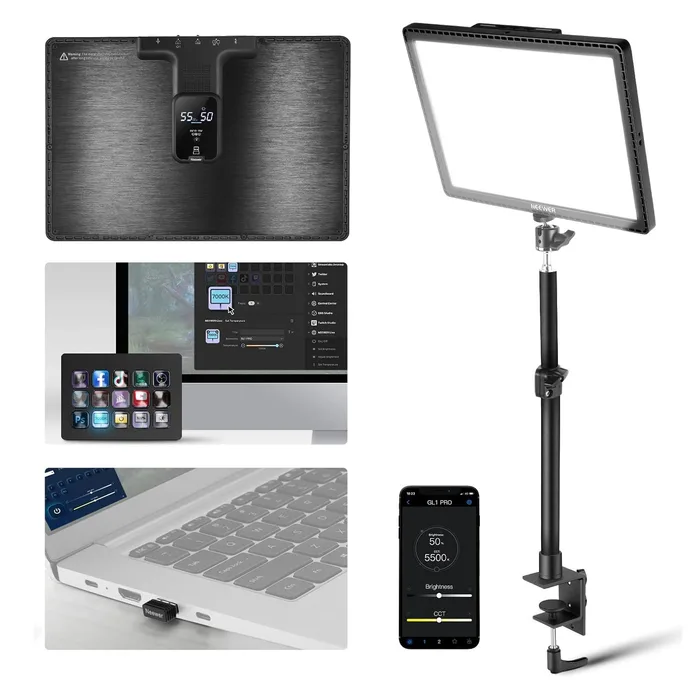
The NEEWER GL1 PRO is the one to buy: 192 LEDs behind an edge-lit panel measuring 332 by 231 by 36 millimetres, a maximum illuminance of 3700 lux at half a metre, CRI97+ and TLCI98+, 2900K to 7000K, 0 to 100 percent dimming, up to 45W, and three separate control paths including a 2.4GHz USB dongle that needs no network at all, plus Elgato Stream Deck compatibility, a clamp-mounted desk stand and a power adapter in the box. The Elgato Key Light is the runner-up, with 160 OSRAM LEDs putting out 2800 lumens, 2900K to 7000K, CRI above 92 percent, up to 45W, dual-band Wi-Fi, and the best diffusion stack here of a precision scatter plate, a double-layer diffuser and opal glass. The Logitech Litra Glow is the compact option at 250 lumens and 2700K to 6500K, USB powered with standard tripod threading, and it claims best in class CRI without publishing a number. The Lume Cube Video Conference and Phone Lighting Kit is the one to skip, because Lume Cube publishes no output, no colour temperature range, no CRI, no dimensions and no battery capacity. Best for: anyone on video calls who looks worse than they do in the room.
Our picks at a glance
- NEEWER GL1 PRO 15.5 inch Key Light - Buy. The highest published colour accuracy here, and the only one that works without Wi-Fi.
- Elgato Key Light - Buy. 2800 lumens through a four-stage diffusion stack, on a clamp that frees your desk.
- Logitech Litra Glow - It depends. 250 lumens over USB, which lights a face beautifully and nothing else.
- Lume Cube Video Conference and Phone Lighting Kit - Skip. Adjustable brightness and colour temperature, with no figure attached to either.
The verdict in 30 seconds
What mattered most
- Output
- Colour temperature
- Colour rendering
- LED count
- Power
- Control
The phrase webcam light covers a tenfold range of output, which is the first thing worth knowing before buying one. At one end is a 250 lumen USB panel that clips to a laptop lid and lights a face at arm's length. At the other is a 2800 lumen mains-powered panel on a desk clamp that will light you, your background and most of the room. Both are sold to the same person for the same purpose. Between them sit the specifications that decide picture quality rather than brightness: colour temperature range, colour rendering index, and whether the diffusion is a sheet of plastic or several layers of optics.
The highest published colour accuracy here, and the only one that works without Wi-Fi.
Best for: Streaming and calls where colour accuracy matters and you would rather not put a light on your Wi-Fi.
- A full specification: 192 LEDs, 332 by 231 by 36 millimetres, DC 12 to 15V at up to 45W maximum, 3700 lux maximum illuminance at half a metre, 0 to 100 percent dimming and 2900K to 7000K.
- CRI97+ and TLCI98+, both published as numbers, which is the highest stated colour accuracy in this comparison, on a flicker-free circuit.
- Three control paths: a 2.4GHz USB dongle that needs no Wi-Fi at all, a Wi-Fi app for PC and Mac, and Bluetooth from a phone, plus Elgato Stream Deck compatibility, with a desk stand, power adapter and cable included.
- Output is quoted as illuminance in lux at half a metre rather than in lumens, so it cannot be compared directly with the Elgato's figure.
- No weight is published.
- No warranty terms appear on the product page.
- Maximum power is 45W on DC 12 to 15 volts, so it needs the supplied mains adapter rather than running from a USB port.
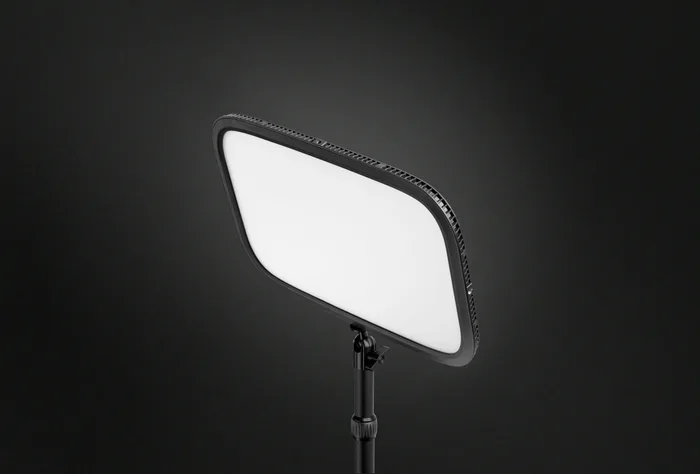
2800 lumens through a four-stage diffusion stack, on a clamp that frees your desk.
Best for: A permanent desk setup where you want the softest light and the tidiest mounting.
- 160 premium OSRAM LEDs producing 2800 adjustable lumens across 2900K to 7000K, with CRI above 92 percent and consumption up to 45W.
- A proper optical stack rather than a plastic sheet: a reflector for even distribution, a precision scatter plate to eliminate hot spots, a double-layer diffuser and opal glass.
- Dual-band Wi-Fi on 2.4GHz and 5GHz with full app control, a desk clamp that expands to 6 centimetres and is padded, and a ball mount for angle.
- CRI above 92 percent is the lowest published colour accuracy of the two lights here that publish a number at all.
- Wi-Fi only, with no dongle and no Bluetooth, so control depends on your network being up.
- Mains powered rather than USB, so it needs an outlet and it is not portable.
- The most expensive light in this comparison.
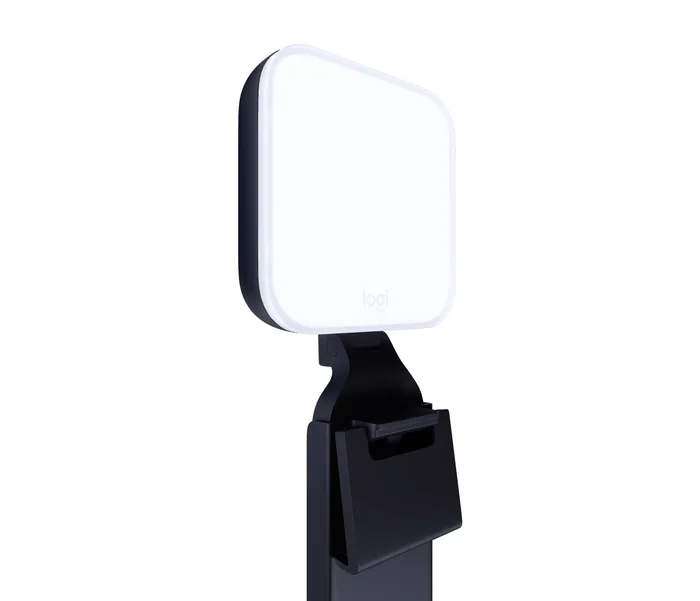
250 lumens over USB, which lights a face beautifully and nothing else.
Best for: Laptop calls, travel and small desks where a full-size panel will not fit.
- USB powered with built-in cable management and standard tripod threading, at 6.24 ounces or 177 grams, so it travels and mounts anywhere.
- A frameless diffuser that spreads light wide and soft, with a colour temperature range of 2700K to 6500K, the warmest low end here.
- Logitech's TrueSoft full-spectrum LED approach is aimed specifically at skin tone rendering rather than raw output.
- 250 lumens maximum, roughly a tenth of the Elgato's output, so it lights a face at close range and does nothing for a background.
- Logitech claims best in class colour rendering without publishing a CRI figure, where two competitors publish numbers.
- No wattage, no LED count and no diffusion detail are published.
- Logitech recommends USB 3.0 or better, so an older port may not drive it properly.
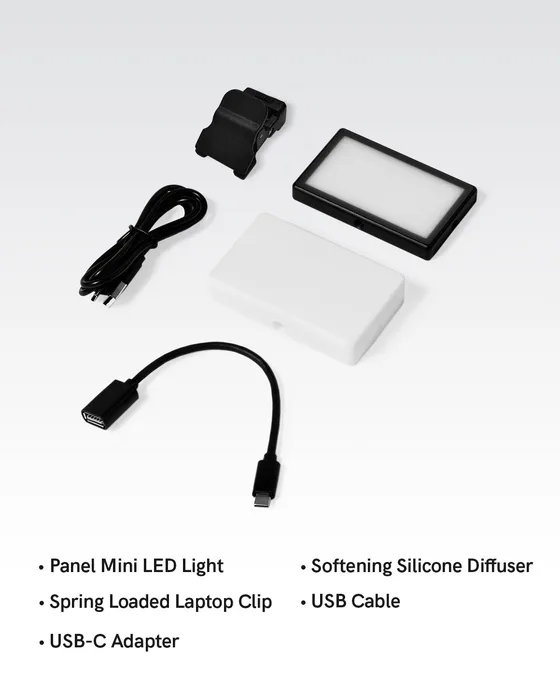
Adjustable brightness and colour temperature, with no figure attached to either.
Best for: Someone who wants a cordless clip-on light and does not need to compare it with anything.
- A premium all-metal body rather than plastic, which none of the other three claims.
- A rechargeable battery with a minute-by-minute battery life display, so it works away from power and tells you how long it has left.
- A universal spring-loaded clip that mounts to a laptop, phone, tablet or camera, shipping with a Panel Mini LED light, a softening silicone diffuser, a USB-C adapter and a cable.
- No output figure in lumens or lux is published anywhere on the page.
- No colour temperature range is given, despite adjustable colour temperature being a headline feature.
- No CRI or TLCI figure, no dimensions, no weight and no battery capacity or run time.
- At mid-range money you are buying less published information than the cheapest light here.
| Criteria | GL1 PRO 15.5 inch Key Light Top pick | Key Light | Litra Glow | Video Conference and Phone Lighting Kit |
|---|---|---|---|---|
| Verdict | Buy it | Buy it | It depends | Skip it |
| Best for | Streaming and calls where colour accuracy matters and you would rather not put a light on your Wi-Fi. | A permanent desk setup where you want the softest light and the tidiest mounting. | Laptop calls, travel and small desks where a full-size panel will not fit. | Someone who wants a cordless clip-on light and does not need to compare it with anything. |
| Price tier | $$ · mid-range | $$$ · premium | $ · budget | $$ · mid-range |
| Output | 3700 lux at 0.5 m | 2800 lumens | 250 lumens | Not published |
| Colour temperature | 2900K to 7000K | 2900K to 7000K | 2700K to 6500K | Not published |
| Colour rendering | CRI97+ and TLCI98+ | CRI above 92 percent | Best in class claimed, no figure | Not published |
| LED count | 192 | 160 OSRAM | Not published | Not published |
| Power | DC 12 to 15V, up to 45W | Up to 45W, mains | USB, 3.0 or better recommended | Rechargeable battery |
| Control | 2.4GHz dongle, Wi-Fi app, Bluetooth | Wi-Fi 2.4 and 5GHz app | On-device | On-device |
| Dimensions | 332 x 231 x 36 mm | 30 x 350 x 250 mm | Not published on this page | Not published |
| Diffusion | Edge-lit plane light source | Scatter plate, double-layer diffuser, opal glass | Frameless diffuser | Softening diffuser |
| Mounting | Clamp-mounted desk stand included | Padded desk clamp to 6 cm, ball mount | Standard tripod thread | Universal clip |
| Weight | Not published | Not published on this page | 177 g / 6.24 oz | Not published |
Which one is right for you?
- Streaming and calls where colour accuracy matters and you would rather not put a light on your Wi-Fi. Buy it NEEWER GL1 PRO 15.5 inch Key Light
- A permanent desk setup where you want the softest light and the tidiest mounting. Buy it Elgato Key Light
- Laptop calls, travel and small desks where a full-size panel will not fit. It depends Logitech Litra Glow
- Someone who wants a cordless clip-on light and does not need to compare it with anything. Skip it Lume Cube Video Conference and Phone Lighting Kit
How we judged the field
Output came first, and the first problem in this category is that makers do not agree on a unit. Elgato and Logitech quote lumens, which is total light emitted. NEEWER quotes illuminance in lux at a stated distance, which is light arriving at a surface and is arguably more useful for a desk light but cannot be converted without knowing the beam pattern. One maker quotes nothing at all. Where a figure exists we used it, and we noted where the units make direct comparison impossible rather than pretending otherwise.
Second, colour rendering, which decides whether you look like yourself. CRI and TLCI are both published as numbers by one maker, CRI alone by another, claimed without a number by a third and omitted by a fourth, and that ordering tells you something. Third, colour temperature range, because a light that cannot match the room it sits in will fight your camera’s white balance. Fourth, diffusion, which is the difference between soft light and a spotlight, and which the better makers describe layer by layer. Fifth, power and control, since a mains panel with Wi-Fi and a USB panel with a dial are different products for different desks. And throughout, what each maker is willing to put in writing.
The NEEWER GL1 PRO publishes the most complete specification in this comparison and it is not close. The panel holds 192 LEDs behind an edge-lit diffuser that NEEWER describes as converting a point light source into a plane light source, measures 332 by 231 by 36 millimetres, runs on DC 12 to 15 volts at up to 45 watts, and produces a maximum illuminance of 3700 lux at half a metre. Dimming runs 0 to 100 percent and colour temperature 2900K to 7000K. Most importantly it publishes CRI97+ and TLCI98+ as figures, which is the highest stated colour accuracy here and a meaningfully better number than the alternatives, on a circuit NEEWER describes as flicker free. The control story is the other differentiator: three separate paths, a 2.4GHz USB dongle that plugs into a PC or Mac and needs no Wi-Fi at all, a Wi-Fi app for desktop, and Bluetooth from a phone, plus compatibility with an Elgato Stream Deck so the light can be dimmed mid-stream from a physical key. A clamp-mounted desk stand, power adapter and cable are in the box. The gaps are the unit mismatch on output, no published weight, and no warranty terms.
The Elgato Key Light is the best-made light here and the one with the most thought behind its optics. It carries 160 premium OSRAM LEDs, named to a manufacturer rather than counted anonymously, producing 2800 adjustable lumens across a 2900K to 7000K range with CRI above 92 percent and consumption up to 45 watts. The diffusion is where the money goes and Elgato lists every stage: a reflector for even distribution without glare, a precision scatter plate to eliminate hot spots, a double-layer diffuser for softness and opal glass on the front. The LEDs are hidden from direct view entirely, which is the correct design for something sitting near your eyeline for eight hours. Mounting is a padded desk clamp expanding to 6 centimetres or 2.35 inches with a ball mount for angle, which keeps the whole thing off your desk surface. Control is over dual-band Wi-Fi at 2.4 and 5GHz through Elgato’s app. The panel is 30 by 350 by 250 millimetres. Three things count against it: a CRI figure below the NEEWER’s, control that depends entirely on your Wi-Fi with no dongle or Bluetooth fallback, and a mains cable, which rules it out as a portable light.
The Logitech Litra Glow is a different product wearing the same category label, and whether that is a problem depends on your desk. Maximum output is 250 lumens, which Logitech describes as optimised for desktop streaming and which is roughly a tenth of the Elgato’s figure. At 40 centimetres from your face that is genuinely enough and the light is soft and flattering; at a metre, or for anything involving a background, it is not. The colour temperature range is 2700K to 6500K, the warmest low end here, which makes it the easiest to match to a lamp-lit room. Logitech’s TrueSoft approach combines full-spectrum LEDs with a frameless diffuser aimed specifically at skin tone rendering, and the whole thing runs from USB with built-in cable management, a standard tripod thread and a weight of 6.24 ounces or 177 grams. The reservation that matters is the CRI. Logitech says TrueSoft achieves best in class colour rendering as measured by CRI and then does not print the number, which on a page that publishes a weight to two decimal places is a conspicuous omission. There is also no wattage, no LED count and no diffusion detail, and Logitech recommends USB 3.0 or better.
The Lume Cube Video Conference and Phone Lighting Kit is the skip, and the reason is that there is nothing to evaluate. Lume Cube describes a premium all-metal design, adjustable brightness and colour temperature, a softening diffuser that creates flattering natural-looking light, a universal clip that mounts to a laptop, phone, tablet or camera, and a rechargeable battery with an accurate minute-by-minute battery display. All of those are plausible and some of them are genuine advantages: an aluminium body is better than plastic, a battery means no cable, and a run-time display that counts down in minutes is more honest than four LED dots. But there is no output figure in lumens or lux, no colour temperature range despite adjustable colour temperature being a headline feature, no CRI or TLCI, no dimensions, no weight, no battery capacity and no run time. At this price the NEEWER publishes eleven numbers and the Logitech publishes a weight to the hundredth of an ounce. Buying this one means taking every claim on trust.
NEEWER GL1 PRO 15.5 inch Key Light vs Elgato Key Light: which should you buy?
NEEWER against Elgato is a closer contest than the price difference suggests, and it turns on colour accuracy against optics. The GL1 PRO publishes CRI97+ and TLCI98+ where the Key Light publishes CRI above 92 percent, and in a product whose job is rendering a face accurately that is the most relevant number on either page. It also has 192 LEDs to the Elgato’s 160, the same 45 watt maximum and the same 2900K to 7000K range, and it includes a clamp-mounted desk stand and power adapter. The three control paths matter too: the 2.4GHz dongle means the light works when your Wi-Fi does not.
The Key Light answers with optics and integration. OSRAM LEDs, a reflector, a precision scatter plate, a double-layer diffuser and opal glass is a genuine optical stack rather than a sheet of acrylic, and the result is a softer source with the emitters completely hidden from view. The padded clamp and ball mount make positioning and angling trivial, and Elgato’s app ecosystem is the smoother of the two. Buy the GL1 PRO if colour accuracy and control independence matter most, or if the price difference does. Buy the Key Light if the light lives permanently on a desk and you want the softest, tidiest result.
What to look for
- An output figure with its unit: lumens and lux at a stated distance are both useful and are not interchangeable, and no figure at all is a warning.
- A published CRI number: above 90 is considered excellent, and best in class without a figure is not a specification.
- A colour temperature range that reaches your room: around 2700K at the warm end matters if you sit under household bulbs.
- A described diffusion stack: a scatter plate, a double diffuser or edge-lighting produce soft light, and a single acrylic sheet does not.
- How it is controlled and what that depends on: Wi-Fi is convenient until the router reboots, and a dongle or Bluetooth removes that risk.
- Mounting that suits your desk: a clamp frees desk space, a stand uses it, and a tripod thread lets you use what you already own.
Our final take
Webcam lights split into two products sharing a name, and the first decision is which one your desk needs. The NEEWER GL1 PRO is the one to buy: the fullest published specification here, the highest stated colour accuracy at CRI97+ and TLCI98+, three control paths including one that bypasses your network entirely, and a clamp-mounted stand and adapter in the box. The Elgato Key Light is the better-engineered panel, with a genuine four-stage diffusion stack, named OSRAM emitters and a clamp that keeps your desk clear, and it is worth the premium for a permanent setup. The Logitech Litra Glow is a fine small light that lights a face and nothing else, and it should publish its CRI. And a mid-priced light that will not tell you how bright it is, what colours it renders or how long its battery lasts is asking for a great deal of faith.
Questions, answered
How many lumens do I actually need?
It depends entirely on where the light sits. A 250 lumen panel 40 centimetres from your face is genuinely enough for a video call, because illumination falls off with the square of distance and at that range a small light is bright. Push it back to a metre for a wider shot and it disappears. A 2800 lumen panel at a metre gives you a properly lit face plus some spill onto the background, which is what makes footage look produced rather than merely visible. Buy the small one for a laptop and the big one for a desk setup.
What is CRI and why does it matter more than brightness?
Colour Rendering Index measures how accurately colours appear under a light compared with daylight, on a scale where 100 is perfect. Elgato notes that 90 and above is considered excellent. It matters because a cheap LED can be blindingly bright and still render skin as grey or orange, which no camera setting fixes. NEEWER publishes CRI97+ and TLCI98+ as numbers; Elgato publishes above 92 percent; Logitech claims best in class without a figure; Lume Cube says nothing. A maker unwilling to state a number is usually not proud of it.
Warm or cool light?
Match the room, then adjust to taste. If your room is lit by warm household bulbs at around 2700K and you point a 6500K daylight panel at your face, you will be blue against an orange background and your camera's white balance will pick one and ruin the other. All three lights here that publish a range cover roughly 2700K to 7000K, which is enough to match anything. The practical method is to set the light close to your room lighting, lock your camera's white balance if it lets you, and only then decide whether you prefer warmer or cooler.
Does diffusion actually make a difference?
It is the difference between a flattering light and a spotlight. A bare LED array is a small, hard source that produces sharp-edged shadows under the nose and chin and glints on glasses. Diffusion spreads the emitting surface out so the light wraps around the face. Elgato publishes the whole stack, a reflector, a precision scatter plate to remove hot spots, a double-layer diffuser and opal glass, and NEEWER describes edge-lighting that converts a point source into a plane source. Both approaches work; a single thin plastic sheet does not.
Do I want Wi-Fi control or a physical dial?
App control is genuinely useful once a light is mounted above and behind your monitor where you cannot reach the buttons, and it lets you set brightness and temperature without leaning into shot. The drawback is dependency: a Wi-Fi light needs your network, and a router reboot mid-stream is a problem you did not previously have. NEEWER's approach of shipping a 2.4GHz USB dongle sidesteps this entirely, which is why it is worth noting. For a light you set once and leave, a dial on the back is completely adequate.
Deciding between the top two? See our head-to-head: NEEWER GL1 PRO 15.5 inch Key Light vs Elgato Key Light.
More Tech & Gadgets reviews
 The Best Welding Gloves: 4 Compared (and One to Skip)
  The Best Welding Jackets: 4 Compared (and One to Skip)
  The Best WiFi Extenders: 4 Compared (and One to Skip)
  The Best Wi-Fi Routers: 4 Compared (and One to Skip)
  The Best Wire Strippers: 4 Compared (and One to Skip)
  The Best Qi2 and MagSafe Wireless Chargers for 2026