

Tech & Gadgets
The Best WiFi Extenders: 4 Compared (and One to Skip)
We compared four current WiFi range extenders on real-world speed, mesh integration, setup, and value against cheap mesh kits.
The short version
For fixing one or two WiFi dead zones, the TP-Link RE715X is the extender to buy: it is an AX3000 design with a gigabit port, and EasyMesh compatibility gives you one seamless network with a compatible router. ASUS router owners should grab the RP-AX58 instead, which joins AiMesh as a genuine mesh node. The WiFi 6E TP-Link RE815XE adds a 6 GHz band but only pays off with 6E-capable devices at short range - at premium money, an entry-level mesh kit usually serves a whole home better. Skip the NETGEAR EAX15: it charges mid-range money for entry-level AX1800 speeds, blocks outlet space, and pushes app subscriptions. If more than a room or two is struggling, stop shopping extenders and buy a cheap mesh system. Best for: renters and homeowners who need to patch a specific dead zone without replacing their router.
Our picks at a glance
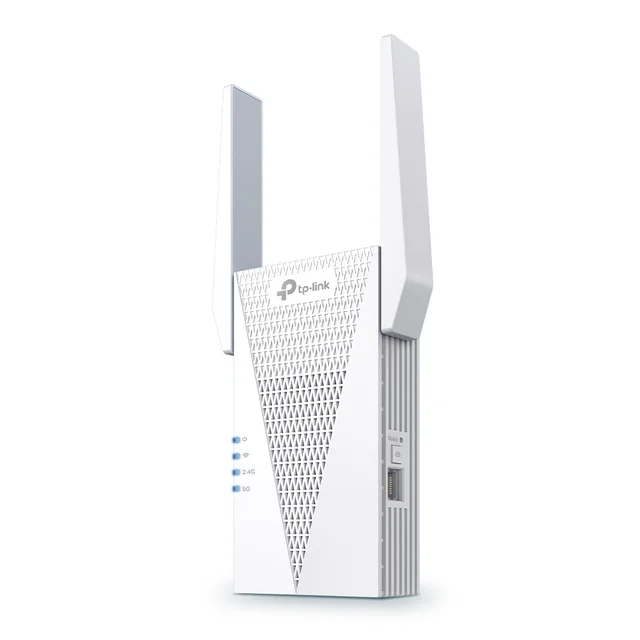
- TP-Link RE715X AX3000 WiFi 6 Range Extender - Buy. The best all-around extender: fast WiFi 6 speeds, EasyMesh support, and a gigabit port, without flagship pricing.
- ASUS RP-AX58 AX3000 Dual-Band WiFi 6 Range Extender - Buy. A sleek AX3000 extender that becomes a true mesh node if you own an ASUS router - the closest thing to a mesh upgrade in extender form.
- TP-Link RE815XE AXE5400 WiFi 6E Range Extender - It depends. The only tri-band extender here, with a 6 GHz band - but at premium money, a budget mesh kit is often the smarter buy.
- NETGEAR EAX15 AX1800 WiFi 6 Mesh Extender - Skip. Mid-range money for entry-level AX1800 hardware, a bulky chassis, and app upsells - rivals do more for the same or less.
The verdict in 30 seconds
What mattered most
- WiFi standard & class
- Bands
- Mesh integration
- Listed WiFi data rate
- Ethernet port / AP mode
- Design
A WiFi extender is the cheapest way to push a signal into one stubborn dead zone - but the category is full of overpriced plugs that barely outperform the router you already own. We synthesized independent testing and thousands of owner reports on four current, widely sold extenders. Two are genuinely worth buying, one only makes sense in a specific situation, and one you should skip in favor of better options - sometimes including a budget mesh kit.
The best all-around extender: fast WiFi 6 speeds, EasyMesh support, and a gigabit port, without flagship pricing.
Best for: Most people with one or two dead zones who want the strongest speed-per-dollar in a plug-in extender.
- AX3000 class with 574 Mbps on 2.4 GHz and 2402 Mbps on 5 GHz listed by TP-Link
- EasyMesh compatibility gives you a single network name and smooth roaming with an EasyMesh-compatible router
- Gigabit Ethernet port doubles as a wired access-point mode, and the Tether app makes setup genuinely easy
- External antennas make it bulkier than minimalist plug-in designs
- Mesh-style roaming needs an EasyMesh-compatible router; otherwise it behaves as a classic extender
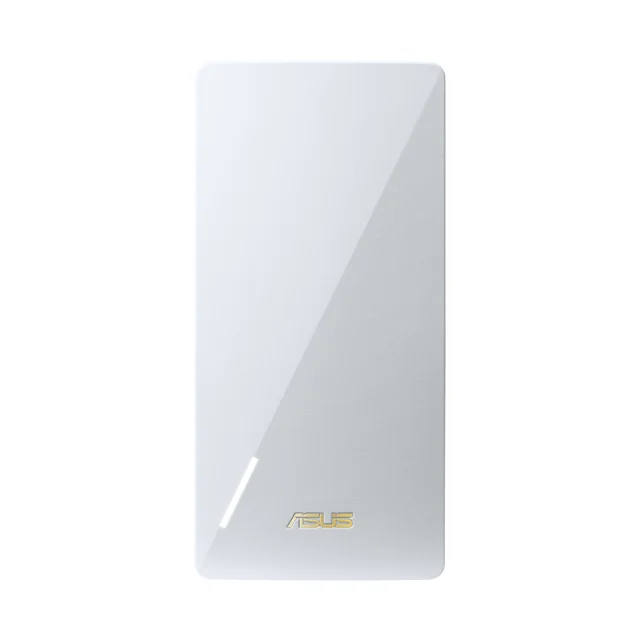
A sleek AX3000 extender that becomes a true mesh node if you own an ASUS router - the closest thing to a mesh upgrade in extender form.
Best for: ASUS router owners, who effectively get a mesh system for the price of an extender.
- Full AiMesh support turns it into a proper mesh node with seamless roaming on ASUS routers
- Clean, antenna-free design that doesn't dominate the wall outlet
- AX3000 class WiFi 6 with a gigabit port for wired devices or access-point duty
- You only get the headline mesh experience paired with an ASUS router; with other brands it's an ordinary repeater
- Setup and firmware options are more technical than TP-Link's app-first approach
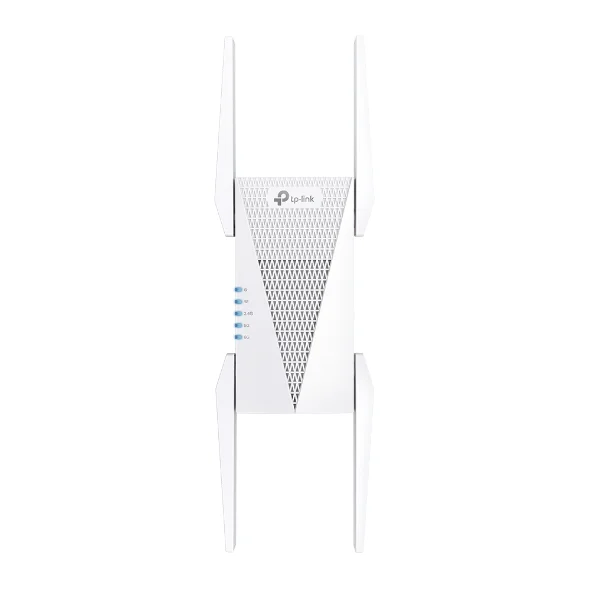
The only tri-band extender here, with a 6 GHz band - but at premium money, a budget mesh kit is often the smarter buy.
Best for: Buyers with 6E/WiFi 7 client devices who need maximum speed one room away - not whole-home coverage.
- Tri-band WiFi 6E with a 6 GHz band rated at 2402 Mbps by TP-Link
- The extra 6 GHz band gives it more airtime than the dual-band units here
- OneMesh/EasyMesh support plus a gigabit port and four antennas for wide coverage
- 6 GHz has short range through walls, so the headline speeds fade fast in exactly the far rooms you buy an extender for
- It can cost about what an entry-level mesh two-pack does, and a mesh kit covers a whole home better
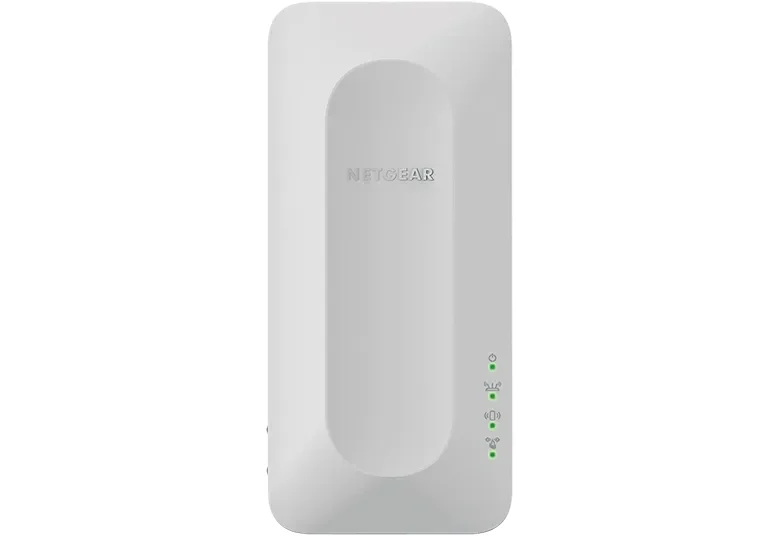
Mid-range money for entry-level AX1800 hardware, a bulky chassis, and app upsells - rivals do more for the same or less.
Best for: Hard to recommend - the RE715X is faster for similar money, and slightly more spent gets a budget mesh kit.
- Simple One WiFi Name feature keeps a single network name with any router
- WiFi 6 with a gigabit Ethernet port in a wall-plug format
- It is an AX1800 design, while the AX3000 rivals here list higher data rates
- Large housing crowds the second outlet, and owners report nagging subscription upsells in the Nighthawk app
- No EasyMesh listed on NETGEAR's product page, and some owner reports of drop-outs after firmware updates
| Criteria | TP-Link RE715X AX3000 WiFi 6 Range Extender Top pick | ASUS RP-AX58 AX3000 Dual-Band WiFi 6 Range Extender | TP-Link RE815XE AXE5400 WiFi 6E Range Extender | NETGEAR EAX15 AX1800 WiFi 6 Mesh Extender |
|---|---|---|---|---|
| Verdict | Buy it | Buy it | It depends | Skip it |
| Best for | Most people with one or two dead zones who want the strongest speed-per-dollar in a plug-in extender. | ASUS router owners, who effectively get a mesh system for the price of an extender. | Buyers with 6E/WiFi 7 client devices who need maximum speed one room away - not whole-home coverage. | Hard to recommend - the RE715X is faster for similar money, and slightly more spent gets a budget mesh kit. |
| Price tier | $$ · mid-range | $$ · mid-range | $$$ · premium | $$ · mid-range |
| WiFi standard & class | WiFi 6, AX3000 | WiFi 6, AX3000 | WiFi 6E, AXE5400 | WiFi 6, AX1800 |
| Bands | Dual-band (2.4 + 5 GHz) | Dual-band (2.4 + 5 GHz) | Tri-band (adds 6 GHz) | Dual-band (2.4 + 5 GHz) |
| Mesh integration | EasyMesh-compatible routers | AiMesh node (ASUS routers) | OneMesh/EasyMesh (TP-Link routers) | One WiFi Name; no EasyMesh listed |
| Listed WiFi data rate | AX3000, 2402 Mbps on 5 GHz | AX3000, 2402 Mbps on 5 GHz | AXE5400, 2402 Mbps on 5 and 6 GHz | AX1800 |
| Ethernet port / AP mode | 1x Gigabit, AP mode | 1x Gigabit, AP mode | 1x Gigabit, AP mode | 1x Gigabit, AP mode |
| Design | Wall plug, two external antennas | Compact wall plug, internal antennas | Large wall plug, four antennas | Bulky wall plug, internal antennas |
| Setup & app experience | Tether app or WPS, very easy | ASUS app/web UI, more technical | Tether app or WPS, very easy | Nighthawk app with subscription upsells |
| Price tier | $$ · mid-range | $$ · mid-range | $$$ · premium | $$ · mid-range |
Which one is right for you?
- Most people with one or two dead zones who want the strongest speed-per-dollar in a plug-in extender. Buy it TP-Link RE715X AX3000 WiFi 6 Range Extender
- ASUS router owners, who effectively get a mesh system for the price of an extender. Buy it ASUS RP-AX58 AX3000 Dual-Band WiFi 6 Range Extender
- Buyers with 6E/WiFi 7 client devices who need maximum speed one room away - not whole-home coverage. It depends TP-Link RE815XE AXE5400 WiFi 6E Range Extender
- Hard to recommend - the RE715X is faster for similar money, and slightly more spent gets a budget mesh kit. Skip it NETGEAR EAX15 AX1800 WiFi 6 Mesh Extender
How we judged the field
We don’t run our own lab. Instead, we compared maker specifications for current range extenders with owner reports - the long-tail complaints that only show up after months of daily use. Four criteria mattered most: real-world throughput at realistic distances (not close-range lab peaks), whether the extender can join your router’s network as one seamless name with working roaming, how painful setup and the companion app are, and honest value - because entry-level mesh kits have gotten cheap enough that an overpriced extender no longer makes sense. We kept this guide strictly to plug-in range extenders; mesh systems and routers get their own guides.
TP-Link RE715X AX3000 WiFi 6 Range Extender
Buy itThe RE715X is what most people should buy, and the reasoning is simple: it is an AX3000 design with a gigabit port at a mid-range price. The AX3000 spec means the 5 GHz band has genuine headroom to both talk to your router and serve your devices, so the old halve-your-speed extender penalty is much less noticeable. Setup through the Tether app is about as easy as this category gets, and the gigabit Ethernet port means it can feed a TV or desktop by wire, or flip into access-point mode if you ever run a cable.
The unlock is pairing it with an EasyMesh-compatible router: TP-Link lists EasyMesh compatibility, which merges it into a single network name with roaming, and that fixes the biggest everyday annoyance of extenders - phones stubbornly clinging to the far-away router. With a router that lacks EasyMesh it works as a traditional extender with a second network name. The external antennas make it a bit conspicuous on the wall, but owners generally report it does the one job an extender exists to do: make the dead room usable.
ASUS RP-AX58 AX3000 Dual-Band WiFi 6 Range Extender
Buy itThe RP-AX58 is the RE715X’s mirror image for the ASUS ecosystem. Same AX3000 class, the same 574 plus 2402 Mbps listed rates, gigabit port, access-point mode - but a cleaner, antenna-free design that doesn’t shout “networking gear” from your hallway outlet. The killer feature is AiMesh: pair it with an AiMesh-compatible ASUS router and it stops being an extender at all, joining the network as a true mesh node with unified naming and roaming handled by the router. For ASUS owners, that’s effectively a mesh upgrade at extender money, and it’s why we rate it a buy.
The honest caveat: with a non-ASUS router it’s just a competent universal repeater, and TP-Link’s app-first setup is friendlier for non-technical users. ASUS’s interface offers more control - separate SSIDs, roaming assist thresholds, detailed logs - which power users will appreciate and everyone else can ignore.
TP-Link RE815XE AXE5400 WiFi 6E Range Extender
It dependsOn paper the RE815XE is the best extender in this guide: tri-band WiFi 6E, four antennas, and a 6 GHz band that TP-Link rates at 2402 Mbps alongside 2402 Mbps on 5 GHz. That third band adds airtime beyond the two bands the other extenders here offer, which is the closest an extender here gets to mesh-style performance.
So why isn’t it a buy? Physics and price. The 6 GHz band that makes it special has short range and poor wall penetration - in the far bedroom you actually bought an extender for, it can fall back to 5 GHz performance similar to the RE715X. And at flagship-extender pricing, it can collide head-on with entry-level mesh two-packs, which cover an entire home rather than one zone. Buy it if you have 6E or WiFi 7 client devices and need maximum speed one room from the router - a garage office through one wall, a games room above the router. For everyone else, the RE715X or a cheap mesh kit is smarter money.
NETGEAR EAX15 AX1800 WiFi 6 Mesh Extender
Skip itThe EAX15 isn’t broken - it extends WiFi, has a gigabit port, and its One WiFi Name feature works with any router. The problem is what it asks versus what it delivers. It’s an entry-level AX1800 device sold at the same mid-range money that buys the AX3000 RE715X, and it is rated for lower speeds (AX1800) than the AX3000 rivals. The chassis is notably bulky and tends to crowd the neighboring outlet. Owner reports add two recurring gripes: the Nighthawk app pushes subscription upsells during and after setup, and a steady trickle of users describe drop-outs appearing after firmware updates.
NETGEAR also does not list EasyMesh on the product page, so unlike TP-Link’s extenders with TP-Link routers or the RP-AX58 with ASUS routers, there’s no path to genuine mesh integration with the router you own. When the same spend gets you a faster extender - and slightly more gets you a real mesh kit - the EAX15 is the one to leave on the shelf.
TP-Link RE715X vs ASUS RP-AX58: which should you buy?
This comes down to the router already in your home. Both are AX3000-class WiFi 6 extenders with gigabit ports, at similar mid-range prices. If you own an ASUS router, the RP-AX58 wins outright: AiMesh turns it into a true mesh node, with roaming and management handled centrally - a materially better experience than any extender mode. If you own a TP-Link router with OneMesh/EasyMesh support, the RE715X returns the favor with unified naming and roaming on its side of the fence. If your router is neither brand, the RE715X takes it on raw results: its Tether app is easier for first-time setup, and its two external antennas may help it hold links at longer range. Neither is a bad buy; the tie-breaker is ecosystem first, simplicity second.
What to look for
- Match your router’s generation. A WiFi 6 (AX-class) extender is the floor in 2026 - AC-class plugs bottleneck modern devices and halve throughput the old-fashioned way.
- AX3000 or better. Entry AX1800 units leave the backhaul link starved; the extra 5 GHz headroom of AX3000 models is where the real-world gains live.
- Mesh compatibility with YOUR router. EasyMesh/OneMesh (TP-Link) or AiMesh (ASUS) gets you one network name and working roaming - the single biggest quality-of-life difference in this category.
- A gigabit Ethernet port. It future-proofs the purchase: wired backhaul for a TV or console today, full access-point mode if you ever pull a cable.
- Placement beats specs. Halfway between router and dead zone, with a strong link back to the router. No extender fixes a bad location.
- Know when to stop. If you’re patching three rooms or shopping premium-priced extenders, an entry-level mesh kit is usually the better product - see our mesh WiFi guide.
Our final take
The extender market in 2026 splits cleanly. The TP-Link RE715X is the default answer - an AX3000 design, easy setup, and EasyMesh compatibility - with the ASUS RP-AX58 the automatic swap for ASUS router owners, where AiMesh makes it something better than an extender. The RE815XE is a specialist: the only tri-band model here, but only where 6 GHz reaches and only for buyers whose devices can use it, at a price that flirts with real mesh systems. The NETGEAR EAX15 shows why this category demands skepticism - familiar brand, fine spec sheet, but AX1800 speed for mid-range money, no EasyMesh listed, and owner-reported software annoyances. Buy an extender to fix a room; buy the RE715X or RP-AX58 to fix it well; and if the problem is bigger than a room, buy a mesh kit instead.
Questions, answered
Should I buy a WiFi extender or a mesh WiFi system?
An extender is the right call when your router covers most of the home and just one area struggles - it's cheaper and keeps your existing router. If multiple rooms or floors have weak signal, a budget mesh two-pack almost always delivers better, more consistent coverage than any single extender, and prices on entry-level mesh kits now overlap with premium extenders. We cover mesh systems and routers in separate guides.
Do WiFi extenders cut your speed in half?
Classic single-band repeaters did, because the same radio had to receive and retransmit every packet. Modern dual-band WiFi 6 extenders like the RE715X and RP-AX58 largely avoid this by using one band to talk to the router and the other to serve devices, and tri-band models like the RE815XE add a third band. You'll still get less speed than sitting next to the router, but results are generally better than older AC-class plugs.
Where should I place a WiFi extender?
Roughly halfway between your router and the dead zone, in a spot where the extender still receives a strong signal - not inside the dead zone itself. If the extender's signal indicator shows a weak link to the router, move it closer. Placing it in the dead zone just rebroadcasts an already-degraded connection.
Will an extender give me one network name, or a separate one?
It depends on pairing. TP-Link extenders joined to a compatible router via OneMesh/EasyMesh, and the ASUS RP-AX58 joined to an ASUS router via AiMesh, share one network name with proper roaming. With a mismatched router, most extenders broadcast a second network (often with an _EXT suffix), and your devices may cling to the weaker signal when you move around - the main everyday annoyance owners report.
Is a WiFi 6E extender worth the extra money?
Only in a narrow case: you own 6E or WiFi 7 laptops and phones, and the area you're covering is close enough that the short-range 6 GHz band still reaches it. Through several walls, 6 GHz fades quickly and a strong dual-band WiFi 6 extender performs similarly for less. If you're tempted by a flagship-priced extender, price out an entry-level mesh kit first.
Deciding between the top two? See our head-to-head: TP-Link RE715X AX3000 WiFi 6 Range Extender vs ASUS RP-AX58 AX3000 Dual-Band WiFi 6 Range Extender.
More Tech & Gadgets reviews
 The Best Wi-Fi Routers: 4 Compared (and One to Skip)
  The Best Qi2 and MagSafe Wireless Chargers for 2026
  The Best Wireless Keyboards for Work: 4 Compared (and One to Skip)
  Best Wireless Mice for Office Work in 2026
  The Best OLED Gaming Monitors: 4 Compared (and One to Skip)
  The Best OLED TVs: 4 Compared (and One to Skip)