

Tech & Gadgets
Best Wireless Mice for Office Work in 2026
We compared four 2026 wireless mice for office work on comfort, scrolling, click noise and cross-device use to find the productivity pick worth buying.
The short version
For a full desk setup, the Logitech MX Master 4 is the pick: sculpted comfort for larger hands, an electromagnetic scroll wheel that switches between precise and free-spinning, near-silent clicks and easy multi-device use. Working from a bag, the MX Anywhere 3S gives most of that in a compact shell. Sore wrists and smaller hands should try the vertical Lift. Skip the Apple Magic Mouse for real productivity: its underside charging port and flat shape undercut long-day comfort.
Our picks at a glance
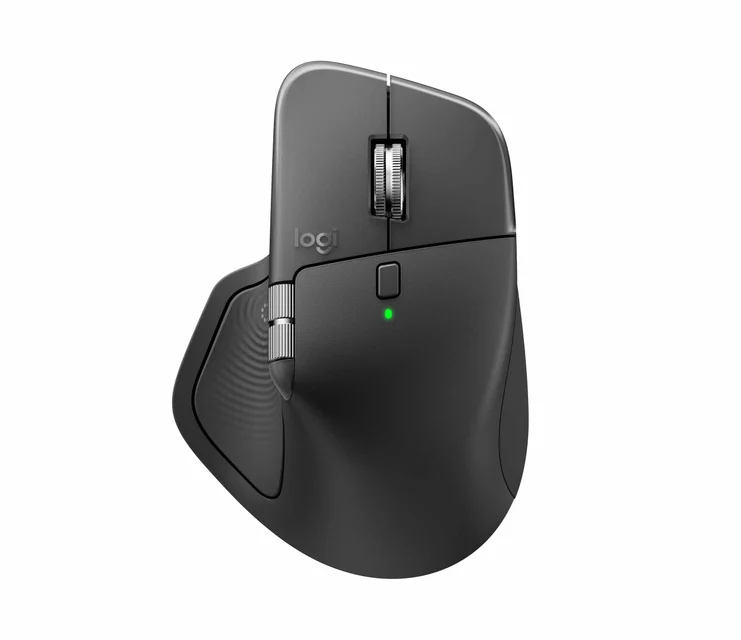
- Logitech MX Master 4 - Buy. The default full-size productivity mouse: sculpted comfort, an electromagnetic scroll wheel and quiet clicks.
- Logitech MX Anywhere 3S - Buy. A compact version of the Master formula for people who work from a bag as much as a desk.
- Logitech Lift Vertical Ergonomic Mouse - It depends. A vertical mouse that puts the wrist in a handshake posture, sized for smaller hands.
- Apple Magic Mouse (USB-C) - Skip. A tidy touch-surface mouse held back by a flat shape and a charging port on its underside.
The verdict in 30 seconds
What mattered most
- Shape and comfort
- Scrolling
- Click noise
- Multi-device and OS
- Battery
- Sensor and surface
A productivity mouse earns its keep over an eight-hour day, not in a benchmark. We weighed independent expert testing against long-term owner reports, focusing on comfort, scrolling, click noise, cross-device use and battery hassle. Below are three current models worth buying for different hands and desks, plus one popular mouse most office buyers should skip.
The default full-size productivity mouse: sculpted comfort, an electromagnetic scroll wheel and quiet clicks.
Best for: Desk-bound workers with medium-to-large hands who scroll long documents and spreadsheets all day.
- MagSpeed electromagnetic wheel toggles between ratcheted precision and free-spin coasting, with a separate thumb wheel for horizontal scroll
- Near-silent main clicks and a Darkfield sensor that tracks on glass; pairs to three devices with cursor hand-off across Windows and macOS
- Heavy at roughly 150 grams, which some owners notice during long lift-and-reposition sessions
- New Actions Ring and haptics depend on the companion software and are strongest on recent Windows
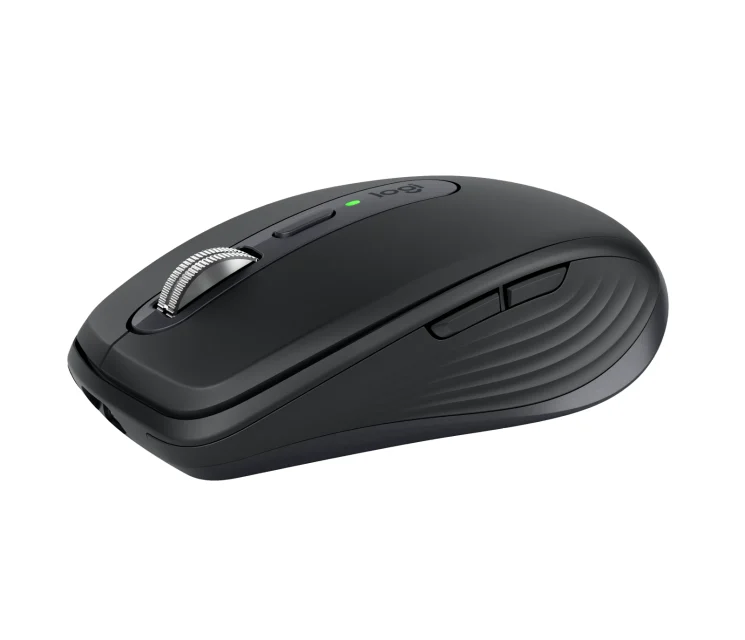
A compact version of the Master formula for people who work from a bag as much as a desk.
Best for: Laptop and hybrid workers who want premium scrolling in something pocketable.
- Carries the same MagSpeed electromagnetic wheel, quiet clicks and glass-capable Darkfield sensor in a travel-size shell
- Connects to three devices over Bluetooth or the Bolt receiver and holds a charge for weeks
- Low, flat body suits small and medium hands; large hands cramp on long stretches
- No dedicated thumb wheel, so horizontal scroll leans on button shortcuts
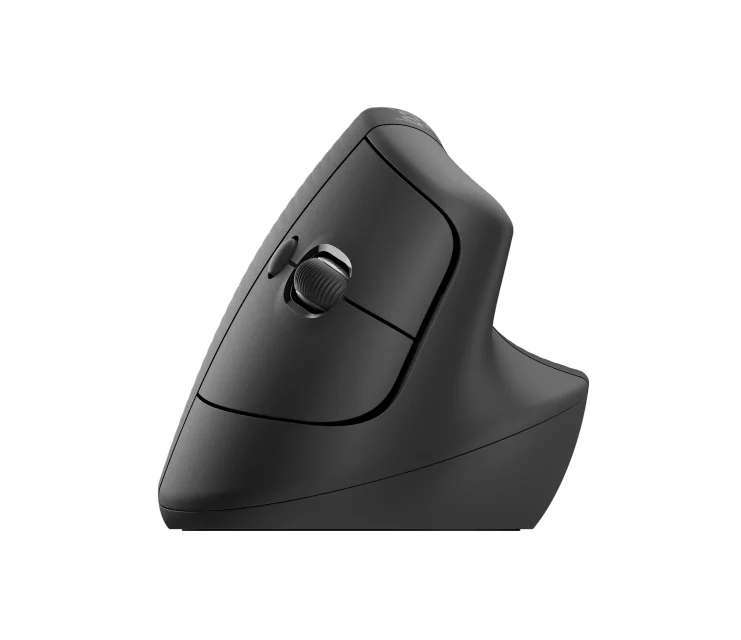
A vertical mouse that puts the wrist in a handshake posture, sized for smaller hands.
Best for: Anyone with wrist or forearm discomfort and smaller hands who wants relief without a big adjustment.
- Vertical orientation keeps the forearm in a more neutral position, which owners with wrist strain report helps
- Quiet main clicks, a left-handed version, and a single AA that runs for around two years
- Built for small-to-medium hands; larger hands hang off the top and lose the ergonomic benefit
- Non-rechargeable AA battery and side buttons that are noticeably louder than the main clicks
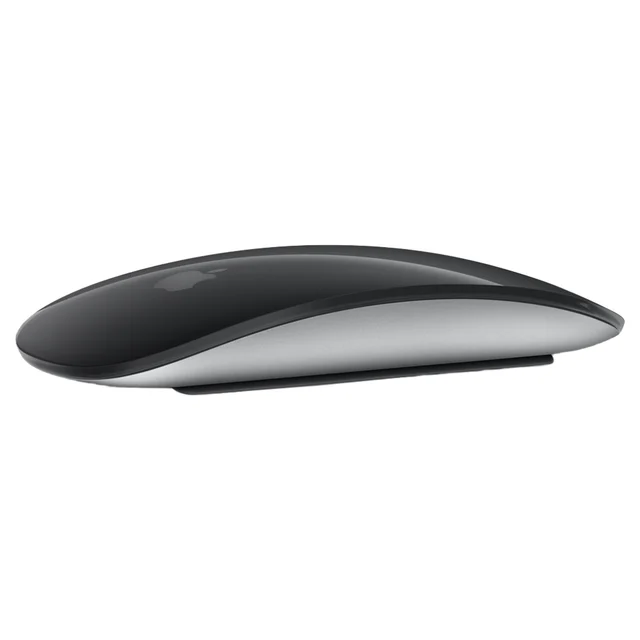
A tidy touch-surface mouse held back by a flat shape and a charging port on its underside.
Best for: Committed Apple-desk users who mostly gesture-scroll and value looks over hand support.
- Full touch surface handles swipe scrolling and gesture navigation without a physical wheel
- Clean design and a charge that lasts about a month between top-ups
- Charges from a port on the bottom, so it lies on its back and cannot be used while charging
- Low, flat body forces a fingertip grip and gives the palm little support over long sessions
| Criteria | Logitech MX Master 4 Top pick | Logitech MX Anywhere 3S | Logitech Lift Vertical Ergonomic Mouse | Apple Magic Mouse (USB-C) |
|---|---|---|---|---|
| Verdict | Buy it | Buy it | It depends | Skip it |
| Best for | Desk-bound workers with medium-to-large hands who scroll long documents and spreadsheets all day. | Laptop and hybrid workers who want premium scrolling in something pocketable. | Anyone with wrist or forearm discomfort and smaller hands who wants relief without a big adjustment. | Committed Apple-desk users who mostly gesture-scroll and value looks over hand support. |
| Price tier | $$$ · premium | $$$ · premium | $$ · mid-range | $$ · mid-range |
| Shape and comfort | Sculpted full-palm, large hands | Compact, small/medium hands | Vertical handshake, small/medium hands | Flat low-profile, fingertip grip |
| Scrolling | MagSpeed wheel plus thumb wheel | MagSpeed electromagnetic wheel | Notched wheel only | Touch-surface swipe |
| Click noise | Near-silent | Near-silent | Quiet main, louder sides | Moderate |
| Multi-device and OS | 3 devices, hand-off, Win/Mac | 3 devices, hand-off, Win/Mac | 3 devices, Win/Mac | One device, Apple only |
| Battery | ~70 days, USB-C rechargeable | ~70 days, USB-C rechargeable | ~2 years, AA | ~1 month, charges from underside |
| Sensor and surface | Darkfield, works on glass | Darkfield, works on glass | Standard optical | Laser, needs a surface |
Which one is right for you?
- Desk-bound workers with medium-to-large hands who scroll long documents and spreadsheets all day. Buy it Logitech MX Master 4
- Laptop and hybrid workers who want premium scrolling in something pocketable. Buy it Logitech MX Anywhere 3S
- Anyone with wrist or forearm discomfort and smaller hands who wants relief without a big adjustment. It depends Logitech Lift Vertical Ergonomic Mouse
- Committed Apple-desk users who mostly gesture-scroll and value looks over hand support. Skip it Apple Magic Mouse (USB-C)
How we judged the field
We do not run our own lab. Instead we synthesize independent expert testing and long-term owner reports, then weigh them against what actually matters for office work. For a productivity mouse that means comfort across a full working day, scroll behavior for long documents and wide spreadsheets, click noise in shared rooms and on calls, how cleanly the mouse moves between machines and operating systems, and how much battery upkeep it demands. We set aside gaming-grade polling rates and lighting, which do nothing for spreadsheet work. We looked only at models still in production in 2026, and we deliberately included one popular mouse we think most office buyers should walk past.
Three of our four picks come from one maker, and that reflects the category rather than a preference: the strongest office options right now differ mainly by size and posture. We have flagged where each one fits so you are choosing by hand and desk, not by brand.
Logitech MX Master 4
Buy itThe Master 4 is the mouse most desk workers should default to. Its sculpted body fills a medium-to-large hand and supports the palm, and that support is the thing reviewers and owners repeatedly tie to less fatigue late in the day. The MagSpeed electromagnetic wheel switches between a ratcheted, notched feel and a free-spinning glide, either at the press of a button or automatically when you flick it, so you can nudge through a spreadsheet row by row and then coast down a long document. A separate thumb wheel covers horizontal scroll. The main clicks are near-silent, the Darkfield sensor tracks on glass and gloss, and the mouse pairs to three devices with cursor hand-off across Windows and macOS.
The 2026 additions, an on-screen ring of shortcuts and light haptic pulses, are useful once configured, though they lean on the companion software and feel most complete on recent Windows. What we liked more: the scroll wheel and the all-day comfort genuinely change how quickly you move through work. What we liked less: at roughly 150 grams it is heavy, and it sits at the top of the price ladder.
Logitech MX Anywhere 3S
Buy itThe Anywhere 3S is the Master formula shrunk for people who work from a bag as much as a desk. It carries the same MagSpeed electromagnetic wheel, the same near-silent clicks and the same glass-capable Darkfield sensor, in a shell small enough to disappear into a laptop sleeve. It connects to three devices over Bluetooth or the bundled receiver and holds a charge for weeks, so travel does not mean carrying a cable.
The trade-offs are physical. The low, flat body suits small and medium hands and starts to cramp larger ones over long stretches, and there is no dedicated thumb wheel, so horizontal scroll relies on button shortcuts you set up yourself. What we liked more: it delivers premium scrolling and quiet operation in something genuinely portable. What we liked less: it is a reach-and-pinch mouse rather than a palm-rest mouse, which shows on marathon days.
Logitech Lift Vertical Ergonomic Mouse
It dependsThe Lift is the pick when comfort is a health question rather than a preference. Its vertical orientation puts the hand in a handshake posture that reduces forearm rotation, and owners dealing with wrist strain often report real relief after a short adjustment. It keeps the main clicks quiet, comes in a left-handed version, and runs for around two years on a single AA, which removes charging from the equation entirely.
It is not for everyone. The Lift is built for small-to-medium hands, and larger hands hang off the top and lose the ergonomic benefit, in which case a bigger vertical model is the better fit. The side buttons are noticeably louder than the main clicks, and the non-rechargeable battery feels dated next to the rechargeable Master and Anywhere. What we liked more: the posture change is easy to adopt and easy on the wrist. What we liked less: the size ceiling and the throwaway battery.
Apple Magic Mouse (USB-C)
Skip itThis is our dis-buy for productivity, and the reasons are the same ones owners have raised for years. The touch surface handles swipe scrolling and gestures cleanly, the design is tidy, and a charge lasts about a month. But the charging port sits on the underside, so to top it up you flip the mouse onto its back and cannot use it while the cable is in. The body is also low and flat, which forces a fingertip grip and gives the palm almost nothing to rest on across a long day.
Switching the port to USB-C did not fix the charging posture, and the shallow shape still limits how the hand sits. What we liked more: the gesture surface is smooth and the mouse looks the part on an Apple desk. What we liked less: the underside port and the flat ergonomics make it a poor fit for the eight-hour use this guide is about.
Logitech MX Master 4 vs Logitech MX Anywhere 3S: which should you buy?
These two share a scroll wheel, a sensor, quiet clicks and multi-device hand-off, so the decision is almost entirely about size and where you work. The Master 4 is the full-desk choice: a bigger body that supports the whole hand, a second thumb wheel for horizontal movement, and enough heft to feel planted during precise work. If your mouse mostly lives on one desk and you value comfort over portability, it is the stronger pick.
The Anywhere 3S is the travel choice. It gives up the palm support and the thumb wheel to fit in a bag, and it is the one to buy if you move between a laptop, a docking setup and the occasional coffee-shop table. Choose the Master 4 for a fixed workstation and larger hands; choose the Anywhere 3S if portability and smaller hands drive the decision.
What to look for
Start with hand size and posture. Larger hands and a permanent desk point to the Master 4; smaller hands or frequent travel point to the Anywhere 3S; existing wrist strain points to the Lift, provided your hand fits its smaller frame. Next, think about your rooms: if you share space or spend the day on calls, the near-silent clicks on the two MX models are worth prioritizing. Then weigh scrolling, since anyone living in long documents or wide spreadsheets benefits most from the electromagnetic wheel that the Lift and the Magic Mouse do not offer. Finally, consider upkeep: rechargeable models mean an occasional cable, while the Lift trades that for a battery you replace every couple of years. Match those four factors to your day and the shortlist narrows quickly.
Our final take
For most office desks, the Logitech MX Master 4 is the one to buy, thanks to palm-filling comfort, a scroll wheel that adapts to the task and clicks quiet enough for any meeting room. The MX Anywhere 3S carries the same strengths for people who work on the move, and the vertical Lift is the honest choice for smaller hands fighting wrist strain. The Apple Magic Mouse looks the part but asks too many comfort compromises for daily productivity, so we would spend the money on one of the Logitech options instead.
Questions, answered
Is a heavier mouse like the MX Master 4 a problem for office work?
Not for most desk use. At around 150 grams it feels planted and glides steadily, which suits precise cursor work. The weight only becomes noticeable if you frequently lift and reposition the mouse on a small desk or a lap surface.
Do quiet or silent clicks actually matter?
In shared offices, open-plan rooms and video calls, yes. Near-silent switches on the Master 4 and Anywhere 3S remove the constant clatter without changing how the click feels under your finger. The Lift is quiet on its main buttons but louder on the side buttons.
Are vertical mice worth it for wrist strain?
They can help. Tilting the hand into a handshake posture reduces forearm rotation, which many owners with discomfort find eases strain. Expect a short adjustment period, and check hand size first: the Lift fits small-to-medium hands and feels cramped for larger ones.
Why not just buy the Apple Magic Mouse for a Mac?
It pairs cleanly and looks tidy, but the charging port sits on the underside, so it cannot be used while charging, and the flat body forces a fingertip grip with little palm support. For all-day Mac work, the Logitech options are more comfortable.
Deciding between the top two? See our head-to-head: Logitech MX Master 4 vs Logitech MX Anywhere 3S.
More Tech & Gadgets reviews
 The Best OLED Gaming Monitors: 4 Compared (and One to Skip)
  The Best OLED TVs: 4 Compared (and One to Skip)
  The Best Powerline Adapters: 4 Compared (and One to Skip)
  The Best Projector Screens: 4 Compared (and One to Skip)
  The Best 2-in-1 Convertible Laptops: 4 Compared (and One to Skip)
  The Best 3D Printers: 4 Compared (and One to Skip)