

Tech & Gadgets
The Best 4K Streaming Devices in 2026 (and the One to Skip)
We compared today's top 4K streaming devices on speed, ads, privacy, and value. Apple TV 4K wins for smoothness, a cheap Roku covers most people, one to skip.
The short version
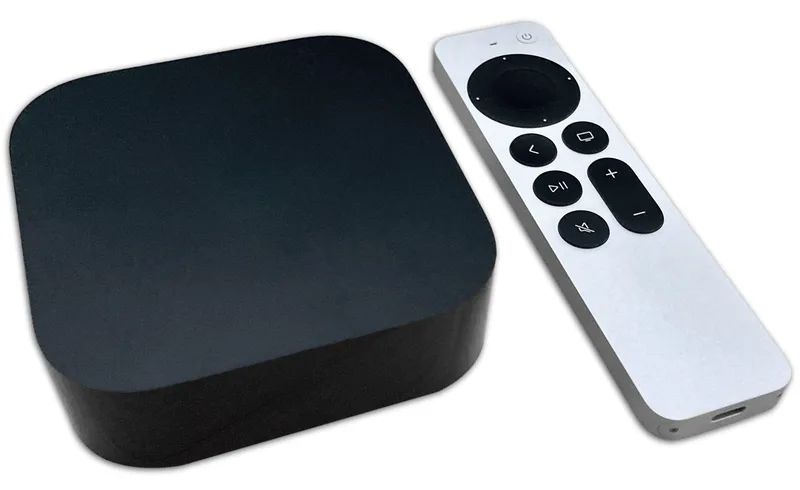
The Apple TV 4K (3rd Gen) is the pick because its A15 chip keeps the interface fast and ad-free years after cheaper boxes start to stutter. The Roku Streaming Stick 4K is the runner-up: get it if you want a neutral, platform-agnostic app grid and a cheaper stick that hides behind the TV. Skip the Google TV Streamer, a capable smart-home hub whose ad-heavy home screen and occasional frame-rate stutter undercut daily use. Best for anyone who wants a streaming box they can ignore for five years.
Our picks at a glance
- Apple TV 4K (3rd Gen) - Buy. The fastest, cleanest, most private streamer, if you'll pay a premium for it.
- Roku Streaming Stick 4K - Buy. The easy, cheap pick that doesn't care which phone or services you own.
- Google TV Streamer - Skip. Capable, but overpriced; cheaper players do the same job for most people.
The verdict in 30 seconds
What mattered most
- Price tier
- Speed & responsiveness
- Ads & clutter
- Best ecosystem fit
- Smart-home hub
- Form factor
A 4K streaming box or stick is the cheapest way to make any TV faster, cleaner, and less annoying than the software baked into most sets. But the experience swings wildly on price, how many ads you're shown, and how nosy the platform is about what you watch. We leaned on independent testing and long-term reviews to separate the truly great from the merely fine, and flagged one popular device that asks too much for what you actually get.
The fastest, cleanest, most private streamer, if you'll pay a premium for it.
Best for: Apple households and anyone who wants the smoothest, ad-free experience and will pay for it.
- Fastest, most responsive interface of any streamer, with no ads on the home screen
- The most private option, plus excellent Dolby Vision/Atmos and doubles as a HomeKit hub
- Costs two to three times what the alternatives do
- Leans hard into Apple's world, so it's most rewarding for iPhone/HomeKit owners
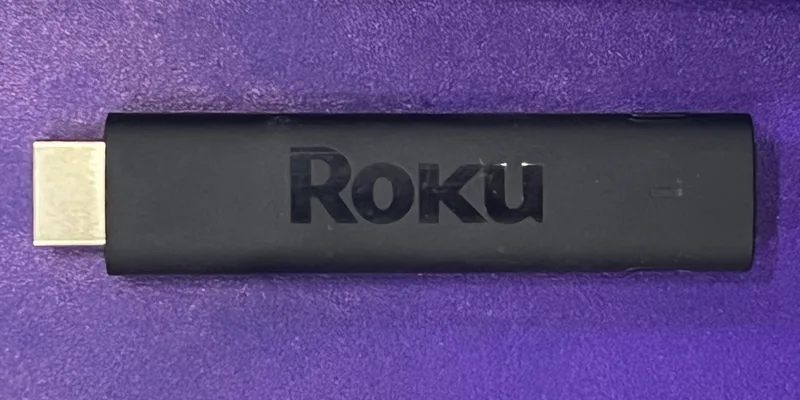
The easy, cheap pick that doesn't care which phone or services you own.
Best for: Most people, anyone who just wants reliable 4K HDR without committing to an ecosystem.
- Cheap, platform-agnostic, and the simplest menu for just finding something to watch
- Supports Dolby Vision and HDR10+, and works with AirPlay, HomeKit, Google Home and Alexa
- Home screen still shows sponsored tiles
- Hardware is quick enough rather than the snappiest
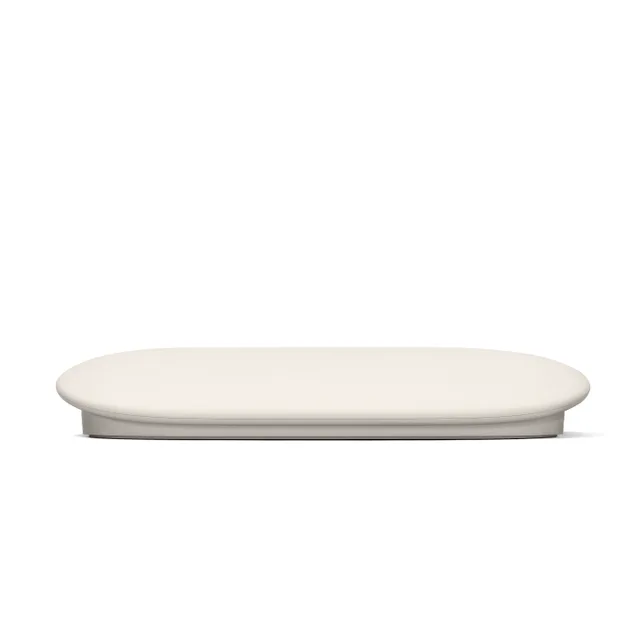
Capable, but overpriced; cheaper players do the same job for most people.
Best for: Deep Google Home users who will actually lean on the smart-home hub; most others can spend less.
- Strong cross-service content recommendations and a truly useful Watchlist
- Built-in Thread/Matter smart-home hub, Ethernet port, and 32GB of storage
- Pricey for what it does; independent testing found budget-tier players match or beat it
- Interface leans on AI-generated rows and ad-style suggestions, and its radio is Wi-Fi 5 (802.11ac), not Wi-Fi 6, though a gigabit Ethernet port is built in
| Criteria | Apple TV 4K (3rd Gen) Top pick | Roku Streaming Stick 4K | Google TV Streamer |
|---|---|---|---|
| Verdict | Buy it | Buy it | Skip it |
| Best for | Apple households and anyone who wants the smoothest, ad-free experience and will pay for it. | Most people, anyone who just wants reliable 4K HDR without committing to an ecosystem. | Deep Google Home users who will actually lean on the smart-home hub; most others can spend less. |
| Price tier | $$$ · premium | $ · budget | $$ · mid-range |
| Price tier | $$$ · premium | $ · budget | $$ · mid-range |
| Speed & responsiveness | Fastest, zero lag | Quick enough | Fast, but not Apple-fast |
| Ads & clutter | None on home screen | Light sponsored tiles | Busy, AI-padded rows |
| Best ecosystem fit | Apple / HomeKit | Platform-agnostic | Google Home / Matter |
| Smart-home hub | HomeKit/Matter hub (Thread on the Wi-Fi + Ethernet model) | None | Built-in Thread/Matter hub |
| Form factor | Set-top box | Plug-in stick | Tabletop wedge |
Which one is right for you?
- Apple households and anyone who wants the smoothest, ad-free experience and will pay for it. Buy it Apple TV 4K (3rd Gen)
- Most people, anyone who just wants reliable 4K HDR without committing to an ecosystem. Buy it Roku Streaming Stick 4K
- Deep Google Home users who will actually lean on the smart-home hub; most others can spend less. Skip it Google TV Streamer
How we judged the field
Four things separate a streaming device you keep from one you replace: processor headroom that resists slowdown, an interface that stays out of your way, reliable app support, and a remote you don’t lose or hate. Most spec-sheet bragging, storage capacity, marketing names for chips and airflow, even 4K itself, which every modern device handles, tells you little about daily use. We don’t lab-test hardware ourselves; we synthesize independent testing with long-term owner reports to see how each device ages, not just how it benchmarks on day one. The pattern is clear: chips age faster than screens, and ad-cluttered home screens wear thin. Our pick is the Apple TV 4K (3rd Gen), with the Roku Streaming Stick 4K close behind.
Apple TV 4K (3rd Gen)
Buy itApple’s flagship streamer is built around the A15 Bionic chip, the same class of processor found in recent iPhones, and it shows in how the interface refuses to stutter. Apple still lists this 3rd generation as current, in 64GB Wi-Fi and 128GB Wi-Fi + Ethernet versions, both with Wi-Fi 6. Concrete strengths: the Siri Remote’s rechargeable design and clickpad, tvOS’s near-total absence of home-screen advertising, and color-balance calibration that uses an iPhone’s sensor to tune your TV’s picture. What we liked more than rivals is the aging curve, since owners routinely report the box feeling as fast in year five as day one, something no budget stick matches. What we liked less: it is the priciest option by a wide margin, and its ecosystem leans toward Apple users, with AirPlay and Fitness+ integration wasted if you’re all-Android. It also lacks a headphone jack on the remote. This is the right pick for anyone who wants a set-and-forget device, values a clean ad-free interface, or already lives in Apple’s ecosystem. If you resent paying premium for a streamer, look below.
Roku Streaming Stick 4K
Buy itRoku’s stick is the neutral, platform-agnostic choice: a simple grid of app tiles with no allegiance to Apple, Google, or Amazon. Named strengths include the compact stick form factor that hides behind the TV, Roku’s comprehensive channel catalog including free ad-supported Roku Channel content, and a remote with dedicated shortcut buttons. What we liked more is search that spans services and surfaces where a title is cheapest to watch, rather than steering you to one store. What we liked less: the home screen carries a large sponsored ad tile, the remote lacks a rechargeable battery and a lost-remote finder unless you step up a tier, and the processor, while fine today, sits closer to the budget end and may feel slower sooner than the Apple box. It is right for cord-cutters who want the widest app support and a stick they can move between TVs, and wrong for anyone chasing the snappiest long-term performance or a fully ad-free start screen.
Google TV Streamer
Skip itThe Google TV Streamer is tempting on paper: it replaced the Chromecast with a set-top shape, added an Ethernet port, and doubles as a Matter and Thread smart-home hub, so it can control lights and locks alongside streaming. Its content recommendations pull from across services into one row, which some owners find useful. So why skip it? Two concrete problems surface in long-term use. First, the home screen leads with a large advertising banner you cannot remove, which grates on a device you look at daily. Second, reviewers and owners repeatedly flag frame-rate matching issues and occasional stutter that the faster Apple chip avoids. Google does not publish the processor, and the Wi-Fi 5 (802.11ac) radio feels behind for a device meant to anchor your living room for years, even with 4GB of memory and 32GB of storage on board. It still suits one buyer: a committed Google Home household that wants a Thread border router and streaming in a single box and doesn’t mind the ads. Everyone else gets a cleaner, longer-lasting experience from our two picks.
Sources
Specs in this review come from these pages.
Apple TV 4K (3rd Gen) vs Roku Streaming Stick 4K: which should you buy?
This comes down to money versus longevity and polish. The Roku Streaming Stick 4K costs a fraction of the Apple box and does the core job, fast and wide app support with cross-service search, well enough that most people would be content. Where the Apple TV 4K (3rd Gen) pulls ahead is everything around the edges: a markedly faster chip that resists slowdown, no sponsored tile dominating the home screen, a rechargeable remote, and ecosystem extras like AirPlay and TV calibration. The trade-off is real. If you replace devices every couple of years anyway, or move a streamer between rooms, the Roku’s stick form and low price make more sense. If you want to buy once and forget it for five years on a main living-room TV, the Apple box’s processor headroom and ad-free interface justify the premium. Neither is a wrong choice; they optimize for different priorities.
What to look for
Get the Apple TV 4K (3rd Gen) if it will anchor your main TV and you want a device you can ignore for years; its chip and ad-free interface are the reason it stays pleasant long after cheaper boxes stutter. It’s the natural pick if you already own an iPhone, iPad, or HomePods, since AirPlay, Fitness+, and camera-based calibration then come free.
Get the Roku Streaming Stick 4K instead if you want the widest, most neutral app support at a low price, or if you need a compact stick to move between TVs or take traveling. Its cross-service search is a real help for finding the cheapest way to watch a title.
Consider the Google TV Streamer only if you are building a Google Home smart-home setup and want a Matter and Thread hub combined with streaming in one box, and you can tolerate a permanent ad banner and occasional stutter. For pure streaming, our two picks age better and stay quieter on the home screen.
Our final take
Streaming hardware lives or dies on how well it ages, and that is decided by the processor and the interface, not the resolution on the box. The Apple TV 4K (3rd Gen) wins because its A15 chip and clean, ad-free tvOS still feel fast years in; buy it for a main TV you want to forget about. The Roku Streaming Stick 4K is the smart-value runner-up for neutral app support in a portable stick. Skip the Google TV Streamer unless its smart-home hub is the actual draw.
Questions, answered
Do I need a 4K streaming device if my TV already has smart features built in?
Often yes. Built-in smart platforms slow down and lose app support within a few years, while a dedicated box stays faster and updated longer. If your TV's interface already lags or drops apps, an external streamer is the cheapest meaningful upgrade you can make.
How long will a streaming device last before it feels slow?
Budget sticks typically feel sluggish within two to three years as apps grow heavier. The Apple TV 4K's A15 chip gives it the longest runway, with owners reporting smooth use five-plus years on. Processor headroom, not resolution support, decides real longevity here.
Does the extra storage or Ethernet on some models actually matter?
For most people, no. Ethernet only helps if your Wi-Fi is unreliable, and large storage matters mainly if you sideload many apps or games. Streaming itself needs little local storage. Buy these features only if you already know you have a specific need.
Is Dolby Vision and Atmos support worth prioritizing?
Only if your TV and speakers support them. All three devices handle Dolby Vision and Atmos, so it is not a differentiator here. Prioritize interface speed and app stability instead, since those affect daily use far more than a format your setup may not even pass through.
Deciding between the top two? See our head-to-head: Apple TV 4K (3rd Gen) vs Roku Streaming Stick 4K.
More Tech & Gadgets reviews
 The Best 4K TVs: 4 Compared (and One to Skip)
  The Best Action Cameras: 4 Compared (and One to Skip)
  The Best All-in-One Computers: 4 Compared (and One to Skip)
  The Best Anemometers: 4 Compared (and One to Skip)
  The Best USB Bluetooth Adapters: 4 Compared (and One to Skip)
  The Best Bluetooth Item Trackers (2026): AirTag-Style Finders, Honestly Compared