

Tech & Gadgets
Best Budget 1440p Gaming Monitors (27"): What's Actually Worth It
We compared four budget 27-inch 1440p gaming monitors on motion, HDR and color to find genuine value - and flag the one popular pick we'd skip.
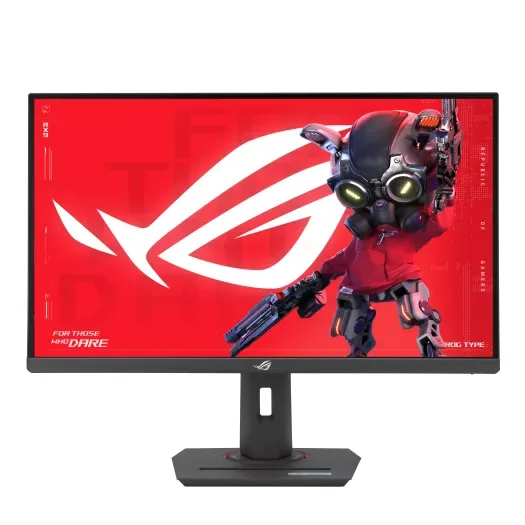
The short version
The ASUS ROG Strix XG27ACS is the pick for most 1440p gamers on a budget: a Fast IPS panel at 180Hz with sharp motion, accurate color, and wide viewing angles, at a lower tier than its rivals. Choose the AOC Q27G3XMN if you want real HDR, since its 336-zone mini-LED backlight delivers highlights the ASUS cannot. Skip the Samsung Odyssey G5 (G55C), which has no local dimming, VA smearing, and a tilt-only stand. Best for players who value fast, clean motion and color over HDR punch.
Our picks at a glance
- ASUS ROG Strix XG27ACS - Buy. The best all-rounder here: fast IPS, accurate color out of the box, and a proper adjustable stand.
- AOC Q27G3XMN - Buy. The cheapest way to get HDR that actually does something, thanks to a 336-zone mini-LED backlight.
- LG UltraGear 27GP850-B - It depends. A color-accurate Nano IPS classic that's still excellent - if you can still find one, since LG has discontinued it.
- Samsung Odyssey G5 (G55C) - Skip. A familiar name that asks flagship-budget money for a basic curved VA panel the rivals beat on every front.
The verdict in 30 seconds
What mattered most
- Panel & refresh
- Motion clarity
- HDR
- Color
- Stand & ergonomics
- Value
A 27-inch 1440p 165Hz+ panel is the sweet spot for most gamers right now, and you no longer need to spend big to get one that's really good. We dug through independent testing and manufacturer specs to separate the real value from the marketing. Three of these four are easy recommendations; the fourth is a well-known name we think you should walk past.
The best all-rounder here: fast IPS, accurate color out of the box, and a proper adjustable stand.
Best for: Most people who want one monitor that does gaming, work and everything in between without fuss.
- Fast IPS with 180Hz and near-instant response - clean, tear-free motion
- Reviewers found it accurate out of the box, with 97% DCI-P3 coverage on ASUS's spec sheet
- Full ergonomic stand plus USB-C video input
- HDR is entry-level (400 nits, no local dimming) - fine, not exciting
- 1000:1 contrast means blacks look grey in a dark room
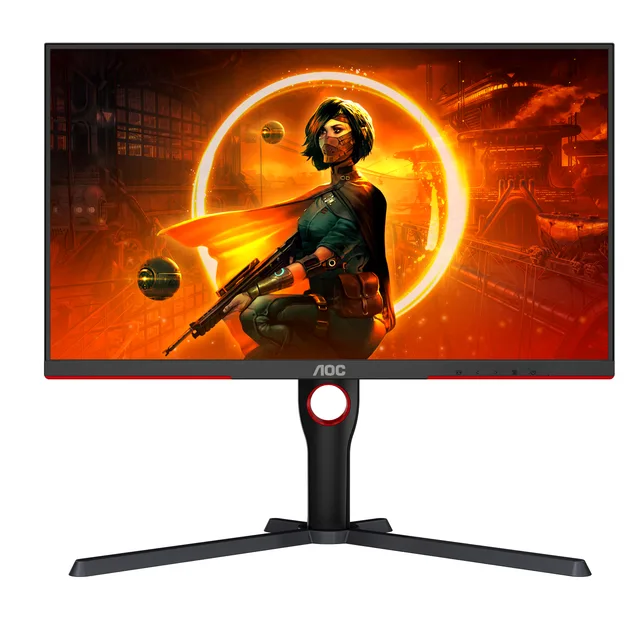
The cheapest way to get HDR that actually does something, thanks to a 336-zone mini-LED backlight.
Best for: Players who mostly game single-player and want HDR highlights that really pop.
- Real HDR: 336-zone mini-LED local dimming with VESA DisplayHDR 1000 certification
- High-contrast VA panel (4000:1 static) with wide color coverage (101% DCI-P3 on AOC's sheet)
- 180Hz and real HDR at a price others can't match
- VA panel shows mild dark smearing in fast, shadowy scenes
- Visible blooming around bright objects on dark backgrounds
- Local dimming can be fiddly outside of HDR content
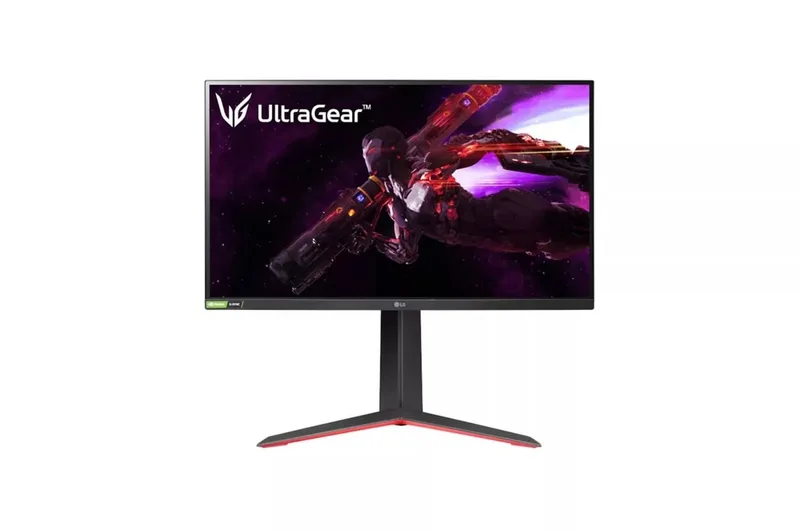
A color-accurate Nano IPS classic that's still excellent - if you can still find one, since LG has discontinued it.
Best for: Buyers who value color accuracy and pixel response over HDR - best bought on sale.
- Nano IPS with ~98% DCI-P3 - superb color for creative work too
- Class-leading response times; 165Hz native, 180Hz overclocked
- Tilt/height/pivot stand
- LG lists the 27GP850-B as discontinued, so you are shopping remaining stock or used units
- Usually the priciest option here, pushing the top of the budget
- Low IPS contrast and only basic HDR400
- Stand adjusts up/down and pivots but doesn't swivel
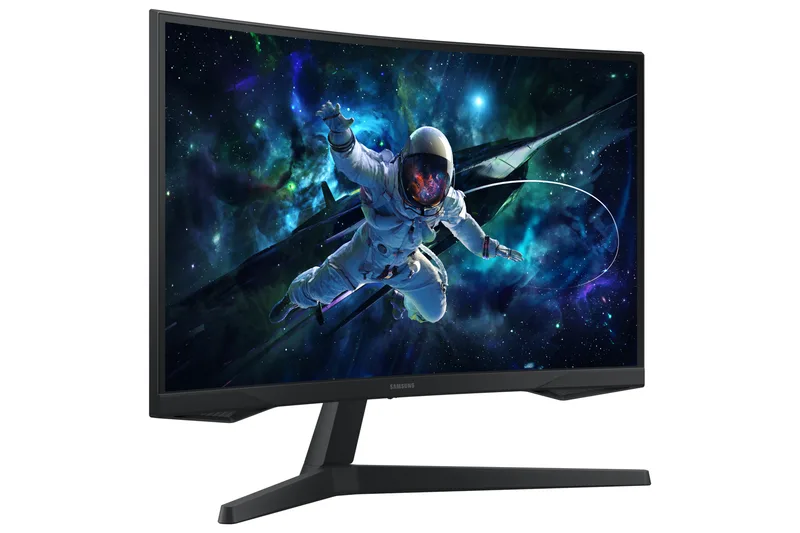
A familiar name that asks flagship-budget money for a basic curved VA panel the rivals beat on every front.
Best for: No one here - the AOC and ASUS beat it for similar money.
- High-contrast curved VA looks punchy in bright rooms
- 1000R curve is immersive for single-monitor setups
- Independent testing flags noticeable black smearing in dark, fast scenes
- Only a tilt-adjustable stand - no height or pivot
- 1ms is MPRT (marketing), not a true response spec; HDR is name-only
- Priced against monitors that simply outperform it
| Criteria | ROG Strix XG27ACS Top pick | Q27G3XMN | UltraGear 27GP850-B | Odyssey G5 (G55C) |
|---|---|---|---|---|
| Verdict | Buy it | Buy it | It depends | Skip it |
| Best for | Most people who want one monitor that does gaming, work and everything in between without fuss. | Players who mostly game single-player and want HDR highlights that really pop. | Buyers who value color accuracy and pixel response over HDR - best bought on sale. | No one here - the AOC and ASUS beat it for similar money. |
| Price tier | $$ · mid-range | $$ · mid-range | $$ · mid-range | $$ · mid-range |
| Panel & refresh | Fast IPS · 180Hz | VA mini-LED · 180Hz | Nano IPS · 165Hz (180Hz OC) | Curved VA · 165Hz |
| Motion clarity | Excellent - quick IPS + ELMB | Very good, mild dark smear | Excellent - class-leading response | Weakest - visible black smear |
| HDR | Basic (HDR400, no dimming) | Real HDR - 336-zone mini-LED, DisplayHDR 1000 | Basic (HDR400, no dimming) | Name-only HDR10 |
| Color | Accurate OOTB · ~97% DCI-P3 | Wide gamut · 101% DCI-P3 (AOC) | Best here · ~98% DCI-P3 | Decent, no wide-gamut punch |
| Stand & ergonomics | Tilt/height/swivel/pivot + USB-C | Tilt/height/swivel/pivot | Tilt/height/pivot (no swivel) | Tilt only |
| Value | $$ · mid-range - best all-round | $$ · mid-range - best HDR value | $$ · mid-range - discontinued, remaining stock only | $$ · mid-range - overpriced for what it is |
Which one is right for you?
- Most people who want one monitor that does gaming, work and everything in between without fuss. Buy it ASUS ROG Strix XG27ACS
- Players who mostly game single-player and want HDR highlights that really pop. Buy it AOC Q27G3XMN
- Buyers who value color accuracy and pixel response over HDR - best bought on sale. It depends LG UltraGear 27GP850-B
- No one here - the AOC and ASUS beat it for similar money. Skip it Samsung Odyssey G5 (G55C)
How we judged the field
Budget 1440p monitors are marketed on peak refresh numbers and HDR badges that often mean little. What actually matters is panel type and its trade-offs, IPS motion and viewing angles versus VA contrast and smear, plus real response time, whether HDR has local dimming or is a sticker, and stand ergonomics you live with daily. A DisplayHDR logo without dimming zones barely differs from SDR. RBE does not run its own colorimeter tests; we synthesize independent testing and owner reports, and weigh recurring complaints like black smear and blooming heavily. For most buyers the ASUS ROG Strix XG27ACS is the pick for balanced speed and image, with the AOC Q27G3XMN the runner-up when HDR is the priority.
ASUS ROG Strix XG27ACS
Buy itThe ASUS ROG Strix XG27ACS is a 27-inch 1440p Fast IPS monitor running at 180Hz with a rated 1ms GTG response. It pairs the IPS strengths, accurate color and wide viewing angles that hold up off-center, with ELMB (Extreme Low Motion Blur) backlight strobing and G-Sync Compatible adaptive sync for tearing-free play. What reviewers and owners like more is the clean, fast motion and neutral color straight out of the box, plus a fuller ergonomic stand than some rivals. What they like less is HDR: this is an edge-lit panel without meaningful local dimming, so its HDR mode adds little over SDR, and IPS black levels look grayer in a dark room than a VA panel. It is the right monitor for competitive and all-round gamers who prioritize response, motion clarity, and color accuracy at a genuine budget tier. It is the wrong pick if HDR highlights and deep contrast top your list, where a mini-LED VA panel pulls ahead.
AOC Q27G3XMN
Buy itThe AOC Q27G3XMN takes the opposite approach: a 27-inch 1440p VA panel at 180Hz backed by a 336-zone mini-LED local dimming backlight, a 4000:1 static contrast ratio, 700 nits typical brightness and DisplayHDR 1000 certification, with a stand that tilts, rises 130mm, swivels and pivots. That hardware gives it real HDR highlights and very high contrast that the IPS picks cannot match near this price. What owners like more is real HDR impact in games and video, with bright specular highlights against deep blacks. What they like less are VA’s familiar drawbacks, black smear when dark objects move across brighter areas, and blooming or haloing where a bright element sits on a black field, which the 336 zones cannot fully hide, plus narrower viewing angles than IPS. It is the right monitor for a single-player and HDR-focused gamer who watches in a darker room and wants contrast and highlight punch on a budget. It is the wrong pick for fast competitive play where IPS motion is cleaner, or if off-angle viewing and blooming-free interfaces matter to you.
LG UltraGear 27GP850-B
It dependsThe LG UltraGear 27GP850-B is a proven 27-inch 1440p Nano IPS monitor, native 165Hz and overclockable to 180Hz, with a rated 1ms GTG response and both G-Sync Compatible and FreeSync support. Its Nano IPS panel delivers a wide color gamut and fast, clean motion that still holds up against newer models. What owners like more is that response and color, it remains one of the sharper-moving IPS panels in the class. What they like less is HDR and value timing: it is edge-lit with weak DisplayHDR 400 that adds little, shows typical IPS glow in dark scenes, and as an older model it is not always priced below newer picks like the XG27ACS. LG now lists the 27GP850-B as discontinued, so what remains is retailer stock and the used market. It depends because when it is discounted it is an easy recommendation, and when it is not, the ASUS matches its strengths for less. It suits a buyer who finds remaining stock on a good deal and wants IPS speed and color without caring about HDR.
Samsung Odyssey G5 (G55C)
Skip itThe Samsung Odyssey G5 (G55C) is tempting as a cheap 1440p high-refresh VA panel, with a high native contrast ratio around 2500:1 that produces deep blacks in a dark room and a 165Hz refresh for smooth motion. The concrete skip reasons are what that low price omits. There is no local dimming, so its HDR10 mode barely differs from SDR, you get contrast, not real HDR. The VA panel smears on fast dark transitions, viewing angles are narrow, and the stand is a notable weakness: tilt-only, with no height, swivel, or pivot adjustment, pushing many owners to buy a VESA mount. What buyers do like is the deep contrast and low cost. It still suits a tight-budget gamer who plays single-player in a dark room and will mount it themselves, but for balanced use the ASUS and AOC are worth the step up. Treat it as a price-first choice, not a well-rounded one.
Sources
Specs in this review come from these pages.
ASUS ROG Strix XG27ACS vs AOC Q27G3XMN: which should you buy?
This is IPS speed versus mini-LED HDR. The ASUS ROG Strix XG27ACS wins on motion clarity, color accuracy, and viewing angles, and it sits at a lower price tier, making it the safer all-round and competitive pick. The AOC Q27G3XMN wins decisively on HDR: its 336-zone mini-LED backlight and DisplayHDR 1000 produce highlights and contrast the edge-lit ASUS cannot, at the cost of VA black smear, some blooming, and narrower angles. Choose the ASUS if you play fast games, value clean motion and accurate color, or work off-angle. Choose the AOC if you mostly play single-player or watch HDR content in a darker room and want real highlight punch. Neither is wrong; pick by whether motion or HDR matters more to how you actually use the screen.
What to look for
Get the ASUS ROG Strix XG27ACS if you want the best-balanced budget pick: Fast IPS motion, accurate color, and wide viewing angles suit competitive play, mixed use, and any brightly lit room, and you are not chasing HDR. Get the AOC Q27G3XMN instead if HDR is a priority, its 336-zone mini-LED and DisplayHDR 1000 give real highlights for single-player and media, provided you accept VA smear and some blooming and usually play in a darker room. Consider the LG UltraGear 27GP850-B if you find remaining stock at a real discount and want Nano IPS speed and color, accepting weak edge-lit HDR and the fact that LG has discontinued it. Skip the Samsung Odyssey G5 (G55C) unless price is your only criterion: its lack of local dimming, VA smear, and tilt-only stand make it a compromise you will feel daily, and the small step up to the ASUS buys a much better-rounded monitor.
Our final take
For most budget 1440p gamers the ASUS ROG Strix XG27ACS is the pick: fast, clean IPS motion with accurate color and real value, as long as you are not buying for HDR. Step to the AOC Q27G3XMN when real HDR highlights matter more than pristine motion, and accept its VA smear and blooming. Grab the LG UltraGear 27GP850-B only on a strong discount. Skip the Samsung Odyssey G5 (G55C) unless price rules everything, because its missing dimming and tilt-only stand show. Buy for how you play, not for the HDR badge.
Questions, answered
Will a budget 1440p monitor still hold up in a few years?
Panel quality ages well; these 180Hz IPS and mini-LED VA panels will feel current for years. The bigger obsolescence risk is your GPU keeping up with 1440p at high refresh. Backlights dim slowly over time, but none of these should visibly degrade within a normal ownership span.
Does HDR actually matter on a budget monitor?
Only when it has local dimming. The AOC Q27G3XMN's 336-zone mini-LED delivers real HDR; the edge-lit ASUS and LG and the dimming-free Samsung carry HDR badges that barely differ from SDR. If HDR matters to you, buy for dimming zones, not the DisplayHDR number.
Should I pick IPS or VA for gaming?
IPS, like the ASUS and LG, gives cleaner motion, accurate color, and wide viewing angles, ideal for fast or mixed use. VA, like the AOC and Samsung, gives deeper contrast but smears on dark motion and narrows off-angle. Choose IPS for speed and versatility, VA for dark-room contrast.
Is it worth paying up from the Samsung to the ASUS?
For most people, yes. The small step from the Samsung Odyssey G5 (G55C) to the ASUS ROG Strix XG27ACS buys a Fast IPS panel, cleaner motion, better viewing angles, and a proper adjustable stand, fixing the Samsung's biggest daily annoyances for a modest increase.
Deciding between the top two? See our head-to-head: ASUS ROG Strix XG27ACS vs AOC Q27G3XMN.
More Tech & Gadgets reviews
 The Best Budget Laptops for Everyday Use: 4 Compared (and One to Skip)
  Best Budget Mechanical Keyboards: The 3 Worth Buying and 1 Popular Pick to Skip
  The Best Budget Tablets: Four Compared, One to Skip
  The Best Cable Modems: 5 Compared (and One to Skip)
  The Best Network Cable Testers: 4 Compared (and One to Skip)
  The Best Camera Straps: 4 Compared (and One to Skip)