

Tech & Gadgets
Best Mesh Wi-Fi Systems: Wi-Fi 7 Picks So You Don't Overpay
Four Wi-Fi 7 mesh systems compared - TP-Link, eero, ASUS and Netgear - so you get whole-home coverage without overpaying for a fee-locked flagship.
The short version
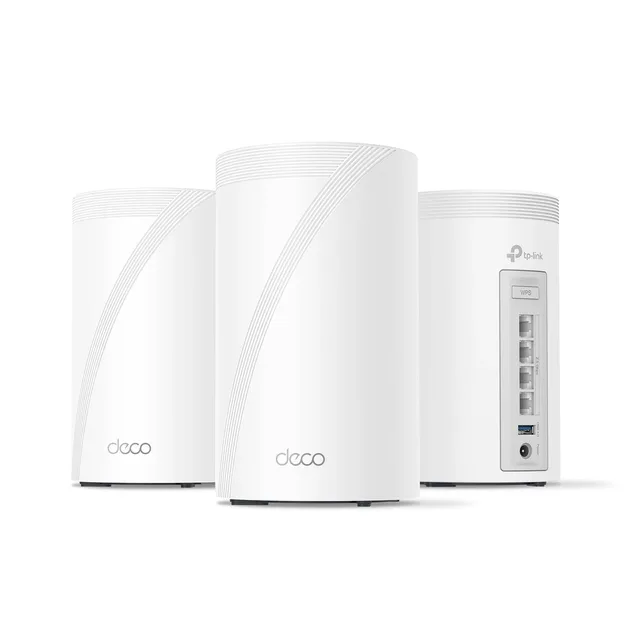
The TP-Link Deco BE63 (Deco 7 Pro) is our pick: tri-band Wi-Fi 7 with strong range, four 2.5-gigabit ports per unit, and full parental and QoS controls without a subscription. The Amazon eero Pro 7 is the runner-up, and it wins for smart homes thanks to a built-in Thread, Zigbee, and Matter hub and the simplest setup. Skip the NETGEAR Orbi 970 Series unless a large home and multi-gig plan can use its speed, its price and tower size outrun most needs. Best for homes wanting fast, reliable Wi-Fi 7 at a fair price.
Our picks at a glance
- TP-Link Deco BE63 (Deco 7 Pro) - Buy. Real Wi-Fi 7 performance and multi-gig wired flexibility at a price that doesn't make you wince.
- eero (Amazon) Amazon eero Pro 7 - Buy. The set-and-forget pick - simplest setup around and a real smart-home hub baked in.
- ASUS ZenWiFi BT10 - It depends. 10-gig wired and a deep feature set with zero subscriptions - if you'll actually use it.
- NETGEAR Orbi 970 Series (RBE973S) - Skip. The fastest mesh reviewers have tested - and priced like a luxury item with its best features rented, not owned.
The verdict in 30 seconds
What mattered most
- Wi-Fi standard
- Fastest wired port
- Ports per node
- Full features need a subscription
- Smart-home hub built in
- Price tier
Mesh Wi-Fi is where most homes finally kill the dead zones, but the Wi-Fi 7 wave has also brought some truly silly pricing and a pile of subscription paywalls. We dug into independent testing and hands-on reviews of the current lineup to find the systems that actually earn their keep. Three of these are easy recommendations for different budgets; one is a fast, gorgeous machine we still think most people should walk away from.
Real Wi-Fi 7 performance and multi-gig wired flexibility at a price that doesn't make you wince.
Best for: Most homes that want real Wi-Fi 7 and multi-gig wired options without paying flagship money.
- Among the fastest 5GHz/6GHz throughput reviewers measured in its price class
- Four 2.5GbE ports plus USB on every node - rare wired flexibility for wired backhaul
- Solid app and reliable roaming
- Tops out at 2.5Gbps wired - no 10-gig ports if you have faster fiber
- The best security and parental controls nudge you toward a small monthly add-on
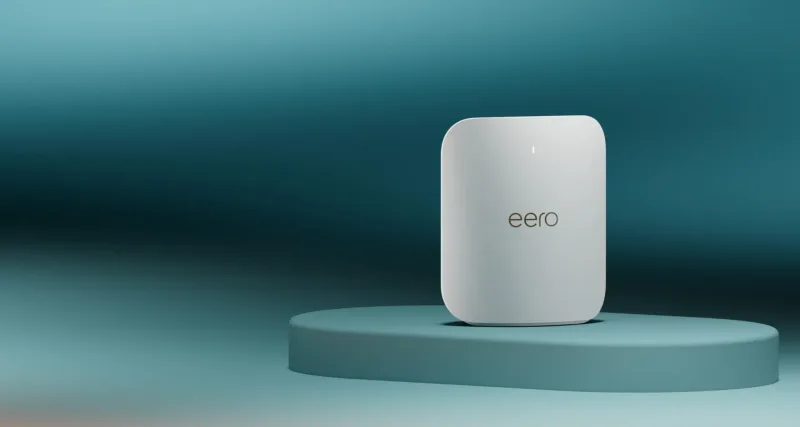
The set-and-forget pick - simplest setup around and a real smart-home hub baked in.
Best for: Smart-home households and anyone who wants Wi-Fi they never have to think about.
- Easiest setup and app of anything here; roaming just works
- Built-in Thread, Zigbee and Matter hub - handy if you run smart-home gear
- Two auto-sensing 5GbE ports per node, supports plans up to 5Gbps
- Only two Ethernet ports per node
- Raw speeds land mid-pack in testing, and some features sit behind eero Plus
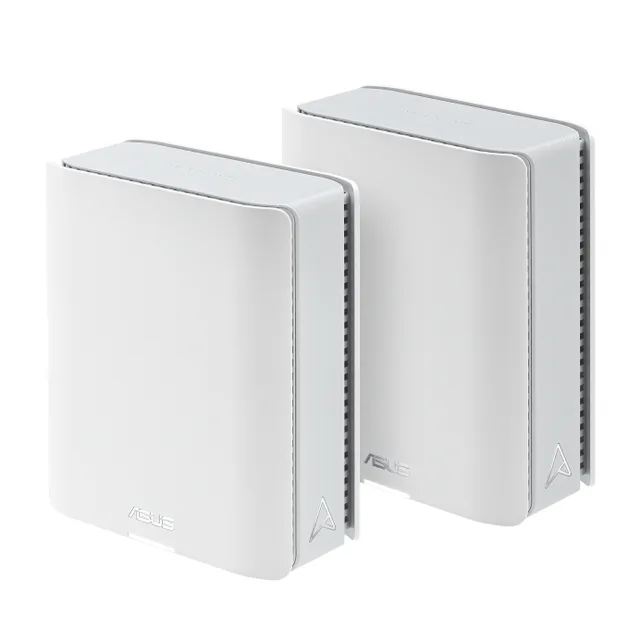
10-gig wired and a deep feature set with zero subscriptions - if you'll actually use it.
Best for: Power users and prosumers who want 10-gig wiring and full control without recurring charges.
- Dual 10G ports for fast fiber and wired backhaul
- Full parental controls, security and VPN included - no ongoing fees
- Fast, stable multi-gig wireless performance in testing
- Expensive, and stingy on port count for the price
- More settings and setup fiddliness than the eero-style crowd
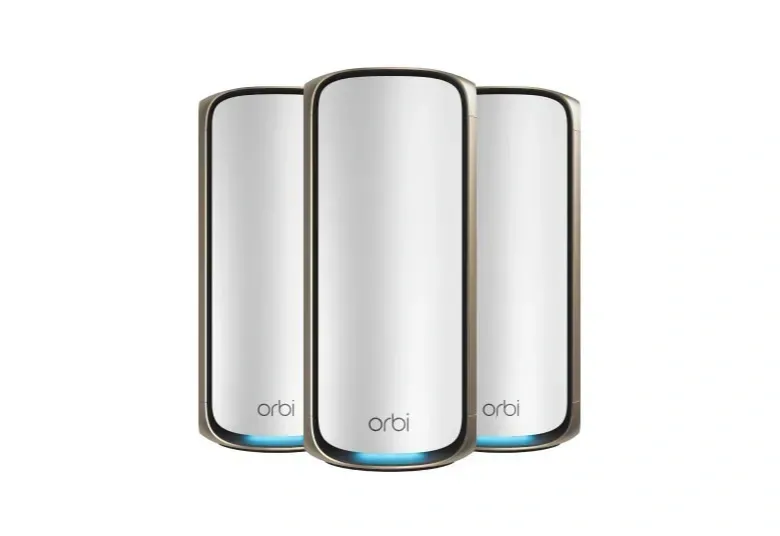
The fastest mesh reviewers have tested - and priced like a luxury item with its best features rented, not owned.
Best for: Large luxury homes on multi-gig fiber where cost truly doesn't matter - which is almost nobody.
- Elite quad-band speed and coverage with a dedicated backhaul
- Polished app and rock-solid reliability
- Flagship pricing for a 3-pack - wildly overkill for nearly every home
- Armor security and parental-control schedules and time limits need recurring subscriptions once the trials end
| Criteria | TP-Link Deco BE63 (Deco 7 Pro) Top pick | Amazon eero Pro 7 | ASUS ZenWiFi BT10 | NETGEAR Orbi 970 Series (RBE973S) |
|---|---|---|---|---|
| Verdict | Buy it | Buy it | It depends | Skip it |
| Best for | Most homes that want real Wi-Fi 7 and multi-gig wired options without paying flagship money. | Smart-home households and anyone who wants Wi-Fi they never have to think about. | Power users and prosumers who want 10-gig wiring and full control without recurring charges. | Large luxury homes on multi-gig fiber where cost truly doesn't matter - which is almost nobody. |
| Price tier | $$$ · premium | $$$ · premium | $$$$ · flagship | $$$$ · flagship |
| Wi-Fi standard | Wi-Fi 7, tri-band | Wi-Fi 7, tri-band | Wi-Fi 7, tri-band | Wi-Fi 7, quad-band |
| Fastest wired port | 2.5 GbE | 5 GbE | 10 GbE | 10 GbE |
| Ports per node | 4x 2.5GbE + USB | 2x 5GbE | 2x 10G + 1x 1G | Router 10G WAN + 10G LAN + 4x 2.5G; satellites 1x 10G + 2x 2.5G |
| Full features need a subscription | Optional (small monthly fee) | Optional (eero Plus) | No - all included | Yes (security + parental) |
| Smart-home hub built in | No | Yes (Thread/Zigbee/Matter) | No | No |
| Price tier | $$$ · premium | $$$ · premium | $$$$ · flagship | $$$$ · flagship |
Which one is right for you?
- Most homes that want real Wi-Fi 7 and multi-gig wired options without paying flagship money. Buy it TP-Link Deco BE63 (Deco 7 Pro)
- Smart-home households and anyone who wants Wi-Fi they never have to think about. Buy it eero (Amazon) Amazon eero Pro 7
- Power users and prosumers who want 10-gig wiring and full control without recurring charges. It depends ASUS ZenWiFi BT10
- Large luxury homes on multi-gig fiber where cost truly doesn't matter - which is almost nobody. Skip it NETGEAR Orbi 970 Series (RBE973S)
How we judged the field
For a whole-home mesh, we prioritized real-world throughput at range over headline “BE” numbers, how nodes carry backhaul traffic, the count and speed of wired ports, coverage per unit for typical walls and floors, and whether everyday features like parental controls and security demand a subscription. We treated peak gigabit ratings that exceed common home internet plans as marketing rather than benefit. To be clear on method: we synthesize independent expert testing and verified owner reports and do not run our own lab. On that basis the TP-Link Deco BE63 (Deco 7 Pro) is our pick for balanced speed, wired flexibility, and subscription-free control, and the Amazon eero Pro 7 is the runner-up for the simplest setup and a built-in smart-home hub.
TP-Link Deco BE63 (Deco 7 Pro)
Buy itOur pick is a tri-band Wi-Fi 7 system (2.4, 5, and 6 GHz) that lands the features most homes actually use without a premium. Two stand out: each unit carries four 2.5-gigabit Ethernet ports, so you can hardwire a desktop, console, NAS, and wired backhaul at every node, and it supports Multi-Link Operation, the Wi-Fi 7 feature that lets capable devices combine bands for lower latency. TP-Link rates a two-pack for up to 5,800 square feet. The Deco app offers granular controls, guest networks, QoS, and parental tools, without demanding a subscription. Reviewers and owners like its strong 5GHz and 6GHz speed and range and the wired flexibility of so many 2.5-gigabit ports. What they like less: some advanced HomeShield security sits behind a paid tier, the units are chunky boxes, and management is app-first with only a limited web interface. Right buyer: a 1-to-2.5-gigabit home wanting current Wi-Fi 7 and multi-gig wiring at a fair outlay. Wrong buyer: someone needing 10-gig ports or deep manual tuning.
Amazon eero Pro 7
Buy itThe runner-up trades wired breadth for simplicity and smart-home integration. It is a tri-band Wi-Fi 7 system with two 5-gigabit Ethernet ports per unit and MLO support, and each node covers around 2,000 square feet. Two features define it: a built-in smart-home hub with Thread, Zigbee, and Matter support that can consolidate other bridges, and eero’s TrueMesh routing, which steers traffic across nodes with minimal fuss. Setup through the eero app is about as painless as mesh gets. Owners like how reliably it self-manages and how it doubles as a hub for lights, locks, and sensors. What they like less: several useful features, ad blocking, advanced security, and content filtering, require the paid eero Plus subscription, manual controls are deliberately sparse with no web interface, and each unit has only two Ethernet ports. Right buyer: a smart-home household that values simple, hands-off networking and Matter or Thread support. Wrong buyer: a tinkerer who wants granular settings or lots of wired ports without paying yearly.
ASUS ZenWiFi BT10
It dependsA tri-band Wi-Fi 7 system (2.4, 5, and 6 GHz) aimed at enthusiasts. Two features stand out: dual 10-gigabit Ethernet ports (one WAN/LAN, one LAN) for genuine multi-gig wired links, and AiProtection Pro, Trend Micro-powered security and parental controls that ASUS provides subscription-free rather than as a paid add-on. It layers in AiMesh flexibility, a built-in VPN, and unusually deep manual settings. Owners and reviewers like the 10-gigabit ports and the free lifetime security, plus the control it hands power users. What makes it an “it depends”: the hardware carries only three network ports total, so wired-client count is limited despite the 10-gigabit speed, it costs more than our top picks, and its depth of settings can overwhelm anyone who just wants working Wi-Fi. Right buyer: an enthusiast with a multi-gig connection who wants control and 10-gigabit wiring. Wrong buyer: a casual user who would never touch the advanced settings.
NETGEAR Orbi 970 Series (RBE973S)
Skip itThe most capable and most expensive system here, a quad-band Wi-Fi 7 mesh with 2.4GHz, two 5GHz bands, and a 6GHz band, one of which is reserved as a dedicated wireless backhaul so node-to-node traffic does not steal capacity from your devices. The router offers a 10-gigabit WAN port, a 10-gigabit LAN port and four 2.5-gigabit LAN ports (each satellite gets one 10-gigabit and two 2.5-gigabit ports), with rated throughput up to 27 Gbps and coverage up to 10,000 square feet as a three-pack. In fairness, it is the fastest option here and the dedicated backhaul holds speed at long range better than tri-band rivals. But the towers are large and hard to hide, advanced security lives behind the NETGEAR Armor subscription after its trial (parental-control schedules and time limits need the paid Smart Parental Controls tier too), and the price is wildly out of proportion to what typical home internet plans can use. Only a large house on a multi-gig connection with a real need for its capacity would see the benefit. Right buyer: that rare large, high-bandwidth household. Wrong buyer: almost everyone else, who pays a steep premium for headroom they will never reach.
Sources
Specs in this review come from these pages.
- TP-Link, Deco BE63 specifications (tp-link.com)
- eero, eero Pro 7 product page (eero.com)
- eero, What is eero Plus? (support.eero.com)
- ASUS, ZenWiFi BT10 tech specs (asus.com)
- NETGEAR, Orbi 970 Series RBE973S product page (netgear.com)
- NETGEAR, How do I set up NETGEAR Smart Parental Controls (kb.netgear.com)
TP-Link Deco BE63 (Deco 7 Pro) vs Amazon eero Pro 7: which should you buy?
Both are strong tri-band Wi-Fi 7 systems, so the choice turns on wiring and philosophy rather than raw speed. The Deco BE63 wins on wired flexibility and control: four 2.5-gigabit ports per unit, more coverage per node, and full parental, QoS, and guest controls with no subscription. The eero Pro 7 wins on simplicity and smart home: a built-in Thread, Zigbee, and Matter hub, the smoothest setup here, and reliable hands-off routing, though it has only two ports. The catch with eero is the subscription, since ad blocking and advanced security need eero Plus, and manual controls stay thin. If you hardwire devices and want free parental tools plus granular settings, choose the Deco. If you run a smart home and prize a system that just works with a hub built in, the eero fits. Most homes get more from the Deco.
What to look for
Start with your internet plan and home, not the box’s headline number. A “BE” rating in the tens of gigabits is theoretical; if your connection is 1 gigabit, most of that ceiling is unreachable, and a sensible tri-band Wi-Fi 7 system already outruns the plan. Match coverage to your square footage and layout, and remember that thick walls and multiple floors matter more than raw area. Decide how nodes will talk to each other: a dedicated wireless backhaul or, better, a wired Ethernet backhaul between units preserves speed at range, which is why multi-gig ports on every node are worth having. Count the wired devices you will plug in, since some systems give you four ports per unit and others just two. Then weigh the subscription question carefully, since some brands gate parental controls and security behind yearly fees, while others include them free. Finally, be realistic about how much tuning you want: enthusiast systems reward tinkering, while hands-off systems hide the settings. Buy for your plan and walls, not the spec sheet.
Our final take
For most homes, the TP-Link Deco BE63 (Deco 7 Pro) is the sensible Wi-Fi 7 pick: strong range, four 2.5-gigabit ports per unit, and full controls without a subscription. Choose the Amazon eero Pro 7 if you want the simplest setup and a built-in Thread, Zigbee, and Matter smart-home hub. The ASUS ZenWiFi BT10 suits enthusiasts wanting 10-gigabit ports and deep control. Skip the NETGEAR Orbi 970 Series unless you have a large house and a multi-gig plan that can actually use its speed, the price and tower size are hard to justify otherwise.
Questions, answered
Do I need Wi-Fi 7 if my internet is 1 gigabit?
Not strictly, but it helps. Even on a 1-gigabit plan, Wi-Fi 7 features like MLO improve latency, range, and how well the system handles many devices at once. You will not hit the headline speeds, but the newer radios still deliver steadier connections than older mesh.
Should nodes connect wirelessly or by Ethernet?
Wired Ethernet backhaul is best where you can run cable; it preserves full speed between nodes and frees the airwaves for your devices. Multi-gig ports on every unit make this easier. Where wiring is impossible, a dedicated wireless backhaul, as on the Orbi, is the next-best option.
Deco BE63 or eero Pro 7 for a smart home?
The eero Pro 7 for most smart homes, because it includes a Thread, Zigbee, and Matter hub that can replace separate bridges. Choose the Deco BE63 if you would rather add your own hub and want more wired ports plus free parental and QoS controls without a subscription.
Why is the NETGEAR Orbi 970 a skip for most people?
It is very fast, with quad-band radios and a dedicated backhaul, but its price and large tower units are wildly out of proportion to what typical internet plans use. Advanced security also needs the Armor subscription. Only large, multi-gig homes will see the benefit.
Deciding between the top two? See our head-to-head: TP-Link Deco BE63 (Deco 7 Pro) vs eero (Amazon) Amazon eero Pro 7.
More Tech & Gadgets reviews
 The Best microSD Cards: 4 Compared (and One to Skip)
  The Best Mini PCs: 4 Compared (and One to Skip)
  The Best Mirrorless Cameras for Beginners: 4 Compared (and One to Skip)
  The Best Model Rocket Kits: 4 Compared (and One to Skip)
  The Best Monitor Calibrators: 4 Compared (and One to Skip)
  The Best NAS Hard Drives: 4 Compared (and One to Skip)