

Tech & Gadgets
The Best Wi-Fi Routers: 4 Compared (and One to Skip)
We compared four standalone Wi-Fi 7 routers on real-world speed, range, wired ports, control depth, and 2026 buyability.
The short version
For a standalone Wi-Fi 7 router in 2026, the ASUS RT-BE96U is our top pick: full tri-band speed, dual 10 Gigabit ports, deep controls, and subscription-free security. The NETGEAR Nighthawk RS700S is the runner-up, with a big wireless rating and range but charging a subscription for its best security. The Amazon eero Max 7 is an it-depends: wonderfully simple and a capable smart-home hub, yet reported as slower by owners and light on manual controls. The TP-Link Archer BE800 has great hardware but is one to skip for U.S. buyers given U.S. regulatory and security scrutiny. Best for: buyers who want one strong router rather than a mesh, and who value control and no recurring fees.
Our picks at a glance
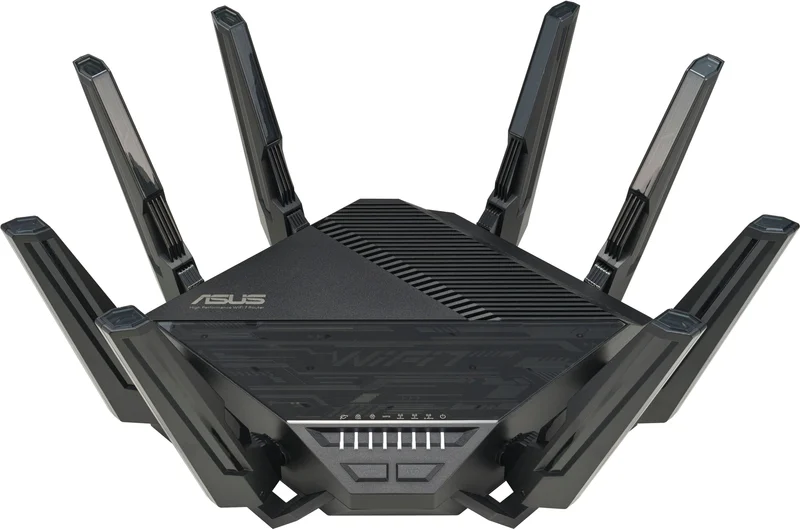
- ASUS RT-BE96U - Buy. A tri-band Wi-Fi 7 powerhouse with deep controls and no paywall on its security suite.
- NETGEAR Nighthawk RS700S - Buy. NETGEAR's flagship BE19000 tower, if you can live with security features behind a subscription.
- eero Amazon eero Max 7 (1-pack) - It depends. The easiest router to live with, but it trades control and outright speed for simplicity.
- TP-Link Archer BE800 - Skip. Excellent hardware undercut by a U.S. regulatory and security cloud.
The verdict in 30 seconds
What mattered most
- Wireless bands
- Antennas and wireless class
- Multi-gig wired ports
- Control & customization
- Built-in security
- Ease of setup
Standalone routers still make sense when you want one powerful box rather than a scattering of mesh nodes. We compared maker specifications and owner reports on four current Wi-Fi 7 models built to anchor a single-router home. Two earn a clear buy, one is a genuine it-depends, and one strong performer lands on the skip list for reasons that have nothing to do with its hardware.
A tri-band Wi-Fi 7 powerhouse with deep controls and no paywall on its security suite.
Best for: Enthusiasts and power users who want maximum control and speed without recurring fees.
- Full tri-band Wi-Fi 7 (2.4, 5, and 6 GHz) with 320 MHz channels, 4K-QAM, and Multi-Link Operation
- Subscription-free network security and parental controls built in
- Dual 10 Gigabit ports plus AiMesh expandability
- Eight external antennas with 4x4 radios on each of the three bands
- Large footprint with prominent external antennas that dominate a shelf
- Firmware and settings depth can overwhelm first-time router owners
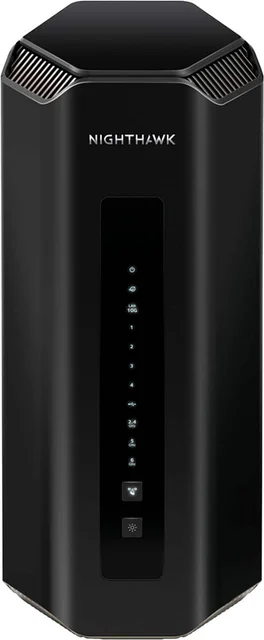
NETGEAR's flagship BE19000 tower, if you can live with security features behind a subscription.
Best for: Large or busy homes chasing the fastest possible wireless and the longest reach.
- Tri-band BE19000 with 4x4 radios on each band, rated for up to 3,500 sq. ft. by NETGEAR
- Tri-band BE19000-class hardware with dual 10 Gigabit ports and a fast quad-core processor
- Simple, guided app setup that gets non-experts online quickly
- Its advanced security and some parental controls require a paid subscription
- Tall tower design and a premium price for capability most homes cannot yet saturate
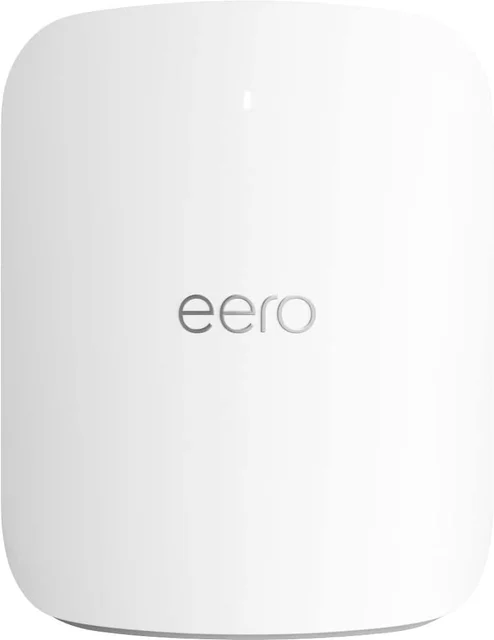
The easiest router to live with, but it trades control and outright speed for simplicity.
Best for: People who value a set-and-forget network and smart-home integration over tuning and top speed.
- Effortless app-guided setup and reliable, hands-off day-to-day operation
- Doubles as a smart-home hub with Thread border-router and Matter support
- Two 10 Gigabit ports and a clean, compact design that hides in plain sight
- Owner reports suggest real-world wireless speeds can trail similarly priced rivals
- Sparse manual controls, and the best security and parental features sit behind an eero Plus subscription
- Designed first as a mesh node, so a single unit underuses the platform
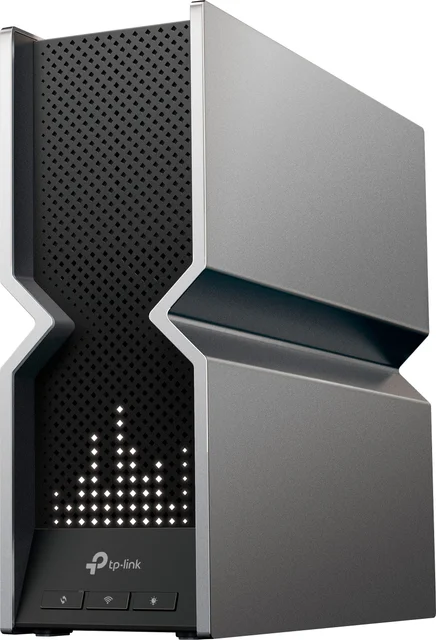
Excellent hardware undercut by a U.S. regulatory and security cloud.
Best for: Hard to recommend to U.S. buyers today; only worth considering where it remains fully supported and sanctioned.
- Tri-band Wi-Fi 7 with two 10G ports and four 2.5G ports
- Distinctive design with a customizable dot-matrix front display
- Eight internal antennas and an LED display
- U.S. regulatory scrutiny of foreign-produced routers and of TP-Link, with ongoing security concerns, puts its long-term supply, support, and firmware updates in question
- Early firmware needed updates to stabilize, according to owner reports
| Criteria | ASUS RT-BE96U Top pick | NETGEAR Nighthawk RS700S | Amazon eero Max 7 (1-pack) | TP-Link Archer BE800 |
|---|---|---|---|---|
| Verdict | Buy it | Buy it | It depends | Skip it |
| Best for | Enthusiasts and power users who want maximum control and speed without recurring fees. | Large or busy homes chasing the fastest possible wireless and the longest reach. | People who value a set-and-forget network and smart-home integration over tuning and top speed. | Hard to recommend to U.S. buyers today; only worth considering where it remains fully supported and sanctioned. |
| Price tier | $$$$ · flagship | $$$$ · flagship | $$$ · premium | $$$ · premium |
| Wireless bands | Tri-band (2.4/5/6 GHz) | Tri-band (2.4/5/6 GHz) | Tri-band (2.4/5/6 GHz) | Tri-band (2.4/5/6 GHz) |
| Antennas and wireless class | 8 external antennas, 4x4 on all three bands | 8 internal antennas, 4x4 on all three bands, up to 3,500 sq. ft. | Not listed by maker | 8 internal antennas, up to 19 Gbps class |
| Multi-gig wired ports | 10G WAN/LAN, 10G LAN, plus 1G ports | 10G internet, 10G LAN, plus four 1G ports | Two 10G | Two 10G plus four 2.5G |
| Control & customization | Very deep | Moderate | Minimal | Deep |
| Built-in security | Included, no fee | Subscription for full features | Best features need eero Plus | Included suite |
| Ease of setup | Moderate | Easy | Easiest | Easy |
| 2026 U.S. buyability | Widely available | Widely available | Widely available | Clouded by U.S. regulatory scrutiny |
| Price tier | $$$$ · flagship | $$$$ · flagship | $$$ · premium | $$$ · premium |
Which one is right for you?
- Enthusiasts and power users who want maximum control and speed without recurring fees. Buy it ASUS RT-BE96U
- Large or busy homes chasing the fastest possible wireless and the longest reach. Buy it NETGEAR Nighthawk RS700S
- People who value a set-and-forget network and smart-home integration over tuning and top speed. It depends eero Amazon eero Max 7 (1-pack)
- Hard to recommend to U.S. buyers today; only worth considering where it remains fully supported and sanctioned. Skip it TP-Link Archer BE800
How we judged the field
We do not run our own lab. Instead, we compare maker specifications and aggregated owner reports into one practical verdict per router. For standalone Wi-Fi 7 models, five things mattered most: real-world wireless speed at close and long range, the quality and count of multi-gig wired ports, how much control the software gives you, whether the best security features cost extra, and how painless setup and daily use are. Because this is a 2026 buying guide, we also weighed a factor that is easy to overlook: whether a model is genuinely safe to buy and will keep receiving support in the United States.
All four are tri-band Wi-Fi 7 routers with a 6 GHz band and at least one 10 Gigabit port, so the differences come down to tuning, philosophy, and circumstance rather than raw specifications.
ASUS RT-BE96U
Buy itThis is the most complete single-box router in the group. The RT-BE96U pairs eight external antennas and 4x4 radios on all three bands with two 10 Gigabit ports, AiMesh expandability if you later add a node, and a security and parental-control suite that is included rather than rented. The settings run deep enough to satisfy tinkerers. The trade-offs are physical size and a learning curve: the antenna-laden chassis is large, and the sheer number of options can intimidate a first-time owner. For anyone who wants maximum capability without recurring fees, it is the easy recommendation.
NETGEAR Nighthawk RS700S
Buy itIf your priority is the fastest possible wireless and the longest reach, the RS700S is NETGEAR’s flagship, rated for up to 3,500 sq. ft. with 4x4 radios on all three bands, a 10 Gigabit internet port and a 10 Gigabit LAN port, plus a quad-core 2.6 GHz processor. Setup through the mobile app is genuinely beginner-friendly. The catch is the subscription: its most useful security and some parental features are locked behind a paid plan, which stings on a router that already sits at the premium end. It is a superb performer, but budget for the ongoing cost if you want the full feature set.
Amazon eero Max 7
It dependsThe eero Max 7 is the friendliest router here to live with. Setup is trivial, it runs reliably without fuss, and it doubles as a smart-home hub with Thread and Matter support. But honesty requires noting two things: owner reports suggest real-world wireless speeds can trail similarly priced rivals, and the platform offers few manual controls, with its best security and parental features reserved for an eero Plus subscription. It is also designed first as a mesh building block, so a lone unit underuses what the system does best. Whether that adds up to a yes depends entirely on how much you value simplicity over speed and control.
TP-Link Archer BE800
Skip itOn hardware alone, the Archer BE800 would be an easy recommendation: tri-band Wi-Fi 7, two 10 Gigabit ports plus four 2.5 Gigabit ports, and a striking design with a customizable front display. The problem is external to the box. U.S. authorities have scrutinized foreign-produced routers, with TP-Link at the center of ongoing security investigations, so check the current status before buying. That casts a real shadow over future firmware updates, warranty support, and availability for U.S. owners. Great engineering cannot offset that uncertainty, so we cannot recommend it to U.S. buyers today.
ASUS RT-BE96U vs NETGEAR Nighthawk RS700S: which should you buy?
These are the two strongest picks, and the choice comes down to priorities. The Nighthawk RS700S has the bigger wireless rating on paper, and if you have a multi-gig plan and Wi-Fi 7 devices, it can make good use of it. But its best security features cost a recurring subscription. The RT-BE96U counters with deeper controls, AiMesh flexibility, and a full security suite at no extra charge. Over a few years of ownership, the ASUS is the better value for most people, which is why it takes the top spot; choose the Nighthawk if its larger wireless rating and range matter more than avoiding fees.
What to look for
- Match the router to your internet speed: a 10 Gigabit port only helps if your plan (or a fast local network) can use it.
- Tri-band with 6 GHz: the 6 GHz band gives Wi-Fi 7 devices a clean, high-capacity lane and is worth prioritizing.
- Wired ports: look for at least one 10 Gigabit port plus one or more 2.5 Gigabit ports for wired devices.
- Subscription policy: check whether security and parental controls are included or rented before you buy.
- Control vs simplicity: decide honestly whether you want to tune settings or just set it and forget it.
- Support and buyability: favor brands with a stable, sanctioned support path in your region.
Our final take
Most homes do not yet need Wi-Fi 7, but if you are buying one strong standalone router to last several years, the ASUS RT-BE96U is the smart default: fast, flexible, and free of recurring fees. Step up to the NETGEAR Nighthawk RS700S if outright speed and range top your list and a subscription does not bother you. The Amazon eero Max 7 is the right call only if simplicity and smart-home integration matter more than performance and control. And as good as the TP-Link Archer BE800 hardware is, the U.S. regulatory picture makes it one to skip for now. Buy for the internet plan and devices you actually have, and you will be happy for years.
Questions, answered
Is Wi-Fi 7 actually worth it right now?
For most homes, the answer is not yet essential. The biggest gains come from a multi-gig internet plan and Wi-Fi 7 client devices, both still uncommon. That said, Wi-Fi 7 features such as Multi-Link Operation and wider 320 MHz channels can improve stability and headroom even with today's devices, so buying one is reasonable future-proofing if the price fits your budget.
Why is the TP-Link Archer BE800 on the skip list if its hardware is good?
The recommendation is about risk, not performance. U.S. authorities have scrutinized foreign-produced routers, with TP-Link a focus amid security investigations, so check the current status before buying. That creates real uncertainty about future firmware updates, support, and availability for U.S. owners. Where the brand remains fully sanctioned and supported, the hardware itself is capable.
Do I need a subscription to use these routers?
You can run any of them without paying extra. However, some models reserve their strongest security and parental-control features for a paid plan. The ASUS RT-BE96U includes its security suite at no additional cost, while the Nighthawk RS700S and the eero Max 7 put their most advanced protection features behind a subscription.
Is a single standalone router better than a mesh system?
It depends on your home. A single powerful router is simpler, often faster at close and medium range, and usually cheaper than a multi-node kit. Mesh wins in large or multi-floor homes with thick walls where one unit cannot reach every corner. A platform like eero is built primarily for mesh, so a single unit works but does not showcase its main strength.
What ports and speeds should I look for to future-proof?
Prioritize at least one 10 Gigabit port if your internet plan is or may become multi-gig, plus one or more 2.5 Gigabit ports for wired devices. Tri-band operation with a 6 GHz band gives Wi-Fi 7 clients a clean, high-capacity lane. Match the router to your actual internet speed and device count rather than the largest number on the box.
Deciding between the top two? See our head-to-head: ASUS RT-BE96U vs NETGEAR Nighthawk RS700S.
More Tech & Gadgets reviews
 The Best Qi2 and MagSafe Wireless Chargers for 2026
  The Best Wireless Keyboards for Work: 4 Compared (and One to Skip)
  Best Wireless Mice for Office Work in 2026
  The Best OLED Gaming Monitors: 4 Compared (and One to Skip)
  The Best OLED TVs: 4 Compared (and One to Skip)
  The Best Powerline Adapters: 4 Compared (and One to Skip)