

Tech & Gadgets
The Best Wireless Keyboards for Work: 4 Compared (and One to Skip)
We compared four wireless work keyboards on typing feel, multi-device switching, battery life, and ergonomics to find the best desk companion.
The short version
For most people the Logitech MX Keys S is the best wireless work keyboard, combining a quiet low-profile feel, three-device switching, smart backlight, and long battery life. If you want mechanical typing feel and deep customization for less, the Keychron V6 Max is the value pick, provided you have desk room. The Apple Magic Keyboard with Touch ID is excellent but only if you stay inside an Apple Silicon Mac setup, because it pairs to one device at a time. Skip the Incase Ergonomic Keyboard for a wireless desk: despite its appealing Microsoft-designed ergonomic shape, it is wired-only and its wireless Compact Ergonomic sibling was listed as unavailable. Best for: desk workers who want one comfortable keyboard that moves cleanly between their laptop, desktop, and tablet.
Our picks at a glance
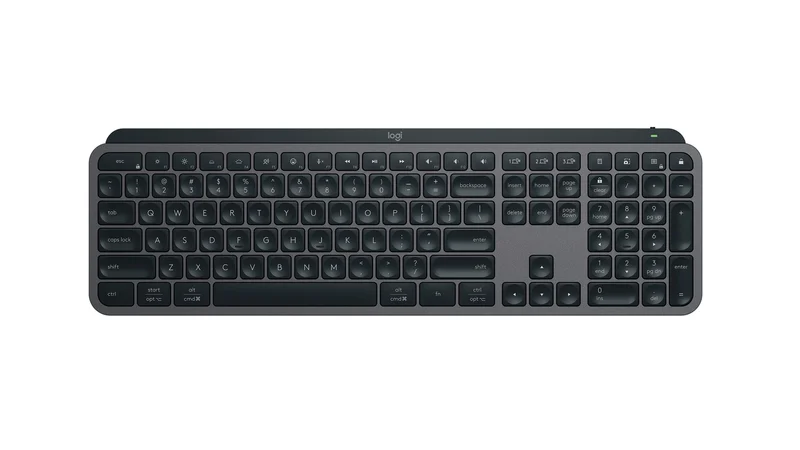
- Logitech MX Keys S - Buy. The low-profile productivity keyboard that does everything a desk worker needs and gets out of the way.
- Keychron V6 Max - Buy. A full-size mechanical board with a genuinely great typing feel and triple-mode wireless, at a price that undercuts the big names.
- Apple Magic Keyboard with Touch ID and Numeric Keypad - It depends. Effortless if you live on an Apple Silicon Mac, frustrating the moment you need to share it with anything else.
- Incase Ergonomic Keyboard (Designed by Microsoft) - Skip. The revival of the classic Microsoft ergonomic shape is welcome, but it is wired-only, which rules it out of a wireless setup.
The verdict in 30 seconds
What mattered most
- Typing feel
- Multi-device switching
- Battery life
- Ergonomics / comfort
- Cross-platform support
- Customization / software
A keyboard is the one tool your hands touch all day, so the differences that matter for work are unglamorous: how it feels after eight hours, how fast it hops between your laptop and desktop, and how rarely you think about charging it. We compared maker specifications and owner reports across four popular options. Two earn a clear recommendation, one is a great buy only if you live inside Apple's ecosystem, and one that people keep asking about should be skipped for a wireless setup.
The low-profile productivity keyboard that does everything a desk worker needs and gets out of the way.
Best for: Anyone who wants one refined, quiet keyboard that moves cleanly between a work laptop, a personal desktop, and a tablet.
- Spherically dished, low-profile keys designed for quiet, accurate, comfortable typing
- Pairs with up to three devices and switches instantly via Bluetooth or the Logi Bolt receiver, with cursor and copy-paste flow across computers
- Smart backlighting with a hand-proximity sensor, plus months of battery with the lights off and USB-C recharging
- Backlit battery life is only about a week and a half before a recharge, per owner reports
- Low-profile membrane feel will not satisfy anyone who wants mechanical key travel
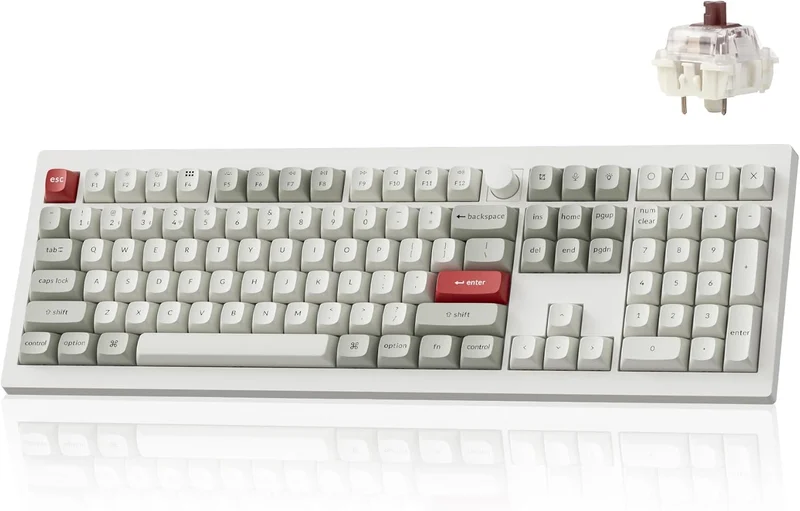
A full-size mechanical board with a genuinely great typing feel and triple-mode wireless, at a price that undercuts the big names.
Best for: Typists and coders who want mechanical feel and deep customization on the desk without paying flagship prices.
- Gasket-mount build with sound-absorbing foam and hot-swappable switches, as Keychron lists it
- Triple-mode connectivity: low-latency 2.4 GHz, Bluetooth to three devices, and wired USB-C, with QMK/VIA remapping
- Large 4000 mAh battery rated by Keychron at up to 190 hours, plus a full number pad and control knob
- Thick, heavy, and takes up a lot of desk space, so it is not travel-friendly
- Loud compared with low-profile rivals, and the gamer-leaning aesthetic and setup will not suit everyone
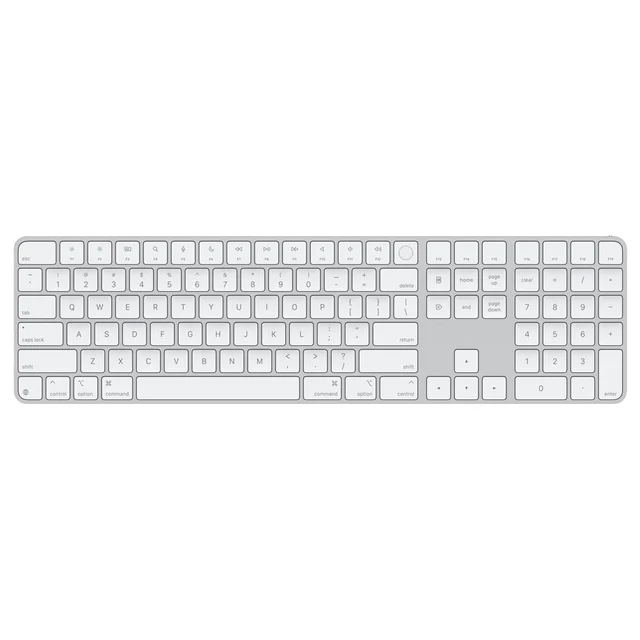
Effortless if you live on an Apple Silicon Mac, frustrating the moment you need to share it with anything else.
Best for: Mac-only desks where Touch ID and tight ecosystem integration outweigh multi-device flexibility.
- Touch ID brings fingerprint unlock, Apple Pay, and password autofill to the desktop, a real quality-of-life upgrade for Mac users
- Thin, quiet, well-built scissor keys with battery life owners measure in weeks per charge
- USB-C recharging and a clean, compact aluminum design that pairs automatically with a Mac
- Connects to one device at a time, so switching to an iPad or PC means reconnecting in Bluetooth settings
- No backlighting at a premium price, and Touch ID works only with Apple Silicon Macs
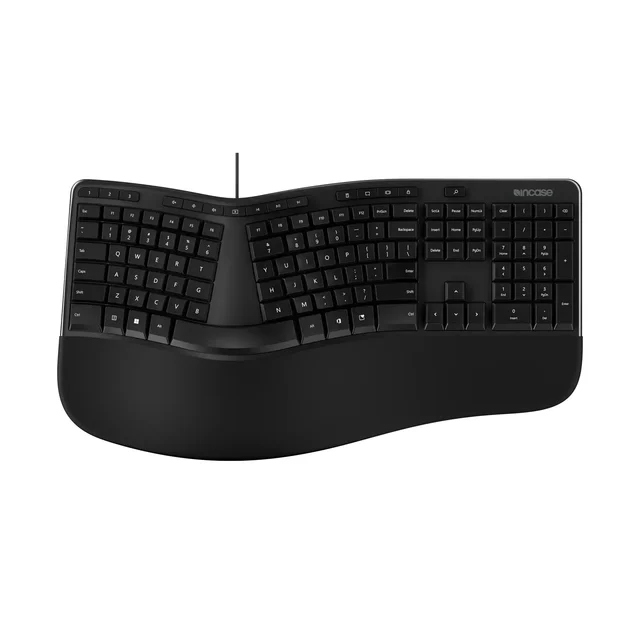
The revival of the classic Microsoft ergonomic shape is welcome, but it is wired-only, which rules it out of a wireless setup.
Best for: Desk-bound typists who specifically want the classic Microsoft ergonomic shape and do not care about going wireless.
- Split, curved layout with a cushioned palm rest that revives the well-regarded Microsoft ergonomic design
- Full number pad, dedicated shortcut keys, and a comfortable resting posture for the hands
- Wired USB only, which defeats the purpose in a wireless, multi-device workflow
- Some owners report a mushier keypress than the original Microsoft board, and Incase's wireless Compact Ergonomic model showed as unavailable on its site, as did this one
| Criteria | Logitech MX Keys S Top pick | Keychron V6 Max | Apple Magic Keyboard with Touch ID and Numeric Keypad | Incase Ergonomic Keyboard (Designed by Microsoft) |
|---|---|---|---|---|
| Verdict | Buy it | Buy it | It depends | Skip it |
| Best for | Anyone who wants one refined, quiet keyboard that moves cleanly between a work laptop, a personal desktop, and a tablet. | Typists and coders who want mechanical feel and deep customization on the desk without paying flagship prices. | Mac-only desks where Touch ID and tight ecosystem integration outweigh multi-device flexibility. | Desk-bound typists who specifically want the classic Microsoft ergonomic shape and do not care about going wireless. |
| Price tier | $$$ · premium | $$ · mid-range | $$$ · premium | $$ · mid-range |
| Typing feel | Quiet, dished low-profile keys tuned for accuracy | Cushioned mechanical feel, deeply customizable | Slim, quiet scissor with short travel | Ergonomic curve, but mushier membrane keypress |
| Multi-device switching | Up to 3 devices, instant switch (Bluetooth or Bolt) | Up to 3 via Bluetooth, plus 2.4 GHz and wired | One device at a time; re-pair to switch | Wired only, single connection |
| Battery life | ~10 days backlit, up to months lights-off - Up to 190 hours (Keychron rating) | Weeks per charge | Not applicable (wired) | - |
| Ergonomics / comfort | Comfortable flat low-profile for long sessions | Comfortable but tall; a wrist rest helps | Comfortable but very low profile | Split, curved layout with palm rest |
| Cross-platform support | Windows, macOS, Linux, ChromeOS, mobile | Windows, macOS, Linux with swappable keycaps | Best on Apple Silicon Macs; limited elsewhere | Windows-focused layout |
| Customization / software | Logi Options+ for key remaps and macros | Open QMK/VIA remapping and hot-swap switches | Minimal; system-level only | Basic dedicated shortcut keys |
| Portability / footprint | Slim full-size, desk-friendly | Thick and heavy full-size | Slim full-size, light | Large ergonomic footprint |
| Price tier | $$$ · premium | $$ · mid-range | $$$ · premium | $$ · mid-range |
Which one is right for you?
- Anyone who wants one refined, quiet keyboard that moves cleanly between a work laptop, a personal desktop, and a tablet. Buy it Logitech MX Keys S
- Typists and coders who want mechanical feel and deep customization on the desk without paying flagship prices. Buy it Keychron V6 Max
- Mac-only desks where Touch ID and tight ecosystem integration outweigh multi-device flexibility. It depends Apple Magic Keyboard with Touch ID and Numeric Keypad
- Desk-bound typists who specifically want the classic Microsoft ergonomic shape and do not care about going wireless. Skip it Incase Ergonomic Keyboard (Designed by Microsoft)
How we judged the field
We do not run our own lab. Instead we compared maker specifications and aggregated owner reports, then weighed them against the criteria that actually matter for a keyboard you use all day at work. Four things rose to the top: typing feel and comfort over long sessions; how quickly and reliably the keyboard moves between multiple devices; battery life and charging convenience; and the physical fit on your desk, from footprint to ergonomics. We also checked cross-platform behavior, because most people mix a work laptop with a personal machine or a tablet. Price is reported only as a qualitative tier, since what you should pay depends on how central the keyboard is to your day.
Logitech MX Keys S
Buy itThe MX Keys S is the keyboard we would hand to most people without hesitation. The spherically dished, low-profile keys are designed to be quiet and accurate, the kind of typing surface that disappears under your fingers after a few minutes. It pairs with up to three devices and switches between them instantly, either over Bluetooth or with Logitech’s Bolt receiver, and it can flow your cursor and clipboard across computers. A hand-proximity sensor lights the backlight as you reach for it and dims it to save power, and Logitech rates the battery at up to 10 days backlit or up to 5 months with backlighting off. It is a premium purchase and it is not mechanical, but for everyday productivity across several machines it is hard to beat.
Keychron V6 Max
Buy itIf you want the tactile pleasure of a mechanical keyboard without paying flagship money, the V6 Max is the value standout. Keychron lists a gasket-mount build, sound-absorbing foam, and hot-swappable switches. It is genuinely versatile too, with low-latency 2.4 GHz, Bluetooth to three devices, wired USB-C, and open QMK/VIA remapping. The trade-offs are physical: it is thick, heavy, and full-size, so it dominates a desk and is not something you toss in a bag. If those constraints fit your setup, it punches well above its price.
Apple Magic Keyboard with Touch ID and Numeric Keypad
It dependsInside an Apple Silicon Mac setup, this is a delight. Touch ID brings fingerprint unlock, Apple Pay, and password autofill to the desktop, the scissor keys are quiet and pleasant, and owners report weeks of use per charge. The problem is life outside that ecosystem. The keyboard connects to one device at a time, so moving it to an iPad or PC means digging into Bluetooth settings, and there is no backlighting despite the premium price. Buy it if your desk is Mac-only; look elsewhere if you juggle platforms.
Incase Ergonomic Keyboard (Designed by Microsoft)
Skip itThis one keeps coming up because it revives the well-loved Microsoft ergonomic shape, complete with a split, curved layout and a cushioned palm rest. The posture is genuinely comfortable. But for a wireless roundup it fails on the most basic requirement: it is wired USB only. Incase also lists a wireless Compact Ergonomic model, but both keyboards showed as unavailable on its site when we checked, and some owners note the current board feels mushier than the Microsoft original it descends from. If you want an ergonomic wireless keyboard, this is not the moment to buy into the line.
Logitech MX Keys S vs Keychron V6 Max: which should you buy?
These are our two recommendations, and they suit different hands. The MX Keys S is the generalist: slim, quiet, effortless across three devices, and the better choice if you value a tidy desk, a low-profile feel, and moving between a laptop, desktop, and tablet all day. The V6 Max is the enthusiast’s value pick: it delivers a richer, more tactile typing experience and deep customization for less money, but it is bulky and loud by comparison. Choose the Logitech if comfort, quiet, and multi-device convenience lead your list; choose the Keychron if the feel of the keys is what you care about most and you have the desk space to spare.
What to look for
- Multi-device pairing: look for at least two or three saved connections with one-press switching if you use more than one computer.
- Connection type: Bluetooth is fine for most work; a 2.4 GHz receiver or wired option adds reliability.
- Battery and charging: prefer USB-C recharging and check whether backlighting sharply cuts runtime.
- Typing feel: decide between quiet low-profile keys and tactile mechanical switches before anything else.
- Layout and footprint: a number pad and control knob help some workflows but enlarge the board.
- Cross-platform labeling: confirm the keyboard supports and labels both Windows and Mac if you switch between them.
Our final take
Most people should buy the Logitech MX Keys S. It gets the fundamentals of a work keyboard right, staying comfortable and quiet through long days while switching cleanly across the devices on your desk. If mechanical feel matters more to you than a slim profile, the Keychron V6 Max delivers it at a friendlier price, as long as you have the room. Reserve the Apple Magic Keyboard with Touch ID for a committed Mac setup, and skip the Incase ergonomic board if you need a wireless version.
Questions, answered
Is a wireless keyboard reliable enough for serious work?
Yes. Modern Bluetooth Low Energy and 2.4 GHz connections are stable for typing, and lag is rarely a problem in everyday document, email, and coding work. If you want the most rock-solid link, choose a keyboard that also offers a USB receiver or wired mode, such as the Keychron V6 Max, and keep the battery charged.
Do I need a mechanical keyboard to be productive?
No. Productivity comes down to comfort and accuracy, not switch type. Many people type fastest and quietest on a low-profile board like the MX Keys S or the Magic Keyboard, while others find the tactile feedback of a mechanical board like the V6 Max more satisfying over long sessions. It is a preference, so try both feels if you can.
Which of these is best for switching between a laptop and a desktop?
The Logitech MX Keys S is the strongest multi-device choice: it pairs with up to three devices and switches with a single key press, and it can flow your cursor and clipboard between computers. The Keychron also handles three Bluetooth devices. The Apple Magic Keyboard is the weakest here, since it connects to one device at a time and must be re-paired to move.
Will these work on both Windows and Mac?
The MX Keys S and Keychron V6 Max are designed for both and label the modifier keys for each platform, with the Keychron including swappable keycaps. The Apple Magic Keyboard technically works on other systems over Bluetooth, but Touch ID and the smoothest experience are reserved for Apple Silicon Macs, so it is best treated as a Mac accessory.
Do split or curved ergonomic keyboards actually reduce wrist strain?
Many owners of split and curved boards, including the Incase ergonomic design, report a more natural hand and wrist posture, and ergonomics research broadly supports reducing awkward angles. Results vary by person, however, and this is general product information, not medical advice. If you have pain or a repetitive-strain concern, consult a qualified professional.
Deciding between the top two? See our head-to-head: Logitech MX Keys S vs Keychron V6 Max.
More Tech & Gadgets reviews
 Best Wireless Mice for Office Work in 2026
  The Best OLED Gaming Monitors: 4 Compared (and One to Skip)
  The Best OLED TVs: 4 Compared (and One to Skip)
  The Best Powerline Adapters: 4 Compared (and One to Skip)
  The Best Projector Screens: 4 Compared (and One to Skip)
  The Best 2-in-1 Convertible Laptops: 4 Compared (and One to Skip)