Explained
WiFi Extenders, Explained
After reading this, you'll be able to read any extender's spec sheet, know which numbers actually predict real-world speed, and tell when you should buy a mesh kit instead.
In this guide
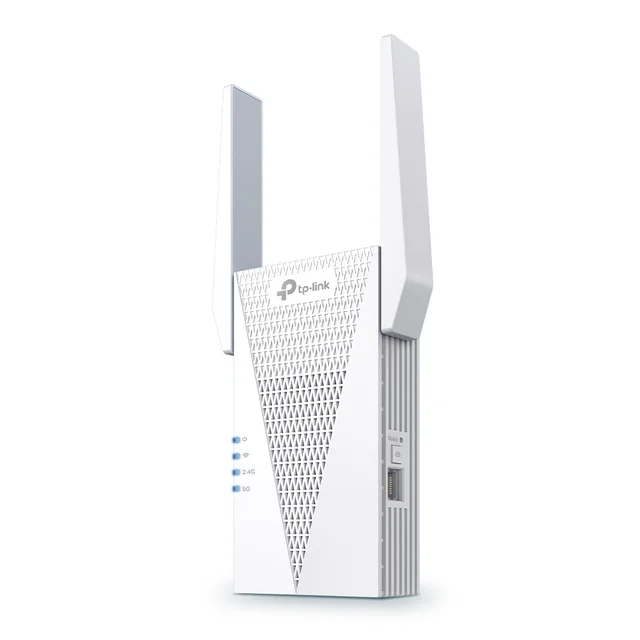
A WiFi extender is a small device - usually a wall plug - that grabs your router's signal and rebroadcasts it into a room the router can't reach. It's the cheapest fix for a single dead zone, but the category is a minefield: spec sheets shout huge speed numbers that have little to do with what you'll actually get, and the difference between a seamless one-network experience and an annoying second network comes down to a compatibility detail most listings bury. The biggest mistake buyers make isn't picking the wrong extender - it's buying an extender at all when their real problem needs a mesh system.
The 30-second version
- Extenders fix rooms, not homes. They're the right tool for one or two dead zones; if several rooms struggle, an entry-level mesh kit will beat any single extender.
- The class number matters more than the marketing name. An AX3000-class WiFi 6 extender has the radio headroom to relay a signal without starving it; entry AX1800 units often don't.
- Mesh compatibility with YOUR router is the killer feature. EasyMesh/OneMesh or AiMesh pairing gets you one network name and real roaming - but only when the extender and router brands match up.
- Placement beats specs. An extender goes halfway between the router and the dead zone, where it still gets a strong signal - putting it in the dead room just rebroadcasts a bad connection.
- The old half-speed penalty is mostly solved. Modern dual-band and tri-band extenders split the work of receiving and retransmitting across bands, so you keep far more of your speed than older single-band plugs allowed.
The products this guide is about
Our verdict on each, with the full reasoning on the companion review.
- Buy TP-Link RE715X AX3000 WiFi 6 Range Extender The best all-around extender: fast WiFi 6 speeds, EasyMesh support, and a gigabit port, without flagship pricing. Amazon
- Buy ASUS RP-AX58 AX3000 Dual-Band WiFi 6 Range Extender A sleek AX3000 extender that becomes a true mesh node if you own an ASUS router - the closest thing to a mesh upgrade in extender form. Amazon
- It depends TP-Link RE815XE AXE5400 WiFi 6E Range Extender The only tri-band extender here, with a 6 GHz band - but at premium money, a budget mesh kit is often the smarter buy. Amazon
- Skip NETGEAR EAX15 AX1800 WiFi 6 Mesh Extender Mid-range money for entry-level AX1800 hardware, a bulky chassis, and app upsells - rivals do more for the same or less. Amazon
What actually matters
- WiFi generation - WiFi 6 (AX-class) is the sensible floor today; older AC-class extenders bottleneck modern phones and laptops and revive the halve-your-speed problem the category is infamous for.
- Speed class (AX1800 vs AX3000 vs higher) - this number tells you how much radio headroom the extender has for its double duty of talking to your router and your devices; AX3000 gives more headroom than AX1800.
- Mesh integration - an extender that joins your router's network as one name with working roaming (EasyMesh, OneMesh, AiMesh) removes the single biggest everyday annoyance: devices clinging to the weak, far-away signal.
- Band count - dual-band (2.4 + 5 GHz) is the standard; tri-band models add a 6 GHz band, but that band fades fast through walls, so it only pays off at short range.
- An Ethernet port - a gigabit port lets you wire a TV or console for rock-solid speed, and lets the extender flip into access-point mode later if you ever run a cable, which future-proofs the purchase.
- Setup and app quality - some brands make setup a two-minute app flow; others expect router-style configuration, and a few push subscription upsells inside the app after you've paid.
- Honest value against mesh kits - entry-level mesh two-packs now overlap in cost with premium extenders, so any extender priced at the top of the category has to justify itself against a product that covers the whole home.
The specs, in plain English
Green flags vs red flags
Green flags
- AX3000-class or better WiFi 6, which gives more radio headroom than entry AX1800
- EasyMesh, OneMesh, or AiMesh support that matches the router brand you already own
- A gigabit Ethernet port with access-point mode, so the device stays useful if you ever run a cable
- A signal-strength indicator or app placement helper that tells you whether the extender's link to the router is strong enough
- Owner reports that emphasize long-term stability - an extender's job is boring reliability in one spot for years
Red flags
- AC-class (WiFi 5) or entry AX1800 hardware sold at mid-range prices - the backhaul link will be starved exactly where you need it
- A giant speed number on the box with no mention of mesh compatibility - a classic sign the listing is selling theoretical peaks, not experience
- Companion apps with subscription upsells during setup, a pattern owners repeatedly flag on certain big-brand extenders
- Recurring owner reports of drop-outs after firmware updates - an extender that needs weekly reboots has failed at its one job
- Premium extender pricing that overlaps entry-level mesh two-packs - at that money, the mesh kit usually serves you better
- Bulky housings that block the second wall outlet, a practical annoyance listings never photograph honestly
Who's who: the brands
- TP-Link - The volume leader in plug-in extenders; strong real-world speeds for the money, an easy app-first setup, and OneMesh/EasyMesh integration with its own routers.
- ASUS - Best known for routers; its extenders can join an ASUS router's AiMesh as true mesh nodes - effectively a mesh upgrade at extender money for ASUS households.
- NETGEAR - A familiar networking name whose extenders trade on the Nighthawk brand; recent models have drawn owner complaints about middling speed for the price and app subscription upsells.
- Linksys - A long-running networking brand with a modest extender range; more of its energy now goes into mesh systems than standalone extenders.
- D-Link - Budget-leaning networking brand with basic extenders; fine for undemanding dead zones, but rarely competitive with the leaders on speed or mesh integration.
How to read a listing without getting fooled
Start with the class number, not the headline. 'AX3000 WiFi 6' tells you the generation and the radio headroom; ignore any claim phrased as 'up to X Mbps,' which describes a lab-perfect sum across bands you'll never see at once. Next, hunt for the mesh line - EasyMesh, OneMesh, or AiMesh - and check it against the router you own, because that one line decides whether you get one seamless network or a second network name your devices cling to at the wrong moments. Confirm there's a gigabit Ethernet port (some budget models still ship slower ports or none). Treat range claims in square feet as fiction - walls, floors, and placement dominate. Finally, scan recent owner reports for two specific patterns: stability after firmware updates, and whether the companion app pushes paid subscriptions. Those two tell you more about year-two ownership than anything on the box.
How much should you spend?
Extender cost is driven mostly by speed class and band count: entry AX1800 units sit at the bottom, AX3000 dual-band models in the middle, and tri-band WiFi 6E units at the top. The value sweet spot is squarely in the mid-range AX3000 tier - that's where the real-world speed gains over cheap units are large, while the jump to premium 6E models only pays off in the narrow case of short-range coverage with 6E-capable devices. Spending less than mid-range usually buys hardware whose backhaul chokes in exactly the far rooms you're trying to fix. Spending more deserves a hard question: premium extender money overlaps with entry-level mesh two-packs, and a mesh kit covers a whole home rather than one zone. As a rule, pay mid-range for one dead room, and redirect anything beyond that toward mesh.
Questions, answered
What does a WiFi extender actually do?
It sits between your router and a weak-signal area, receives the router's WiFi, and rebroadcasts it with fresh strength. Your devices connect to the extender instead of straining to reach the router. Because everything is relayed, the extender's own link back to the router - the backhaul - sets the ceiling on your speed, which is why placement and radio headroom matter more than headline numbers.
Will an extender cut my internet speed in half?
Old single-band extenders did, because one radio had to receive and retransmit every packet. Modern dual-band WiFi 6 models largely avoid this by using one band for the router link and the other for your devices, and tri-band models can dedicate an entire band to the router link. Expect somewhat less speed than sitting next to the router, but nothing like the old halving - provided you buy AX3000-class or better and place it well.
Extender, mesh system, or new router - which do I actually need?
If your router covers most of the home and one or two spots struggle, an extender is the cheapest effective fix. If multiple rooms or floors are weak, a mesh kit will beat any single extender for consistency. If your router is many years old (WiFi 5 or earlier), upgrading it may fix coverage and speed at the source. A useful tell: if you're considering buying two extenders, you want a mesh system.
Why does my extender show up as a separate network with _EXT at the end?
That's the default behavior when the extender and router can't do proper mesh integration. It works, but your devices decide for themselves when to switch networks - and they're bad at it, often clinging to the weaker signal as you move around. Buying an extender whose mesh system (EasyMesh/OneMesh or AiMesh) matches your router's brand gives you one network name with the router managing handoffs, which is the single biggest usability upgrade in this category.
Where's the best place to plug in a WiFi extender?
Roughly halfway between the router and the dead zone - close enough to the router to receive a strong signal, close enough to the dead zone to cover it. Plugging it into the dead room itself is the most common mistake: it just rebroadcasts an already-degraded signal. Use the extender's signal indicator or app placement helper, and if it shows a weak link to the router, move one outlet closer.
Is a WiFi 6E or tri-band extender worth the extra money?
Only in a narrow case: your laptops and phones support 6E or WiFi 7, and the area you're covering is close to the extender - the 6 GHz band is very fast but fades quickly through walls. For a far bedroom two walls away, a strong dual-band AX3000 model typically performs similarly for meaningfully less. If you're eyeing a flagship-priced extender, compare it against an entry-level mesh kit before you commit.
Or jump to the head-to-head: TP-Link RE715X AX3000 WiFi 6 Range Extender vs ASUS RP-AX58 AX3000 Dual-Band WiFi 6 Range Extender.