Explained
3D Printers, Explained
After reading this you'll know whether you want filament or resin, what an enclosure and auto-calibration really buy you, and how to read a printer's spec sheet without being fooled.
In this guide
A 3D printer turns a digital model into a physical object by building it up in thin layers, and in 2026 the good ones mostly just work. The two big families are filament (FDM) machines that melt plastic and resin printers that cure liquid with UV light, and picking the wrong one for your goals is the most common first mistake. Most spec sheets bury the things that actually shape your day-to-day experience, so this guide translates the marketing into what you'll notice on your desk.
The 30-second version
- Filament (FDM) is the friendlier start for most people. it handles a huge range of everyday objects with no gloves, liquid, or fumes to manage.
- Resin wins only on fine detail. it's the right tool for miniatures and models, but it adds a messy wash-and-cure routine most buyers don't want.
- Auto-calibration is one of the biggest predictors of a good first print. a machine that levels and tunes itself removes the frustration that used to define this hobby.
- An enclosure only matters for tough engineering plastics. if you mostly print PLA and PETG, you're paying for heat retention you'll never use.
- The cheapest printer is rarely the best value. hours of tuning and inconsistent support can cost you more than a small step up in price.
The products this guide is about
Our verdict on each, with the full reasoning on the companion review.
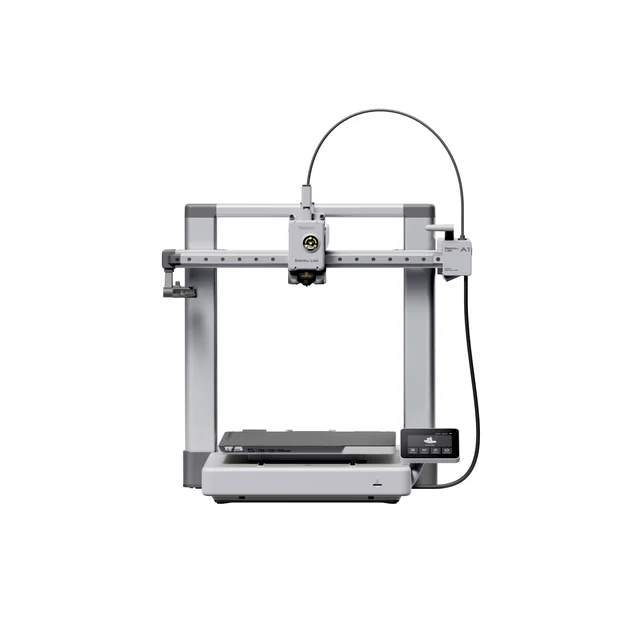
- Buy Bambu Lab A1 The printer that turns 3D printing from a hobby-project into an appliance you actually use. Amazon
- Buy Prusa Research Prusa CORE One An enclosed CoreXY workhorse for people who print functional parts in demanding materials.
- It depends Elegoo Saturn 4 Ultra 16K Stunning fine detail for miniatures and models, but a messier, more demanding workflow than filament. Amazon
- Skip Creality Ender-3 V3 A fast, capable descendant of the printer that defined budget 3D printing, now outclassed on experience.
What actually matters
- Printer type (FDM vs resin) - this is the first and biggest fork: filament for general-purpose objects and functional parts, resin for the finest detail. Choose based on what you actually plan to make, not on which sounds more advanced.
- Auto-calibration and bed leveling - machines that measure and correct themselves before each print turn a fussy setup into a press-and-go appliance. This is the difference between getting objects and getting a project.
- Out-of-box experience - how much fighting stands between unboxing and a clean first print. A printer that works in minutes beats one you have to earn.
- Material range and enclosure - an open frame handles PLA, PETG, and TPU; an enclosed, heated chamber is what lets you print ABS, ASA, polycarbonate, and nylon without warping.
- Print quality at speed - a fast printer that produces stringy or warped parts is a slow printer in disguise. Look for machines that hold quality when they run quickly.
- Ecosystem and support - documentation, spare-part availability, and community size decide how painless the machine is to live with over years, not just on day one.
- Multicolor capability - nice to have if you want it, but it adds cost and complexity, so only prioritize it if colorful prints are a real goal.
The specs, in plain English
Green flags vs red flags
Green flags
- Reliable auto-calibration and bed leveling that owners say 'just works' out of the box
- Strong print quality in independent testing that holds up even at higher speeds
- A large, active community and readily available, affordable spare parts
- Clear documentation and a track record of responsive, consistent support
- An enclosure only if you plan to print engineering materials like ABS or nylon
Red flags
- Owner reports of fussy setup and constant tuning just to get a clean print
- Inconsistent or hard-to-reach support, especially on an otherwise cheap machine
- Headline speed numbers with little said about the resulting surface quality
- A resin printer marketed as an all-purpose machine when you want general-use printing
- Being locked into a closed, cloud-dependent ecosystem you're not comfortable with
Who's who: the brands
- Bambu Lab - Known for polished, near-hands-off filament printers that made auto-calibration and easy multicolor the new default.
- Prusa Research - A reputation built on reliability, repairability, and thorough documentation, favored for enclosed engineering-grade machines.
- Elegoo - A go-to name in resin printing, known for high-resolution detail machines aimed at miniatures and models.
- Creality - The brand that popularized budget filament printing with the Ender line; huge community and cheap parts, but more variable polish and support.
How to read a listing without getting fooled
When you read a printer listing, resist being sold on the biggest number. Start by confirming the type, since an FDM machine and a resin machine solve completely different problems. Next, look past speed claims to whether the machine has genuine auto-calibration and how owners describe the first-print experience, because that friction is what you'll feel every session. Check whether it's open-frame or enclosed and match that to the materials you actually intend to use rather than the full list a spec sheet brags about. Treat build volume as 'is it big enough for my projects' rather than 'bigger is better.' Finally, weigh the ecosystem: documentation, spare-part availability, and community size tell you how the machine will hold up long after the honeymoon, and those details rarely appear in the headline specs.
How much should you spend?
Spend based on what you'll print, not on chasing the top of the range. A capable, beginner-friendly filament printer sits in a comfortable middle where auto-calibration and reliable print quality are now standard, and for most people that's the value sweet spot. Going cheaper can be tempting, but the rock-bottom machines often claw the savings back in tuning time and uneven support, so the lowest sticker price isn't the lowest real cost. Paying a clear premium makes sense only when you genuinely need an enclosed machine for engineering materials, long-term reliability for a small shop, or the specialist detail of a good resin printer; if you mostly print decorative PLA, that extra money buys features you won't use. In short, buy the least expensive machine that removes the most friction for your actual projects.
Questions, answered
Should my first 3D printer be filament (FDM) or resin?
For most beginners, a filament printer is the friendlier start: no gloves, no liquid resin, and it handles a huge range of everyday objects and functional parts. Resin printers produce far finer detail for miniatures and models, but they involve messy liquid resin, ventilation, and a wash-and-cure routine. Pick filament for general use and resin only if fine detail is your main goal.
Do I actually need an enclosed printer?
Only if you plan to print engineering materials such as ABS, ASA, polycarbonate, or nylon, which need a warm, stable chamber to avoid warping. If you mostly print PLA, PETG, and TPU, an open-frame machine is perfectly fine and usually cheaper. Buying an enclosure you'll never use is a common way to overspend.
Why is auto-calibration such a big deal?
Auto-calibration and bed leveling are among the biggest predictors of a good first-print experience. A machine that measures and corrects itself removes the manual tuning that used to make 3D printing frustrating, so you spend your time making objects instead of fixing the printer. It's the feature to prioritize if you want the machine to feel like an appliance.
Can 3D printers make multicolor prints?
Some filament printers can, using an add-on multi-material unit that feeds several colors into one print; that's the simplest path to clean multicolor. Many machines print a single color at a time in their standard form, and resin printers print in one resin color per job. Only prioritize multicolor if it's a genuine goal, since it adds cost and complexity.
Is resin printing safe to do at home?
This is general product information, not safety or medical advice. Uncured liquid resin and its fumes can irritate skin and airways, so owners typically use nitrile gloves, work in a well-ventilated space, and wash and UV-cure prints before handling. Follow the manufacturer's safety instructions and local disposal rules, and consult a qualified professional if you have specific health concerns.
Is the cheapest printer a good deal?
Not always. A budget machine with a big community and cheap parts can serve you well if the low price is decisive and you enjoy tinkering. But at a similar spend, a more polished printer often gives a smoother setup and more consistent results with less fuss, and better support. Factor in the hours of tuning a cheap machine can demand, because that's part of its real cost.
Or jump to the head-to-head: Bambu Lab A1 vs Prusa Research Prusa CORE One.